
12628744
Beschreibung

Mindmap von Simon Howe, aktualisiert more than 1 year ago

|
Erstellt von Simon Howe
vor fast 8 Jahre
|
|
GCSE CS Programming
- Programming Basics
- Variables and constants
- Variable - is a value that can change
during the running of a computer
program
- e.g. SET Num TO 65
SET Num TO Num +1
- e.g. SET Num TO 65
SET Num TO Num +1
- Assignment - this is how a variable or
constant is set at the start of the code or at
some point within the code
- Constant - is a value that does
not change during the running of
a computer program
- http://www.teach-ict.com/2016/GCSE_Computing/OCR_J276/2_2_programming_techniques/variables_etc/miniweb/index.php
- Variable - is a value that can change
during the running of a computer
program
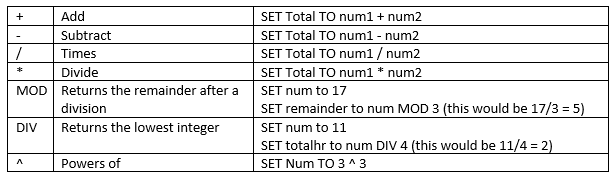
- Arithmetic operators
- They are used to combine statements which
can be evaluated as T or F
- They are used to combine statements which
can be evaluated as T or F
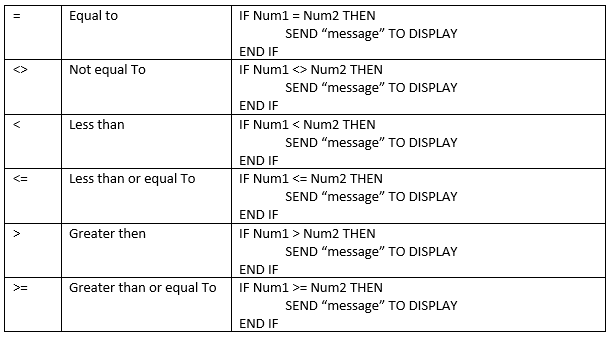
- Relational operators
- Are used to compare different
items of data within an
algorithm
- For Comparing string
you would use 'Hello'
- Are used to compare different
items of data within an
algorithm
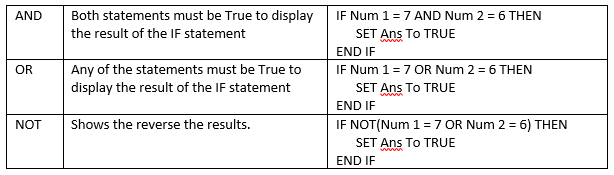
- Logical operators
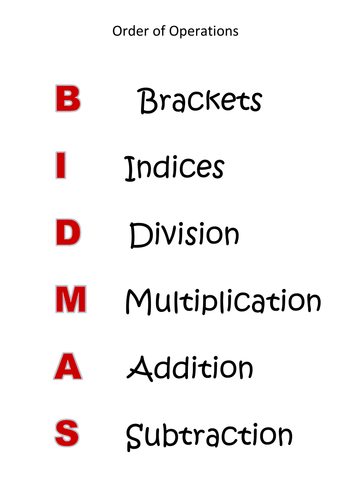
- BIDMAS is needed to create a correct
order of operations in a calculation (this
could help you find errors within the
code
- are used in algorithms to specify how values are to be used
- BIDMAS is needed to create a correct
order of operations in a calculation (this
could help you find errors within the
code
- Variables and constants
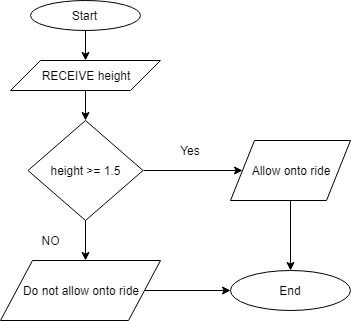
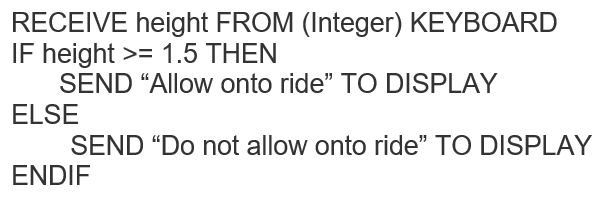
- Selection
- This shows a
decision or use of
an IF statement
within the code
- Flow chart example
- Pseudocode example
- This shows a
decision or use of
an IF statement
within the code
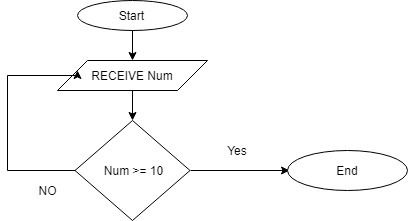
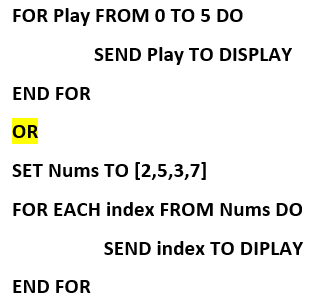
- Iteration
- Determinate loop
- Count controlled - This is where you
know how many time
the loop need to run (
For loop's)
- Count controlled - This is where you
know how many time
the loop need to run (
For loop's)
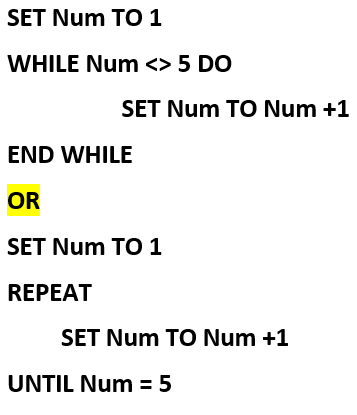
- indeterminate loop
- Condition controlled, when you
do not know how may time the
program will loop (while Loop)
- Condition controlled, when you
do not know how may time the
program will loop (while Loop)
- This is when
the program is
repeated using
loops.
- Determinate loop
- Data types
- Examples
- Integer -
whole
number
e.g. 34
- Real - A
Decimal
number
e.g.
13.32
- Boolean - True or False
- Character
- A single
letter e.g.
A
- string - A
collection
of
characters
e.g. Hello
- Integer -
whole
number
e.g. 34
- Declaring Data types
- Data types may need to be
declared within a program.
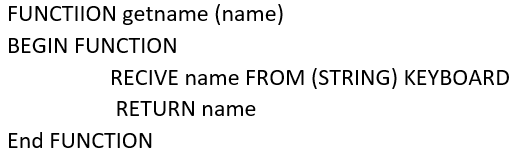
e.g. RECEIVE NAME FROM
(STRING) KEYBOARD
- Data types may need to be
declared within a program.
e.g. RECEIVE NAME FROM
(STRING) KEYBOARD
- Examples
- String Manipulation
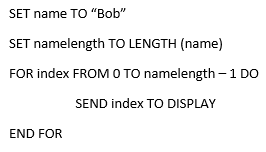
- string traversal - this is the process of
moving through a sting one letter at a
time, with the use of a loop
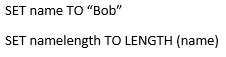
- Length function -
can be used to find
how may letters
are in a string
- Length function -
can be used to find
how may letters
are in a string
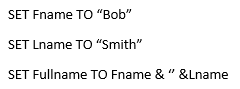
- Concatemntaion - this is how to
join strings together using the
& symbol
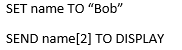
- Indexes - this can
display 1 character
for a string suing
indexing, this starts
at 0 for the first
letter
- string traversal - this is the process of
moving through a sting one letter at a
time, with the use of a loop
- Arrays
- Indexes
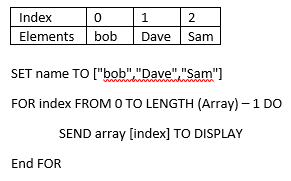
- An element is an
item of data at a
specified index
position
- An element is an
item of data at a
specified index
position
- Tow-dimensional Arrays
- This is where you have multiple arrays in one
array, which forms a matrix(table) structure.
- This is where you have multiple arrays in one
array, which forms a matrix(table) structure.
- Records
- A collection of data
which can be
different data types
- Array of Records
e.g. SET name TO
["bob","Dave","Sam"]
- Array of Records
e.g. SET name TO
["bob","Dave","Sam"]
- A collection of data
which can be
different data types
- structure, a way of
storing data. This is
similar ro a variable but
can store multiple data
items
- e.g. SET name TO ["bob","Dave","Sam"]
- e.g. SET name TO ["bob","Dave","Sam"]
- https://www.bbc.com/education/guides/z4tf9j6/revision
- Indexes
- File Handling
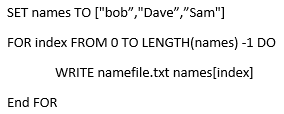
- Writing to a text file - This uses WRITE
method to write data directly to a file or a
loop to indirectly write data to the file
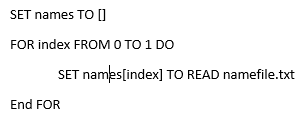
- Reading data from a text file - Each READ statement
reads a record from the file into the program and put
the data into the Array (for a 2D array the data will need
to be split)
- Writing to a text file - This uses WRITE
method to write data directly to a file or a
loop to indirectly write data to the file
- Subprograms
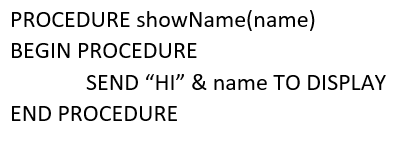
- Procedures
- Do not resturn a value to
the main program.
- Do not resturn a value to
the main program.
- Function
- Return a value to the main program
- Return a value to the main program
- A subprogram is a self contained
sequence of program instructions
that do a specific task
- Make the program code easy to read and write
- Easy to identify errors within the code
- Make testing easier
- Makes the program shorter and can code can be reused many times
- Make the program code easy to read and write
- Calling Sub programs -
- Sub programs are called from
within the main program
- SET name TO getname(name)
- SET name TO getname(name)
- Sub programs are called from
within the main program
- Local and global Variables
- Local - can only be
used within a
subprogram
- Global - can be used
within any subprogram
but must be declared at
the start of the program
- Local - can only be
used within a
subprogram
- Procedures
- Validation
- This process checks that data that is
inputted is correct for the program and
meet the data needed for the program
to work.
- Needed to identify unexpected or
erroneous data without breaking
the program.
- Needed to identify unexpected or
erroneous data without breaking
the program.
- Presence check - to ensure
data has been entered
- Range check - data should
be entered between a
range e.g. between 10 and
20
- Length check - a specified
length of number or
characters have been entered
- This process checks that data that is
inputted is correct for the program and
meet the data needed for the program
to work.
- Testing
- This is needed to make sure the program meets the needs of the user.
- Test data
- Normal data - this is a Valid or in range test
- Boundary Data - test under extreme
conditions e.g. at the upper and lower
limits of what to be entered
- Erroneous data - data that should be be
excepted within the code
- Normal data - this is a Valid or in range test
- Test plan
- show the test data,
expected and actual results
and the type of test
- show the test data,
expected and actual results
and the type of test
- Errors
- Syntax
- Logical
- Run time
- Syntax
- Debugging - the process of
identifying errors and
correcting them within the
code.
- This is needed to make sure the program meets the needs of the user.
- https://www.bbc.com/education/guides/zrxncdm/revision
Medienanhänge



Möchten Sie kostenlos Ihre eigenen Mindmaps mit GoConqr erstellen? Mehr erfahren.