
8888757
Beschreibung

Mindmap von Jamie Sparks, aktualisiert more than 1 year ago
|
|
Erstellt von Jamie Sparks
vor mehr als 8 Jahre
|
|
2.6 Data Representation
- Number System
- Binary
- Base 2 (There are only 2
numbers ‐ 0,1)
- Base 2 (There are only 2
numbers ‐ 0,1)
- Denary
- Base 10 (There are 10
numbers ‐
0,1,2,3,4,5,6,7,8,9)
- Base 10 (There are 10
numbers ‐
0,1,2,3,4,5,6,7,8,9)
- Hexadecimal
- Base 16 (There are 16
numbers ‐
0,1,2,3,4,5,6,7,8,9,A,B,C,D,E,F)
- Base 16 (There are 16
numbers ‐
0,1,2,3,4,5,6,7,8,9,A,B,C,D,E,F)
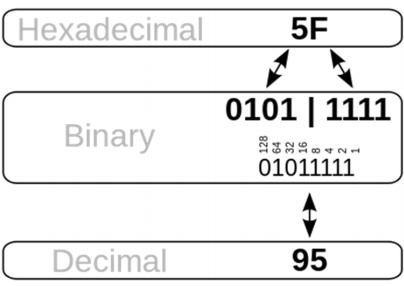
- Hexadecimal conversion
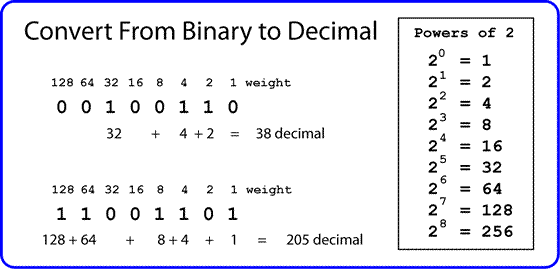
- Binary To Denary
- Binary
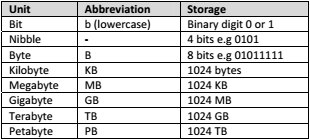
- Units
- Binary Shifts
- Binary shifts are really good for
doing super fast multiplication and
division. They are only good with
powers of 2.
- Left shift (Moving 1s to the left has
the effect of doubling the number
for every place shifted left)
- Right shift (moving 1’s to right has
the effect of halving a number for
every place shifted right)
- Binary shifts are really good for
doing super fast multiplication and
division. They are only good with
powers of 2.
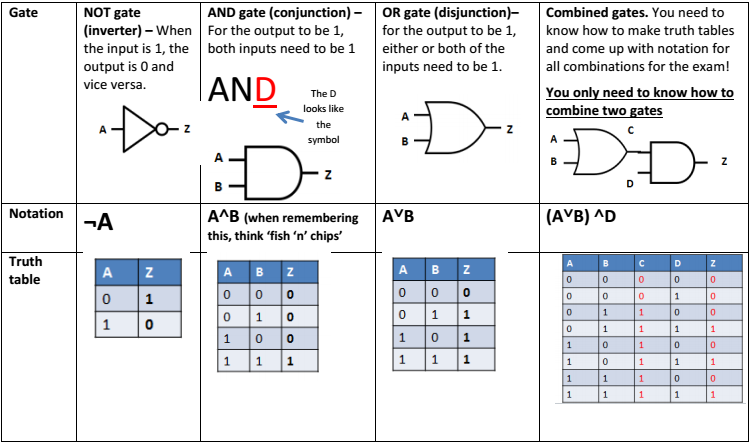
- Logic Gates
- Character Sets
- Ascii - given a 7 bit binary code (therefore can only store 128 characters). An extra 0 is inserted to the start of the 7
bit code so that it fits nicely into 1 byte (8 bits)
- Extended ASCII gives each character 8 bits (therefore can store up to 256 characters). It is useful for
European languages like French and German
- Unicode comes in several different forms and tries to cover every possible character that might be written. The most
common forms are 16‐bit (65,536) and 32‐bit (4,294,967,296)
- Ascii - given a 7 bit binary code (therefore can only store 128 characters). An extra 0 is inserted to the start of the 7
bit code so that it fits nicely into 1 byte (8 bits)
- Images
- Metadata means ‘data about data’. This sounds confusing, but you could
also think of it as ‘properties’
- For images this will be things like resolution, width, height, file type
and bit depth For sound files this might be length, artist, album, file
type.
- For images this will be things like resolution, width, height, file type
and bit depth For sound files this might be length, artist, album, file
type.
- Pixel – Pixels are the squares that make up an image. The
word stands for ‘picture element’
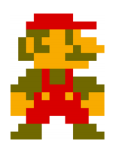
- Colour depth – Colour depth refers to how many bits are
used to store the colour of each pixel. For example, this
picture of Mario is 8 bit.
- Resolution – Resolution refers to the density of pixels in
an image (i.e how many pixels are within a certain
area). It is measured in dots per inch (dpi)
- Metadata means ‘data about data’. This sounds confusing, but you could
also think of it as ‘properties’
- Sound
- Sample Size
- refers to how many bits can be used for each sample. 3 bits means that 8 possible ‘levels’ (voltages) can
be represented. Of course, the more levels you have, the better the quality of the sound. The bit depth
on CD is 16 bits. On DVD is 24 bits.
- refers to how many bits can be used for each sample. 3 bits means that 8 possible ‘levels’ (voltages) can
be represented. Of course, the more levels you have, the better the quality of the sound. The bit depth
on CD is 16 bits. On DVD is 24 bits.
- Sample Size
Medienanhänge



Möchten Sie kostenlos Ihre eigenen Mindmaps mit GoConqr erstellen? Mehr erfahren.