
15391928
Beschreibung

Quiz von Samuel Melendez, aktualisiert more than 1 year ago

|
Erstellt von Samuel Melendez
vor etwa 8 Jahre
|
|
Frage 1

Antworten
-
Move tool
-
select tool
Frage 2
Antworten
-
Crop tool
-
cross tool
Frage 3
Antworten
-
wand tool
-
sparkle tool
Frage 4
Antworten
-
pencil tool
-
pointer tool
Frage 5
Antworten
-
brush tool
-
paint tool
Frage 6
Antworten
-
eraser tool
-
block tool
Frage 7
Antworten
-
Paint bucket
-
spill tool
Frage 8
Antworten
-
gradient tool
-
wall paper
Frage 9
Antworten
-
stamp tool
-
red tool
Frage 10
Antworten
-
drawing tool
-
shape tool
Frage 11
Antworten
-
dodge tool
-
burn tool
Frage 12
Antworten
-
dodge
-
burn
Frage 13
Antworten
-
bloat
-
boat
Frage 14
Antworten
-
pinch
-
inch
Frage 15
Antworten
-
type tool
-
A tool
Frage 16
Antworten
-
set main color
-
black box
Frage 17
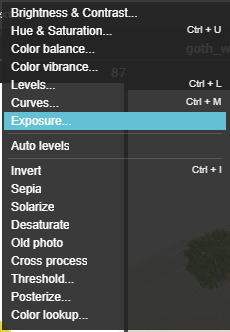
Antworten
-
change color
-
make huge
Frage 18
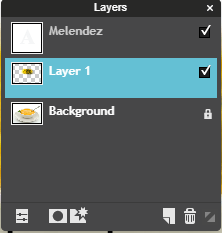
Antworten
-
opacity
-
change dial
Frage 19
Antworten
-
star tool
-
layer styles
Frage 20
Antworten
-
add a layer
-
change layer settings
Frage 21
Antworten
-
delete layer
-
find garbage
Frage 22
Antworten
-
expand panel
-
hide panel
Frage 23
Frage
The navigator allows you to zoom in and out.
Antworten
- True
- False
Frage 24
Frage
If the layers panel is missing click on
Antworten
-
edit and return to default mode
-
you must refresh the window
-
there is nothing you can do
-
view and layers
Frage 25
Frage
To merge one image with another the eraser tool's hardness should be set to
Antworten
-
100
-
30 or lower
-
50 or higher
-
200
Frage 26
Frage
Before you can use free transform or distort on text you must right click on the layer and choose
Antworten
-
change size
-
merge
-
rasterize
-
delete
Frage 27
Frage
Free distort is best for changing the shape of an object.
Antworten
- True
- False
Frage 28
Frage
Free transform is for
Antworten
-
changing an element into another element
-
changing one life form into another
-
changing the size of an object
Frage 29
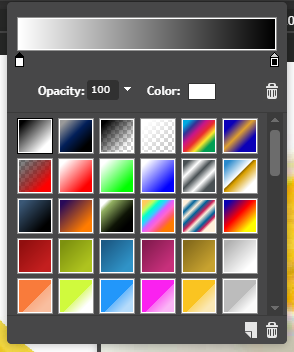
Antworten
-
Change the color of the ink dropper
-
add more white
Frage 30
Antworten
-
delete an ink dropper
-
delete an option
Frage 31
Antworten
-
where you can add another dropper
-
where you can delete a dropper
Frage 32
Frage
Within the gradient panel the ink droppers can not move.
Antworten
- True
- False
Möchten Sie mit GoConqr kostenlos Ihre eigenen Quiz erstellen? eigenen Mehr erfahren.