
10806706
Descripción

Test por Samuel Melendez, actualizado hace más de 1 año

|
Creado por Samuel Melendez
hace alrededor de 9 años
|
|
Pregunta 1
Pregunta
Animation _______________
Respuesta
-
is a still image
-
must be digital
-
may consist of images that change quickly
Pregunta 2
Pregunta
In class we created animation by
Respuesta
-
saving different images
-
recording a video
-
drawing different images
Pregunta 3
Pregunta
To have animation there must be a change
Respuesta
- True
- False
Pregunta 4
Pregunta
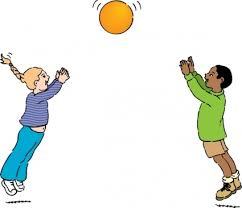
To create an animation with this image____________
Respuesta
-
You can not because it is a still image.
-
you must cut out the ball and place it on its own layer.
-
you should erase the ball
Pregunta 5
Pregunta
When creating an animation you should always
Respuesta
-
Create a new folder for the animation
-
save the images with the exact same name
-
make sure each image saved is the same
Pregunta 6
Pregunta
If you save an image with the same exact name as a previous image you will risk deleting the original image.
Respuesta
- True
- False
Pregunta 7
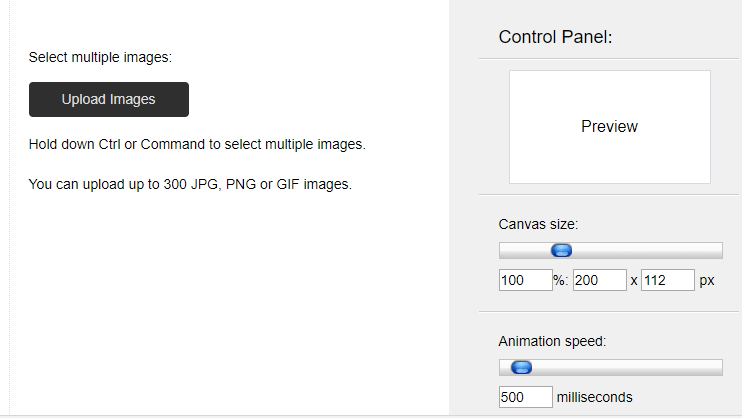
Respuesta
-
Click to add images
-
click to delete images
Pregunta 8
Respuesta
-
displays a preview of the animation
-
is a video in your documents
Pregunta 9
Respuesta
-
allows you to edit images
-
allows you to change the speed
Pregunta 10
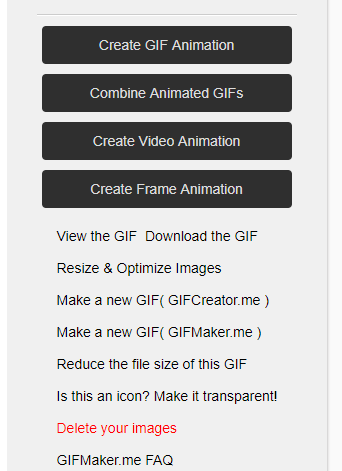
Respuesta
-
click to upload images
-
click to create the animation
Pregunta 11
Respuesta
-
click to save to the cloud
-
click to download the animation
Pregunta 12
Pregunta
To see your animation running you should
Respuesta
-
double click on the file
-
you can only see the animation at gifmaker.me
-
Right-click and choose open with, then chrome.
Pregunta 13
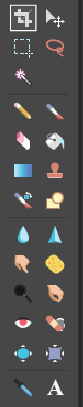
Respuesta
-
Marquee tool
-
square tool
Pregunta 14
Respuesta
-
magic tool
-
wand tool
Pregunta 15
Respuesta
-
color picker
-
needle
Pregunta 16
Pregunta
To erase the green around Bart I should be on the _________________________________
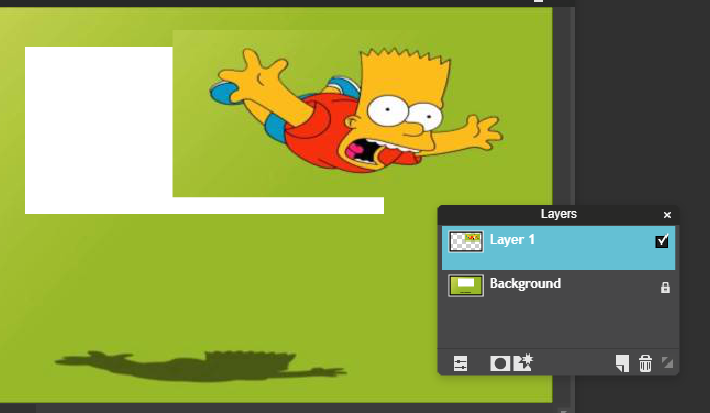
Respuesta
-
background layer
-
Layer 0
-
Layer 1
Pregunta 17
Pregunta
With the marquee tool we can
Respuesta
-
Select any part of the image
-
select certain colors
-
only select the background
Pregunta 18
Pregunta
With the wand tool we can
Respuesta
-
create magic
-
make things appear
-
select a color
¿Quieres crear tus propios Tests gratis con GoConqr? Más información.