
21203618
Descripción

Test por Ian Simpson, actualizado hace 11 meses

|
Creado por Ian Simpson
hace casi 6 años
|
|
Pregunta 1
Pregunta
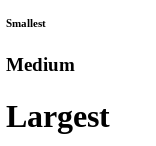
Place the HTML tags in the correct location so that the webpage will look like the one shown in the image.
<!DOCTYPE html>
[blank_start]<html>[blank_end]
<head>
<title>Headings[blank_start]</title>[blank_end]
</head>
<body>
[blank_start]<h6>[blank_end]Smallest[blank_start]</h6>[blank_end]
[blank_start]<h3>[blank_end]Medium[blank_start]</h3>[blank_end]
[blank_start]<h1>[blank_end]Largest[blank_start]</h1>[blank_end]
</body>
</html>
Respuesta
-
<html>
-
</title>
-
<h6>
-
</h6>
-
<h3>
-
</h3>
-
<h1>
-
</h1>
Pregunta 2
Pregunta
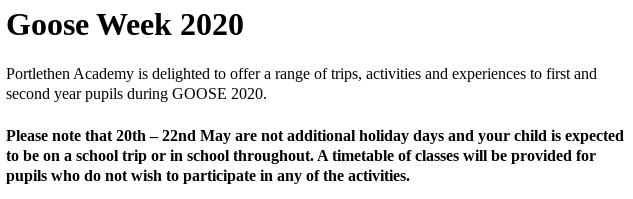
Place the HTML tags in the correct location so that the webpage will look like the one shown in the image.
[blank_start]<h1>[blank_end]Goose Week 2020[blank_start]</h1>[blank_end]
[blank_start]<p>[blank_end]Portlethen Academy is delighted to offer a range of trips, activities and experiences to first and second year pupils during GOOSE 2020.[blank_start]</p>[blank_end]
[blank_start]<h4>[blank_end]Please note that 20th – 22nd May are not additional holiday days and your child is expected to be on a school trip or in school throughout. A timetable of classes will be provided for pupils who do not wish to participate in any of the activities.[blank_start]</h4>[blank_end]
Respuesta
-
<h1>
-
</h1>
-
<p>
-
</p>
-
<h4>
-
</h4>
Pregunta 3
Pregunta
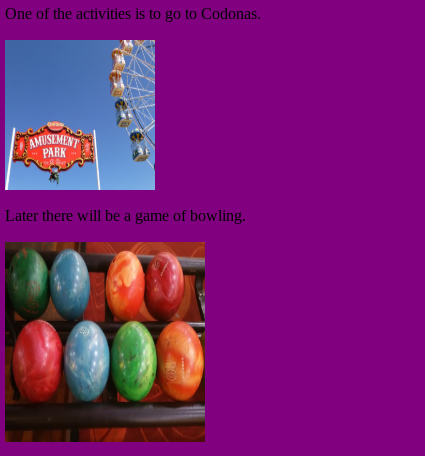
Place the HTML tags in the correct location so that the webpage will look like the one shown in the image.
<body bgcolor="[blank_start]#800080[blank_end]">
<p>One of the activities is to go to Codonas.</p>
[blank_start]<!-- codonas.jpg -->[blank_end]
<img src="codonas.jpg" width=[blank_start]150[blank_end] height=150>
<p>Later there will be a game of bowling.[blank_start]</p>[blank_end]
<!-- bowling.jpg -->
[blank_start]<img src=[blank_end][blank_start]"bowling.jpg"[blank_end] width=200 height=[blank_start]200[blank_end]>
[blank_start]</body>[blank_end]
Respuesta
-
#800080
-
#808000
-
#00BFFF
-
<!-- codonas.jpg -->
-
150
-
200
-
"bowling.jpg"
-
"codonas.jpg"
-
<img src=
-
<a href=
-
</p>
-
</body>
-
</h1>
Pregunta 4
Pregunta
Place the HTML tags in the correct location so that the webpage will look like the one shown in the image.
[blank_start]<!DOCTYPE html>[blank_end]
<html>
<head>
<title>Tables</title>
</head>
<body>
<table [blank_start]border=1[blank_end] width=100%>
<tr height=100>
[blank_start]<td style="background-color:#FF0000">[blank_end]</td>
[blank_start]<td style="background-color:#FFA500">[blank_end]</td>
[blank_start]<td style="background-color:#808000">[blank_end]</td>
</tr>
[blank_start]</table>[blank_end]
</body>
</html>

Respuesta
-
<!DOCTYPE html>
-
border=1
-
border=0
-
<td style="background-color:#FF0000">
-
<td style="background-color:#FFA500">
-
<td style="background-color:#808000">
-
</table>
-
</a>
¿Quieres crear tus propios Tests gratis con GoConqr? Más información.