
5225057
Description

Quiz by Marty Collins, updated more than 1 year ago

|
Created by Marty Collins
almost 10 years ago
|
|
Question 1
Question
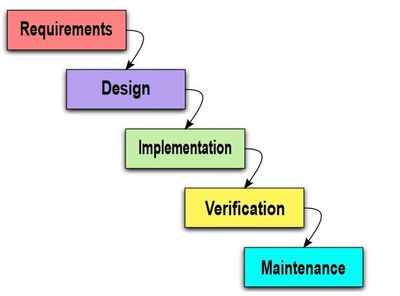
Waterfall Method
Each step must be [blank_start]completed[blank_end] before moving on to the next
All steps must be completed before any [blank_start]value[blank_end] is delivered to the customer
Lends itself to scheduling and [blank_start]reporting[blank_end]
Clings to idea of Big [blank_start]Design[blank_end] Up Front (BDUF)…perfecting the design before moving on to implementation
Perfection of this sort is better suited to other forms of engineering, not [blank_start]software[blank_end] engineering
Answer
-
completed
-
value
-
reporting
-
Design
-
software
Question 2
Answer
-
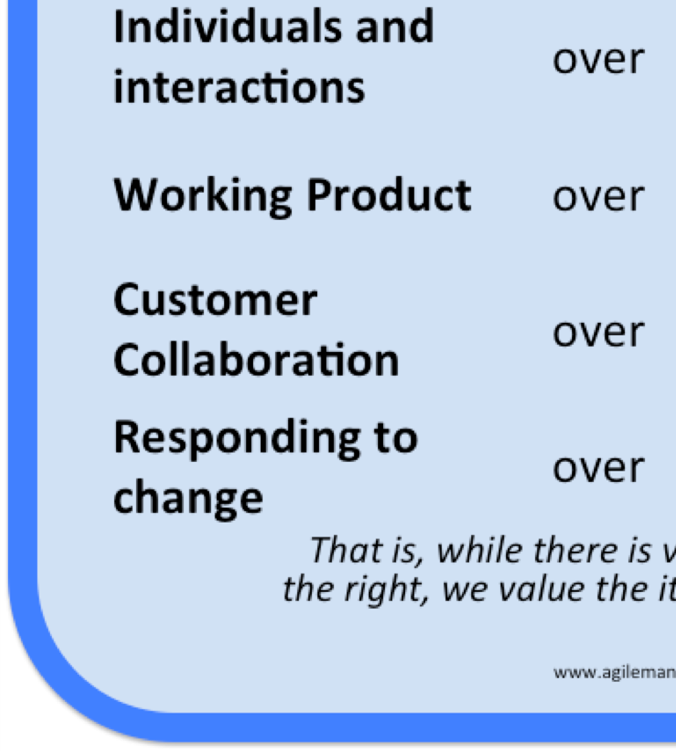
processes and tools
-
comprehensive documentation
-
contract negotiation
-
following a plan
Question 3
Question
Agile is Good
Agile is a [blank_start]value[blank_end] system
Agile does not dictate any one [blank_start]approach[blank_end]
Agile has worked well for many [blank_start]projects[blank_end]
Answer
-
value
-
approach
-
projects
Question 4
Question
Kanban
Kanban is an approach to software development based on the principles of [blank_start]Lean[blank_end]
Answer
-
Lean
Question 5
Question
The Board
One possible solution is to be able to see the [blank_start]work[blank_end] items all of the time
For every [blank_start]item[blank_end] a team is working on create a little [blank_start]note[blank_end] and put it on the wall
Answer
-
work
-
item
-
note
Question 6
Question
Work in Process (WIP)
WIP is the number of work items you have going at the [blank_start]same[blank_end] time (the stickies on the board)
Less WIP leads to quicker flow through your process: shorter [blank_start]lead[blank_end] times
You become more [blank_start]Agile[blank_end] because you deliver the important stuff first
In the first iteration there was a lot of waiting but each worker was [blank_start]efficient[blank_end] and worked through the entire batch before handing it down
In the last iteration every worker worked for a longer time making them less efficient as individuals but more efficient as a team
So…optimising your process for quicker flow can lead to poorer [blank_start]resource[blank_end] [blank_start]utilisation[blank_end]
Answer
-
same
-
lead
-
Agile
-
efficient
-
resource
-
utilisation
Question 7
Question
Limit Work in Process (WIP)
Strive to work with fewer [blank_start]items[blank_end] at the same time
Smaller [blank_start]batches[blank_end] means shorter lead times
Resource efficiency [blank_start]decreases[blank_end] while flow efficiency [blank_start]increases[blank_end]
Rather than starting a new work item (thereby increasing the batch…creating a new sticky) help someone in the [blank_start]team[blank_end] finish one already in progress
Use [blank_start]visualisation[blank_end] to make the limits explicit
Answer
-
items
-
batches
-
decreases
-
increases
-
team
-
visualisation
Question 8
Question
Use visualisation to make the limits explicit
Choose a [blank_start]maximum[blank_end] number of work items allowed to be in progress at the same time
When value starts to be delivered to the customer there will be less demand for [blank_start]estimates[blank_end]
You won’t feel [blank_start]swamped[blank_end] with work because you have a limit on how many things you work on at the same time
If someone adds a [blank_start]new[blank_end] item they will have to decide what gets taken out
Answer
-
maximum
-
estimates
-
swamped
-
new
Question 9
Question
How low should the limit be?
Low WIP limit creates a lot of [blank_start]slack[blank_end]. Think of one work item..as soon as it is ready for development the developers could pick it up and start working on it…as soon as it is ready for testing the testers could pick it up and start working on it etc
Good for [blank_start]lead[blank_end] times but companies will not pay for people to sit [blank_start]idle[blank_end]
You need a balance…Fast Flow Vs Work to do …the WIP limit is a trigger for discussion
Answer
-
slack
-
lead
-
idle
Question 10
Question
Queues
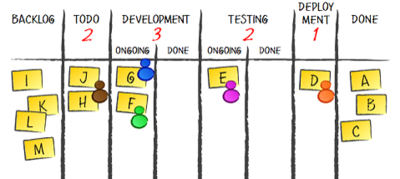
Note the WIP limit as an integer in the column
Introducing queues will allow you to [blank_start]visualise[blank_end] what is waiting and what is in progress
Have queues where there is a limited [blank_start]resource[blank_end]…it’s a good way of signalling that work is ready to be pulled to the next stage
You can manipulate the WIP limit by [blank_start]reallocating[blank_end] resources
Answer
-
visualise
-
resource
-
reallocating
Question 11
Question
Expedite Items
Don’t hold off urgent work in order not to break the [blank_start]WIP[blank_end] limit
A common solution is to create a special lane on the board for urgent stuff, often referred to as an [blank_start]Expedite[blank_end] Lane
Should only be used for [blank_start]urgent[blank_end] cases and should not be used as a fast lane to cheat the system…its like introducing another coin in the simulation earlier
Expedited items will pass through the system faster but will [blank_start]increase[blank_end] WIP
Answer
-
WIP
-
Expedite
-
urgent
-
increase
Question 12
Question
Metrics
Metrics by you, for you, to help you improve
With the Kanban board you are set up to track two important metrics; [blank_start]lead[blank_end] time and [blank_start]throughput[blank_end]
Lead time is the time it takes for a [blank_start]work[blank_end] item to go from start to finish- from the first column to the last
Throughput is the rate at which you [blank_start]complete[blank_end] work – count the number of items you finish in a given period of time
In the previous board it could be as simple as writing down the date (onto the sticky) when the item entered the elected column and writing down the date when it enters the Scheduled column
Answer
-
throughput
-
lead
-
work
-
complete
Question 13
Question
Three Principles…now Six Practice
[blank_start]Visualise[blank_end]
Limit Work in [blank_start]Process[blank_end]
Manage [blank_start]Flow[blank_end]
Make Process Policies [blank_start]Explicit[blank_end]
[blank_start]Visualisation[blank_end] achieve much of this
Implement [blank_start]Feedback[blank_end] Loops
Retrospective for the process itself
Improve [blank_start]Collaboratively[blank_end], Evolve Experimentally
Use [blank_start]models[blank_end] such as TOC or Lean to push team towards improvement
Answer
-
Visualise
-
Process
-
Flow
-
Explicit
-
Visualisation
-
Feedback
-
Collaboratively
-
models
Want to create your own Quizzes for free with GoConqr? Learn more.