
Mindmap
AH Computing Software Development
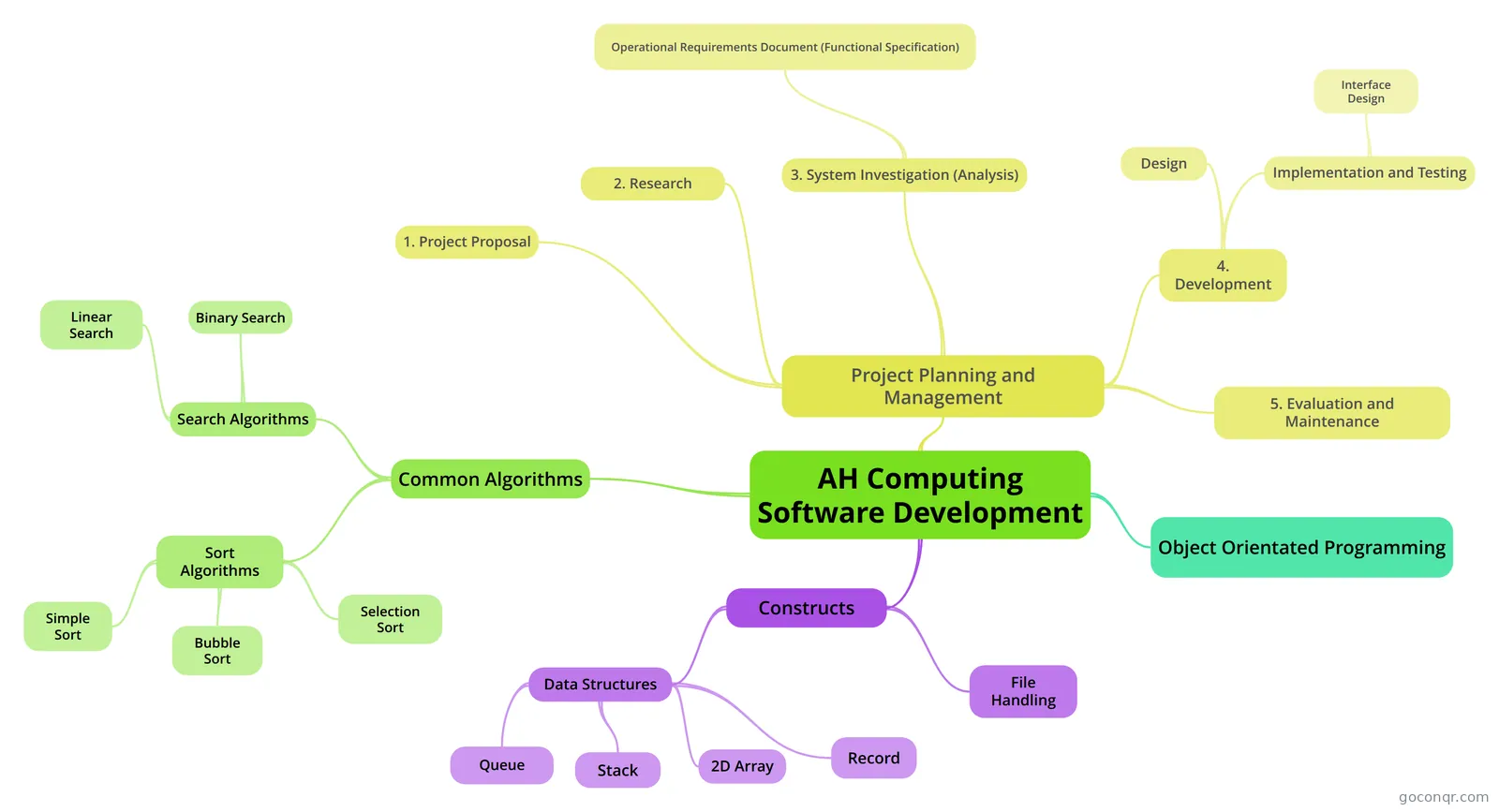
Mind map: AH computing software development
Inhalt der Mindmap
AH Computing Software Development
Project Planning and Management
- 1. Project Proposal
- Need - slow system, bottlenecks, frustration, enhancements elsewhere, need for maintaining standards Outline problem / need and give some idea of the scale, risk and budget. Produced by client.
- 2. Research
- Is the project worth doing? Usually completed by Project leader. Technical (compatibility, hardware and software) Legal (Legal Acts, Existing Contracts & Licences, Health and Safety) Schedule (scheduling, deadlines, Gantt charts) and Economic (initial cost, lifespan, staff costs, maintenance, training, break-even point from cost-benefit analysis) considerations. No Legal or contractual requirements at this stage.Indicates a range of approaches with recommended choices.
- 3. System Investigation (Analysis)
- What needs to be done to solve the problem? Performed by System Analysts. System investigation will involve studying the current system, questionnaires, interviews
- Operational Requirements Document (Functional Specification)
- Legally binding contract - no extra works required without payment. All tasks must be completed on time. • Functional specification of what the system will do. • Boundaries scope of the system. • Physical specification of hardware. • Data requirements of the system. • Preliminary estimate of costings. • Preliminary estimate of timings (System Prospectus). • Details of user training and documentation required.
- 4. Development
- Design
- Programmers use methodologies: structure charts, data flow diagrams, Jackson structured programming, pseudocode to describe process in a top-down way. Verified by analyst against requirements
- Implementation and Testing
- Tasks to be carried out during implementation will include: Coding and testing of the system;Human Computer Interfaces fully designed and tested;Setting up hardware on site;Legacy files converted to correct formats and media;Manuals and documentation completed and available;Staff trained. Trace Tables, Dry Runs (manual trace table), Breakpoints and variable inspections used in debugging code.CASE tools for automatic code generation from design, automatic user documentation, programmer to programmer communication, central code storage and update.Testing Types: Component - single procedure or function tested in isolation.Module - group of linked procedures or functions tested together. Alpha-Testing: Early testing of incomplete solution by clients for feedback. Beta/Acceptance - testing the software by clients before releaseBlack box (functional) testing - testing without thinking about the code (inputs -> outputs). White Box (structural) testing - testing with thought to code structure.Changeover Strategies: Parallel, Phased, Pilot, Direct and Combination.
- Interface Design
- Command Driven - less hardware resources needed, commands can be batched to create powerful programs, no menu searching. But... difficult to remember commands, keying errors, commands can vary between os. Graphical - opposite of command driven. WYSIWYG, window to window transfer, boxes for information, icons. Menus - a way of guiding user commands, organised, less error prone.
- Design
- 5. Evaluation and Maintenance
- Evaluation: time to complete tasks, down time, fitness for purpose, help-line call outs, satisfaction surveys. Maintenance: time heavy (67% of total time). Corrective, Adaptive, Perfective and Preventive (good docs, structural refactoring of code to prevent issues.)
- 1. Project Proposal
Object Orientated Programming
- Classes - templates that describe the attributes (characteristics) and operations (actions) of a programming entity. Objects - actual working entity created from the class template. Subclass/Inheritance - Classes that inherit all the attributes and operations of the superclass above. Stops code duplication and changes to the superclass are propagated down to all subclasses. Encapsulation - objects protect their inner data from change. All external data requests must be handled through the object's interface. Polymorphism - related sub-classes can respond in different ways to an inherited operation depending on the circumstance. Same syntax - different semantics. Good Points: Object/Class re-use, Inheritance cuts down code and change management, Class hierarchy provides organisation to the code, encapsulation protects code from global changes, objects can link well to database tables. Bad points: not all problems can be accurately modelled using objects, for simple data processing tasks it can be unnecessarily complicated.
Constructs
- File Handling
- Text Files require:A filename and a channel number to represent them.Three processes are required: OPEN > PROCESS > CLOSESyntax varies on language:Old VB syntax:Open "FileName" For FileType As #ChannelNumberFileType can be: Input (read), Output (write), Append .Usual structure:Open myfile To Input As #1Loop until file empty textVar = readlineNextClose #1Open myfile To Output As #1Loop until file empty writeline(text) Next Close #1
- Data Structures
- Queue
- Queue - a data structure where the more recent element added is the last element to be removed i.e. the elements are added to the tail and removed from the head of the list. Two pointers required in this case: one points to the Head Position (top) the other points to the Tail position (end). The data doesn't change (inefficient use of processer), just the pointer values during push and pop.A push causes the Tail (end) pointer to be increased by 1. A pop causes the Head (top) pointer to be increased by 1. When 1 item is in the queue the head and tail pointers will have the same value. An empty queue is when the tail pointer is one less than the head pointer. (Nb this can also indicate a full queue in a circular set up!) A circular queue can be used to utilise the empty items at the head of the queue - the tail pointer goes back there. Queue - adding an item algorithm If Rear = Maximum Then Rear = 1 Else Rear = Rear+1 EndIf If Rear = Start-1 Or (Rear = Maximum and Start = 1) Then Output 'Queue Full' Else queue(Rear) = data EndIf If Rear = Start-1 Or (Rear = Maximum and Start = 1) Then Output 'Queue Empty' Else Data = Queue(Start) EndIf If Start = Maximum Then Start = 1 Else Start = Start + 1 End If
- Stack
- Stack - a data structure where the last element added is the first element to be removed i.e. the elements are added and removed from the top of the stack. Bottom position of stack is fixed. Top position is recorded in a "stack pointer" register (variable). Elements are "push"ed onto the stack (added to the top / increase stack pointer) or "pop"ed out of the stack - ( top element taken out / decrease stack pointer) Stack Underflow: a pop causes the stack pointer to go below the bottom position. Stack Overflow: a push causes the stack pointer to go over the size of the data structure (1D array usually). Push Algorithm If Stack_pointer > Maximum then Output 'Stack Overflow' Else Stack_pointer = Stack_pointer + 1 Stack(Stack_pointer) = Data item EndIf Pop Algorithm If Stack_pointer < Minimum then Output 'Stack Underflow Else Data item = Stack(Stack_pointer) Stack_pointer = Stack_pointer - 1 EndIf
- 2D Array
- 2 Dimensional array is used to create a grid like (rows and columns) data structure. Syntax Example: Dim arrayName(1 to rows, 1 to columns) As String assignment: arrayName(3,4) = "Hugh Bloggs" Watch for 0 index or 1 index. array. Filled up by nested loops: For row = 0 to x For col = 0 to y arrayName(row,col) = "Name" Next Next
- Record
- User defined Data structure that allows the programmer to group sets of fields, of different type, together. Structure <name> Dim field1 As type Dim field2 As type etc etc End Structure ( 'Type' instead of 'Structure' in old VB talk) Often records stored in array: E.g. Dim recArray(10) As And then data read in from a text file.
- Queue
- File Handling
Common Algorithms
- Search Algorithms
- Linear Search
- Simple search strategy that works on an unordered list. Takes N/2 searches on average. Algorithm: set item to find found = false Loop while not end AND found = false if listitem(loop index) = item to find foudn = true end if End Loop If found then display message
- Binary Search
- Strategy that works by chopping up an ordered list into halves.Mid value of list is repeatedly selected, compared against search item, and then half the list not containing the search item is discarded.On average will take logN comparisons: better than linear on average. Algorithm set lower to lowest index set upper to highest index loop set middle to (lower+upper) div 2 if search_value> list[middle] then lower=middle+1 else upper=middle–1 end if until list[middle] =search_value or lower>upper if search_value= list[middle] then write ‘Search item was found at’, middle else write ‘Search item is not in list’ end if
- Linear Search
- Sort Algorithms
- Simple Sort
- Compare 1st item with all the rest, swapping if necessary. Then do the same with the second, etc, etc. So will require N(N - 1)/2 comparisons. A lot of comparisons, but low on memory requirements. Algorithm for outer = 0 to n-1 for inner = outer + 1 to n if List (outer) > List(inner) then swap values end if next inner next outer
- Bubble Sort
- Make pivot value the top of the list. Compare and swap elements up to this pivot. Then reduce the pivot by 1 and repeat. Continue until pivot is the first position. largest (or smallest if descending sort) Element 'bubbles' up to the pivot value in each pass of the algorithm N*N comparisons needed in worst case - inefficient. Better if the list is partially sorted - can detect a sorted list and stop. No memory overheads. Algorithm for outer = n to 1 step -1 for inner = 1 to n-1 if list(inner) > list(inner + 1) then temp = list(inner) list(inner) = list(inner + 1) list(inner+1) = temp end if next inner next outer
- Selection Sort
- Two lists used - one unsorted and the other empty. Perform a minimum (or maximum) algorithm on the top list and move the min (max) value into the new list; replace in original with a dummy value. Repeat until all items are filled into sorted list. Inefficient - N*N comparisons. Minimal (but some - two lists) memory requirements. Algorithm for outer = 1 to n minimum = outer for inner = 1 to N if list_A(inner) < list_A(minimum) then minimum = inner end if next inner list_B(outer) = list_A(minimum) list_A(minimum) = dummy value next outer
- Simple Sort
- Search Algorithms
Informationen
- Beschreibung
- Mindmap am AH Computing Software Development, erstellt von John Lawrence am 24/05/2013.
- Erstellt von
- John Lawrence
- Aufrufe
- 181
- Bewertung