
Mindmap
CORE JAVA APIS
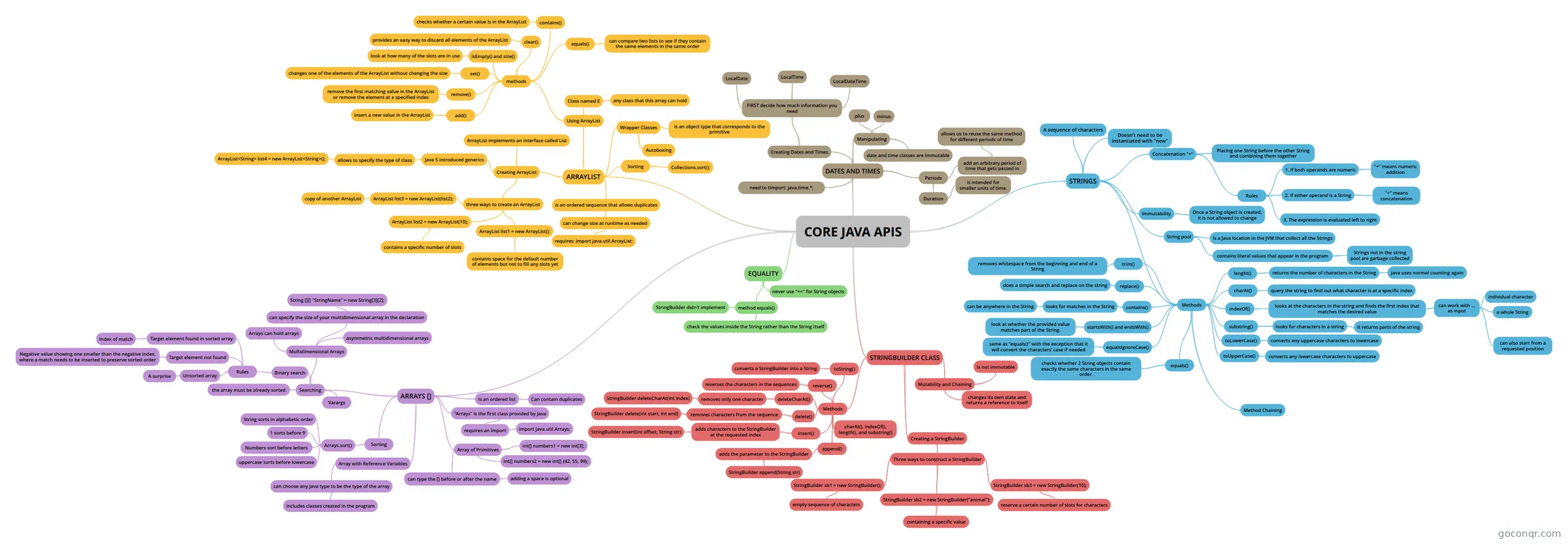
Mind map: Core Java APIs
Inhalt der Mindmap
CORE JAVA APIS
STRINGS
- A sequence of characters
- Doesn't need to be instantiated with "new"
- Concatenation "+"
- Placing one String before the other String and combining them together
- Rules
- 1. If both operands are numeric
- "+" means numeric addition
- 2. If either operand is a String
- "+" means concatenation
- 3. The expression is evaluated left to right
- 1. If both operands are numeric
- Immutability
- Once a String object is created, it is not allowed to change
- String pool
- Is a Java location in the JVM that collect all the Strings
- contains literal values that appear in the program
- Strings not in the string pool are garbage collected
- Methods
- lenght()
- returns the number of characters in the String
- Java uses normal counting again
- returns the number of characters in the String
- charAt()
- query the string to find out what character is at a specific index
- indexOf()
- looks at the characters in the string and finds the first index that matches the desired value
- can work with ... as input
- individual character
- a whole String
- can also start from a requested position
- can work with ... as input
- looks at the characters in the string and finds the first index that matches the desired value
- substring()
- looks for characters in a string
- It returns parts of the string
- looks for characters in a string
- toLowerCase()
- converts any uppercase characters to lowercase
- toUpperCase()
- converts any lowercase characters to uppercase
- equals()
- checks whether 2 String objects contain exactly the same characters in the same order.
- equalsIgnoreCase()
- same as "equals()" with the exception that it will convert the characters’ case if needed
- startsWith() and endsWith()
- look at whether the provided value matches part of the String.
- contains()
- looks for matches in the String
- can be anywhere in the String
- looks for matches in the String
- replace()
- does a simple search and replace on the string
- trim()
- removes whitespace from the beginning and end of a String
- Method Chaining
- lenght()
STRINGBUILDER CLASS
- Mutability and Chaining
- is not immutable
- changes its own state and returns a reference to itself
- Creating a StringBuilder
- Three ways to construct a StringBuilder
- StringBuilder sb1 = new StringBuilder();
- empty sequence of characters
- StringBuilder sb2 = new StringBuilder("animal");
- containing a specific value
- StringBuilder sb3 = new StringBuilder(10);
- reserve a certain number of slots for characters
- StringBuilder sb1 = new StringBuilder();
- Three ways to construct a StringBuilder
- Methods
- charAt(), indexOf(), length(), and substring()
- append()
- adds the parameter to the StringBuilder
- StringBuilder append(String str)
- adds the parameter to the StringBuilder
- insert()
- adds characters to the StringBuilder at the requested index
- StringBuilder insert(int offset, String str)
- adds characters to the StringBuilder at the requested index
- delete()
- removes characters from the sequence
- StringBuilder delete(int start, int end)
- removes characters from the sequence
- deleteCharAt()
- removes only one character
- StringBuilder deleteCharAt(int index)
- removes only one character
- reverse()
- reverses the characters in the sequences
- toString()
- converts a StringBuilder into a String
- Mutability and Chaining
EQUALITY
- never use "==" for String objects
- method equals()
- check the values inside the String rather than the String itself
- StringBuilder didn't implement
ARRAYS []
- Is an ordered list
- Can contain duplicates
- Array of Primitives
- int[] numbers1 = new int[3];
- int[] numbers2 = new int[] {42, 55, 99};
- can type the [] before or after the name
- adding a space is optional
- Array with Reference Variables
- can choose any Java type to be the type of the array
- includes classes created in the program
- can choose any Java type to be the type of the array
- Sorting
- Arrays.sort()
- String sorts in alphabetic order
- 1 sorts before 9
- Numbers sort before letters
- uppercase sorts before lowercase
- Arrays.sort()
- "Arrays" is the first class provided by Java
- requires an import
- import java.util.Arrays;
- requires an import
- Searching
- the array must be already sorted
- Binary search
- Rules
- Target element found in sorted array
- Index of match
- Target element not found
- Negative value showing one smaller than the negative index, where a match needs to be inserted to preserve sorted order
- Unsorted array
- A surprise
- Target element found in sorted array
- Rules
- Varargs
- Multidimensional Arrays
- Arrays can hold arrays
- can specify the size of your multidimensional array in the declaration
- String [][] "StringName" = new String[3][2];
- asymmetric multidimensional arrays
- Is an ordered list
ARRAYLIST
- is an ordered sequence that allows duplicates
- can change size at runtime as needed
- requires: import java.util.ArrayList;
- can change size at runtime as needed
- Creating ArrayList
- three ways to create an ArrayList
- ArrayList list1 = new ArrayList();
- contains space for the default number of elements but not to fill any slots yet
- ArrayList list2 = new ArrayList(10);
- contains a specific number of slots
- ArrayList list3 = new ArrayList(list2);
- copy of another ArrayList
- ArrayList list1 = new ArrayList();
- Java 5 introduced generics
- allows to specify the type of class
- ArrayList<String> list4 = new ArrayList<String>();
- allows to specify the type of class
- ArrayList implements an interface called List
- three ways to create an ArrayList
- Using ArrayList
- Class named E
- any class that this array can hold
- methods
- add()
- insert a new value in the ArrayList
- remove()
- remove the first matching value in the ArrayList or remove the element at a specified index
- set()
- changes one of the elements of the ArrayList without changing the size
- isEmpty() and size()
- look at how many of the slots are in use
- clear()
- provides an easy way to discard all elements of the ArrayList
- contains()
- checks whether a certain value is in the ArrayList
- equals()
- can compare two lists to see if they contain the same elements in the same order
- add()
- Class named E
- Wrapper Classes
- is an object type that corresponds to the primitive
- Autoboxing
- Sorting
- Collections.sort();
- is an ordered sequence that allows duplicates
DATES AND TIMES
- need to timport: java.time.*;
- Creating Dates and Times
- FIRST decide how much information you need
- LocalDate
- LocalTime
- LocalDateTime
- FIRST decide how much information you need
- Manipulating
- date and time classes are immutable
- plus
- minus
- Periods
- add an arbitrary period of time that gets passed in
- allows us to reuse the same method for different periods of time
- Duration
- is intended for smaller units of time.
- add an arbitrary period of time that gets passed in
Informationen
- Beschreibung
- Certificacion Java Mindmap am CORE JAVA APIS, erstellt von Enrique López Mata am 25/11/2018.
- Erstellt von
- Enrique López Mata
- Aufrufe
- 14
- Bewertung