
Mindmap
Cloud Information
Inhalt der Mindmap
Cloud Information
Cloud services
- IaaS (Infrastructure as a Service)
- offer pay as you go access to the infrastructures you need
- agile in scaling services up and down with demand
- PaaS (Platform as a Service)
- allow you to lease the cloud infrastructure for an entire application lifecycle from development to maintenance
- AWS Elastic Beanstalk
- SaaS (Software as a Service)
- allows you to lease on a subscription basis cloud services hosted by SaaS providers
- ERP, HCM, email, IT service management can be example of functional workload that can be moved
- IaaS (Infrastructure as a Service)
Cloud Type
- Private Cloud
- Deployed on premises
- costly and difficult to manage
- better for direct control over their environment
- easier to meet security or business governance reasons
- Public Cloud
- can includ VM, apps or even storage capacity
- Hybrid Cloud
- combine public and private cloud
- mix between internal and external cloud services
- Private Cloud
Formation Cloud Practitioner Essentials
- Amazon Elastic Compute Cloud (Amazon EC2)
- Virtual Server
- Linux or Windows
- webs apps
- databses
- internal business apps
- external third party app
- Linux or Windows
- Multitenancy : Sharing underlying hardware between virtual machines
- Vertical scaling
- Type of EC2 instances
- general purpose
- balanced resources
- compute optimized
- memory optimized
- accelerated computing
- storage optimized
- general purpose
- Purchase options
- on demand
- savings plans
- Reserved instances
- Spot Instances
- dedicated hosts
- Virtual Server
- Key value of Cloud computing
- Pay for what you need
- Over internet
- Stop guessing capicity
- No money spending to run and maintain data centers
- speed and agility / flexibility
- Type of
- Datacenters are separated by Regions
- no data shared between Regions at all
- 4 reasons to chose your Region
- Compliance
- Proximity for latency problem , so chose depending on your client
- Pricing
- feature availability
- Availability Zone
- run across at least two AZ in one regions
- for disaster reasons
- some regions are regionnally scoped
- located 10s on miles apart
- run across at least two AZ in one regions
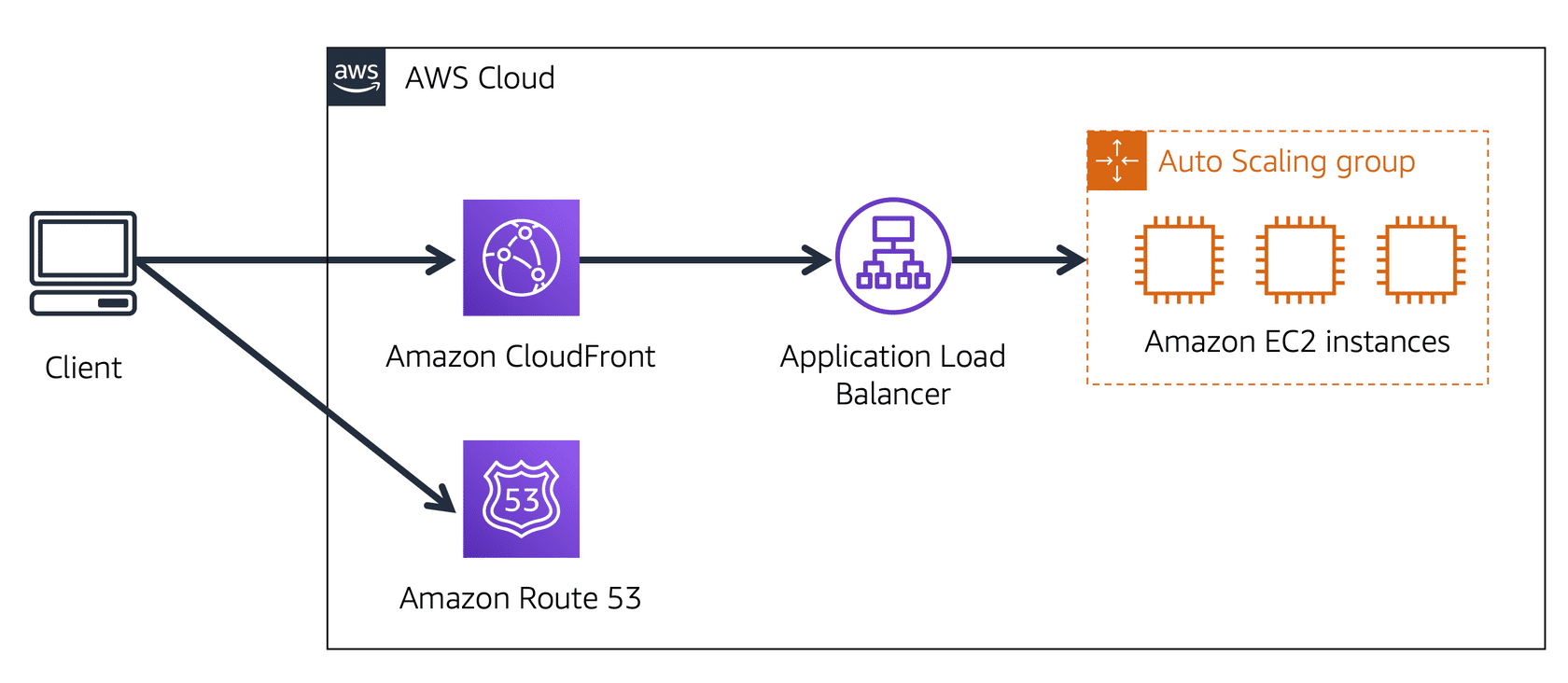
- Amazon Cloud Front
- Uses edge locations
- run DNS (Domain Name Service)
- named Amazon Route 53
- run DNS (Domain Name Service)
- Uses edge locations
- Serverless Computing
- AWS Lambda
- upload code
- set code to trigger from an event source
- code runs only when triggered
- pay only for the compute time used
- code runs only when triggered
- set code to trigger from an event source
- upload code
- CASE for Virtual servers
- Provision instances (virtual servers)
- Upload your code
- Continue to manage the instances while your application is running
- only think about the code
- no need to manage or provision theses servers
- Aazon
- AWS Lambda
- Containers
- Amazon ECS (Elastic Container Service)
- Supports Docker containers
- Docker(opens in a new tab) is a software platform that enables you to build, test, and deploy applications quickly
- Supports Docker containers
- Amazon EKS (Elastic Kubernetes Service)
- Supports Kubernetes on AWS
- Kubernetes(opens in a new tab) is open-source software that enables you to deploy and manage containerized applications at scale.
- Supports Kubernetes on AWS
- AWS Fargate
- Serverless compute engine for containers. It works with both Amazon ECS and Amazon EKS.
- Amazon ECS (Elastic Container Service)
- Ways to interact with AWS services
- AWS Management Console
- AWS Command Line Interface (AWS CLI)
- software development kits (SDKs)
- AWS Elastic Beanstalk
- you provide code and configuration settings, and Elastic Beanstalk deploys the resources necessary to perform the following tasks:
- Adjust capacity / Load balancing / Automatic scaling / Application health monitoring
- you provide code and configuration settings, and Elastic Beanstalk deploys the resources necessary to perform the following tasks:
- AWS CloudFormation
- you can treat your infrastructure as code. This means that you can build an environment by writing lines of code instead of using the AWS Management Console to individually provision resources.
- Amazon Elastic Compute Cloud (Amazon EC2)
Networking
- Amazon Virtual Private Cloud (Amazon VPC)
- A networking service that you can use to establish boundaries around your AWS resources
- Internet Gateway
- To allow public traffic from the internet to access your VPC, you attach an internet gateway to the VPC.
- Virtual private gateway
- To access private resources in a VPC, you can use a virtual private gateway.
- allows protected internet traffic to enter into the VPC
- AWS Direct Connect
- lets you to establish a dedicated private connection between your data center and a VPC.
- Public Subnets
- contain resources that need to be accessible by the public
- Private Subnets
- contain resources that should be accessible only through your private network, such as a database that contains customers’ personal information and order histories.
- ACL Networks
- virtual firewall that controls inbound and outbound traffic at the subnet level.
- perform stateless packet filtering. They remember nothing and check packets that cross the subnet border each way: inbound and outbound.
- Security Groups
- A security group is a virtual firewall that controls inbound and outbound traffic for an Amazon EC2 instance.
- Security groups perform stateful packet filtering. They remember previous decisions made for incoming packets.
- A packet is a unit of data sent over the internet or a network.
- Domain Name System (DNS)
- DNS resolution involves a customer DNS resolver communicating with a company DNS server.
- Amazon Route 53
- DNS web service. It gives developers and businesses a reliable way to route end users to internet applications hosted in AWS.
- Amazon Virtual Private Cloud (Amazon VPC)
Storage and database
- Instance stores
- Block-level storage volumes behave like physical hard drives. An instance store(opens in a new tab) provides temporary block-level storage for an Amazon EC2 instance.
- When the instance is terminated, you lose any data in the instance store.
- Block-level storage volumes behave like physical hard drives. An instance store(opens in a new tab) provides temporary block-level storage for an Amazon EC2 instance.
- Amazon Elastic Block Store (Amazon EBS)
- provides block-level storage volumes that you can use with Amazon EC2 instances.
- If you stop or terminate an Amazon EC2 instance, all the data on the attached EBS volume remains available
- need to configure it
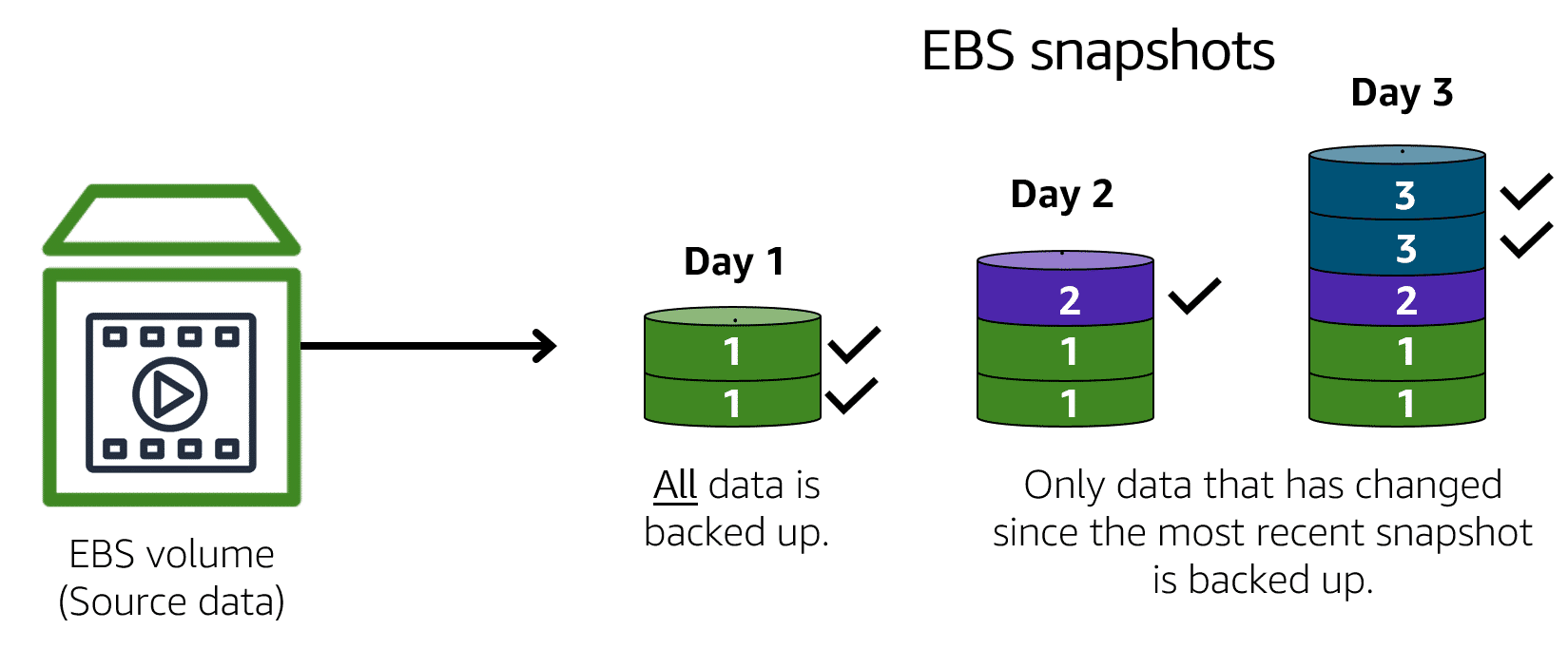
- Because EBS volumes are for data that needs to persist, it’s important to back up the data. You can take incremental backups of EBS volumes by creating Amazon EBS snapshots.
- An EBS snapshot is an incremental backup.
- If you stop or terminate an Amazon EC2 instance, all the data on the attached EBS volume remains available
- provides block-level storage volumes that you can use with Amazon EC2 instances.
- Amazon Simple Storage Service (Amazon S3)
- provides object-level storage. Amazon S3 stores data as objects in buckets.
- 8 differents classes
- S3 Standard
- Designed for frequently accessed / data Stores data in a minimum of three Availability Zones
- S3 Standard-Infrequent Access (S3 Standard-IA)
- Ideal for infrequently accessed data Similar to Amazon S3 Standard but has a lower storage price and higher retrieval price
- S3 One Zone-Infrequent Access (S3 One Zone-IA)
- S3 Standard
- 8 differents classes
- provides object-level storage. Amazon S3 stores data as objects in buckets.
- object storage
- In object storage, each object consists of data, metadata, and a key. The data might be an image, video, text document, or any other type of file. Metadata contains information about what the data is, how it is used, the object size, and so on. An object’s key is its unique identifier.
- File Storage
- In file storage, multiple clients (such as users, applications, servers, and so on) can access data that is stored in shared file folders. In this approach, a storage server uses block storage with a local file system to organize files. Clients access data through file paths.
- Amazon Elastic File System (Amazon EFS)
- scalable file system used with AWS Cloud services and on-premises resources. As you add and remove files, Amazon EFS grows and shrinks automatically.
- Amazon Relational Database Service (Amazon RDS)
- Instance stores
Migration and Innovation
- AWS Well Architected Framework
- 6 Perspectives
- focus on business capabilities
- Business
- Governance
- People
- focus on technical capabilities.
- Operations
- Security
- Platform
- focus on business capabilities
- 6 Perspectives
- Strategies for migration
- Rehosting
- “lift-and-shift” involves moving applications without changes.
- Replatforming
- “lift, tinker, and shift,” involves making a few cloud optimizations to realize a tangible benefit
- Refactoring/re-architecting
- involves reimagining how an application is architected and developed by using cloud-native features
- Repurchasing
- involves moving from a traditional license to a software-as-a-service model.
- Retaining
- consists of keeping applications that are critical for the business in the source environment.
- Retiring
- the process of removing applications that are no longer needed.
- Rehosting
- AWS Snow Family members
- The AWS Snow Family is a collection of physical devices that help to physically transport up to exabytes of data into and out of AWS.
- AWS Snowcone
- AWS Snowconeis a small, rugged, and secure edge computing and data transfer device. It features 2 CPUs, 4 GB of memory, and up to 14 TB of usable storage.
- AWS Snowball
- Snowball Edge Storage Optimized devices are well suited for large-scale data migrations and recurring transfer workflows, in addition to local computing with higher capacity needs.
- Snowball Edge Compute Optimized provides powerful computing resources for use cases such as machine learning, full motion video analysis, analytics, and local computing stacks.
- AWS Snowmobile
- AWS Snowmobile is an exabyte-scale data transfer service used to move large amounts of data to AWS. You can transfer up to 100 petabytes of data per Snowmobile, a 45-foot long ruggedized shipping container, pulled by a semi trailer truck.
- Innovation with AWS
- AWS Well Architected Framework
Bilder und Dateien der Mindmap
Informationen
- Beschreibung
- Mindmap am Cloud Information, erstellt von Valentin SIMON am 27/02/2024.
- Erstellt von
- Valentin SIMON
- Aufrufe
- 0
- Bewertung