
Karteikarten
SmartLog, SmartEvent y SmartMonitor (R80.10)
Karten in diesem Stapel (45)
- 1LOG Tracking Options in R80.10?Tracking Options
• None - Do not generate a log.
• Log - This is the default Track option. It shows all the information that the Security Gateway used to match the connection. At a minimum, this is the Source, Destination, Source Port, and Destination Port. If there is a match on a rule that specifies an application, a session log shows the application name (for example, Dropbox). If there is a match on a rule that specifies a Data Type, the session log shows information about the files, and the contents of the files.
• Accounting - Select this to update the log at 10 minute intervals, to show how much data has passed in the connection: Upload bytes, Download bytes, and browse time - 2In R80.10, R80 and R77.xx, are the LOG Tracking Options the same?When upgrading from R77.xx or from R80 to R80.10, there are changes to the names of the options in the Track column
- 3Advanced LOG Track options in R80.10?• Detailed Log - Equivalent to the Log option, but also shows the application that matched the connections, even if the rule does not specify an application
• Extended Log - Equivalent to the Detailed option, but also shows a full list of URLs and files in the connection or the session - 4Log Generation options?• per Connection - Select this to show a different log for each connection in the session. This is the default for rules in a Layer with only Firewall enabled. These are basic firewall logs.
• per Session - Select this to generate one log for all the connections in the same session. This is the default for rules in a Layer with Applications and URL Filtering or Content Awareness enabled. These are basic Application Control logs. - 5What are the alert options available in the track column?For each alert option, you can define a script in Menu > Global Properties > Log and Alert >
• None - Do not generate an alert.
• Alert - Generate a log and run a command, such as: Show a popup window, send an email alert or an SNMP trap alert, or run a user-defined script as defined in the Global Properties.
• SNMP - Send an SNMP alert to the SNMP GUI, or run the script defined in the Global Properties.
• Mail - Send an email to the administrator, or run the mail alert script defined in the Global Properties.
• User Defined Alert - Send one of three possible customized alerts. The alerts are defined by the scripts specified in the Global Properties - 6What is a Log Sessions?A session is a user's activity at a specified site or with a specified application. The session starts when a user connects to an application or to a site. The Security Gateway includes all the activity that the user does in the session in one session log.
- 7What can be seen in the LOG per session, as opposed to the LOG per connection?• Connections - Shows all the connections in the session. These show if Per connection is also selected in the Track option of the rule.
• URLs - Shows all the URLs in the session. These show if Extended Log is selected in the Track option of the rule.
• Files - Shows all the files uploaded or downloaded in the session. These show if Extended Log is selected in the Track option of the rule, or if a Data Type was matched on the connection.
Extended LOG also include the application name, such as is indicated in Detailed LOG - 8session timeout? By default, after a session continues for _____ hours, the Security Gateway starts a new session logBy default, after a session continues for three hours, the Security Gateway starts a new session log. You can change this in SmartConsole from the Manage & Settings view, in Blades > Application & URL Filtering > Advanced Settings > General > Connection unification.
- 9By default, SmartConsole shows a predefined set of columns and information based on the selected blade in your query (SmartLog). This is known as the ________ Profile.By default, SmartConsole shows a predefined set of columns and information based on the selected blade in your query. This is known as the Column Profile. For example:
• The DLP column profile includes columns for: Blade, Type, DLP Incident UID, and severity.
• The Threat Prevention column profile includes columns for: Origin, Action, Severity, and Source User.
A column profile is assigned based on the blade that occurs most frequently in the query results. This is called Automatic Profile Selection, and is enabled by default. - 10SmartEvent Software Blade?The SmartEvent Software Blade is a unified security event management and analysis solution that delivers real-time, graphical threat management information.
SmartConsole, SmartView Web Application, and the SmartEvent GUI client consolidate billions of logs and show them as prioritized security events - 11What is an Event?An event is a record of a security incident. It is based on one or more logs, and on rules that are defined in the Event Policy.
An example of an event that is based on one log: A High Severity Anti-Bot event. One Anti-Bot log with a Severity of High causes the event to be recorded. An example of an event that is based on more than one log: A Certificate Sharing event. Two login logs with the same certificate and a different user cause the event to be recorded. - 12For which blades SmartEvent doesn't automatically generate events?SmartEvent automatically defines logs that are not Firewall, VPN, or HTTPS Inspection logs, as events.
Most logs are Firewall, VPN and HTTPS inspection logs. Therefore, SmartEvent does not define them as events by default to avoid a performance impact on the SmartEvent Server - 13Events that are based on a suspicious pattern of two or more logs, are created by the SmartEvent __________ UnitEvents that are based on a suspicious pattern of two or more logs, are created by the SmartEvent Correlation Unit. These correlated events are defined in the SmartEvent client GUI, in the Policy tab.
- 14Which option should be enabled to generate events for the Firewall blade in gateways with R77.xx installed or lower?For logs from R77.xx Gateways and lower: To create events for Firewall, in the SmartEvent Policy tab, enable Consolidated Sessions > Firewall Session
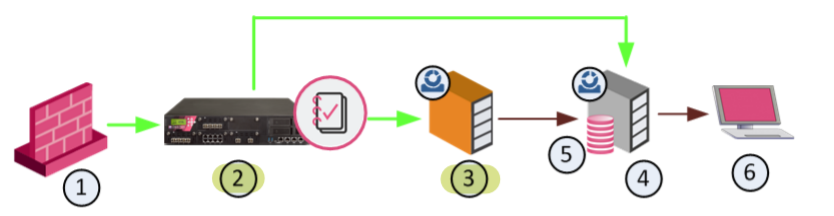
- 15—• SmartEvent Correlation Unit (3) analyzes log entries on Log Servers (2).
• SmartEvent Server (4) contains the Events Database (5).
• The SmartEvent and SmartConsole clients (6) manage the SmartEvent Server.
The SmartEvent components can be installed on one computer (that is, a standalone deployment) or multiple computers and sites (a distributed deployment) - 16What does the SmartEvent Correlation Unit do?Identifies events: Analyzes each log entry from a Log Server, and looks for patterns according to the installed Event Policy. The logs contain data from Check Point products and certain third-party devices. When a threat pattern is identified, the SmartEvent Correlation Unit forwards the event to the SmartEvent Server. You can install more than one SmartEvent Correlation Unit. Each SmartEvent Correlation Unit can analyze logs from more than one Log Server or Domain Log Server.
- 17What does th SmartEvent Server doReceives the items that are identified as events by the SmartEvent Correlation Unit. The SmartEvent Server does further analysis to determine the severity level of the event and what action to do. The
event is stored in the system database.
Events database stores events in the SmartEvent Server. - 18What general tasks does the SmartEvent Correlation Unit do?The SmartEvent Correlation Unit analyzes the log entries and identifies events from them. During analysis, the SmartEvent Correlation Unit does one of these actions:
• Marks log entries that are not stand-alone events, but can be part of a larger pattern to be identified later.
• Takes a log entry that meets one of the criteria set in the Events Policy, and generates an event.
• Takes a new log entry that is part of a group of items. Together, all these items make up a security event. The SmartEvent Correlation Unit adds it to an ongoing event.
• Discards log entries that do not meet event criteria. - 19How to log in to SmartEvent using SmartView Web Applicationhttps:///smartview/
- 20In which tap in SmartEvent GUI Client you can create an event definition?Use the Policy tab of the SmartEvent GUI client to configure and customize the events that define the SmartEvent Event Policy. Here you define the Event Policy. You define system components, such as SmartEvent Correlation Unit, lists of blocked IP addresses and other general settings. The types of events that SmartEvent can detect are listed here, and sorted into a number of categories. To change each event, change the default thresholds and set Automated Responses.
- 21Modifications to the Event Policy do not take effect until saved on the __________ server and installed to the SmartEvent _____________ Unit.Modifications to the Event Policy do not take effect until saved on the SmartEvent server and installed to the SmartEvent Correlation Unit.
To enable changes made to the Event Policy:
1. Click File > Save.
2. Click Actions > Install Event Policy.
You can undo changes to the Event Policy, if they were not saved. To undo changes: click File > Revert Changes. - 22How can you reduce the number of false alarms generated by SmartEvent?SmartEvent constantly takes data from your Log Servers, and searches for patterns in all the network chatter that enters your system. Depending on the levels set in each Event Definition, the number of events detected can be high. You can change the thresholds and other criteria of an event, to reduce the number of false alarms.
- 23Some Event Definition Parameters?These are the usual types of configurable elements:
• Thresholds, such as Detect the event when more than x connections were detected over y seconds
• Severity, such as Critical, Medium, Informational, etc.
• Automatic Reactions, such as Block Source or run External Script
• Exceptions, such as Apply the following exceptions
• Time Object, such as to issue an event
if the following occurs outside the following Working Hours - 24What does the Event Threshold allow?The Event Threshold allows you to modify the limits that, when exceeded, indicates that an event has occurred. The limits typically are the number of connections, logs, or failures, and the period of time in which they occurred.
- 25How does the severity of an event affect the queries that the SmartEvent Correlation Unit makes in the LOG Server LOGs to filter for possible events?An event severity affects in which queries (among those that filter for severity) this type of event will appear
- 26Automatic Reactions?When detected, an event can activate an Automatic Reaction. The SmartEvent administrator can create and configure one Automatic Reaction, or many, according to the needs of the system.
To create an automatic reaction:
1. Create an automatic reaction object in the Event definition, or from General Settings > Objects > Automatic Reactions.
These are the types of Automatic Reactions:
• Mail
• Block Source - instruct the Security Gateway to block the source IP address from which this event was detected for a configurable period of time
• Block Event activity - instruct the Security Gateway to block a distributed attack that emanates from multiple sources, or attacks multiple destinations
• External Script
• SNMP Trap - 27What are the SNMP Trap parameters when configuring a SNMP Trap Reaction?SNMP Trap parameters: Host, Message, OID and Community name.
The command send_snmp uses values that are found in the file chkpnnt.mib, in the directory $CPDIR/lib/snmp/. An OID value used in the SNMP Trap parameters window must be defined in chkpnnt.mib, or in a file that refers it. If the OID field is left blank, the value is determined from iso.org.dod.internet.private.enterprises.checkpoint.products.fw.fwEvent =
1.3.6.1.4.1.2620.1.1.11.
When the automatic reaction occurs, the SNMP Trap is sent as a 256 byte DisplayString text. But, if the OID type is not text, the message is not sent. - 28Where do you store the External Script for Automatic Reaction?Put the script on the SmartEvent Server:
a) In $RTDIR/bin, create the folder ext_commands. Run:
mkdir $RTDIR/bin/ext_commands
b) Put the script in $RTDIR/bin/ext_commands/ or in a folder under that location. The
path and script name must not contain any spaces.
c) Give the script executable permissions. Run:
chmod +x
In the Add Automatic Reaction window:
a) Give the automatic reaction object a significant Name.
b) In Command line, enter the name of the script to run. Specify the name of the script that is
in $RTDIR/bin/ext_commands/ directory. Use the relative path if needed. Do not
specify the full path of $RTDIR/bin/ext_commands/. - 29What are Working Hours used for?Working Hours are used to detect unauthorized attempts to access protected systems and other forbidden operations after-hours. To set the Regular Working Hours for an event, select a Time Object that you have configured from the drop-down list.
- 30Is it possible to add an exception to an event definition?Exceptions allow an event to be independently configured for the sources or destinations that appear. For example, if the event Port Scan from Internal Network is set to detect an event when 30 port scans have occurred within 60 seconds, you can also define that two port scans detected from host A in 10 seconds of each other is also an event.
Each exception is configured in the event definition. An exception may have a different automatic reaction. - 31High Level Overview of Event IdentificationEvents are detected by the SmartEvent Correlation Unit. The SmartEvent Correlation Unit scans logs for criteria that match an Event Definition. SmartEvent uses these procedures to identify these events:
• Matching a Log Against Global Exclusions
• Matching a Log Against Each Event Definition
• Creating an Event Candidate
• When a Candidate Becomes an Event - 32When the SmartEvent Correlation Unit reads a log, it first checks if the log matches all defined _____ ExclusionsWhen the SmartEvent Correlation Unit reads a log, it first checks if the log matches all defined Global Exclusions. Global Exclusions (defined on the Policy tab > Event Policy > Global Exclusions) direct SmartEvent to ignore logs that are not expected to contribute to an event.
If the log matches a Global Exclusion, it is discarded by the system. If not, the SmartEvent Correlation Unit starts to match it against each Event Definition. - 33What makes up an event definition?Each Event Definition contains a filter which is comprised of a number of criteria that must be found in all matching logs. The criteria are divided by product: The Event Definition can include a number of different products, but each product has its own criterion. SmartEvent divides this procedure into two steps. The SmartEvent Correlation Unit first checks if the Product value in the log matches one of the permitted Product values of an Event Definition. If a Log did not contain a permitted Product value, the SmartEvent Correlation Unit compares the log against Event Definition "B", and so on. If the log fails to match against an Event Definition, it is discarded.
The SmartEvent Correlation Unit checks if the log contains the Product-specific criteria to match the Event Definition. - 34What is an Event Candidate used for?When a log matches the criteria, it is added to an Event Candidate. Event candidates let SmartEvent track logs until an event threshold is crossed, at which point an event is generated. Each Event Definition can have multiple event candidates, each of which keeps track of logs grouped by equivalent properties. When a log matches the event definition, but has properties different than those of the existing event candidates, a new event candidate is created. This event candidate is added to what can be thought of as the Event Candidate Pool.
- 35Once an event is generated, does the SmartEvent Correlation Unit stop searching for LOGs that meet the event criteria?When a candidate becomes an event, the SmartEvent Correlation Unit forwards the event to the Event Database. But to discover an event does not mean that SmartEvent stops to track logs
related to it. The SmartEvent Correlation Unit adds matching logs to the event as long as they continue to arrive during the event threshold - 36In reference to the number of LOGs, what are the two options available when creating an event definition?Set which of these options generates the event:
• A single log — Frequently depicts an event, such as a log from a virus scanner that reports that a virus has been found.
• Multiple logs — Required if the event can only be identified as a result of a combination of multiple logs, such as a High Connection Rate - 37What can be done in the SmartEvent client policy tab?• Adding a SmartEvent Correlation Unit and Log Servers
• Create offline jobs analyze historical log
• Adding objects to the Internal Network
• Creating scripts to run as Automatic Reactions for certain events
• Creating objects for use in filters - 38To help SmartEvent conclude if events originated internally or externally, you must define the _______ Network.To help SmartEvent conclude if events originated internally or externally, you must define the Internal Network.
- 39What tasks do dbsync perform?SmartEvent with Management High Availability. The SmartEvent database keeps a synchronized copy of management objects locally on the
SmartEvent Server. This process, dbsync, allows SmartEvent to work independently of different management versions and different management servers in a High Availability environment. Dbsync initially connects to the management server with which SIC is established. It retrieves all the objects. After the initial synchronization it gets updates when an object is saved. Dbsync registers all the High Availability management machines and periodically tests the connectivity with the newest management server. If connectivity is lost, it attempts to connect to the other High Availability management servers until it finds an active one and connects to it. If two management servers are active concurrently, dbsync stays connected to one management server. Dbsync does not get changes made on the other management server until a
synchronization operation is done. - 40Which filter allows you to specify the SmartEvent Correlation Unit that generates an event?Multiple correlation units can read logs from the same Log Servers. That way, the units provide redundancy if one of them fails. The events that the correlation units detect are duplicated in the
SmartEvent database. But these events can be disambiguated if you filter them with the Detected By field in the Event Query definition. The Detected By field specifies which SmartEvent Correlation Unit detected the event. If the SmartEvent Server becomes unavailable, the correlation units keep the events until it can reconnect with the SmartEvent Server and forward the events. - 41In which Blades are Detailed Log and Extended Log only available?Detailed Log and Extended Log are only available if one or more of these Blades are enabled on the Layer: Applications & URL Filtering, Content Awareness, or Mobile Access.
- 42What are the options available to calculate the traffic direction?• Incoming – all the sources are external to the network and all destinations are inner
• Outgoing – all sources are in the network and all destinations external
• Internal – sources and destinations are all in the network
• Other – a mixture of and internal and external values makes the result indeterminate - 43Tracking Options for R80◦ Network Log - Generates a log with only basic Firewall information: Source, Destination, Source Port, Destination Port, and Protocol.
◦ Log - Equivalent to the Network Log option, but also includes the application name (for example, Dropbox), and application information (for example, the URL of the Website). This is the default Tracking option.
◦ Full Log - Equivalent to the log option, but also records data for each URL request made.
- If suppression is not selected, it generates a complete log (as defined in pre-R80 management).
- If suppression is selected, it generates an extended log (as defined in pre-R80
management). - 44You can add these options to a Log, Full Log, or Network Log for R80:◦ Accounting - If selected, update the log every 10 minutes, to show how much data has passed in the connection: Upload bytes, Download bytes, and browse time.
◦ Suppression - If selected, one log is generated every three hours for all the connections - 4541Monitoring Traffic and Connections
Informationen
- Beschreibung
- Der Nutzer hat seine Fachbereichs-Information gelöscht. Karteikarten am SmartLog, SmartEvent y SmartMonitor (R80.10), erstellt von Gelöschter Nutzer am 29/05/2019.
- Erstellt von
- Gelöschter Nutzer · Mai 2019
- Aktualisiert
- 17 Jun 2019
- Aufrufe
- 44
- Verlauf
-
- Erstellt von brian gustavo triviño taborda · 28 Mai 2019
- Kopiert von brian gustavo triviño taborda · 29 Mai 2019
- Bewertung