
4650980


| Question | Answer |
| Name six hardware components. | Desktop CPU (Central Processing Unit) Keyboard Monitor Cables Mouse. |
| The computer needs an ......... ......... to actually work. | Operating system. |
| What two functions is the operating system responsible for? | Maintaining and managing security such as passwords and viruses. Providing us with Graphic User Interface. |
| What is a hardware? | The term hardware refers to the physical parts of a computer that can be seen and touched. |
| What is an operating system? | An operating system is the most important system of the computer. It manages and controls all other software as well as the relationship between the hardware and the software. |
| What is data? | Data is unprocessed information. |
| What is information? | Informarion is processed data. |
| What is software? | The term software refers to a sequence of stored instructions to get the computer to perform specific tasks. |
| What five actions can be performed by the mouse? | Clicking Double clicking Right-clicking Dragging Scrolling. |
| What is meant by the action performed by the mouse, namely clicking? | Resting the cursor on an object and then selecting the object by clicking the left button once. |
| What is meant by the action performed by the mouse, namely double clicking? | Quickly clicking the left button twice. |
| What is meant by the action performed by the mouse, namely right-clicking? | Pressing the right mouse button instead of the left button once. |
| What is meant by the action performed by the mouse namely dragging? | Holding down the left mouse button while moving the mouse. |
| What is meant by the action performed by the mouse namely scrolling? | Most mice have a wheel between the two buttons that is used to scroll up and down in a document on the screen. |
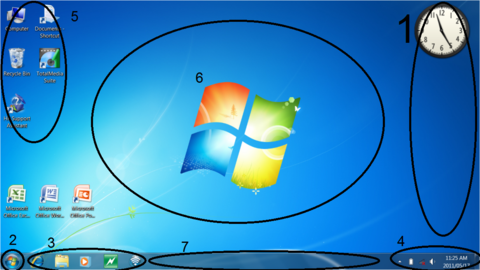
| 1. Gadgets 2. Start menu 3. Quick Launch Bar 4. Notification bar 5. Desktop Icons 6. Desktop 7. Taskbar | |
| When logging in, the user... | Gains access to the programs and data. |
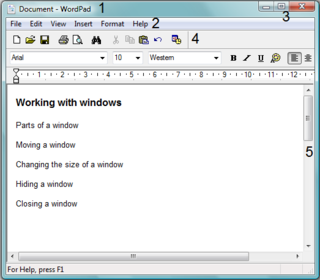
| 1. Title bar 2. Menu bar 3. Minimize, Maximize and close icons 4. Toolbar 5. Scrollbars | |
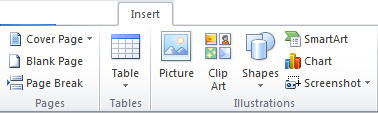
| What is this below picture called? | A Ribbon |
| In which versions of Microsoft did this first appear? | In office 2007. |
| What does title bar mean? | The term title bar refers to the bar at the top of a window that displays the name of the file in use as well as the program viewing the file. |
| What does menu bar mean? | The term menu bar refers to the bar below the title bar that displays a set of commands present in the text. |
| What are scroll bars? | Scroll bars allow you to scroll through a window to see any information that may not be visible due to the size of the window. |
| What is a toolbar? | The toolbar is a collection of buttons and icons representing a set of related tasks. |
| What does the term, booting, refer to? | The term, booting, refers to the process in which the computer loads the operating system. This action is initiated by the user. |
| What is the Central Processing Unit (CPU)? | Hardware components that perform all calculations and execute all instructions. |
| What is a desktop? | The first basic screen that is loaded when the computer has finished booting. |
| What is the home row? | The anchor keys on both left and right side of the keyboard. Keys are as followed: Left: ASDF Right: JKL; |
| What is input? | Input is the process of inserting a set of instructions into the computer. |
| Random Accessed Memory (RAM) | Temporary storage for programs and data being processed in and by the computer. |
| What is output? | Output is what the computer produces to provide us with the results of processing. |
| Storage | Hardware used to permanently store data and information on the computer. |
| What is the difference between storage and memory? | Memory only temporarily saves the data; whereas storage permanently saves the data up to the point of removal. |
| What is a window? | A rectangular area on the screen used to display the content or feedback from a program. |
| What is a tooltip? | Upon resting the cursor on an object or icon, a hint or information will pop up. |
Want to create your own Flashcards for free with GoConqr? Learn more.