
Test
Word processing Pretest Stage 3 Part 1
Este test tiene tipos de pregunta que se abren en el reproductor de siempre.
Preguntas del test (12)
1Which of these icons did Jo use to align the heading?
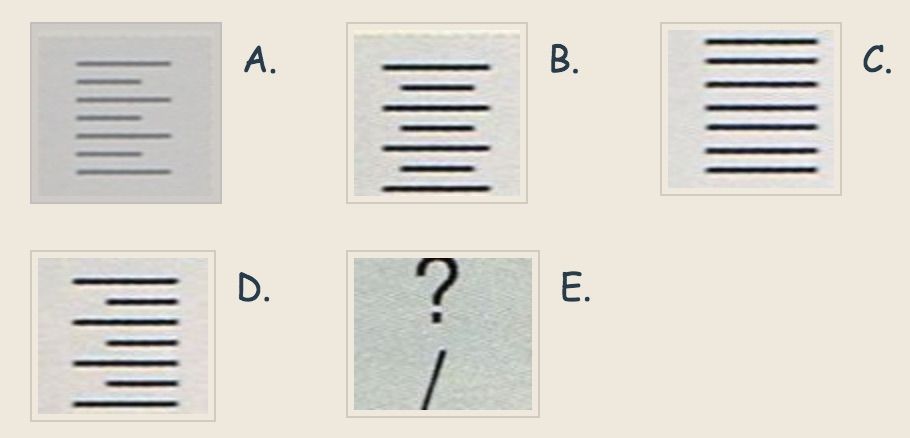
- AA
- BB
- CC
- DD
2When Jo typed her question marks, she used the icons at letter E and one other key. Which other key did she press?
- ACaps Lock
- BTab
- CInsert
- DShift
3Jo realised that she had left out the letter e in the word roasted. What should she do to put the 'e' in roasted?
- AHighlight the whole word and type an 'e'.
- BClick at the end of the word and type an 'e'.
- CClick at the beginning of the word and type an 'e'.
- DClick where the letter is missing and type an 'e'.
4Jo accidently deleted a word from her poem. This was the last thing that she did. What option should she choose from the Edit menu to fix it?
- APaste
- BUndo
- CPaste Special
- DSelect
5Ravi is about to save his work. Before he clicks on Save, he should [blank_start]what[blank_end]
- Afinish writing the procedure.
- Btype a file name.
- Cclick on Documents.
- Dclick on Cancel
6In this screen, 'pigeons' is the name of a [blank_start]_______[blank_end]
- Afont
- Bmenu
- Cfile
- Dfolder
7What is the more frequently used word for 'insertion point'? Answer[blank_start]__________[blank_end]
- AI beam
8What font size has he used for the heading?
- A22 pt
- B36 pt
- C24 pt
- D9 pt
- E12 pt
9What font style has he used for the body of the text?
- ARegular
- BBold
- CItalics
- DUnderline
10Mohammed wants to use the word 'ocean' instead of the word 'sea' each time it appears. What is the quickest way for him to do this?
- ADelete each word 'sea' and retype 'ocean'.
- BUse the Select All command and type 'ocean'.
- CUse the Find/Replace command from the Edit menu.
- DHighlight the word 'sea' each time and type 'ocean'.
11 Lin has selected one of the pictures.
What would happen if she clicked and dragged on the handle marked A.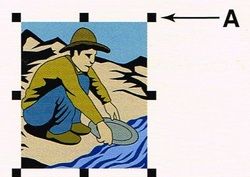
- AIt would get smaller.
- BIt would get skinny.
- CIt would get bigger.
- DIt would get fatter.
- EIt would get larger or smaller.
12Lin has used certain features in her word processing document so far. Check ALL the boxes showing the features that she has used.
- Ainserted a table
- Bunderline
- Cbold headings
- Dinserted graphics
Información
- Descripción
- Connects with https://nuwarra.weebly.com/word-processing-pretest-s3.html
- Autor
- Judy Stephenson
- Idioma
- English
- Visitas
- 1.311
- Etiquetas
- Valoración
- Aún sin valoraciones Valora este test