
Test
Module 13: Wireless Network Security
Este test tiene tipos de pregunta que se abren en el reproductor de siempre.
Preguntas del test (19)
1WIFI -> IEEE 802.11 standar
NOTE no es un protocolo sino un standar.
Ventajas:
-fast and easy
-range
Inconvenientes:
-bandwidth
-electronic equipment can interfere
-security- AVerdadero
- BFalso
2Wireless Terminologies
[blank_start]BSSID[blank_end]
The MAC address of an access point that has
set up a Basic Service Set (BSS)
I[blank_start]SM band[blank_end]
A set of frequency for the international
Industrial,scientific, and Medical
communities
[blank_start]Access Point[blank_end]
Used to connect wireless devices to a wireless
network
[blank_start]Hotspot[blank_end]
Places where wireless network is available for
public use
Orthogonal [blank_start]Frequency-division[blank_end]
Mulüplexing (OFDM)
Method of encoding digital data on multiple
carrier frequencies
DWect-sequence [blank_start]Spread Spec&um[blank_end]
(DSSS)
Original data signal is multiplied with a pseudo
random noise spreading code
Frequency-[blank_start]hopping Spread Spectrum[blank_end]
(FHSS)
Method of transmitting radio signals by rapidly
switching a carrier among many frequency
channels- ABSSID
- BSM band
- CAccess Point
- DHotspot
- EFrequency-division
- FSpread Spec&um
- Ghopping Spread Spectrum
3ISSD --> nombre de la red
BSSID --> MAC del punto de acceso- AVerdadero
- BFalso
4APRÉNDETELO ....
802.11A: More channels, high speed, and less interference
802.11B: Protocol of Wi-Fi revolution, de facto standard
802.11C: Operation of bridge connections
802.11D. Worldwide compliance with regulations for use of wireless signal spectrun
802.11E Quality of Service (QoS) support
802.11F Inter-Access Point Protocol
802.11G 54 Mbps standard, 2.4 GHz signaling
802.11H: Supports European regulatory requirements
802.11I Improves WLAN security
802.11J: Supports Japan regulatory requirements
802.11K. WLAN system management
802.11M: Maintains documentation
802.11N Multiple Input, Multiple Output (MIMO) antennas
802.11P Wireless Access for the Vehicular Environment
802.11R Supports fast roaming
802.11T Wireless Performance Prediction
802.11U: Internetworking with external networks
802.11V Wireless network management
802.16: Long distance wireless infrastructure (WiMAX)
Bluetooth: Cable replacement option
900 MHz: Low speed, coverage, and backward compatibility- AVerdadero
- BFalso
5Wireless Network Topology
[blank_start]Wireless Local Area Network (WLAN)[blank_end]/ local Area Wireless Network ([blank_start]LAWN[blank_end]): WLAN technologies connect users within a local
area. Area can be a corporate or campus building, or a public space, such as an airport.
- uses wireless transmissions ratherthan wires to communicate between the nodes
- The [blank_start]IEEE 802.11 group of standards[blank_end] specifies the tech nologies for wireless
- [blank_start]High-frequency radio[blank_end] waves or in[blank_start]frared[blank_end] can be used as a carrier to communicate- ALAWN
- BIEEE 802.11 group of standards
- CWireless Local Area Network (WLAN)
- DHigh-frequency radio
- Efrared
6Wireless Personal Area Network (WPAN): It is a [blank_start]short range[blank_end] and hoc network providing
instantaneous connectivity to the user. Generally, it is known as Bluetooth
- WPAN is a network for interconnecting devices [blank_start]close to an individual person's workspac[blank_end]e
- It allows communication within a short range, i.e. about [blank_start]10 meters[blank_end]
- This network can be made possible with network technologies such as [blank_start]IrDA[blank_end] (Infrared Data Association (IrDA)) and [blank_start]Bluetoo[blank_end]th
- [blank_start]Bluetooth is the best example of[blank_end] a WPAN- Ashort range
- Bclose to an individual person's workspac
- C10 meters
- DIrDA
- EBluetoo
- FBluetooth is the best example of
7Wireless Metropolitan Area Network (WMAN): WMAN technologies allow users to
communicate wirelessly between different locations within a metropolitan area. That area
can encompass a university campus or multiple offices in a city
- A WMAN is a wireless communication network that covers a metropolitan area
- It connects the multiple WLANsover a [blank_start]range of 50 km[blank_end]
- It offers broadband network access via [blank_start]exterior antennas[blank_end]
- It normally uses w[blank_start]ireless infrastructure or optical fiber[blank_end] connections to link its sites- Arange of 50 km
- Bexterior antennas
- Cireless infrastructure or optical fiber
8Wireless Wide Area Network (WWAN): It connects the notebooks and handheld
computers to the Internet using digital cellular networks across [blank_start]far-reaching geographic area[blank_end]
- A WWAN is similarto a WLAN ,but covers more area than WLAN
- Its coverage is offered on a [blank_start]nationwide level[blank_end]
- It allows usersto have access to the Internet, email, and corporate applications and information even while away from their office- Afar-reaching geographic area
- Bnationwide level
9SSID -> unique name given to WLAN
-- does NOT provide security
--up to 32 characteres long
--- AVerdadero
- BFalso
10Types of Wireless Encryption
The following are the various wireless encryption algorithms developed so far:
-[blank_start]WEP[blank_end]: A WLAN data encryption protocol and it is an old, original wireless security standard
that can be cracked easily.
-[blank_start]WPA[blank_end]: It is a WLAN data encryption protocol using TKIP, MIC, and AES encryption. It uses a 48-bit IV, and TKIP encryption for wireless security
-[blank_start]WPA2[blank_end]: WPA2 uses [blank_start]AES (128-bit) and CCMP[blank_end] for wireless data encryption.
-[blank_start]WPA2 Enterpri[blank_end]se: It integrates [blank_start]EAP standards[blank_end] as WPA encryption.
- -[blank_start]TKIP[blank_end]: A security protocol [blank_start]used in WPA as a replacement for WEP[blank_end]
- -[blank_start]AES[blank_end]: It is a symmetric-key encryption, [blank_start]used in WPA2 as a replacement of T KIP[blank_end].
-[blank_start]LEAP[blank_end]: A proprietary WLAN authentication protocol [blank_start]developed by Cisco[blank_end]. Kerberos,
-[blank_start]EAP[blank_end]: Supports multiple authentication methods, such as [blank_start]token cards, certificates, etc.[blank_end]
-[blank_start]RADIUS[blank_end]: A centralized authentication and authorization management system
[blank_start]-802.11 i :[blank_end] An IEEE standard that specifies security mechanisms for 802.11 wireless networks.
-[blank_start]CCMP[blank_end]: CCMP uses AES with 128 bit keys and a 48-bit packet number for integrity and replay protection.- AWEP
- BWPA
- CWPA2
- DAES (128-bit) and CCMP
- EWPA2 Enterpri
- FEAP standards
- GTKIP
- Hused in WPA as a replacement for WEP
- IAES
- Jused in WPA2 as a replacement of T KIP
- KLEAP
- Ldeveloped by Cisco
- MEAP
- Ntoken cards, certificates, etc.
- ORADIUS
- P-802.11 i :
- QCCMP
11web - [blank_start]24 bit[blank_end]
wap - [blank_start]48 bit[blank_end]- A24 bit
- B48 bit
12WEP es un STREA CIPHER que usa RC4
- AVerdadero
- BFalso
13EXAMEN
HAZ LAS TABLAS TANTAS VECES COMO NECESITES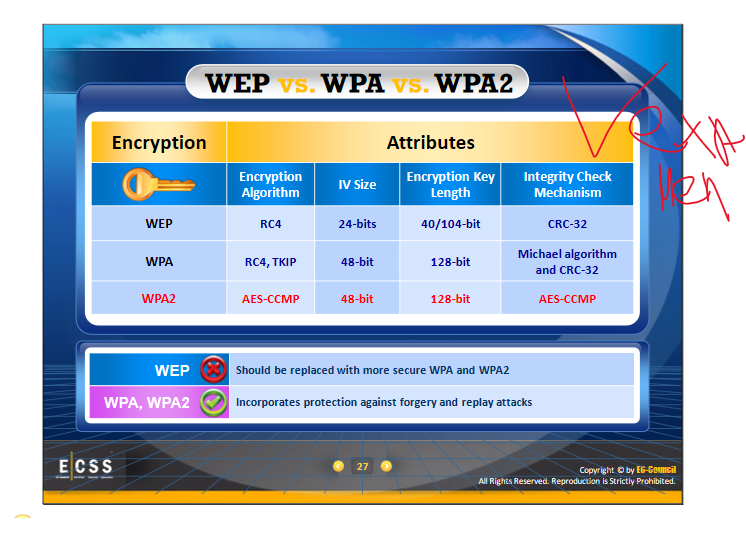
- ANONE
14Temporal Key Integration Protocol
(TKIP) The features of Temporal Key Integration Protocol (TKIP) are as
follows:
-[blank_start]RC4is[blank_end] the encryption algorithm used
-It generates new key after every [blank_start]10kb (10.000 paquetes)[blank_end]
-The [blank_start]initialization vector is hashed by TKIP[blank_end]
-It checks for integrity of the message
Advanced Encryption Standard (AES) has the following features:
-Keys used are [blank_start]128/192/256 bits[blank_end]
-Requires less [blank_start]memory[blank_end]
-[blank_start]Data block[blank_end] size is 128 bits- ARC4is
- B10kb (10.000 paquetes)
- Cinitialization vector is hashed by TKIP
- D128/192/256 bits
- Ememory
- FData block
15WPA recuerda
.
TKIP (Temporal Key Integrity Protocol):
- TKIP utilizes the RC4 stream cipher encryption with 128-bit keys and 64-bit [blank_start]message integrity check (MIC).[blank_end]
128-bit Temporal Key:
- Under TKIP, the client starts with a 128-bit '"temporal key" (TK) that is then [blank_start]combined with the client's MAC address[blank_end] and with an IV to create a key that is used to encrypt data via the RC4. It implements a sequence counter to protect against [blank_start]replay attacks.[blank_end]- Amessage integrity check (MIC).
- Bcombined with the client's MAC address
- Creplay attacks.
16WPA2
WPA2 offers two modes Of operation:
[blank_start]WPA-Personal:[blank_end]
-This version makes use of a setup password [blank_start](pre-shared key, PSK)[blank_end] and protects unauthorized network access. In PSK mode each wireless network device encrypts the network traffic [blank_start]using 128-bit key[blank_end] that is during the four-way handshake, and can be entered as a passphrase of 8 to 63 ASCOO characters.
[blank_start]WPA-Enterprise:[blank_end]
-This confirms the network user [blank_start]through a server.[blank_end] It includes [blank_start]EAP or RADIUS for centralized client[blank_end] authentication using multiple authentication methods, such as token cards, Kerberos, certificates etc. Users are assigned [blank_start]login credentials by a centralized serve[blank_end]r which they must present when connecting to the network.- AWPA-Personal:
- B(pre-shared key, PSK)
- Cusing 128-bit key
- DWPA-Enterprise:
- Ethrough a server.
- FEAP or RADIUS for centralized client
- Glogin credentials by a centralized serve
17Wi-Fi Chalking -- techniques to detect open wireless networks.
[blank_start]WarWalking[blank_end]: To perform WarWalking, attackers walk around with Wi-Fi enabled laptops
to detect open wireless networks.
[blank_start]WarFlying/warstorming:[blank_end] WarFlying is an activity in which attackers fly around with Wi-Fi enabled
laptops to detect open wireless networks.
[blank_start]WarDriving:[blank_end] According to www.wordspy.com, WarDriving is a computer cracking
technique that involves driving through a neighborhood with a wireless enabled notebook
computer, mapping houses and businesses that have wireless access points.
[blank_start]WarChalking[blank_end]: This term comes from whackers who [blank_start]use chalk[blank_end] (una marca) to place a special symbol on
a sidewalk or another surface to indicate a nearby wireless network that offers Internet access. It is a method used to [blank_start]draw symbols[blank_end] in public places to advertise open Wi-Fi networks.- AWarWalking
- BWarFlying/warstorming:
- CWarDriving:
- DWarChalking
- Edraw symbols
- Fuse chalk
18WIRELESS THREATS
[blank_start]ACCESS CONTROL ATTACKS[blank_end]
Wireless access control attacks aim to [blank_start]penetrate a network[blank_end] by evading wireless LAN
access control measures, such as AP MAC filters and Wi-Fi port access controls. There are
several kinds of access control attacks.
[blank_start]Integrity Attacks[blank_end]
In integrity attacks, attackers send [blank_start]forged control, management, or data fram[blank_end]es over a
wireless network to misdirect the wireless devices in order to perform another type of attack
Wireless Threats: [blank_start]Confidentiality Attacks[blank_end]
These attacks attempt to [blank_start]intercept confidential information[blank_end] sent over wireless associations, whether sent in the clear text or encrypted by Wi-Fi protocols.
Wireless Threats: [blank_start]Availability Attacks[blank_end]
These attacks aim at obstructing the delivery of wireless services to legitimate users, either by [blank_start]crippling those resources[blank_end] or by denying them access to WLAN resources. There are many attacks an attacker can use to obstruct the availability of wireless networks.
Wireless Threats: [blank_start]Authentication Attacks[blank_end]
The objective of authentication attacks is to [blank_start]steal the identity[blank_end] of Wi-Fi clients, their personal information, login credentials, etc. to gain unauthorized access to network resources
Wireless Threats: [blank_start]Rogue Access Point Attack[blank_end]
Unauthorized access points can allow anyone with an 802.11-equipped device onto the corporate network, which puts a potential attacker close to the mission-critical resources.
Wireless Threats: [blank_start]DOS Attacks[blank_end]
Denial of Service Attacks DOS is an incident in which a user or organization is deprived of the services of a resource they would normally expect to have e DOS attacks disable the network by [blank_start]flooding network traffic[blank_end]
Wireless Threats: [blank_start]Man in the Middle MITM[blank_end]
A Man-in-the-Middle (MITM) attack is a type of attack in which attacker is able to [blank_start]read, insert, and modifythe message[blank_end] in between two users.
This attack is also called TCP
hijacking- AACCESS CONTROL ATTACKS
- Bpenetrate a network
- CIntegrity Attacks
- Dforged control, management, or data fram
- EConfidentiality Attacks
- Fintercept confidential information
- GAvailability Attacks
- Hcrippling those resources
- IAuthentication Attacks
- Jsteal the identity
- KRogue Access Point Attack
- LDOS Attacks
- Mflooding network traffic
- NMan in the Middle MITM
- Oread, insert, and modifythe message
19WIRELESS SECURITY
Wireless Transportation Layer Security (WTLS)
WTLS depend on the Transport Layer Security protocol (TLS) and it is a derivative of
the [blank_start]secure socket layer protocol.[blank_end]
Provides:
-Privacy
-Integrity of the data
-Authenticacion
Extensible Authentication Protocol (EAP) Methods
Common methods used by EAP are as follows:
TLS: It is a certificate based two way authentication (dos clientes)
TTLS: This authentication uses certificates for the server side and a simple method forthe client side
MD5: It is a challenge based password authentication
LEAP: It is Cisco's proprietary username based authentication- Asecure socket layer protocol.
Información
- Descripción
- Module 13: Wireless Network Security
- Idioma
- English
- Visitas
- 11
- Etiquetas
- Valoración
- Aún sin valoraciones Valora este test