
Fichas
GCSE Computer Science Revision
Fichas del conjunto (8)
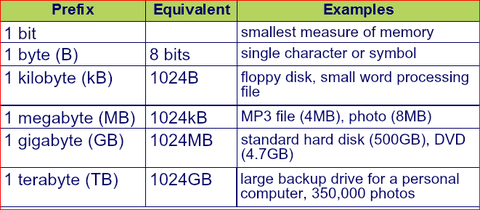
- 1Secondary Storage: RAM only stores data temporarily and ROM only stores a small number of instructions necessary to start the computer, so mist programs and data must be stored in secondary storage.
- 2A backup is a secure second copy of data and files that is stored in another location. If the original files are lost or damaged, you can use the backup copy. When choosing the files’ size and the durability of the medium.There are three main categories of secondary storage:
Optical media
Magnetic media
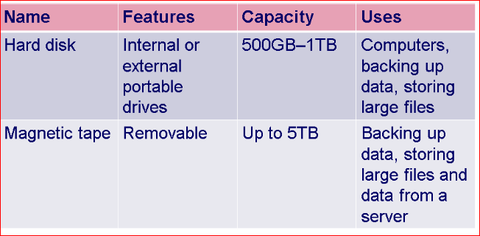
Solid state drives. - 3Optical media- uses lasers to read and write to and from the surface of the storage medium.Magnetic media- use different patterns of magnetization to store data. Magnetic storage can be found in magnetic tape. Data cannot be retrieved quickly from these tapes, but they do have a high storage capacity and are often used to back up large amounts of data from computer servers.
- 4—Solid state drives- use a grid of transistors. Solid state storage is used in many storage devices such as memory pens, smart cards and solid state hard disks. As it has no moving parts, solid state storage can withstand more physical wear and tear than other types of storage.
- 5—Algorithms:
An algorithm is a step by step approach to solving problem. It is written in pseudocode, which is independent of any particular programming language.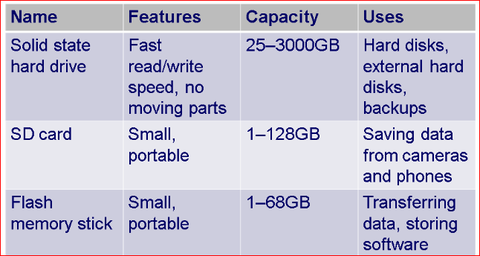
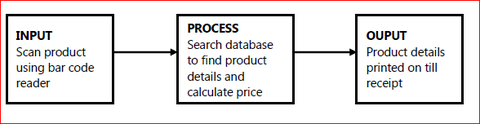
- 6Flowchart: Decision or choice: diamond Input and output: parallelogram Start and end of a program: rectangle with extra lines either side start/end: ovalInput – this is where data is entered into the computer system. It can be entered manually by using a keyboard to type in a part number into an online shopping form, for example, or by using a bar code reader to enter details of a sale at a supermarket.
- 7Process – this is where the data in-putted is used to convert the input into a readable form; the bar code read in can be processed to obtain a description of the product, the size of the product and the price, for example.Output – the information obtained by processing the data is presented to the user in a logical form; in the case of a supermarket, this could be to produce a display as the product is scanned in and all the products purchased could be printed out on a till receipt with suitable calculations when
- 8out on a till receipt with suitable calculations when the shopping transaction is completed.
Información
- Descripción
- Fichas sobre GCSE Computer Science Revision, creado por Chloe Yong el 09/11/2014.
- Creado por
- Chloe Yong
- Visitas
- 42
- Valoración