
Fichas
Digital Communications Windows 10
Fichas del conjunto (43)
- 1What is Windows Explorer?A file managing application.
- 2What can you do in Windows Explorer?Navigate the hard drive, organize files, display files/folders
- 3What can you keep in a folder?Photos, files, Word documents, ect
- 4Can a folder be empty?Yes
- 5What is the default Windows application for editing text files?Notepad
- 6What is the default Windows application for word processing?Wordpad
- 7What does DOS stand for?Device Operating System
- 8What is the clipboard?The invisible place copied or cut articles are stored
- 9When do you use the clipboard?When you click 'cut' or 'copy' and then paste.
- 10What are the different ways to copy something?Right click > Copy
CTRL+C - 11What is the Windows Task Manager?A program that allows you to see everything running on the computer at once.
- 12How do you open the Windows Task Manager?CTRL+ALT+DELETE
- 13What is the difference between a folder and a directory in operating systems?Folders have a small graphic folder; directories are lists with names and very few images.
- 14What can you do with Windows Paint?Edit images or paint.
- 15What is the task bar?The bar on the bottom or side of the screen.
- 16What can you see on the Task Bar?Running or pinned applications, the time, notifications
- 17Why is the control panel typically used?It contains controls for every aspect of the computer.
- 18What does the dash in the top-right corner of an application do?Minimize
- 19What does the square in the top-right corner of an application do?Restore the application size
- 20What does the 'x' in the top-right corner of an application do?Close the application
- 21What is a user in Windows?The profile/account for the person using the computer.
- 22Can there be more than one user logged in at a time?Yes
- 23Do you need a password for being a user?No, but it is recommended
- 24What is the Window's Registry application?A database with important information about system hardware, installed programs and settings, and profiles of each of the user accounts on the computer
- 25How do you select multiple files that are all together?Click and drag over the files
Click the first and then add SHIFT - 26How do you select multiple files that are separated?CTRL+CLICK
- 27In which drive is Windows located?C
- 28What is a megabyte?A unit of 1 million bytes
- 29Where is information temporarily stored for use by the CPU?The RAM
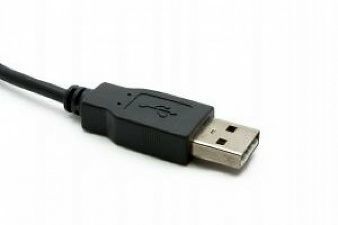
- 30What is a USB?A connecting device
- 31What does a USB connector look like?
- 32What are two reasons why your computer may be running slowly?You have an update that needs to take place
Too many windows are open - 33What is the Print Screen (PrtSc) button for?Screenshots
- 34How do you manually resize a window?Hover over an edge/corner and then drag once little arrows appear.
- 35What does it mean to "hover" over something in a computer?Rest the mouse over something but not click
- 36What is a "context-sensitive" menu?The menu that is brought up with the right mouse click that changes depending o what has been clicked.
- 37What is a radio button?A round button that is generally given when you have multiple options.
- 38How many radio buttons may you select in any given group?1
- 39What can you do with a keyboard shortcut?Copy, paste, cut or preform any action quickly.
- 40What are text boxes?Areas where you can type words, numbers or symbols.
- 41What is an icon?A graphic symbol representing either a program or a file.
- 42Where do files go when you delete them?The Recycling Bin
- 43How do you open the start menu?Lower left hand corner or on the keyboard between CTRL and ALT
Información
- Descripción
- A study guide for Windows 10 and basic Windows functinos
- Creado por
- Ellie T (Extreme
- Visitas
- 42
- Etiquetas
- Valoración