
Fichas
Network Topology
Fichas del conjunto (12)
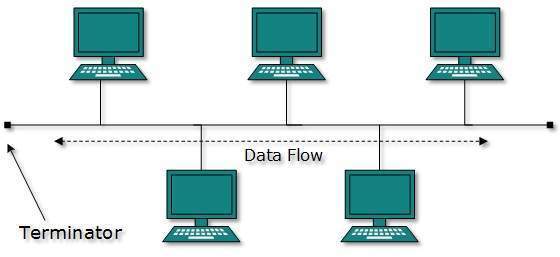
- 1Advantages of a Bus Topology!*Cheap - Only one cable is needed.
*Extra Network - Easy to add an extra Network - 2Disadvantages of a Bus Topology!*Whole network will fail if the cable is cut or damaged.
*Difficult to identify where a fault is on the cable.
*The more networks are attached, the slower it runs due to the single message architecture of the Bus Topology.
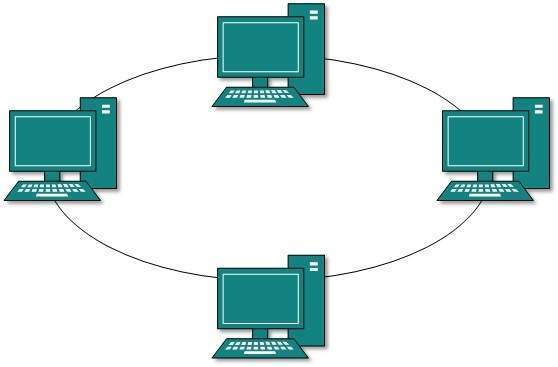
*All data sent is received by all devices. - 3Advantages of a Ring Topology!*Adding extra devices does not affect the performance of the network.
*Easy to add extra network devices. - 4Disadvantages of a Ring Topology!*Whole network will fail if the cable is cut or damaged.
*Difficult to identify where a fault is on the cable.
*If you add or take away a network it temporarily disabled the entire Topology due to the Ring Topology being in a loop!
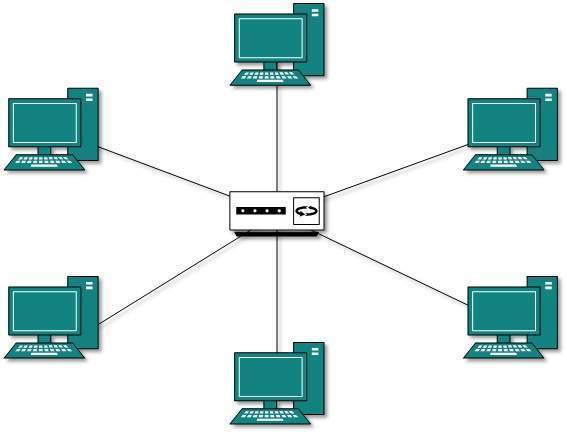
*More expensive to install than a bus because it requires more cable. - 5Advantages of a Star Topology!*A damaged cable will not stop the whole network from working, only the networks connected to it.
*If a switch is used, messages are only sent to the networks that need them, increasing security.
*Easy to locate faults.
*A new device can be added easily. - 6Disadvantages of a Star Topology!*If the hub or switch fails then the whole network will fail.
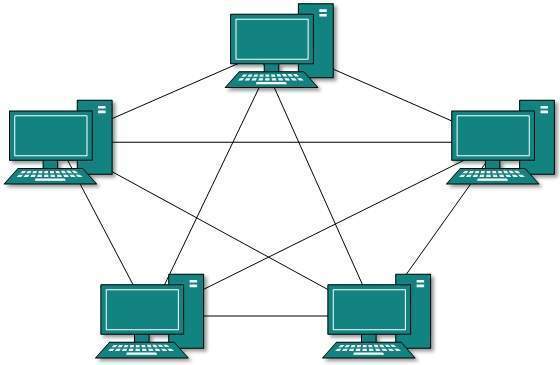
*Expensive to install due to the amount of cable needed and the hub or switch. - 7Advantages of a Mesh Topology!*Very fault tolerant, if one device fails messages can be re-routed.
*Very high performance due each network device being connected to multiple other devices.
*In a wireless network, each node extends the range of the network. - 8Disadvantages of a Mesh Topology!*Difficult and expensive to install.
*Can be difficult to manage due the number of connections within the network. - 9—Star Topology
- 10—Ring Topology
- 11—Mesh Topology
- 12—Bus Topology