
Mapa mental
APPLICATION LAYER
Contenido del mapa
APPLICATION LAYER
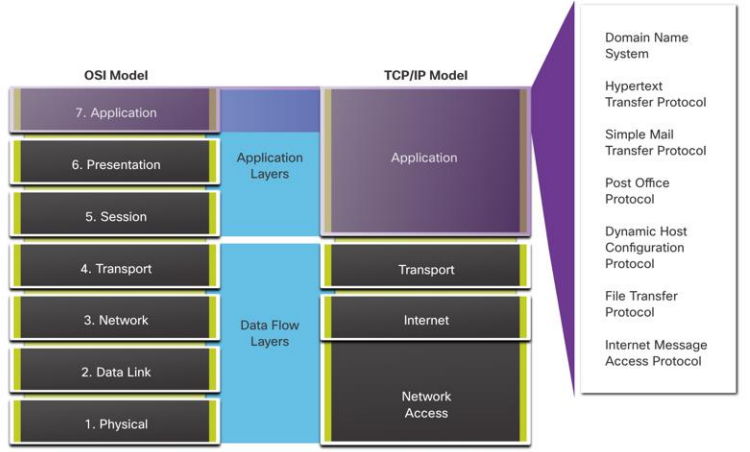
15.1 APPLICATION, PRESENTATION, AND SESSION
- Application Layer
- The application layer provides the interface between the applications used to communicate, and the underlying network over which messages are transmitted.
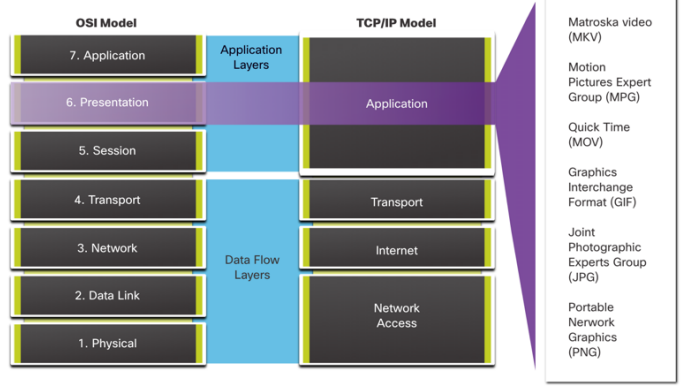
- The presentation layer
- • Formatting, or presenting, data at the source device into a compatible format for receipt by the destination device.
- • Compressing data in a way that can be decompressed by the destination device.
- • Encrypting data for transmission and decrypting data upon receipt.
- • Compressing data in a way that can be decompressed by the destination device.
- • Formatting, or presenting, data at the source device into a compatible format for receipt by the destination device.
- The session layer
- • It creates and maintains dialogs between source and destination applications.
- • It handles the exchange of information to initiate dialogs, keep them active, and to restart sessions that are disrupted or idle for a long period of time.
- • It creates and maintains dialogs between source and destination applications.
- TCP/IP Application Layer Protocols
- The TCP/IP application protocols specify the format and control information necessary for many common internet communication functions.
- Application Layer
15.2 PEER-TO-PEER
- Client-Server Model
- In the client/server model, the device requesting the information is called a client and the device responding to the request is called a server.
- Peer-to-Peer Networks
- In a peer-to-peer (P2P) network, two or more computers are connected via a network and can share resources (such as printers and files) without having a dedicated server.
- Every connected end device (known as a peer) can function as both a server and a client.
- In a peer-to-peer (P2P) network, two or more computers are connected via a network and can share resources (such as printers and files) without having a dedicated server.
- Common P2P Applications
- With P2P applications, each computer in the network that is running the application can act as a client or a server for the other computers in the network that are also running the application.
- Common P2P networks include the following: • BitTorrent • Direct Connect • eDonkey • Freenet
- With P2P applications, each computer in the network that is running the application can act as a client or a server for the other computers in the network that are also running the application.
- Client-Server Model
15.5 FILE SHARING SERVICES
- File Transfer Protocol
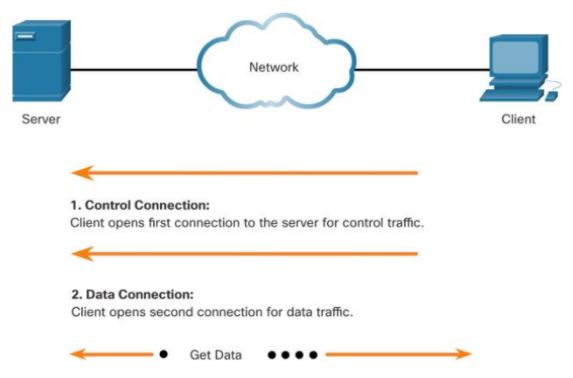
- FTP was developed to allow for data transfers between a client and a server. An FTP client is an application which runs on a computer that is being used to push and pull data from an FTP server.
- Server Message Block
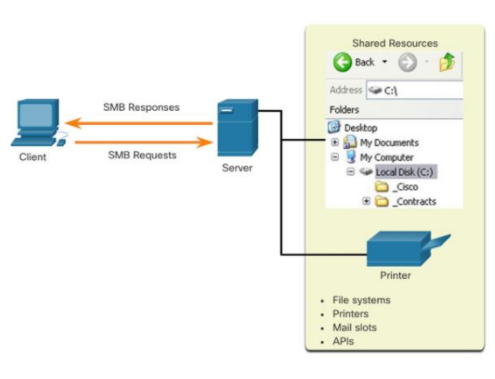
- The Server Message Block (SMB) is a client/server, request- response file sharing protocol. Servers can make their own resources available to clients on the network.
- File Transfer Protocol
15.4 IP ADDRESSING SERVICES
- Domain Name Service
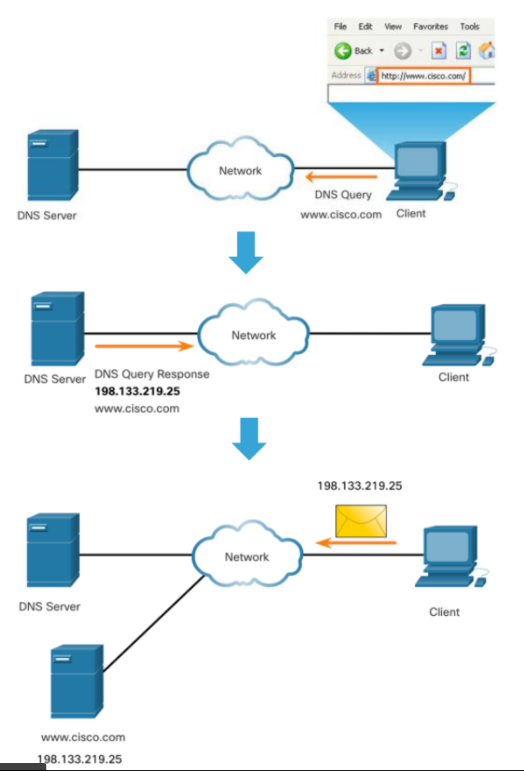
- Domain names were created to convert the numeric IP addresses into a simple, recognizable name.
- DNS Message Format
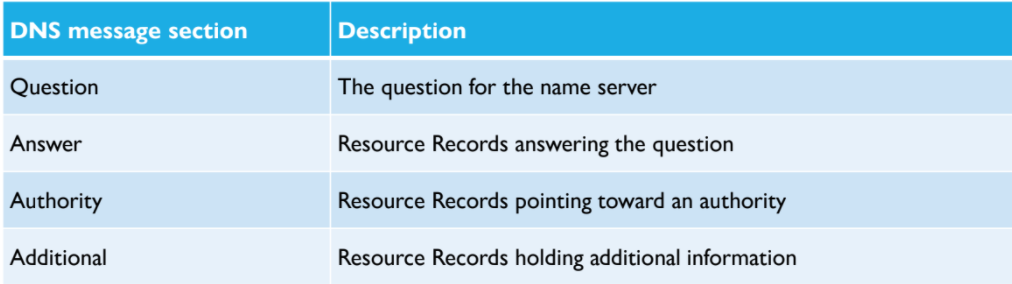
- The DNS server stores different types of resource records that are used to resolve names. These records contain the name, address, and type of record.
- DNS Hierarchy
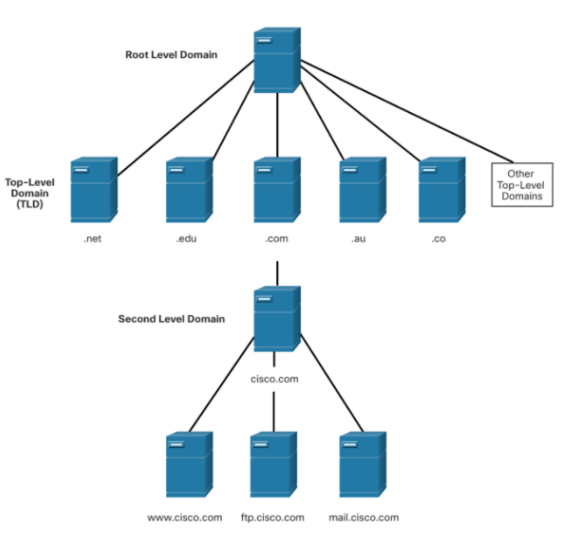
- • DNS uses a hierarchical system to create a database to provide name resolution.
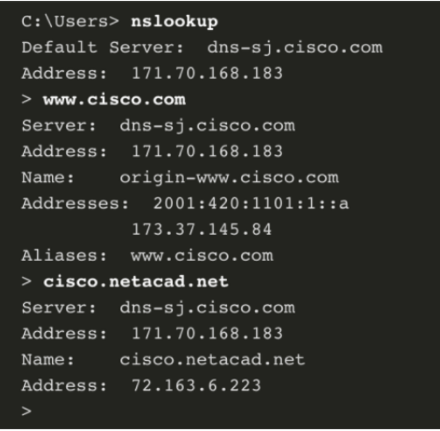
- The nslookup Command
- Nslookup is a computer operating system utility that allows a user to manually query the DNS servers configured on the device to resolve a given host name.
- DNS Hierarchy
- Dynamic Host Configuration Protocol
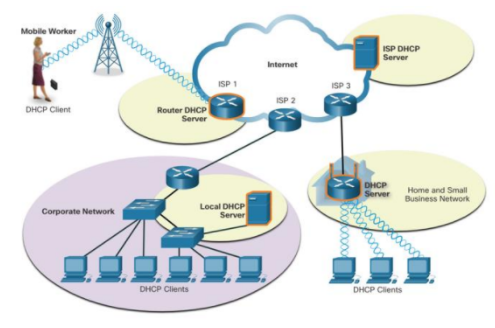
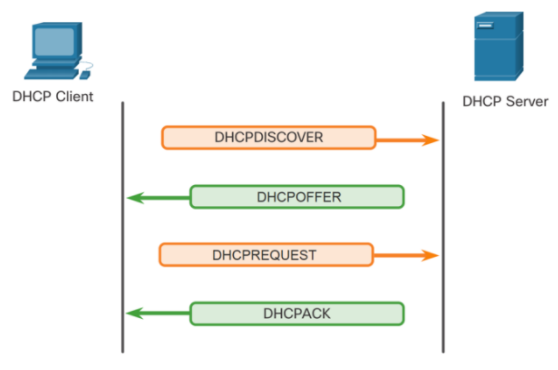
- The Dynamic Host Configuration Protocol (DHCP) for IPv4 service automates the assignment of IPv4 addresses, subnet masks, gateways, and other IPv4 networking parameters.
- DHCP Operation
- The Dynamic Host Configuration Protocol (DHCP) for IPv4 service automates the assignment of IPv4 addresses, subnet masks, gateways, and other IPv4 networking parameters.
- The DNS server stores different types of resource records that are used to resolve names. These records contain the name, address, and type of record.
- DNS Message Format
- Domain names were created to convert the numeric IP addresses into a simple, recognizable name.
- Domain Name Service
15.3 WEB AND EMAIL PROTOCOLS
- Hypertext Transfer Protocol and Hypertext Markup Language
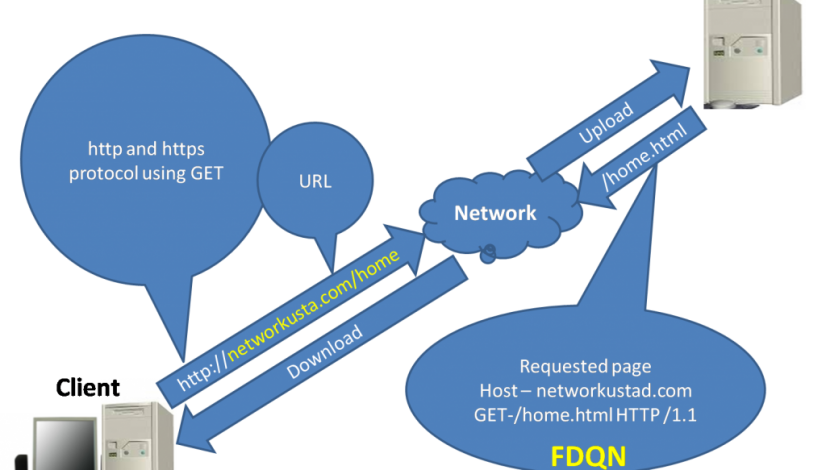
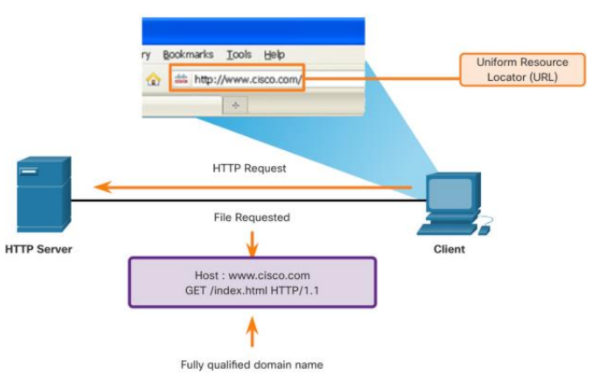
- Web and Email Protocols Hypertext Transfer Protocol and Hypertext Markup Language When a web address or Uniform Resource Locator (URL) is typed into a web browser, the web browser establishes a connection to the web service.
- HTTP and HTTPS
- HTTP is a request/response protocol that specifies the message types used for that communication. The three common message types are GET, POST, and PUT
- Email Protocols
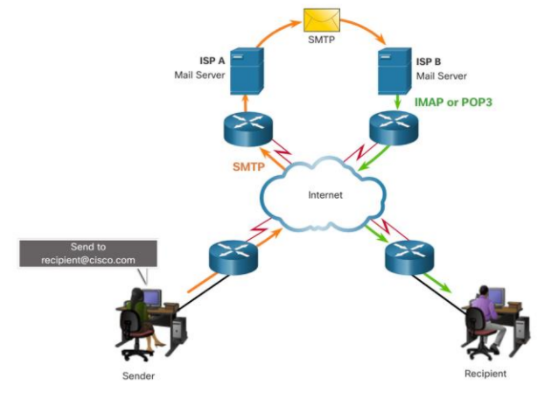
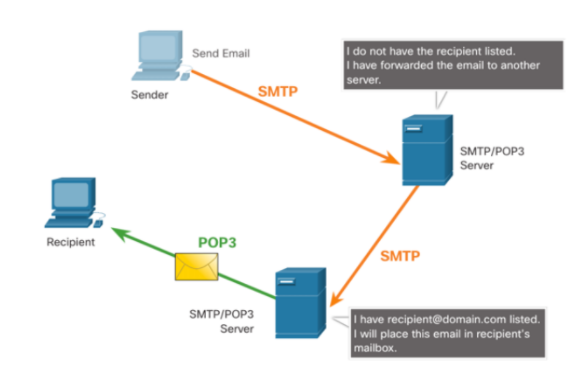
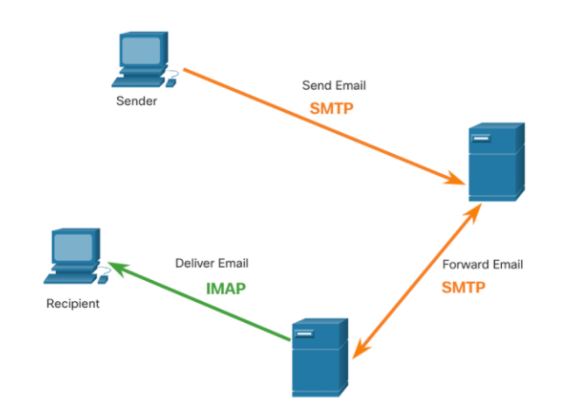
- Email is a store-and-forward method of sending, storing, and retrieving electronic messages across a network. The email protocols used for operation are: • Simple Mail Transfer Protocol (SMTP) – used to send mail. • Post Office Protocol (POP) & IMAP – used for clients to receive mail.
- SMTP
- SMTP message formats require a message header and a message body. Although the message body can contain any amount of text, the message header must have a properly formatted recipient email address and a sender address.
- POP
- POP is used by an application to retrieve mail from a mail server. With POP, mail is downloaded from the server to the client and then deleted on the server. This is the default operation of POP.
- IMAP
- IMAP is another protocol that describes a method to retrieve email messages. Unlike POP, when the user connects to an IMAP-capable server, copies of the messages are downloaded to the client application
- SMTP
- Email is a store-and-forward method of sending, storing, and retrieving electronic messages across a network. The email protocols used for operation are: • Simple Mail Transfer Protocol (SMTP) – used to send mail. • Post Office Protocol (POP) & IMAP – used for clients to receive mail.
- HTTP and HTTPS
- Web and Email Protocols Hypertext Transfer Protocol and Hypertext Markup Language When a web address or Uniform Resource Locator (URL) is typed into a web browser, the web browser establishes a connection to the web service.
- Hypertext Transfer Protocol and Hypertext Markup Language
Imágenes y archivos del mapa





Información
- Descripción
- Mapa Mental sobre APPLICATION LAYER, creado por ARAIZA FLORES EMMANUEL el 21/09/2021.
- Creado por
- ARAIZA FLORES EMMANUEL
- Visitas
- 0
- Valoración