
Mapa mental
Specialized Topics Continued
Contenido del mapa
Specialized Topics Continued
Networking programming
- Essential Concepts
- Each system has a virtual "loopback" network adapter
- IP range 127.x.x.x is reserved for loopback. Default 127.0.0.1 (localhost)
- TCP and UDP use 216 ≈ 65000 ports
- Ports 1 – 1024 are reserved and on many systems need admin privileges
- A unique port is needed at each part of the communication
- Address 0.0.0.0 is used as any/all address
- Client Networking (TCP)
- The client initiates the connection by opening a connection to server port
- The client "knows" which ip address and port to use
- The TCP stack takes care of providing two channels (sending and receiving)
- Server Networking
- The server binds for requests on a predefined port on a predefined address (or 0.0.0.0 for all)
- The server then waits for a connection by calling accept to receive a new connection
- Accepted connections get their own local port so that multiple connections are possible
- Server now needs to wait for new connections as well as handle the current one
- Sockets
- Abstraction for network access
- Origin in Unix
- Abstracts away from implementation and networking protocol
- Provides file handles that can be read or written to
- Sockets don't have a "file" length
- End of file when connection is closed
- Client Sockets
- Specify address family (AF_INET, AF_INET6, AF_UNIX), and address (including port) of destination
- Local port can be specified, but generally isn't (OS manages this)
- Connect will initiate the connection
- Connection can then be written to or read from.
- Server Sockets
- Specify address family (AF_INET, AF_INET6, AF_UNIX), and port (and address) to listen to
- Accept will wait for a connection and return a new open socket for the connection
- Connection can then be written to or read from.
- Synchronous Networking
- Accept, recv, send (or read, write) are blocking (they return only when finished)
- Network operations can be really slow
- You might want to do something while waiting (like update the GUI and respond to user events) – so you need threads
- Asynchronous Networking
- Give commands, the OS handles them
- Callbacks on completion/error
- Polling to see if new data is available
- The only way to do I/O in Javascript
- No synchronization problems (race conditions etc.), but harder programming model.
- Http Basics
- <COMMAND> <PATH> <PROTOCOL> eg: "GET / HTTP/1.1"
- <HEADERS> eg: "Accept-Encoding: gzip"
- Implementation of a server
- Serve "basic" HTTP/1.0
- Ignore most headers
- Return the request in text/plain
- Server Workflow
- Create a new socket. Bound to 0.0.0.0:80
- While not shutting down
- accept a new connection
- Read the first line in the connection
- Read a line. If it's empty stop processing, If not, add it to the known headers
- If there is a content-length header. Read the content
- Process the request based on the path
- Essential Concepts
Advanced I/O
- What is I/O
- Computers only make sense if they can interact
- That means they need to be able to receive inputs
- And produce outputs
- I/O Devices
- Keyboard
- Mouse
- Screen
- Scanner
- Printer
- Hard Disk
- Hardware perspective
- CPU
- Devices live on buses (PCI, USB)
- Buses are middle-men (often layered)
- Devices are exposed in two ways (not exclusive)
- I/O ports (mostly used in Memory Mapped mode)
- Memory access (put video memory into cpu address space)
- I/O ports (on x86 architecture)
- Maximum 32 bits
- Addressed one by one
- In total 65,536 available (each device only gets a limited amount)
- Ports are unique across a computer (PnP needed to dynamically assign ports)
- Can be exposed as "plain" memory (memory mapped I/O)
- Memory based I/O
- Ports are made available as memory addresses (no longer a big issue with large address spaces)
- Device based memory is made available in main address space
- Creates (imperfect) illusion that everything is memory
- DMA (Direct Memory Access)
- I/O in many cases is really slow
- Memory mapped I/O doesn't stop slowness
- Copying I/O from hardware to memory is a "simple" operation
- Special purpose helper system (DMA engine)
- Hardware needs to "cooperate" / be designed for it.
- OS role
- All these technical details are primarily relevant for driver / OS writers
- But there are performance and design consequences that leak into programs
- CPU
- Programming I/O
- Kinds of I/O
- Disk – Arbitrated through File System layer
- Video – Arbitrated through windowing system
- Audio – Arbitrated through audio layer
- Network – Arbitrated through networking layer
- Mouse, Keyboard etc. Arbitrated through windowing system
- General I/O – Arbitrated through device drivers exposing specific or generic interface
- Common thread
- There can only be one program controlling a device
- Many programs want access
- The OS must arbitrate and often control
- Programs receive OS regulated access to smaller abstractions of the device
- I/O Models
- Synchronous – Stop the thread while performing an operation
- Asynchronous – Don't wait for results (but optionally be notified on completion)
- Access Modes
- Command based – Use special commands to access the I/O device
- Memory mapped – Get access as if it is a range in memory (where this makes sense) – A bit more complex, but faster, and reuses virtual memory techniques
- Java
- Did not use to support many advanced modes
- With NIO (New IO) supports many more modes
- I/O Buffering
- Unbuffered – When using small reads this can be very slow
- Buffered – Read in large blocks, let users use it as small
- Unless requesting "direct I/O" always has OS cache between program and file
- Access modes
- Read – Only read the file
- Write – Remove existing content and write
- Append – Add to the end of the file
- Random Access – Be able to move through the file (and reading/writing)
- Read+ – Read access that does not disallow writing
- Files kinds
- Binary files. Store sequences of bytes. When storing/reading values larger than bytes, byte order matters (big/small endian)
- Text files. Store sequences of characters. Depends on character encoding (mapping bytes in the file to unicode), and line ending
- Kinds of I/O
- What is I/O
Callbacks and Lambdas
- Functors
- Literally function objects
- Allow functionality to be provided outside object control
- In some cases could be replaced with inheritance
- uses
- Comparator<T>
- OnClickListener
- Runnable
- Difference from function
- Function only has address / name
- Functor / function object may have state
- Function ref
- Address to a function
- Type that allows for correct calling
- Since 1.7 there is a MethodHandle in java that “does this”
- Traditional Method objects are also references
- In C/C++ it is a pointer (32 or 64 bits) to the address where the executable code starts
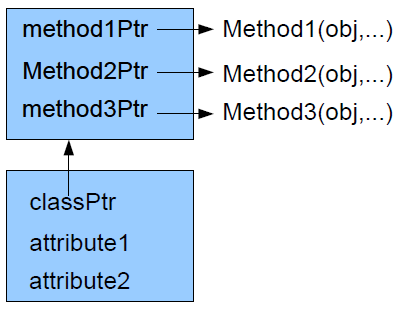
- Poor man's objects (with virtual methods)
- Struct(ured) type with method pointers
- The pointed to functions have the object as first parameter, and operate on it
- The function pointers don't change (or are stored in a shared “class” object)
- Example
- 2 kinds of data - java
- Objects – Always references, inherit from Object, all methods are virtual
- Primitives – Limited, fixed set of stack based numbers that are the building blocks of everything else
- Other entities
- Classes/types – Have a runtime “existence” through Class objects
- Methods – Available through reflection
- You can see them, but they are not straightforward (or cheap) to use.
- They are second class citizens.
- First class functions
- When you don't have data
- “like static methods”
- Parameters can be functions
- Functions can return functions
- Other first class "things"
- Primitives
- can be calculated
- Objects
- Can be instantiated (new Object)
- Primitives
- Creating first class functions
- Lambda (λ) (Yes the Greek letter)
- Lambda calculus is a formalisation of programming
- Lambda functions are functions that create functions.
- Why lambda
- Lambda calculus teaches us the awesome power of “dynamic” function creation
- Very compact way to specify functions in-line
- Allows for easy use of very powerful algorithms
- Use new Thread(() -> { System.out.println(); });
- Lambda usage
- map(iterable, function) → new iterable storing the results
- filter(collection, function) → shortened collection containing only some functions
- Event handlers
- Create a function that incorporates a link to an object and calls a method on it as a replacement of a functor.
- Functors
Generics/Templates
- Core programming concepts
- Abstraction
- Handling complexity
- Code reuse
- Using libraries
- Designing your own code
- Correctness
- Design for reuse
- Support various uses
- Accept any type
- Keep code correct
- Make types and other things a part of the "parameters" to types and functions
- Introspection
- Type info available at run-time
- Instantiate objects at run-time
- Create method calls at run-time
- Java Class objects
- Code generation
- Special code
- Android's R.java – Link resources to java
- Qt's MOC (Meta Object Compiler) to support a library feature
- Generate code from UML (even round-tripping
- Compiler (generates assembler code)
- Special code
- Runtime code generation
- Better(reified) generics (C# style)
- Just in time compilation
- Various Java libraries with Classloader
- Compile time code generation
- Special purpose tools
- One-off programs
- Framework tools
- Android R.java
- JSP processing
- Generics
- Allow compiler to enforce rules on types
- Language specifies type dependencies in classes / functions
- Only work on types
- Generic types are highly related (but not actually the same type)
- One body of code
- Generic implementation
- Type erasure (java) – At run-time generics have disappeared.
- Reification (.net) – Remember the used type, allowing for things like arrays of generics (up to having separate implementation for primitives)
- What is an object in Java/C#
- In place use of objects
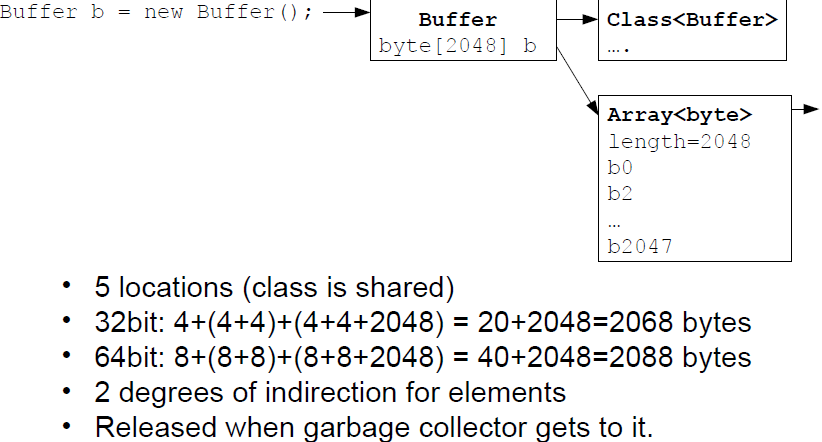
- Memory usage
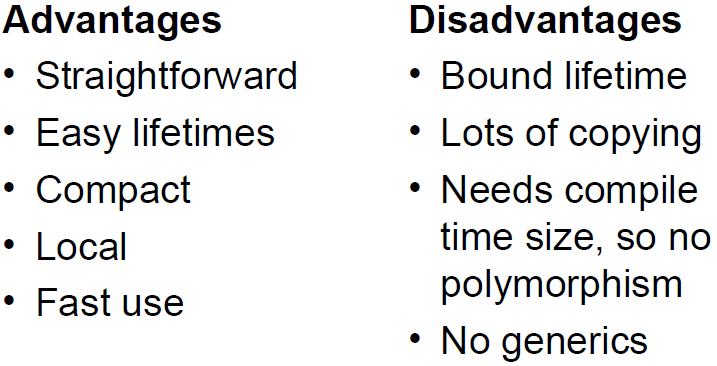
- In place - Memory is part of owner (object / stack)
- Pointer/reference - Separately allocated memory, Owner has a pointer (size does not depend on type)
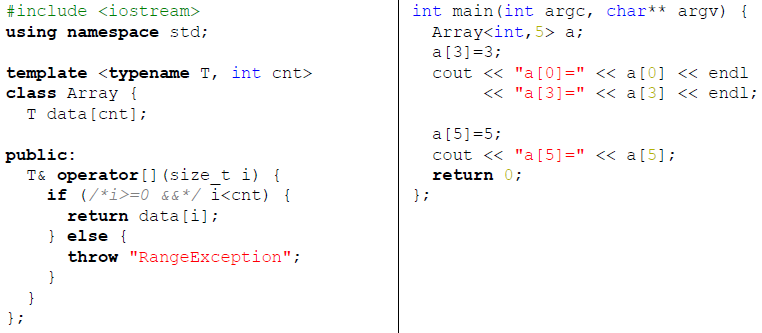
- Templates
- C++ solution to code reuse (especially for containers)
- Unlike generics, is not a type of itself
- Arbitrary specialisations are allowed
- Tells compiler how to create function or class based on parameter type or number
- Example Template
- Core programming concepts
Imágenes y archivos del mapa
Información
- Descripción
- Mapa Mental sobre Specialized Topics Continued, creado por Bhavit Chhatralia el 30/05/2014.
- Creado por
- Bhavit Chhatralia
- Visitas
- 86
- Valoración