
Fichas
Remote Access VPN

Fichas del conjunto (42)
- 1The VPN tunnel guarantees:• Authenticity - Uses standard authentication methods
• Privacy - All VPN data is encrypted
• Integrity - Uses industry-standard integrity assurance methods - 2The Check Point IPsec VPN Software Blade provides these VPN connectivity modes:• Office Mode
Remote users can be assigned the same or non-routable IP addresses from the local ISP. Office Mode solves some routing problems and encapsulates the IP packets with an available IP address from the internal network. Remote users can send traffic as if they are in the office
and avoid VPN routing problems.
• Visitor Mode
Remote users can be restricted to using only HTTP and HTTPS protocols. Visitor Mode lets these users tunnel all protocols through regular TCP connections on port 443. - 3VPN is composed of these VPN Components:• VPN endpoints, such as Security Gateways, Security Gateway clusters, or remote clients
• VPN trust entities, such as a Check Point Internal Certificate Authority (ICA). The ICA is part ofthe Check Point suite used for creating SIC trusted connection between Security Gateways, authenticating administrators and third party servers. The ICA provides certificates for internal
Security Gateways and remote access clients which negotiate the VPN link.
• VPN Management tools, such as Security Management Server and SmartDashboard.
• VPN Domain - A group of computers and networks connected to a VPN tunnel by one VPN gateway that handles encryption and protects the VPN Domain members.
• VPN Community - A named collection of VPN domains, each protected by a VPN gateway.
• Remote Access VPN - An encryption tunnel between a Security Gateway and remote access clients, such as Endpoint Security VPN, and communities.
• Remote Access Community - A group of computers, appliances, and devices that access, with authentication and encryption, the internal protected network from physically remote sites - 4To allow the user to access a network resource protected by a Security Gateway, a VPN tunnel establishment process is initiated. An ___ negotiation takes place between the peers.During IKE negotiation, the peers' identities are authenticated. The Security Gateway verifies the user's identity and the client verifies that of the Security Gateway. The authentication can be
performed using several methods, including digital certificates issued by the Internal Certificate Authority (ICA). It is also possible to authenticate using third-party PKI solutions and pre-shared
secrets. After the IKE negotiation ends successfully, a secure connection (a VPN tunnel) is established between the client and the Security Gateway. All connections between the client and the Security Gateway VPN domain (the LAN behind the Security Gateway) are encrypted inside this VPN tunnel,
using the IPsec standard - 5After adding a gateway to a VPN community, the ___ automatically creates a certificate for the Security Gateway.After adding a gateway to a VPN community, the ICA automatically creates a certificate for the Security Gateway.
- 6What is the default option when setting the VPN domain for the Remote Access community?The default is All IP Addresses behind Gateway are based on Topology information
- 7Where do you change the VPN domain for a remote access VPN?To change the VPN domain:
a) From the Check Point Gateway tree, click Network Management.
b) In VPN Domain, click Set domain for Remote Access Community. - 8What is the default group in the remote access VPN community, and what are the types of groups that can be assigned to the community?By default, the Remote Access VPN Community includes a user group, All Users, that includes all defined users. You can use this group or add different user groups to the Remote Access VPN
Community. The community can contain users defined in LDAP, which includes Active Directory, or users defined on the Security Management Server. - 9For a remote access VPN community, where authentication is configured for VPN Blades and Mobile Access?Users must authenticate to the VPN gateway with a supported authentication method. You can configure authentication methods for the remote access gateway in:
• Gateway Properties > VPN Clients > Authentication
• SmartDashboard > Mobile Access tab > Authentication
• Gateway Properties > Mobile Access > Authentication - 10On newer remote access clients that connect to R__.x gateways, users can see multiple login options and select one that applies to them. On older clients or clients that work with pre- R__.__ gateways, users see one configured authentication method.On newer remote access clients that connect to R80.x gateways, users can see multiple login options and select one that applies to them. On older clients or clients that work with pre- R80.10 gateways, users see one configured authentication method.
- 11What does this rule do?This rule allows traffic from RemoteAcccess VPN Community to the internal network on all services when the traffic starts from the Endpoint Security VPN client. The source is an Access Role object in which the client Enpoint Security VPN is specified.
- 12All of Check Point's Remote Access solutions provide:• Enterprise-grade, secure connectivity to corporate resources.
• Strong user authentication.
• Granular access control. - 13Client-Based vs. Clientless Check Point remote access solutions use IPsec and SSL encryption protocols to create secure connections. All Check Point clients can work through NAT devices, hotspots, and proxies. These are the types of installations for remote access solutions:• Client-based - Client application installed on endpoint computers and devices. The client supplies access to most types of corporate resources according to the access privileges of the
user
• Clientless - Users connect through a web browser and use HTTPS connections. Clientless solutions usually supply access to web-based corporate resources.
• On demand client - Users connect through a web browser and a client is installed when necessary. - 14What corporate resources does a Checkpoint clientless remote access solution provide access to?Users connect through a web browser and use HTTPS connections. Clientless solutions usually supply access to web-based corporate resources.
- 15What corporate resources does a Checkpoint client-based remote access solution provide access to?Client application installed on endpoint computers and devices. The client
supplies access to most types of corporate resources according to the access rivileges of the user. - 16All of Check Point's Remote Access solutions provide: • Enterprise-grade, secure connectivity to corporate resources. • Strong user authentication. • Granular access control. What does secure connectivity mean?Secure Connectivity - Traffic is encrypted between the client and VPN gateway and strong user authentication is supported. All Check Point solutions supply this.
These solutions require licenses based on the number of users connected at the same time. - 17What does Security Verification for Endpoint computers in some of the Check Point's Remote Access solutions provide:Makes sure that devices connecting to the gateway meet security requirements. Endpoint machines that are not compliant with the security policy have limited or no connectivity to corporate resources. Some Check Point solutions supply this.
- 18What does Endpoint Security in some of the Check Point's Remote Access solutions provide:• Endpoint Security:
• Desktop Firewall - Protects endpoint computers at all times with a centrally managed security policy. This is important because remote clients are not in the protected network and traffic to clients is only inspected if you have a Desktop Firewall. Some Check Point
solutions supply this
• More Endpoint Security Capabilities - Check Point solutions can include more Endpoint Security capabilities, such as anti-malware, disk encryption and more.
These solutions require licenses based on the number of clients installed. - 19SSL VPN Portal and Clients (remote Access Solution)(Encryption Protocol: SSL):
- Mobile Access Web Portal
- SSL Network Extender for Mobile Access Blade
- Capsule Workspace for iOS
(previously Mobile Enterprise)
- Capsule Workspace for Android
(previously Mobile Enterprise)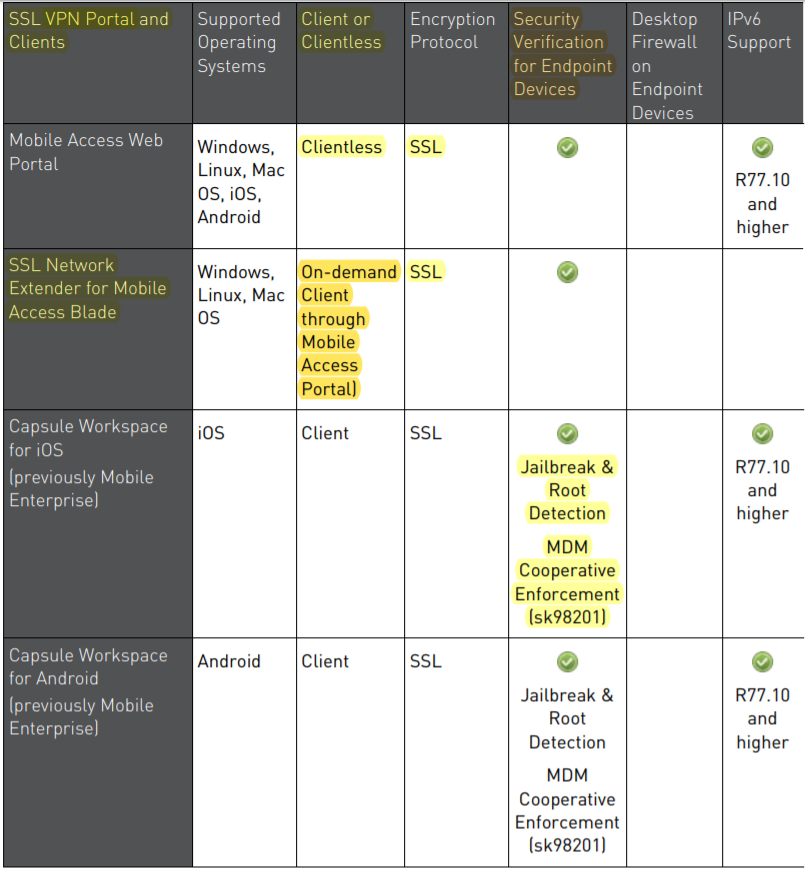
- 20Layer-3 VPN Tunnel Clients (remote Access Solution)Layer-3 VPN Tunnel Clients:
- Capsule Connect for iOS
(previously Mobile VPN)
- Capsule VPN for Android
(previously Mobile VPN)
- Check Point VPN Plugin for Windows
8.1
- Check Point Capsule VPN for Windows 10
- Check Point Mobile for Windows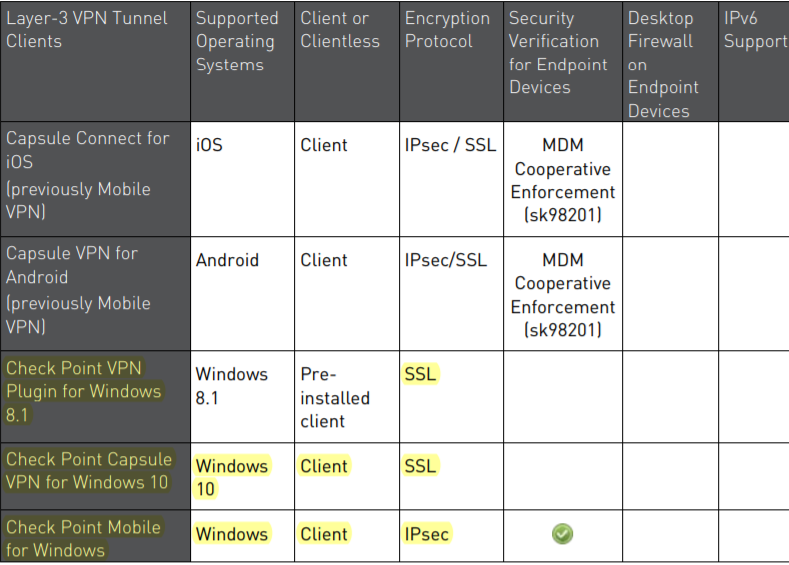
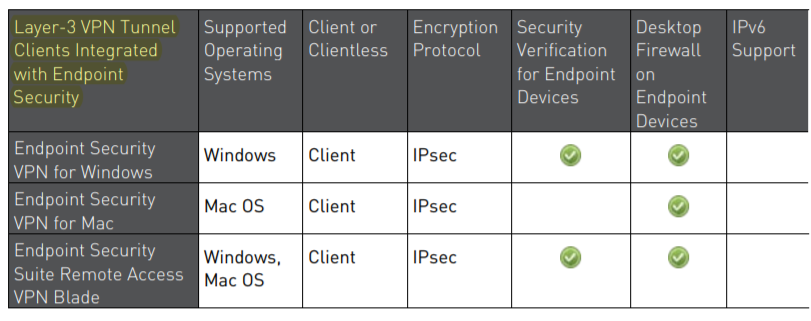
- 21Layer-3 VPN Tunnel Clients Integrated with Endpoint Security (remote Access Solution)
- 22Mobile Access Web Portal (remote Access Solution)?The Mobile Access Portal is a clientless SSL VPN solution. It is recommended for users who require access to corporate resources from home, an internet kiosk, or another unmanaged computer
It provides:
• Secure Connectivity
• Security Verification
The Mobile Access Portal supplies access to web-based corporate resources. You can use the on-demand client, SSL Network Extender, through the Portal to access all types of corporate resources.
Required Licenses - Mobile Access Software Blade on the gateway. - 23SSL Network Extender (remote Access Solution)?SSL Network Extender is a thin SSL VPN on-demand client installed automatically on the user's machine through a web browser. It supplies access to all types of corporate resources.
SSL Network Extender has two modes:
• Network Mode - Users can access all application types (Native-IP-based and Web-based) in the internal network. To install the Network Mode client, users must have administrator privileges on the client computer.
Supported Platforms: Windows, Mac OS X, Linux
• Application Mode - Users can access most application types (Native-IP-based and Web-based) in the internal network, including most TCP applications. The user does not require administrator privileges on the endpoint machine.
Supported Platforms - Windows
Required Licenses - Mobile Access Software Blade on the gateway - 24Capsule Workspace for iOS and Android (remote Access Solution)?Capsule Workspace for iOS adn Android is an SSL VPN client. It supplies secure connectivity and access to web-based corporate resources and Microsoft Exchange services. It also gives secure access to Capsule Docs protected documents. It was previously called Mobile Enterprise. It protects only the business data inside the App and does not require device-level security measures, such as device-lock or device- wipe.
Required Licenses - Mobile Access Software Blade on the gateway and a mail license on the Security Management Server - 25Capsule Connect for iOS (remote Access Solution)?Capsule Connect is a full L3 tunnel app that gives users network access to all mobile applications. It supplies secure connectivity and access to all types of corporate resources. It was previously
called Mobile VPN.
Required Licenses - Mobile Access Software Blade on the gateway and a mail license on the
Security Management Server - 26Capsule VPN for Android (remote Access Solution)?Capsule VPN for Android devices is an L3 VPN client. It supplies secure connectivity and access to corporate resources using L3 IPSec/SSL VPN Tunnel. It was previously called Mobile VPN.
Required Licenses - Mobile Access Software Blade on the gateway - 27Check Point VPN Plugin for Windows 8.1 and 10 (remote Access Solution)?Check Point VPN Plugin for Windows 8.1 and 10 is an L3 VPN client. It supplies secure connectivity and access to corporate resources using L3 SSL VPN Tunnel.
Required Licenses - Mobile Access Software Blade on the gateway - 28Check Point Mobile for Windows (remote Access Solution)?Check Point Mobile for Windows is an IPsec VPN client. It is best for medium to large enterprises that do not require an Endpoint Security policy.
The client gives computers:
• Secure Connectivity
• Security Verification
Required Licenses - IPsec VPN and Mobile Access Software Blades on the gateway. - 29Endpoint Security VPN (remote Access Solution)?Endpoint Security VPN is an IPsec VPN client that replaces SecureClient. It is best for medium to large enterprises.
The client gives computers:
• Secure Connectivity
• Security Verification
• Endpoint Security that includes an integrated Desktop Firewall, centrally managed from the Security Management Server.
Required Licenses - The IPsec VPN Software Blade on the gateway, an Endpoint Container license, and an Endpoint VPN Software Blade license on the Security Management Server. *** It does not require Mobile Access Blade*** - 30Endpoint Security Suite (remote Access Solution)?The Endpoint Security Suite simplifies endpoint security management by unifying all endpoint security capabilities in a single console. Optional Endpoint Security Software Blades include:
Firewall, Compliance Full Disk Encryption, Media Encryption & Port Protection, and Anti- Malware & Program Control. As part of this solution, the Remote Access VPN Software Blade provides full,
secure IPsec VPN connectivity.
The Endpoint Security suite is best for medium to large enterprises that want to manage the endpoint security of all of their endpoint computers in one unified console.
Required Licenses - Endpoint Security Container and Management licenses and an Endpoint VPN Software Blade on the Security Management Server. - 31SecuRemote (remote Access Solution)?SecuRemote is a secure, but limited-function IPsec VPN client. It provides secure connectivity.
Required Licenses - IPsec VPN Software Blade on the gateway. It is a free client and does not require additional licenses. - 32For R80.x gateways, you can include Remote Access and VPN clients in rules as the Source of the rule. To do this you create an _____ ____ for each client.For R80.x gateways, you can include Remote Access and VPN clients in rules as the Source of the rule. To do this you create an Access Role for each client.
- 33In a remote access VPN, how is access to corporate resources limited based on the client (Mobile and IPSec) from which the user connects?For R80.x gateways, create Access Roles for Remote Access and VPN Clients to include them in rules in the Access Control Rule Base. This applies to Mobile Access and IPsec clients. When an
Access Role for a client is in the Source column of a rule, the rule applies to traffic that originates from that client.
You can also use an Access Role in the Destination column.
You must enable Identity Awareness on each gateway that is an installation target for rules with Access Roles - 34Can I have different encryption methods in a remote access VPN for each user?The encryption properties of the users participating in a Remote Access community are set by default. If you must modify the encryption algorithm, the data integrity method and/or the
Diffie-Hellman group, you can either do this globally for all users or configure the properties per user - 35How to change the encryption methods in a remote access VPN for a user?To configure encryption policies for specified users:
1. Open Global Properties, and click Remote Access > Authentication and Encryption.
2. From the Encryption algorithms section, click Edit.
3. In the Encryption Properties window, click the IPSEC Security Association (Phase 2) tab.
4. Clear Enforce Encryption Algorithm and Data Integrity on all users.
5. Click OK and close the Global Properties window.
6. For each user:
b) Within an user object, click Encryption.
c) Click Edit.
The IKE Phase 2 Properties window is displayed.
d) Click the Encryption tab.
e) Click Defined below.
f) Configure the Encryption Algorithm and Data Integrity - 36How to change the encryption methods in a remote access VPN for all user (globally)?To modify the user encryption properties globally:
1. From Menu, click Global Properties.
2. From the navigation tree, click Remote Access > VPN- Authentication and Encryption.
3. From the Encryption algorithms section, click Edit.
4. In the IKE Security Association (Phase 1) tab, configure the applicable settings:
• Support encryption algorithms
• Use encryption algorithms - Choose the encryption algorithm that will have the highest priority of the selected algorithms. If given a choice of more than one encryption algorithm
to use, the algorithm selected in this field will be used.
• Support Data Integrity - Select the hash algorithms that will be supported with remote hosts to ensure data integrity.
• Use Data Integrity - The hash algorithm chosen here will be given the highest priority if more than one choice is offered.
• Support Diffie-Hellman groups - Select the Diffie-Hellman groups that will be supported with remote hosts.
• Use Diffie-Hellman group - Client users utilize the Diffie-Hellman group selected in this field. - 37Authentication is a key factor in establishing a secure communication channel among Security Gateways and remote clients. Various authentication methods are available• Digital certificates
• Pre-shared secrets
• Other authentication methods
On R80.10 and higher Mobile Access and IPsec VPN gateways, you can configure multiple login options. The options can be different for each gateway and each Software Blade. Users select one
of the available options to log in with a supported client. - 38How does authentication with Digital User Certificates work?Digital Certificates are the most recommended and manageable method for authentication. Both parties present certificates as a means of proving their identity. Both parties verify that the peer's certificate is valid (i.e. that it was signed by a known and trusted CA, and that the certificate has not expired or been revoked). Digital certificates are issued either by Check Point's Internal Certificate Authority or third-party
PKI solutions. The ICA can issue certificates both to Security Gateways (automatically) and to remote users (generated or initiated). As part of the certificate validation process during the IKE negotiation, both the client and the
Security Gateway check the peer's certificate against the Certificate Revocation List (CRL) published by the CA which issued the certificate. If the client is unable to retrieve a CRL, the Security Gateway retrieves the CRL on the client's behalf and transfers the CRL to the client during the IKE negotiation (the CRL is digitally signed by the CA for security). - 39Authentication is a key factor in establishing a secure communication channel among Security Gateways and remote clients. Various authentication methods are available: • Digital certificates • Pre-shared secrets • Other authentication methods What Other authentication methods exist?These user authentication methods are supported for remote access.
• Security Gateway Password - Users enter their password held on the Security Gateway.
• DynamicID One Time Password - Users enter the number shown in an SMS message to a specified cellphone number or by email.
• OS Password - Users enter their Operating System password.
• SecurID One Time Password - Users enter the number shown on a Security Dynamics SecurID card.
SoftID (a software version of RSA's SecurID) and various other One Time Password cards and USB tokens are also supported.
• RADIUS - Users enter the correct response, as defined by the RADIUS server.
• TACACS - Users enter the correct response, as defined by the TACACS or TACACS+ server.
• SAA - SAA is an OPSEC API extension to Remote Access Clients that enables third party authentication methods, such as biometrics, to be used with Endpoint Security VPN, Check Point Mobile for Windows, and SecuRemote. - 40___is an OPSEC API extension to Remote Access Clients that enables third party authentication methods, such as biometrics, to be used with Endpoint Security VPN, Check Point Mobile for Windows, and SecuRemote.SAA is an OPSEC API extension to Remote Access Clients that enables third party authentication methods, such as biometrics, to be used with Endpoint Security VPN, Check Point Mobile for Windows, and SecuRemote.
- 41In a remote access VPN, is it possible to prevent older Mobile Access and IPsec VPN clients from being used to authenticate the user ?By default, older clients connect with a single authentication method, based on settings available on pre-R80 gateways.
You can block older clients from connecting. After you do this, only clients that support multiple login options can connect to the gateway.
By default, Allow old clients to connect is selected in VPN Clients > Authentication. If you clear the option, older clients are blocked.
You can choose if newer clients that support multiple login options can connect with the authentication settings defined for older clients. - 42—
Información
- Descripción
- El usuario ha eliminado su información de asignaturas Fichas sobre Remote Access VPN, creado por Usuario eliminado el 29/05/2019.
- Creado por
- Usuario eliminado · may 2019
- Actualizado
- 17 jun 2019
- Visitas
- 25
- Historial
-
- Creado por brian gustavo triviño taborda · 26 may 2019
- Copiado por brian gustavo triviño taborda · 29 may 2019
- Valoración