
How to Discover and Join a Group
Diapositivas del conjunto (3)
-
Discovering and Joining a Group
- So you've signed in and want to start finding relevant Groups on GoConqr that you can join right away but aren't sure exactly how to do so.
- Well don't worry because it couldn't be any easier!
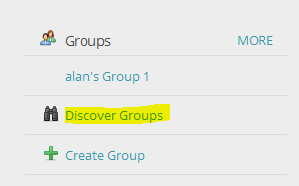
- To view the Public Groups that are available to join, simply click or tap on the Discover Groups button located on the left-hand side of your dashboard.
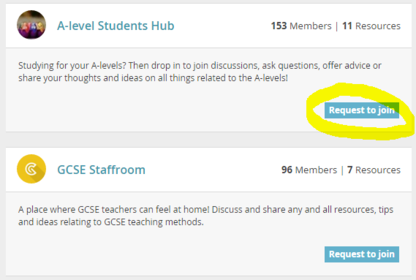
- You will then be able to view all Public Groups and learn more about each Group in the description box, along with the number of users and resources that have been shared in each one.
-
- Once you've spotted a Group that you'd like to be a part of, it's time to send a request to join it.
- To do so, simply select the Request to Join button at the bottom of the description of the Group in question.
- Once you've done this, it's up to the Group Admin or Creator to approve your request. How long this takes depends on the person accepting the request, but generally you won't have to wait too long before you're up and running.
-
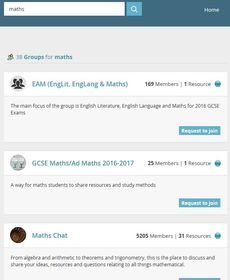
- You can now search for Groups by putting the topic you are interested in in the Search bar at the top of the page.
- You will see results for Groups with that term in the title or description.
- Request to join as above!
Información
- Descripción
- A short guide on how to discover and join Public Groups that are relevant to your interests.
- Creado por
- Micheal Heffernan · abr 2016
- Actualizado
- 22 feb 2017
- Visitas
- 327
- Etiquetas
- Valoración