
Test
AZ-104 Simulado VI
Preguntas del test (35)
1Question #01
You have five Azure virtual machines that run Windows Server 2016. The virtual machines are configured as web servers.
You have an Azure load balancer named LB1 that provides load balancing services for the virtual machines.
You need to ensure that visitors are serviced by the same web server for each request.
What should you configure?- ASession persistence to Client IP and protocol
- BProtocol to UDP
- CSession persistence to None
- DFloating IP (direct server return) to Enabled
2Question #02
You have an Azure subscription that uses the public IP addresses shown in the following table.
You need to create a public Azure Standard Load Balancer.
Which public IP addresses can you use?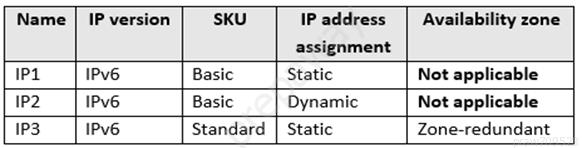
- AIP1, IP2, and IP3
- BIP2 only
- CIP3 only
- DIP1 and IP3 only
3Question #03
You have an Azure subscription.
You are deploying an Azure Kubernetes Service (AKS) cluster that will contain multiple pods. The pods will use kubernet networking.
You need to restrict network traffic between the pods.
What should you configure on the AKS cluster?- Athe Azure network policy
- Bthe Calico network policy
- Cpod security policies
- Dan application security group
4Question #04
HOTSPOT -
You have the web apps shown in the following table.
You need to monitor the performance and usage of the apps by using Azure Application Insights. The solution must minimize modifications to the application code.
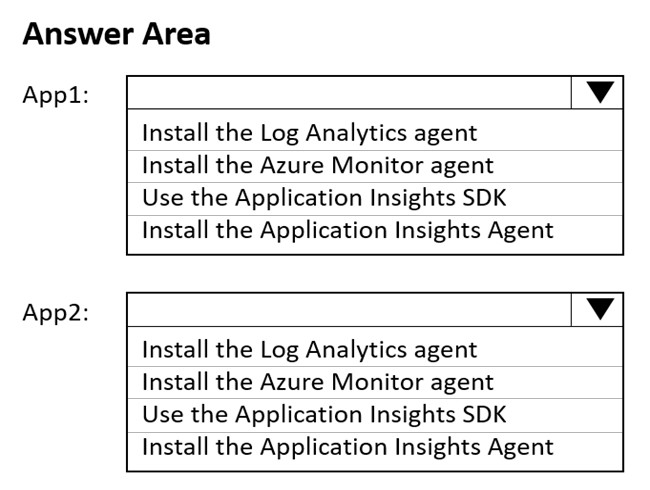
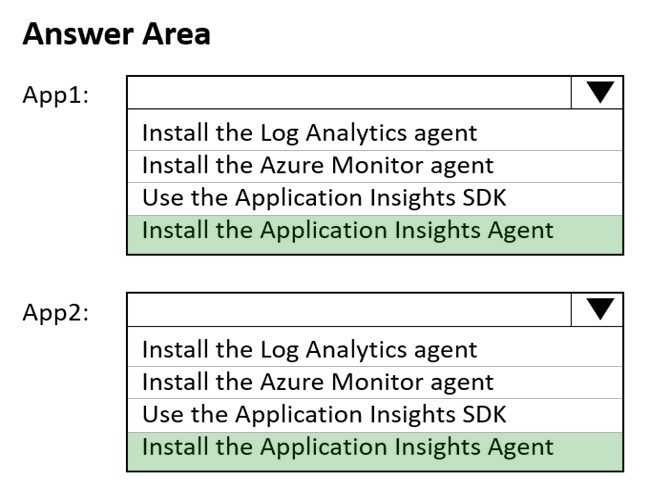
What should you do on each app? To answer, select the appropriate options in the answer area.
NOTE: Each correct selection is worth one point.
Hot Area: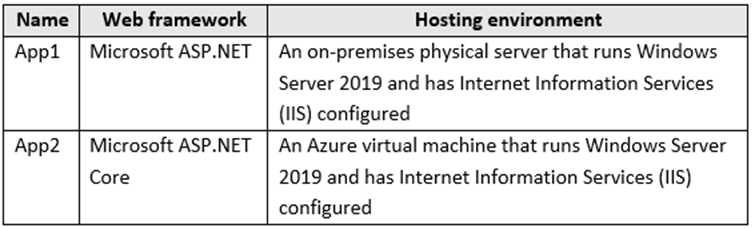
- A
- B
- A
5Question #05
You have an Azure virtual machine named VM1.
You use Azure Backup to create a backup of VM1 named Backup1.
After creating Backup1, you perform the following changes to VM1:
✑ Modify the size of VM1.
✑ Copy a file named Budget.xls to a folder named Data.
✑ Reset the password for the built-in administrator account.
✑ Add a data disk to VM1.
An administrator uses the Replace existing option to restore VM1 from Backup1.
You need to ensure that all the changes to VM1 are restored.
Which change should you perform again?- AModify the size of VM1.
- BReset the password for the built-in administrator account.
- CAdd a data disk.
- DCopy Budget.xls to Data.
6Question #06 Pagina45 - 01
HOTSPOT -
You have an Azure Active Directory (Azure AD) tenant named contoso.onmicrosoft.com that contains the users shown in the following table.
You enable password reset for contoso.onmicrosoft.com as shown in the Password Reset exhibit. (Click the Password Reset tab.)
You configure the authentication methods for password reset as shown in the Authentication Methods exhibit. (Click the Authentication Methods tab.)
For each of the following statements, select Yes if the statement is true. Otherwise, select No.
NOTE: Each correct selection is worth one point.
Hot Area: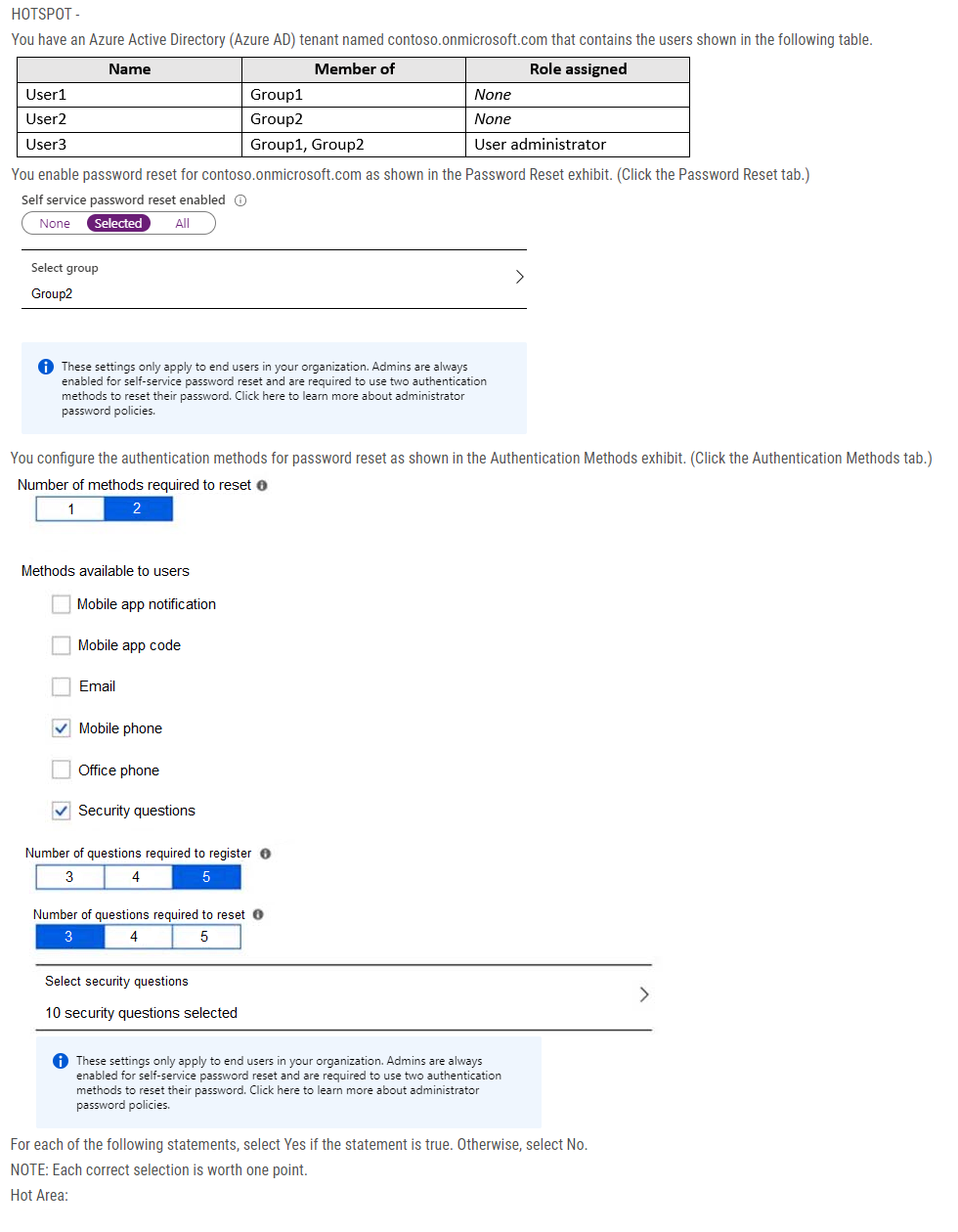
- A
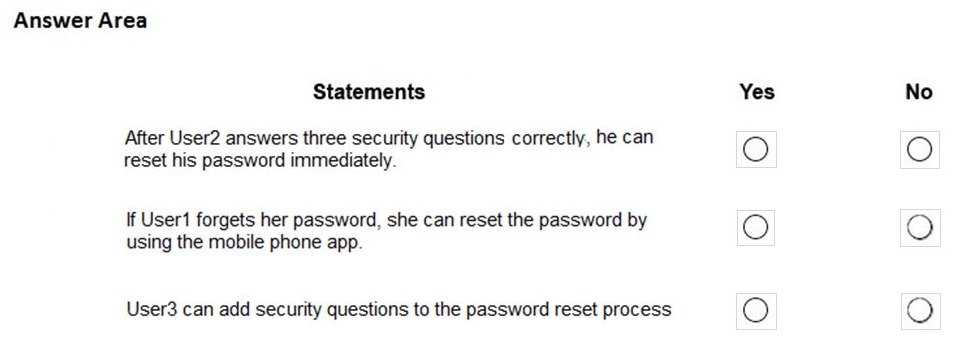
- BBox 1: No
Box 2: No
Box 3: No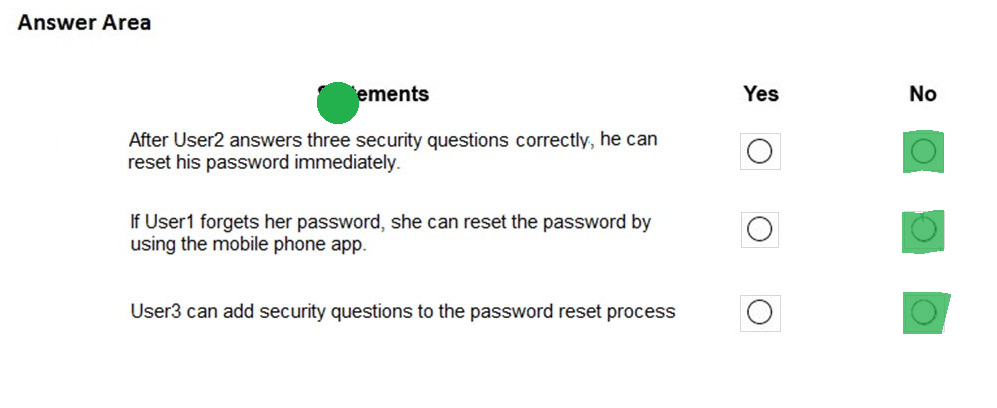
- A
7Question #07 Pagina45 - 02
Your company has a main office in London that contains 100 client computers.
Three years ago, you migrated to Azure Active Directory (Azure AD).
The company's security policy states that all personal devices and corporate-owned devices must be registered or joined to Azure AD.
A remote user named User1 is unable to join a personal device to Azure AD from a home network.
You verify that User1 was able to join devices to Azure AD in the past.
You need to ensure that User1 can join the device to Azure AD.
What should you do?- AAssign the User administrator role to User1.
- BFrom the Device settings blade, modify the Maximum number of devices per user setting.
- CCreate a point-to-site VPN from the home network of User1 to Azure.
- DFrom the Device settings blade, modify the Users may join devices to Azure AD setting.
8Question #08 Pagina45 - 03
Note: This question is part of a series of questions that present the same scenario. Each question in the series contains a unique solution that might meet the stated goals. Some question sets might have more than one correct solution, while others might not have a correct solution.
After you answer a question in this section, you will NOT be able to return to it. As a result, these questions will not appear in the review screen.
You have an Azure subscription that contains the following users in an Azure Active Directory tenant named contoso.onmicrosoft.com:
User1 creates a new Azure Active Directory tenant named external.contoso.onmicrosoft.com.
You need to create new user accounts in external.contoso.onmicrosoft.com.
Solution: You instruct User1 to create the user accounts.
Does that meet the goal?- AVerdadero
- BFalso
9Question #09 Pagina45 - 04
You have an existing Azure subscription that contains 10 virtual machines.
You need to monitor the latency between your on-premises network and the virtual machines.
What should you use?- AService Map
- BConnection troubleshoot
- CNetwork Performance Monitor
- DEffective routes
10Question #10 Pagina46 - 05
DRAG DROP -
You have an Azure Linux virtual machine that is protected by Azure Backup.
One week ago, two files were deleted from the virtual machine.
You need to restore the deleted files to an on-premises Windows Server 2016 computer as quickly as possible.
Which four actions should you perform in sequence? To answer, move the appropriate actions from the list of actions to the answer area and arrange them in the correct order.
Select and Place:- A
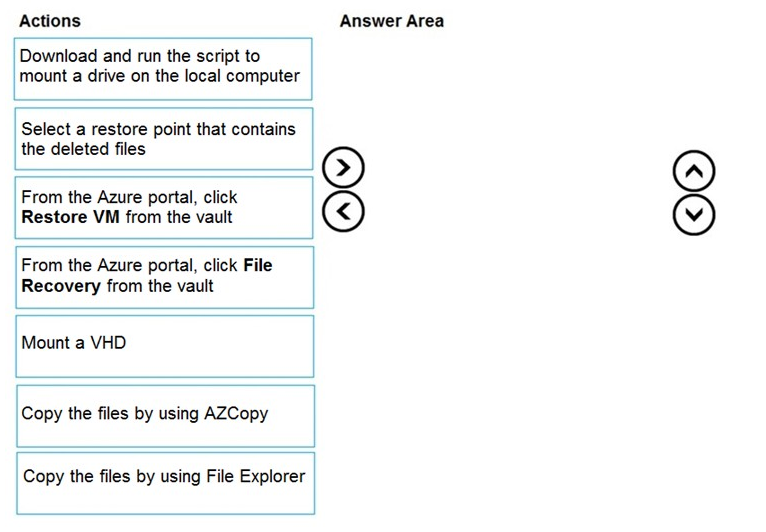
- BStep 1: From the Azure portal, click File Recovery from the vault
Step 2. Select a restore point that contains the deleted files
Step 3: Download and run the script to mount a drive on the local computer
Generate and download script to browse and recover files:
Step 4: Copy the files using File Explorer!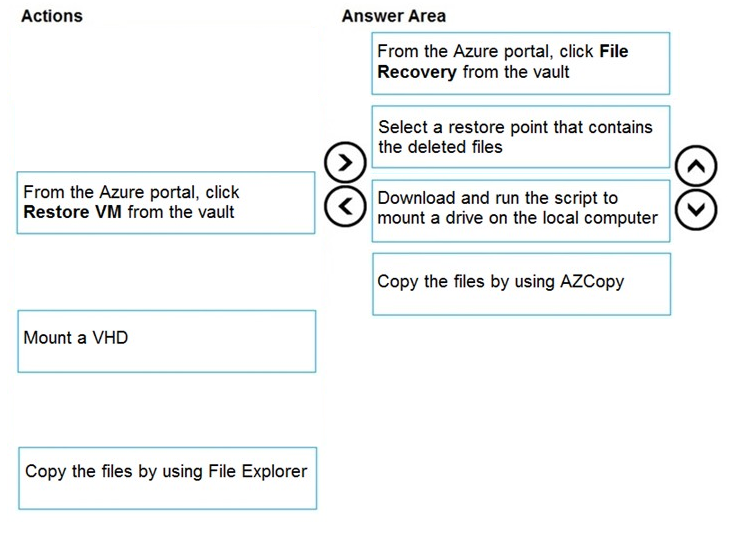
- A
11Question #11 Pagina46 - 06
HOTSPOT -
You purchase a new Azure subscription named Subscription1.
You create a virtual machine named VM1 in Subscription1. VM1 is not protected by Azure Backup.
You need to protect VM1 by using Azure Backup. Backups must be created at 01:00 and stored for 30 days.
What should you do? To answer, select the appropriate options in the answer area.
NOTE: Each correct selection is worth one point.
Hot Area:- A
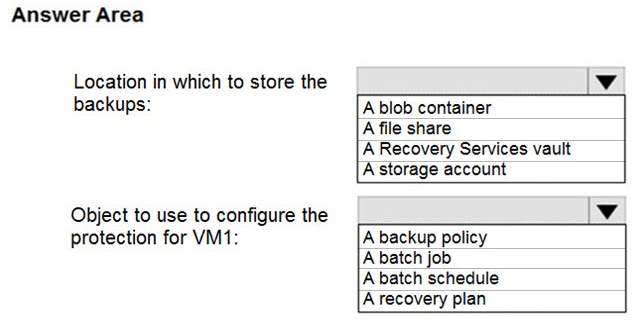
- BBox 1: A Recovery Services vault
Box 2: A backup policy -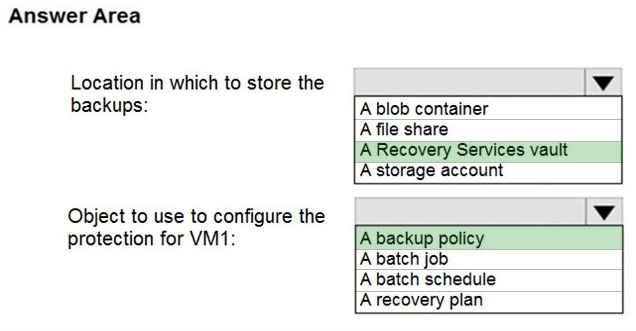
- A
12Question #12 Pagina46 - 07
You have an Azure virtual machine named VM1.
Azure collects events from VM1.
You are creating an alert rule in Azure Monitor to notify an administrator when an error is logged in the System event log of VM1.
Which target resource should you monitor in the alert rule?- Avirtual machine extension
- Bvirtual machine
- Cmetric alert
- DAzure Log Analytics workspace
13Question #13 Pagina46 - 08
You have an Azure subscription that contains 100 virtual machines.
You regularly create and delete virtual machines.
You need to identify unattached disks that can be deleted.
What should you do?- AFrom Azure Cost Management, view Cost Analysis
- BFrom Azure Advisor, modify the Advisor configuration
- CFrom Microsoft Azure Storage Explorer, view the Account Management properties
- DFrom Azure Cost Management, view Advisor Recommendations
14Question #14 Pagina46 - 09
You have an Azure web app named webapp1.
Users report that they often experience HTTP 500 errors when they connect to webapp1.
You need to provide the developers of webapp1 with real-time access to the connection errors. The solution must provide all the connection error details.
What should you do first?- AFrom webapp1, enable Web server logging
- BFrom Azure Monitor, create a workbook
- CFrom Azure Monitor, create a Service Health alert
- DFrom webapp1, turn on Application Logging
15Question #15 Pagina47 - 10
You have an Azure subscription that has a Recovery Services vault named Vault1. The subscription contains the virtual machines shown in the following table:
You plan to schedule backups to occur every night at 23:00.
Which virtual machines can you back up by using Azure Backup?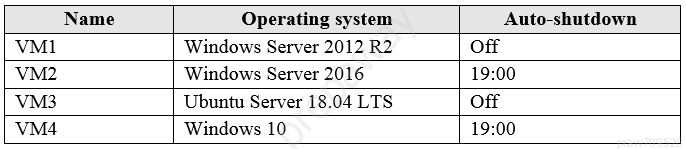
- AVM1 and VM3 only
- BVM1, VM2, VM3 and VM4
- CVM1 and VM2 only
- DVM1 only
16Question #16 Pagina47 - 11
HOTSPOT -
You create a Recovery Services vault backup policy named Policy1 as shown in the following exhibit:
Use the drop-down menus to select the answer choice that completes each statement based on the information presented in the graphic.
NOTE: Each correct selection is worth one point.
Hot Area: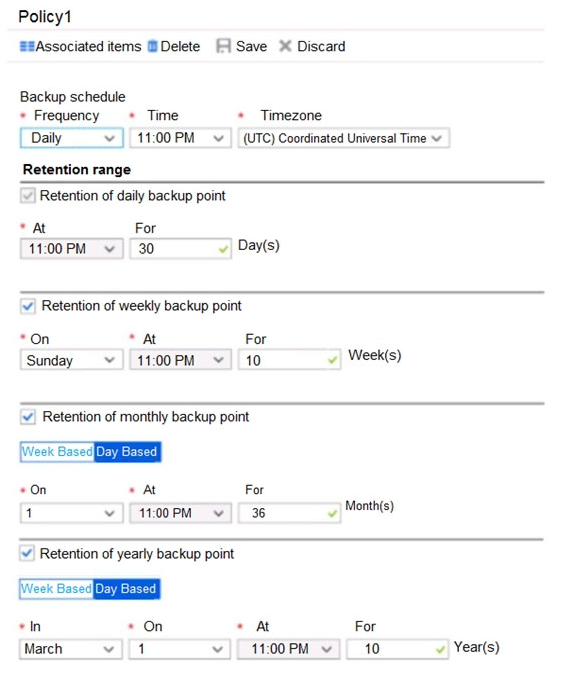
- A
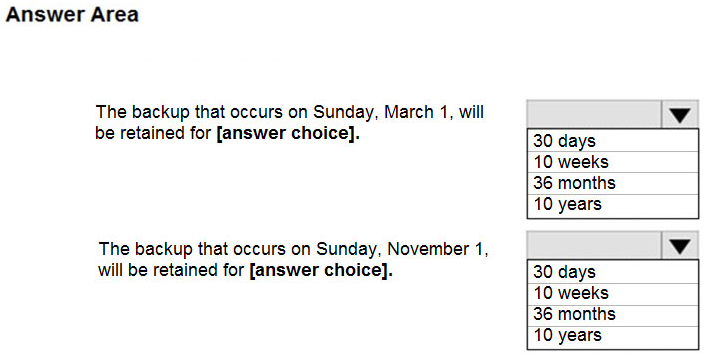
- BBox 1: 10 years
Box 2: 36 months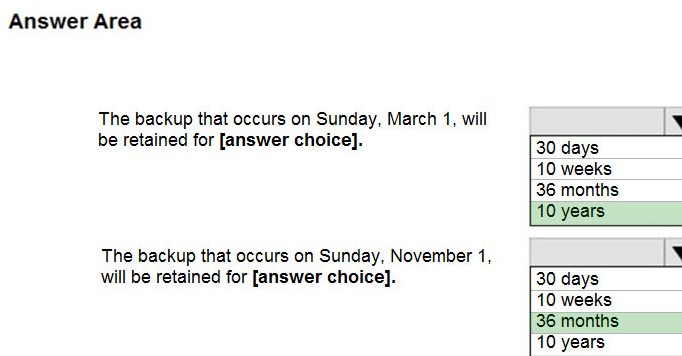
- A
17Question #17 Pagina47 - 12
You have the Azure virtual machines shown in the following table:
You have a Recovery Services vault that protects VM1 and VM2.
You need to protect VM3 and VM4 by using Recovery Services.
What should you do first?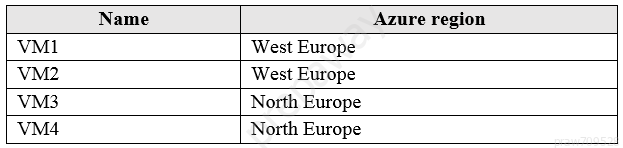
- ACreate a new Recovery Services vault
- BCreate a storage account
- CConfigure the extensions for VM3 and VM4
- DCreate a new backup policy
18Question #18 Pagina47 - 13
HOTSPOT -
You have an Azure subscription that contains an Azure Storage account named storage1 and the users shown in the following table.
You plan to monitor storage1 and to configure email notifications for the signals shown in the following table.
You need to identify the minimum number of alert rules and action groups required for the planned monitoring.
How many alert rules and action groups should you identify? To answer, select the appropriate options in the answer area.
NOTE: Each correct selection is worth one point.
Hot Area: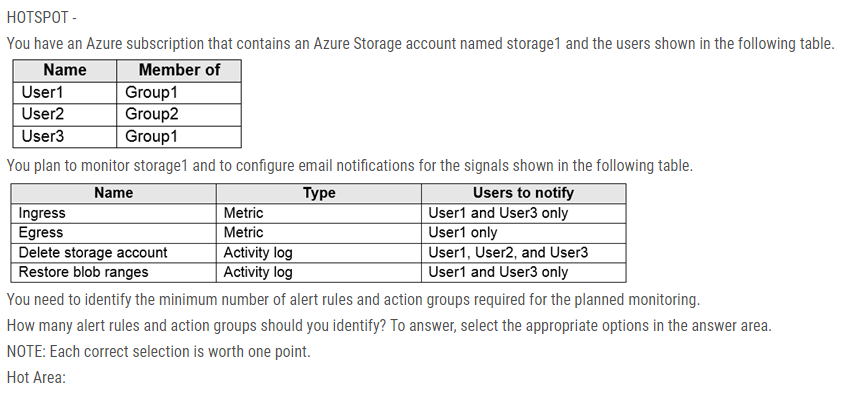
- A
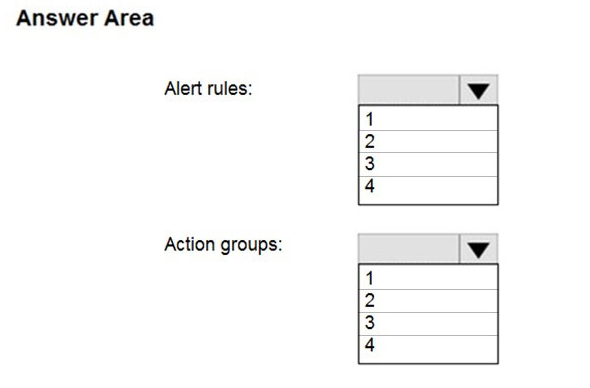
- BBox 1: 4
Box 2: 3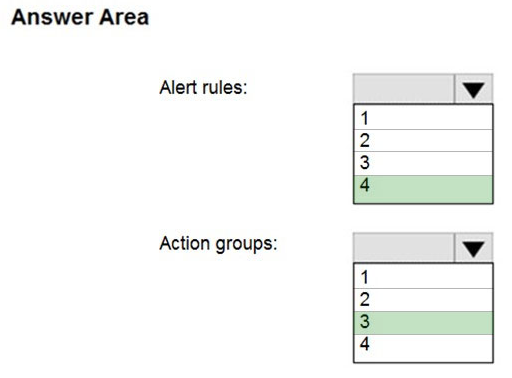
- A
19Question #19 Pagina47 - 14
You have an Azure subscription that contains the identities shown in the following table.
User1, Principal1, and Group1 are assigned the Monitoring Reader role.
An action group named AG1 has the Email Azure Resource Manager Role notification type and is configured to email the Monitoring Reader role.
You create an alert rule named Alert1 that uses AG1.
You need to identity who will receive an email notification when Alert1 is triggered.
Who should you identify?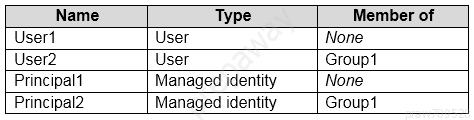
- AUser1 and Principal1 only
- BUser1, User2, Principal1, and Principal2
- CUser1 only
- DUser1 and User2 only
20Question #20 Pagina48 - 15
HOTSPOT -
You have an Azure virtual machine named VM1 and a Recovery Services vault named Vault1.
You create a backup policy named Policy1 as shown in the exhibit.
You configure the backup of VM1 to use Policy1 on Thursday, January 1 at 1:00 AM.
You need to identify the number of available recovery points for VM1.
How many recovery points are available on January 8 and January 15? To answer, select the appropriate options in the answer area.
NOTE: Each correct selection is worth one point.
Hot Area: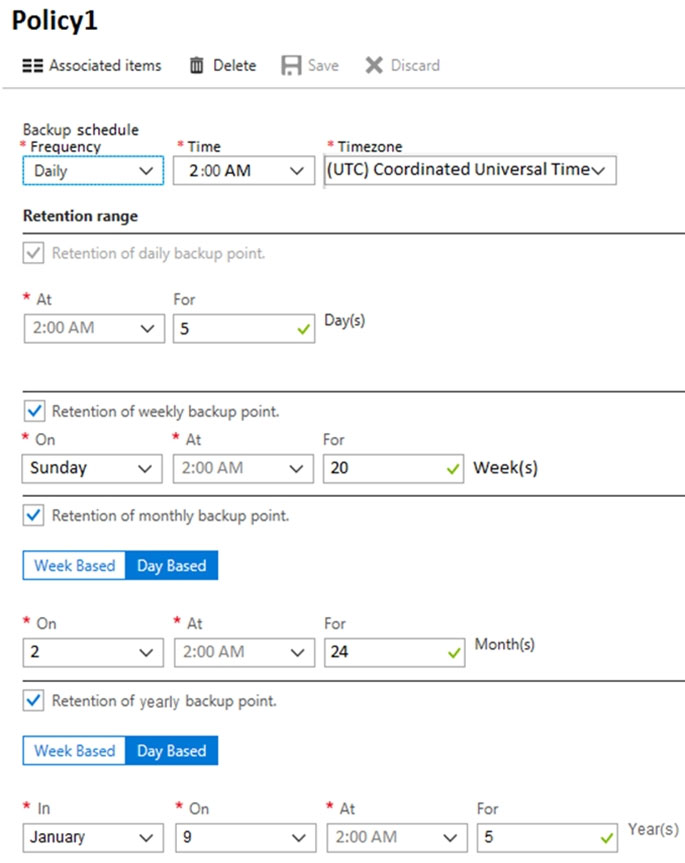
- A
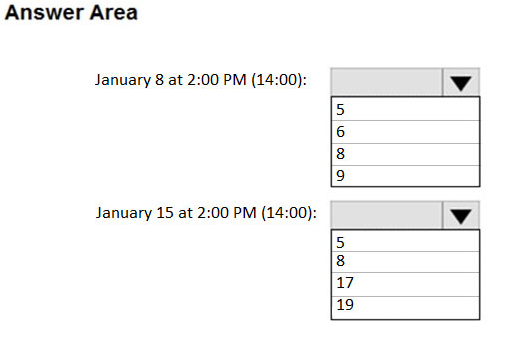
- BBox 1: 6
Box 2: 8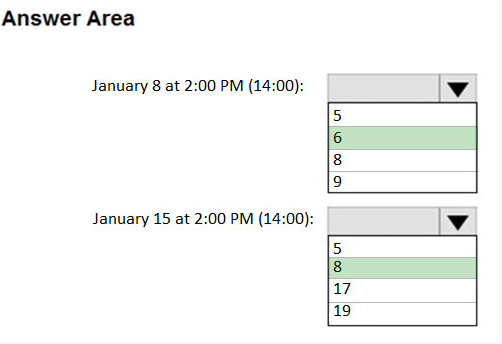
- A
21Question #21 Testlet 1 Pagina48 - 01
Introductory Info
Case study -
This is a case study. Case studies are not timed separately. You can use as much exam time as you would like to complete each case. However, there may be additional case studies and sections on this exam. You must manage your time to ensure that you are able to complete all questions included on this exam in the time provided.
To answer the questions included in a case study, you will need to reference information that is provided in the case study. Case studies might contain exhibits and other resources that provide more information about the scenario that is described in the case study. Each question is independent of the other questions in this case study.
At the end of this case study, a review screen will appear. This screen allows you to review your answers and to make changes before you move to the next section of the exam. After you begin a new section, you cannot return to this section.
To start the case study -
To display the first question in this case study, click the Next button. Use the buttons in the left pane to explore the content of the case study before you answer the questions. Clicking these buttons displays information such as business requirements, existing environment, and problem statements. If the case study has an
All Information tab, note that the information displayed is identical to the information displayed on the subsequent tabs. When you are ready to answer a question, click the Question button to return to the question.
Overview -
Contoso, Ltd. is a manufacturing company that has offices worldwide. Contoso works with partner organizations to bring products to market.
Contoso products are manufactured by using blueprint files that the company authors and maintains.
Existing Environment -
Currently, Contoso uses multiple types of servers for business operations, including the following:
File servers
Domain controllers
Microsoft SQL Server servers
Your network contains an Active Directory forest named contoso.com. All servers and client computers are joined to Active Directory.
You have a public-facing application named App1. App1 is comprised of the following three tiers:
A SQL database
A web front end
A processing middle tier -
Each tier is comprised of five virtual machines. Users access the web front end by using HTTPS only.
Requirements -
Planned Changes -
Contoso plans to implement the following changes to the infrastructure:
Move all the tiers of App1 to Azure.
Move the existing product blueprint files to Azure Blob storage.
Create a hybrid directory to support an upcoming Microsoft 365 migration project.
Technical Requirements -
Contoso must meet the following technical requirements:
Move all the virtual machines for App1 to Azure.
Minimize the number of open ports between the App1 tiers.
Ensure that all the virtual machines for App1 are protected by backups.
Copy the blueprint files to Azure over the Internet.
Ensure that the blueprint files are stored in the archive storage tier.
Ensure that partner access to the blueprint files is secured and temporary.
Prevent user passwords or hashes of passwords from being stored in Azure.
Use unmanaged standard storage for the hard disks of the virtual machines.
Ensure that when users join devices to Azure Active Directory (Azure AD), the users use a mobile phone to verify their identity.
Minimize administrative effort whenever possible.
User Requirements -
Contoso identifies the following requirements for users:
Ensure that only users who are part of a group named Pilot can join devices to Azure AD.
Designate a new user named Admin1 as the service admin for the Azure subscription.
Admin1 must receive email alerts regarding service outages.
Ensure that a new user named User3 can create network objects for the Azure subscription.
Question
HOTSPOT -
You need to configure the Device settings to meet the technical requirements and the user requirements.
Which two settings should you modify? To answer, select the appropriate settings in the answer area.
Hot Area:- A
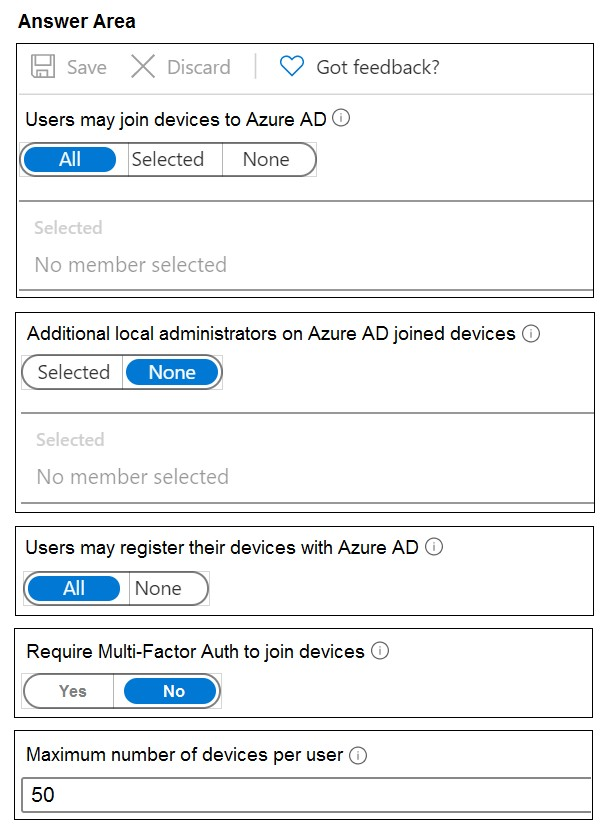
- BBox 1: Selected
Box 2: Yes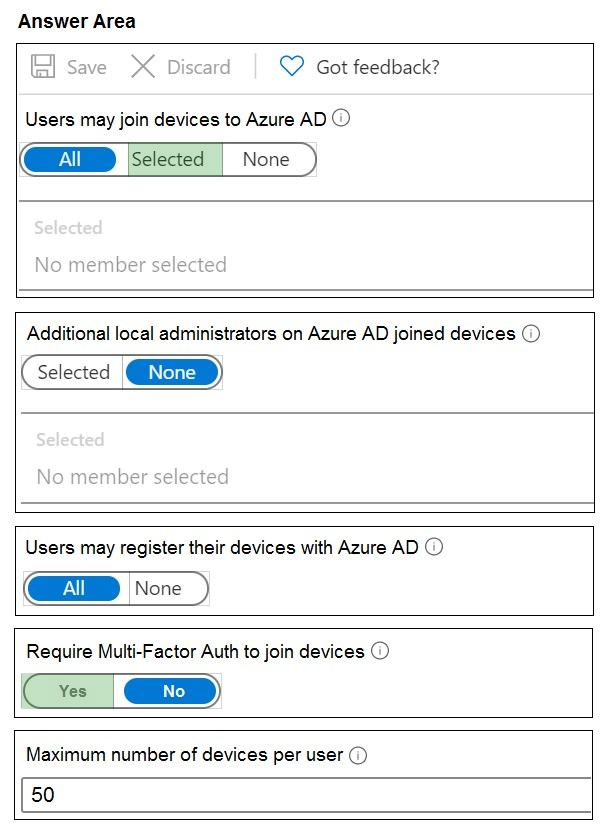
- A
22Question #22 Testlet 1 Pagina48 - 02
Introductory Info
Case study -
This is a case study. Case studies are not timed separately. You can use as much exam time as you would like to complete each case. However, there may be additional case studies and sections on this exam. You must manage your time to ensure that you are able to complete all questions included on this exam in the time provided.
To answer the questions included in a case study, you will need to reference information that is provided in the case study. Case studies might contain exhibits and other resources that provide more information about the scenario that is described in the case study. Each question is independent of the other questions in this case study.
At the end of this case study, a review screen will appear. This screen allows you to review your answers and to make changes before you move to the next section of the exam. After you begin a new section, you cannot return to this section.
To start the case study -
To display the first question in this case study, click the Next button. Use the buttons in the left pane to explore the content of the case study before you answer the questions. Clicking these buttons displays information such as business requirements, existing environment, and problem statements. If the case study has an
All Information tab, note that the information displayed is identical to the information displayed on the subsequent tabs. When you are ready to answer a question, click the Question button to return to the question.
Overview -
Contoso, Ltd. is a manufacturing company that has offices worldwide. Contoso works with partner organizations to bring products to market.
Contoso products are manufactured by using blueprint files that the company authors and maintains.
Existing Environment -
Currently, Contoso uses multiple types of servers for business operations, including the following:
File servers
Domain controllers
Microsoft SQL Server servers
Your network contains an Active Directory forest named contoso.com. All servers and client computers are joined to Active Directory.
You have a public-facing application named App1. App1 is comprised of the following three tiers:
A SQL database
A web front end
A processing middle tier -
Each tier is comprised of five virtual machines. Users access the web front end by using HTTPS only.
Requirements -
Planned Changes -
Contoso plans to implement the following changes to the infrastructure:
Move all the tiers of App1 to Azure.
Move the existing product blueprint files to Azure Blob storage.
Create a hybrid directory to support an upcoming Microsoft 365 migration project.
Technical Requirements -
Contoso must meet the following technical requirements:
Move all the virtual machines for App1 to Azure.
Minimize the number of open ports between the App1 tiers.
Ensure that all the virtual machines for App1 are protected by backups.
Copy the blueprint files to Azure over the Internet.
Ensure that the blueprint files are stored in the archive storage tier.
Ensure that partner access to the blueprint files is secured and temporary.
Prevent user passwords or hashes of passwords from being stored in Azure.
Use unmanaged standard storage for the hard disks of the virtual machines.
Ensure that when users join devices to Azure Active Directory (Azure AD), the users use a mobile phone to verify their identity.
Minimize administrative effort whenever possible.
User Requirements -
Contoso identifies the following requirements for users:
Ensure that only users who are part of a group named Pilot can join devices to Azure AD.
Designate a new user named Admin1 as the service admin for the Azure subscription.
Admin1 must receive email alerts regarding service outages.
Ensure that a new user named User3 can create network objects for the Azure subscription.
Question
You need to meet the user requirement for Admin1.
What should you do?- AFrom the Azure Active Directory blade, modify the Groups
- BFrom the Azure Active Directory blade, modify the Properties
- CFrom the Subscriptions blade, select the subscription, and then modify the Access control (IAM) settings
- DFrom the Subscriptions blade, select the subscription, and then modify the Properties
23Question #23
Introductory Info
Case study -
This is a case study. Case studies are not timed separately. You can use as much exam time as you would like to complete each case. However, there may be additional case studies and sections on this exam. You must manage your time to ensure that you are able to complete all questions included on this exam in the time provided.
To answer the questions included in a case study, you will need to reference information that is provided in the case study. Case studies might contain exhibits and other resources that provide more information about the scenario that is described in the case study. Each question is independent of the other questions in this case study.
At the end of this case study, a review screen will appear. This screen allows you to review your answers and to make changes before you move to the next section of the exam. After you begin a new section, you cannot return to this section.
To start the case study -
To display the first question in this case study, click the Next button. Use the buttons in the left pane to explore the content of the case study before you answer the questions. Clicking these buttons displays information such as business requirements, existing environment, and problem statements. If the case study has an
All Information tab, note that the information displayed is identical to the information displayed on the subsequent tabs. When you are ready to answer a question, click the Question button to return to the question.
Overview -
General Overview -
Contoso, Ltd. is a consulting company that has a main office in Montreal and branch offices in Seattle and New York.
Environment -
Existing Environment -
Contoso has an Azure subscription named Sub1 that is linked to an Azure Active Directory (Azure AD) tenant. The network contains an on-premises Active
Directory domain that syncs to the Azure AD tenant.
The Azure AD tenant contains the users shown in the following table.
Sub1 contains two resource groups named RG1 and RG2 and the virtual networks shown in the following table.
User1 manages the resources in RG1. User4 manages the resources in RG2.
Sub1 contains virtual machines that run Windows Server 2019 as shown in the following table
No network security groups (NSGs) are associated to the network interfaces or the subnets.
Sub1 contains the storage accounts shown in the following table.
Requirements -
Planned Changes -
Contoso plans to implement the following changes:
Create a blob container named container1 and a file share named share1 that will use the Cool storage tier.
Create a storage account named storage5 and configure storage replication for the Blob service.
Create an NSG named NSG1 that will have the custom inbound security rules shown in the following table.
Associate NSG1 to the network interface of VM1.
Create an NSG named NSG2 that will have the custom outbound security rules shown in the following table.
Associate NSG2 to VNET1/Subnet2.
Technical Requirements -
Contoso must meet the following technical requirements:
Create container1 and share1.
Use the principle of least privilege.
Create an Azure AD security group named Group4.
Back up the Azure file shares and virtual machines by using Azure Backup.
Trigger an alert if VM1 or VM2 has less than 20 GB of free space on volume C.
Enable User1 to create Azure policy definitions and User2 to assign Azure policies to RG1.
Create an internal Basic Azure Load Balancer named LB1 and connect the load balancer to VNET1/Subnet1
Enable flow logging for IP traffic from VM5 and retain the flow logs for a period of eight months.
Whenever possible, grant Group4 Azure role-based access control (Azure RBAC) read-only permissions to the Azure file shares.
Question
HOTSPOT -
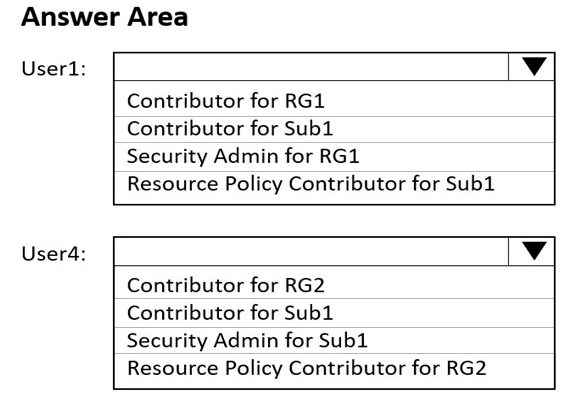
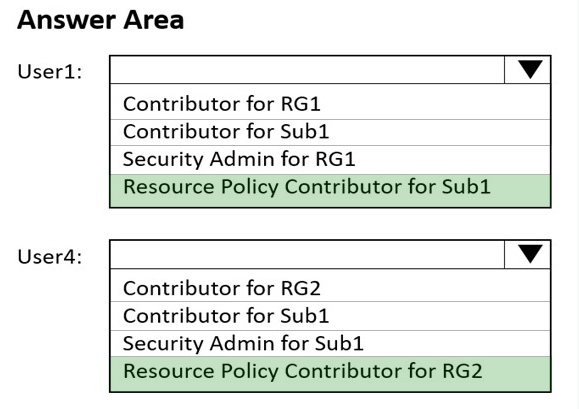
You need to ensure that User1 can create initiative definitions, and User4 can assign initiatives to RG2. The solution must meet the technical requirements.
Which role should you assign to each user? To answer, select the appropriate options in the answer area.
NOTE: Each correct selection is worth one point.
Hot Area: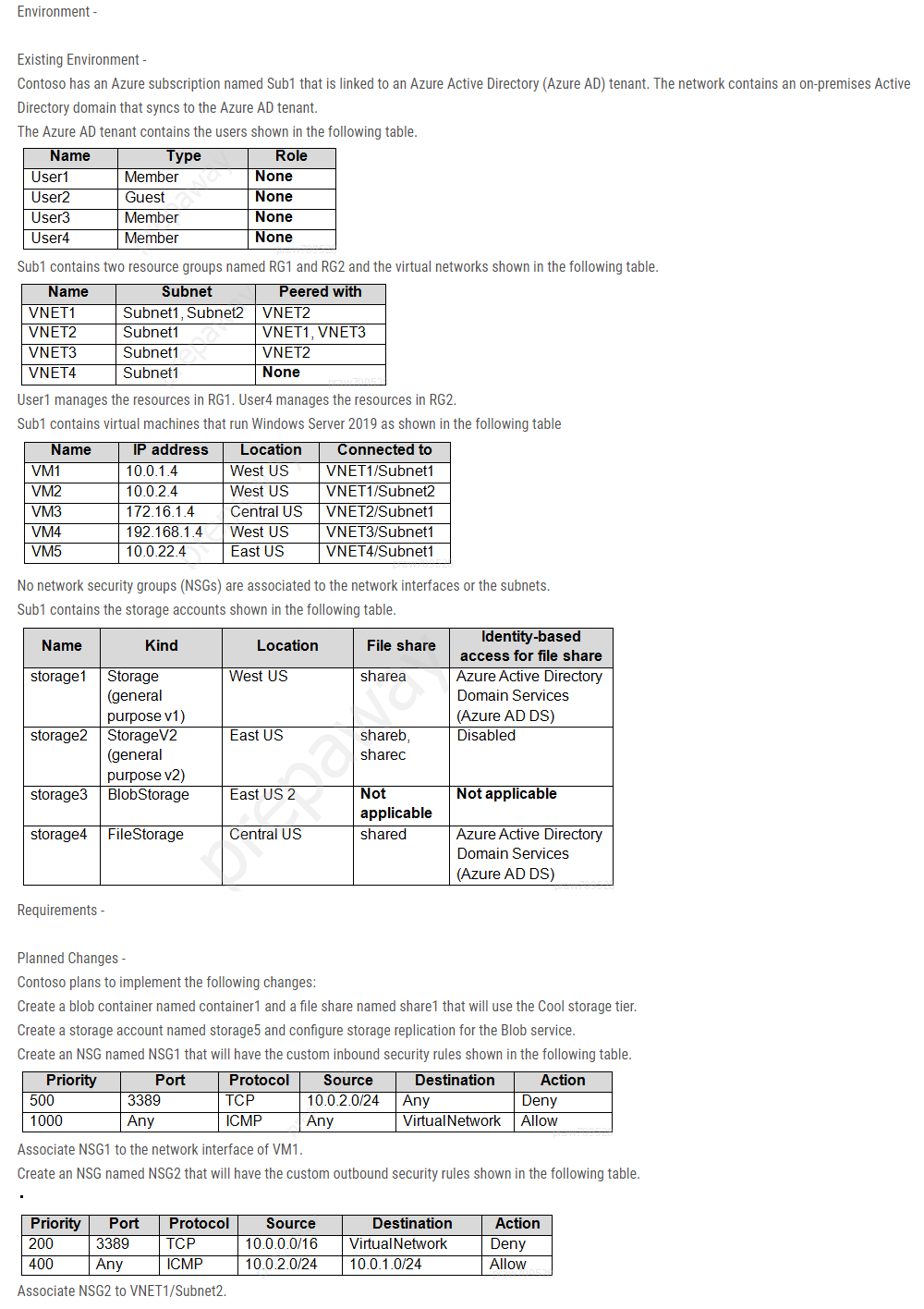
- A
- B
- A
24Question #24 Testlet 2 Pagina48 - 01
Introductory Info
Case study -
This is a case study. Case studies are not timed separately. You can use as much exam time as you would like to complete each case. However, there may be additional case studies and sections on this exam. You must manage your time to ensure that you are able to complete all questions included on this exam in the time provided.
To answer the questions included in a case study, you will need to reference information that is provided in the case study. Case studies might contain exhibits and other resources that provide more information about the scenario that is described in the case study. Each question is independent of the other questions in this case study.
At the end of this case study, a review screen will appear. This screen allows you to review your answers and to make changes before you move to the next section of the exam. After you begin a new section, you cannot return to this section.
To start the case study -
To display the first question in this case study, click the Next button. Use the buttons in the left pane to explore the content of the case study before you answer the questions. Clicking these buttons displays information such as business requirements, existing environment, and problem statements. If the case study has an
All Information tab, note that the information displayed is identical to the information displayed on the subsequent tabs. When you are ready to answer a question, click the Question button to return to the question.
Overview -
Contoso, Ltd. is a manufacturing company that has offices worldwide. Contoso works with partner organizations to bring products to market.
Contoso products are manufactured by using blueprint files that the company authors and maintains.
Existing Environment -
Currently, Contoso uses multiple types of servers for business operations, including the following:
File servers
Domain controllers
Microsoft SQL Server servers
Your network contains an Active Directory forest named contoso.com. All servers and client computers are joined to Active Directory.
You have a public-facing application named App1. App1 is comprised of the following three tiers:
A SQL database
A web front end
A processing middle tier -
Each tier is comprised of five virtual machines. Users access the web front end by using HTTPS only.
Requirements -
Planned Changes -
Contoso plans to implement the following changes to the infrastructure:
Move all the tiers of App1 to Azure.
Move the existing product blueprint files to Azure Blob storage.
Create a hybrid directory to support an upcoming Microsoft 365 migration project.
Technical Requirements -
Contoso must meet the following technical requirements:
Move all the virtual machines for App1 to Azure.
Minimize the number of open ports between the App1 tiers.
Ensure that all the virtual machines for App1 are protected by backups.
Copy the blueprint files to Azure over the Internet.
Ensure that the blueprint files are stored in the archive storage tier.
Ensure that partner access to the blueprint files is secured and temporary.
Prevent user passwords or hashes of passwords from being stored in Azure.
Use unmanaged standard storage for the hard disks of the virtual machines.
Ensure that when users join devices to Azure Active Directory (Azure AD), the users use a mobile phone to verify their identity.
Minimize administrative effort whenever possible.
User Requirements -
Contoso identifies the following requirements for users:
Ensure that only users who are part of a group named Pilot can join devices to Azure AD.
Designate a new user named Admin1 as the service admin for the Azure subscription.
Admin1 must receive email alerts regarding service outages.
Ensure that a new user named User3 can create network objects for the Azure subscription.
Question
You need to implement a backup solution for App1 after the application is moved.
What should you create first?- Aa recovery plan
- Ban Azure Backup Server
- Ca backup policy
- Da Recovery Services vault
25Question #25 Testlet 2 Pagina48 - 02
Introductory Info
Case study -
This is a case study. Case studies are not timed separately. You can use as much exam time as you would like to complete each case. However, there may be additional case studies and sections on this exam. You must manage your time to ensure that you are able to complete all questions included on this exam in the time provided.
To answer the questions included in a case study, you will need to reference information that is provided in the case study. Case studies might contain exhibits and other resources that provide more information about the scenario that is described in the case study. Each question is independent of the other questions in this case study.
At the end of this case study, a review screen will appear. This screen allows you to review your answers and to make changes before you move to the next section of the exam. After you begin a new section, you cannot return to this section.
To start the case study -
To display the first question in this case study, click the Next button. Use the buttons in the left pane to explore the content of the case study before you answer the questions. Clicking these buttons displays information such as business requirements, existing environment, and problem statements. If the case study has an
All Information tab, note that the information displayed is identical to the information displayed on the subsequent tabs. When you are ready to answer a question, click the Question button to return to the question.
Overview -
Contoso, Ltd. is a manufacturing company that has offices worldwide. Contoso works with partner organizations to bring products to market.
Contoso products are manufactured by using blueprint files that the company authors and maintains.
Existing Environment -
Currently, Contoso uses multiple types of servers for business operations, including the following:
File servers
Domain controllers
Microsoft SQL Server servers
Your network contains an Active Directory forest named contoso.com. All servers and client computers are joined to Active Directory.
You have a public-facing application named App1. App1 is comprised of the following three tiers:
A SQL database
A web front end
A processing middle tier -
Each tier is comprised of five virtual machines. Users access the web front end by using HTTPS only.
Requirements -
Planned Changes -
Contoso plans to implement the following changes to the infrastructure:
Move all the tiers of App1 to Azure.
Move the existing product blueprint files to Azure Blob storage.
Create a hybrid directory to support an upcoming Microsoft 365 migration project.
Technical Requirements -
Contoso must meet the following technical requirements:
Move all the virtual machines for App1 to Azure.
Minimize the number of open ports between the App1 tiers.
Ensure that all the virtual machines for App1 are protected by backups.
Copy the blueprint files to Azure over the Internet.
Ensure that the blueprint files are stored in the archive storage tier.
Ensure that partner access to the blueprint files is secured and temporary.
Prevent user passwords or hashes of passwords from being stored in Azure.
Use unmanaged standard storage for the hard disks of the virtual machines.
Ensure that when users join devices to Azure Active Directory (Azure AD), the users use a mobile phone to verify their identity.
Minimize administrative effort whenever possible.
User Requirements -
Contoso identifies the following requirements for users:
Ensure that only users who are part of a group named Pilot can join devices to Azure AD.
Designate a new user named Admin1 as the service admin for the Azure subscription.
Admin1 must receive email alerts regarding service outages.
Ensure that a new user named User3 can create network objects for the Azure subscription.
Question
You need to move the blueprint files to Azure.
What should you do?- AGenerate an access key. Map a drive, and then copy the files by using File Explorer.
- BUse Azure Storage Explorer to copy the files.
- CUse the Azure Import/Export service.
- DGenerate a shared access signature (SAS). Map a drive, and then copy the files by using File Explorer.
26Question #26 Testlet 2 Pagina49 - 03
Introductory Info
Case study -
This is a case study. Case studies are not timed separately. You can use as much exam time as you would like to complete each case. However, there may be additional case studies and sections on this exam. You must manage your time to ensure that you are able to complete all questions included on this exam in the time provided.
To answer the questions included in a case study, you will need to reference information that is provided in the case study. Case studies might contain exhibits and other resources that provide more information about the scenario that is described in the case study. Each question is independent of the other questions in this case study.
At the end of this case study, a review screen will appear. This screen allows you to review your answers and to make changes before you move to the next section of the exam. After you begin a new section, you cannot return to this section.
To start the case study -
To display the first question in this case study, click the Next button. Use the buttons in the left pane to explore the content of the case study before you answer the questions. Clicking these buttons displays information such as business requirements, existing environment, and problem statements. If the case study has an
All Information tab, note that the information displayed is identical to the information displayed on the subsequent tabs. When you are ready to answer a question, click the Question button to return to the question.
Overview -
Contoso, Ltd. is a manufacturing company that has offices worldwide. Contoso works with partner organizations to bring products to market.
Contoso products are manufactured by using blueprint files that the company authors and maintains.
Existing Environment -
Currently, Contoso uses multiple types of servers for business operations, including the following:
File servers
Domain controllers
Microsoft SQL Server servers
Your network contains an Active Directory forest named contoso.com. All servers and client computers are joined to Active Directory.
You have a public-facing application named App1. App1 is comprised of the following three tiers:
A SQL database
A web front end
A processing middle tier -
Each tier is comprised of five virtual machines. Users access the web front end by using HTTPS only.
Requirements -
Planned Changes -
Contoso plans to implement the following changes to the infrastructure:
Move all the tiers of App1 to Azure.
Move the existing product blueprint files to Azure Blob storage.
Create a hybrid directory to support an upcoming Microsoft 365 migration project.
Technical Requirements -
Contoso must meet the following technical requirements:
Move all the virtual machines for App1 to Azure.
Minimize the number of open ports between the App1 tiers.
Ensure that all the virtual machines for App1 are protected by backups.
Copy the blueprint files to Azure over the Internet.
Ensure that the blueprint files are stored in the archive storage tier.
Ensure that partner access to the blueprint files is secured and temporary.
Prevent user passwords or hashes of passwords from being stored in Azure.
Use unmanaged standard storage for the hard disks of the virtual machines.
Ensure that when users join devices to Azure Active Directory (Azure AD), the users use a mobile phone to verify their identity.
Minimize administrative effort whenever possible.
User Requirements -
Contoso identifies the following requirements for users:
Ensure that only users who are part of a group named Pilot can join devices to Azure AD.
Designate a new user named Admin1 as the service admin for the Azure subscription.
Admin1 must receive email alerts regarding service outages.
Ensure that a new user named User3 can create network objects for the Azure subscription.
Question
HOTSPOT -
You need to identify the storage requirements for Contoso.
For each of the following statements, select Yes if the statement is true. Otherwise, select No.
NOTE: Each correct selection is worth one point.
Hot Area:- A
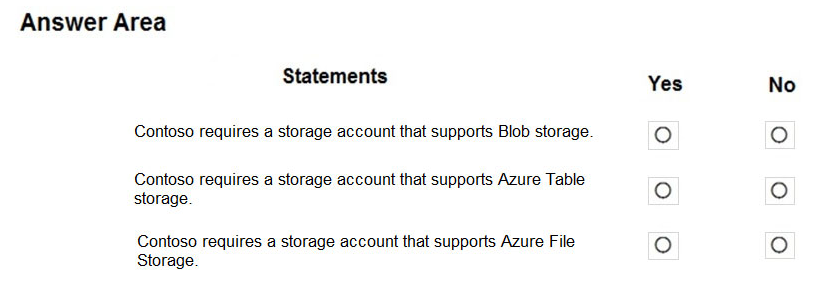
- BBox 1: Yes
Box 2: No
Box 3: No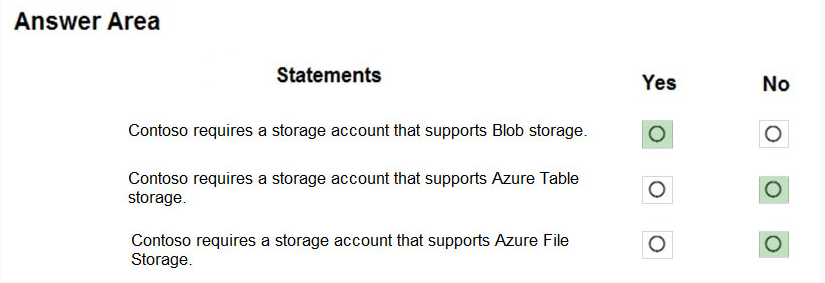
- A
27Question #27
Introductory Info
Case study -
This is a case study. Case studies are not timed separately. You can use as much exam time as you would like to complete each case. However, there may be additional case studies and sections on this exam. You must manage your time to ensure that you are able to complete all questions included on this exam in the time provided.
To answer the questions included in a case study, you will need to reference information that is provided in the case study. Case studies might contain exhibits and other resources that provide more information about the scenario that is described in the case study. Each question is independent of the other questions in this case study.
At the end of this case study, a review screen will appear. This screen allows you to review your answers and to make changes before you move to the next section of the exam. After you begin a new section, you cannot return to this section.
To start the case study -
To display the first question in this case study, click the Next button. Use the buttons in the left pane to explore the content of the case study before you answer the questions. Clicking these buttons displays information such as business requirements, existing environment, and problem statements. If the case study has an
All Information tab, note that the information displayed is identical to the information displayed on the subsequent tabs. When you are ready to answer a question, click the Question button to return to the question.
Overview -
General Overview -
Contoso, Ltd. is a consulting company that has a main office in Montreal and branch offices in Seattle and New York.
Environment -
Existing Environment -
Contoso has an Azure subscription named Sub1 that is linked to an Azure Active Directory (Azure AD) tenant. The network contains an on-premises Active
Directory domain that syncs to the Azure AD tenant.
The Azure AD tenant contains the users shown in the following table.
Sub1 contains two resource groups named RG1 and RG2 and the virtual networks shown in the following table.
User1 manages the resources in RG1. User4 manages the resources in RG2.
Sub1 contains virtual machines that run Windows Server 2019 as shown in the following table
No network security groups (NSGs) are associated to the network interfaces or the subnets.
Sub1 contains the storage accounts shown in the following table.
Requirements -
Planned Changes -
Contoso plans to implement the following changes:
Create a blob container named container1 and a file share named share1 that will use the Cool storage tier.
Create a storage account named storage5 and configure storage replication for the Blob service.
Create an NSG named NSG1 that will have the custom inbound security rules shown in the following table.
Associate NSG1 to the network interface of VM1.
Create an NSG named NSG2 that will have the custom outbound security rules shown in the following table.
Associate NSG2 to VNET1/Subnet2.
Technical Requirements -
Contoso must meet the following technical requirements:
Create container1 and share1.
Use the principle of least privilege.
Create an Azure AD security group named Group4.
Back up the Azure file shares and virtual machines by using Azure Backup.
Trigger an alert if VM1 or VM2 has less than 20 GB of free space on volume C.
Enable User1 to create Azure policy definitions and User2 to assign Azure policies to RG1.
Create an internal Basic Azure Load Balancer named LB1 and connect the load balancer to VNET1/Subnet1
Enable flow logging for IP traffic from VM5 and retain the flow logs for a period of eight months.
Whenever possible, grant Group4 Azure role-based access control (Azure RBAC) read-only permissions to the Azure file shares.
Question
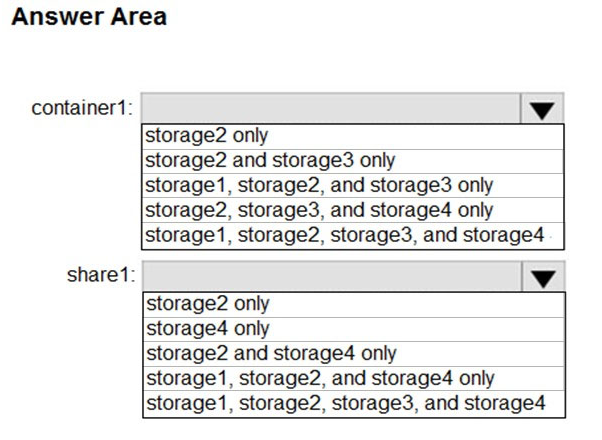
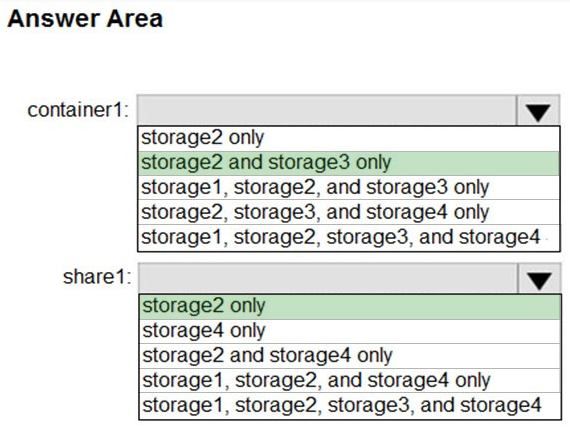
HOTSPOT -
You need to create container1 and share1.
Which storage accounts should you use for each resource? To answer, select the appropriate options in the answer area.
NOTE: Each correct selection is worth one point.
Hot Area: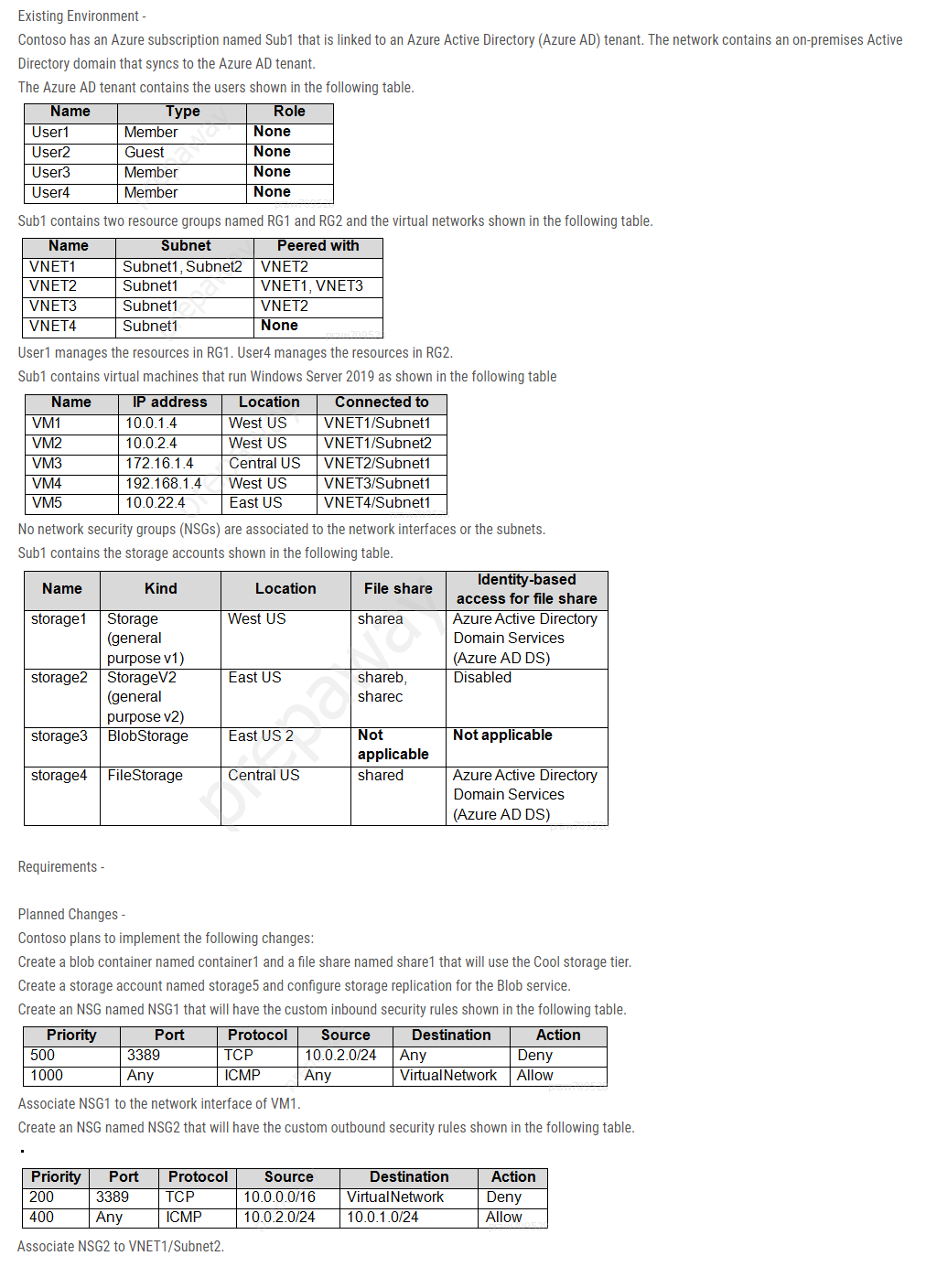
- A
- B
- A
28Question #2T8
Introductory Info
Case study -
This is a case study. Case studies are not timed separately. You can use as much exam time as you would like to complete each case. However, there may be additional case studies and sections on this exam. You must manage your time to ensure that you are able to complete all questions included on this exam in the time provided.
To answer the questions included in a case study, you will need to reference information that is provided in the case study. Case studies might contain exhibits and other resources that provide more information about the scenario that is described in the case study. Each question is independent of the other questions in this case study.
At the end of this case study, a review screen will appear. This screen allows you to review your answers and to make changes before you move to the next section of the exam. After you begin a new section, you cannot return to this section.
To start the case study -
To display the first question in this case study, click the Next button. Use the buttons in the left pane to explore the content of the case study before you answer the questions. Clicking these buttons displays information such as business requirements, existing environment, and problem statements. If the case study has an
All Information tab, note that the information displayed is identical to the information displayed on the subsequent tabs. When you are ready to answer a question, click the Question button to return to the question.
Overview -
General Overview -
Contoso, Ltd. is a consulting company that has a main office in Montreal and branch offices in Seattle and New York.
Environment -
Existing Environment -
Contoso has an Azure subscription named Sub1 that is linked to an Azure Active Directory (Azure AD) tenant. The network contains an on-premises Active
Directory domain that syncs to the Azure AD tenant.
The Azure AD tenant contains the users shown in the following table.
Sub1 contains two resource groups named RG1 and RG2 and the virtual networks shown in the following table.
User1 manages the resources in RG1. User4 manages the resources in RG2.
Sub1 contains virtual machines that run Windows Server 2019 as shown in the following table
No network security groups (NSGs) are associated to the network interfaces or the subnets.
Sub1 contains the storage accounts shown in the following table.
Requirements -
Planned Changes -
Contoso plans to implement the following changes:
Create a blob container named container1 and a file share named share1 that will use the Cool storage tier.
Create a storage account named storage5 and configure storage replication for the Blob service.
Create an NSG named NSG1 that will have the custom inbound security rules shown in the following table.
Associate NSG1 to the network interface of VM1.
Create an NSG named NSG2 that will have the custom outbound security rules shown in the following table.
Associate NSG2 to VNET1/Subnet2.
Technical Requirements -
Contoso must meet the following technical requirements:
Create container1 and share1.
Use the principle of least privilege.
Create an Azure AD security group named Group4.
Back up the Azure file shares and virtual machines by using Azure Backup.
Trigger an alert if VM1 or VM2 has less than 20 GB of free space on volume C.
Enable User1 to create Azure policy definitions and User2 to assign Azure policies to RG1.
Create an internal Basic Azure Load Balancer named LB1 and connect the load balancer to VNET1/Subnet1
Enable flow logging for IP traffic from VM5 and retain the flow logs for a period of eight months.
Whenever possible, grant Group4 Azure role-based access control (Azure RBAC) read-only permissions to the Azure file shares.
Question
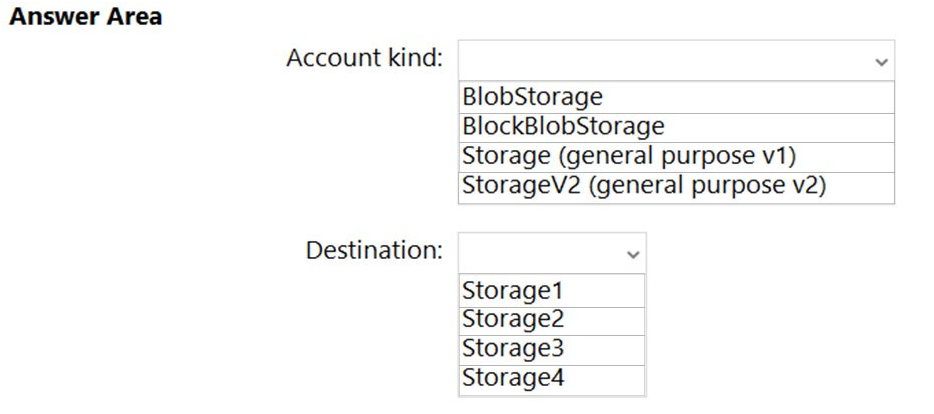
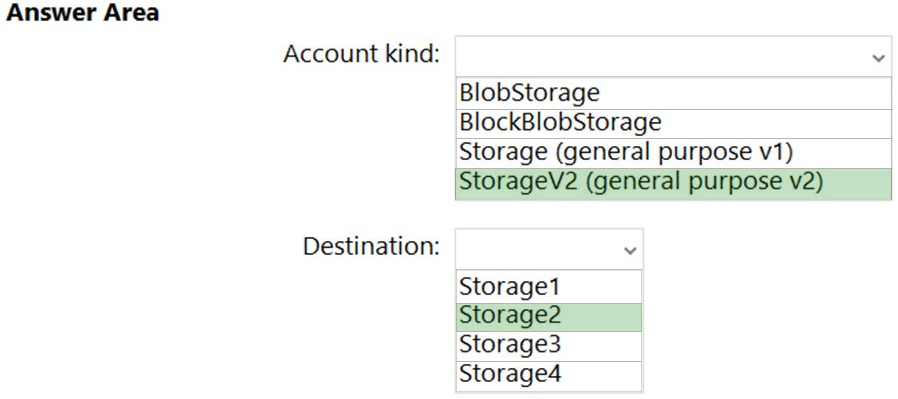
HOTSPOT -
You need to create storage5. The solution must support the planned changes.
Which type of storage account should you use, and which account should you configure as the destination storage account? To answer, select the appropriate options in the answer area.
NOTE: Each correct selection is worth one point.
Hot Area:- A
- B
- A
29Question #29 Testlet 3 Pagina49 - 01
Introductory Info
Case study -
This is a case study. Case studies are not timed separately. You can use as much exam time as you would like to complete each case. However, there may be additional case studies and sections on this exam. You must manage your time to ensure that you are able to complete all questions included on this exam in the time provided.
To answer the questions included in a case study, you will need to reference information that is provided in the case study. Case studies might contain exhibits and other resources that provide more information about the scenario that is described in the case study. Each question is independent of the other questions in this case study.
At the end of this case study, a review screen will appear. This screen allows you to review your answers and to make changes before you move to the next section of the exam. After you begin a new section, you cannot return to this section.
To start the case study -
To display the first question in this case study, click the Next button. Use the buttons in the left pane to explore the content of the case study before you answer the questions. Clicking these buttons displays information such as business requirements, existing environment, and problem statements. If the case study has an
All Information tab, note that the information displayed is identical to the information displayed on the subsequent tabs. When you are ready to answer a question, click the Question button to return to the question.
Overview -
Litware, Inc. is a consulting company that has a main office in Montreal and two branch offices in Seattle and New York.
The Montreal office has 2,000 employees. The Seattle office has 1,000 employees. The New York office has 200 employees.
All the resources used by Litware are hosted on-premises.
Litware creates a new Azure subscription. The Azure Active Directory (Azure AD) tenant uses a domain named litware.onmicrosoft.com. The tenant uses the
Premium P1 pricing tier.
Existing Environment -
The network contains an Active Directory forest named litware.com. All domain controllers are configured as DNS servers and host the litware.com DNS zone.
Litware has finance, human resources, sales, research, and information technology departments. Each department has an organizational unit (OU) that contains all the accounts of that respective department. All the user accounts have the department attribute set to their respective department. New users are added frequently.
Litware.com contains a user named User1.
All the offices connect by using private connections.
Litware has data centers in the Montreal and Seattle offices. Each office has a firewall that can be configured as a VPN device.
All infrastructure servers are virtualized. The virtualization environment contains the servers in the following table.
Litware uses two web applications named App1 and App2. Each instance on each web application requires 1 GB of memory.
The Azure subscription contains the resources in the following table.
The network security team implements several network security groups (NSGs)
Requirements -
Planned Changes -
Litware plans to implement the following changes:
Deploy Azure ExpressRoute to the Montreal office.
Migrate the virtual machines hosted on Server1 and Server2 to Azure.
Synchronize on-premises Active Directory to Azure Active Directory (Azure AD).
Migrate App1 and App2 to two Azure web apps named WebApp1 and WebApp2.
Technical Requirements -
Litware must meet the following technical requirements:
Ensure that WebApp1 can adjust the number of instances automatically based on the load and can scale up to five instances.
Ensure that VM3 can establish outbound connections over TCP port 8080 to the applications servers in the Montreal office.
Ensure that routing information is exchanged automatically between Azure and the routers in the Montreal office.
Enable Azure Multi-Factor Authentication (MFA) for the users in the finance department only.
Ensure that webapp2.azurewebsites.net can be accessed by using the name app2.litware.com.
Connect the New York office to VNet1 over the Internet by using an encrypted connection.
Create a workflow to send an email message when the settings of VM4 are modified.
Create a custom Azure role named Role1 that is based on the Reader role.
Minimize costs whenever possible.
Question
You discover that VM3 does NOT meet the technical requirements.
You need to verify whether the issue relates to the NSGs.
What should you use?- ADiagram in VNet1
- BDiagnostic settings in Azure Monitor
- CDiagnose and solve problems in Traffic Manager profiles
- DThe security recommendations in Azure Advisor
- EIP flow verify in Azure Network Watcher
30Question #30
Introductory Info
Case study -
This is a case study. Case studies are not timed separately. You can use as much exam time as you would like to complete each case. However, there may be additional case studies and sections on this exam. You must manage your time to ensure that you are able to complete all questions included on this exam in the time provided.
To answer the questions included in a case study, you will need to reference information that is provided in the case study. Case studies might contain exhibits and other resources that provide more information about the scenario that is described in the case study. Each question is independent of the other questions in this case study.
At the end of this case study, a review screen will appear. This screen allows you to review your answers and to make changes before you move to the next section of the exam. After you begin a new section, you cannot return to this section.
To start the case study -
To display the first question in this case study, click the Next button. Use the buttons in the left pane to explore the content of the case study before you answer the questions. Clicking these buttons displays information such as business requirements, existing environment, and problem statements. If the case study has an
All Information tab, note that the information displayed is identical to the information displayed on the subsequent tabs. When you are ready to answer a question, click the Question button to return to the question.
Overview -
Litware, Inc. is a consulting company that has a main office in Montreal and two branch offices in Seattle and New York.
The Montreal office has 2,000 employees. The Seattle office has 1,000 employees. The New York office has 200 employees.
All the resources used by Litware are hosted on-premises.
Litware creates a new Azure subscription. The Azure Active Directory (Azure AD) tenant uses a domain named litware.onmicrosoft.com. The tenant uses the
Premium P1 pricing tier.
Existing Environment -
The network contains an Active Directory forest named litware.com. All domain controllers are configured as DNS servers and host the litware.com DNS zone.
Litware has finance, human resources, sales, research, and information technology departments. Each department has an organizational unit (OU) that contains all the accounts of that respective department. All the user accounts have the department attribute set to their respective department. New users are added frequently.
Litware.com contains a user named User1.
All the offices connect by using private connections.
Litware has data centers in the Montreal and Seattle offices. Each office has a firewall that can be configured as a VPN device.
All infrastructure servers are virtualized. The virtualization environment contains the servers in the following table.
Litware uses two web applications named App1 and App2. Each instance on each web application requires 1 GB of memory.
The Azure subscription contains the resources in the following table.
The network security team implements several network security groups (NSGs)
Requirements -
Planned Changes -
Litware plans to implement the following changes:
Deploy Azure ExpressRoute to the Montreal office.
Migrate the virtual machines hosted on Server1 and Server2 to Azure.
Synchronize on-premises Active Directory to Azure Active Directory (Azure AD).
Migrate App1 and App2 to two Azure web apps named WebApp1 and WebApp2.
Technical Requirements -
Litware must meet the following technical requirements:
Ensure that WebApp1 can adjust the number of instances automatically based on the load and can scale up to five instances.
Ensure that VM3 can establish outbound connections over TCP port 8080 to the applications servers in the Montreal office.
Ensure that routing information is exchanged automatically between Azure and the routers in the Montreal office.
Enable Azure Multi-Factor Authentication (MFA) for the users in the finance department only.
Ensure that webapp2.azurewebsites.net can be accessed by using the name app2.litware.com.
Connect the New York office to VNet1 over the Internet by using an encrypted connection.
Create a workflow to send an email message when the settings of VM4 are modified.
Create a custom Azure role named Role1 that is based on the Reader role.
Minimize costs whenever possible.
Question
You need to ensure that VM1 can communicate with VM4. The solution must minimize the administrative effort.
What should you do?- ACreate an NSG and associate the NSG to VM1 and VM4.
- BEstablish peering between VNET1 and VNET3.
- CAssign VM4 an IP address of 10.0.1.5/24.
- DCreate a user-defined route from VNET1 to VNET3.
31Question #31 Testlet 4 Pagina49 - 01
Introductory Info
Case study -
This is a case study. Case studies are not timed separately. You can use as much exam time as you would like to complete each case. However, there may be additional case studies and sections on this exam. You must manage your time to ensure that you are able to complete all questions included on this exam in the time provided.
To answer the questions included in a case study, you will need to reference information that is provided in the case study. Case studies might contain exhibits and other resources that provide more information about the scenario that is described in the case study. Each question is independent of the other questions in this case study.
At the end of this case study, a review screen will appear. This screen allows you to review your answers and to make changes before you move to the next section of the exam. After you begin a new section, you cannot return to this section.
To start the case study -
To display the first question in this case study, click the Next button. Use the buttons in the left pane to explore the content of the case study before you answer the questions. Clicking these buttons displays information such as business requirements, existing environment, and problem statements. If the case study has an
All Information tab, note that the information displayed is identical to the information displayed on the subsequent tabs. When you are ready to answer a question, click the Question button to return to the question.
Overview -
Litware, Inc. is a consulting company that has a main office in Montreal and two branch offices in Seattle and New York.
The Montreal office has 2,000 employees. The Seattle office has 1,000 employees. The New York office has 200 employees.
All the resources used by Litware are hosted on-premises.
Litware creates a new Azure subscription. The Azure Active Directory (Azure AD) tenant uses a domain named litware.onmicrosoft.com. The tenant uses the
Premium P1 pricing tier.
Existing Environment -
The network contains an Active Directory forest named litware.com. All domain controllers are configured as DNS servers and host the litware.com DNS zone.
Litware has finance, human resources, sales, research, and information technology departments. Each department has an organizational unit (OU) that contains all the accounts of that respective department. All the user accounts have the department attribute set to their respective department. New users are added frequently.
Litware.com contains a user named User1.
All the offices connect by using private connections.
Litware has data centers in the Montreal and Seattle offices. Each office has a firewall that can be configured as a VPN device.
All infrastructure servers are virtualized. The virtualization environment contains the servers in the following table.
Litware uses two web applications named App1 and App2. Each instance on each web application requires 1 GB of memory.
The Azure subscription contains the resources in the following table.
The network security team implements several network security groups (NSGs)
Requirements -
Planned Changes -
Litware plans to implement the following changes:
Deploy Azure ExpressRoute to the Montreal office.
Migrate the virtual machines hosted on Server1 and Server2 to Azure.
Synchronize on-premises Active Directory to Azure Active Directory (Azure AD).
Migrate App1 and App2 to two Azure web apps named WebApp1 and WebApp2.
Technical Requirements -
Litware must meet the following technical requirements:
Ensure that WebApp1 can adjust the number of instances automatically based on the load and can scale up to five instances.
Ensure that VM3 can establish outbound connections over TCP port 8080 to the applications servers in the Montreal office.
Ensure that routing information is exchanged automatically between Azure and the routers in the Montreal office.
Enable Azure Multi-Factor Authentication (MFA) for the users in the finance department only.
Ensure that webapp2.azurewebsites.net can be accessed by using the name app2.litware.com.
Connect the New York office to VNet1 over the Internet by using an encrypted connection.
Create a workflow to send an email message when the settings of VM4 are modified.
Create a custom Azure role named Role1 that is based on the Reader role.
Minimize costs whenever possible.
Question
HOTSPOT -
You need to meet the connection requirements for the New York office.
What should you do? To answer, select the appropriate options in the answer area.
NOTE: Each correct selection is worth one point.
Hot Area: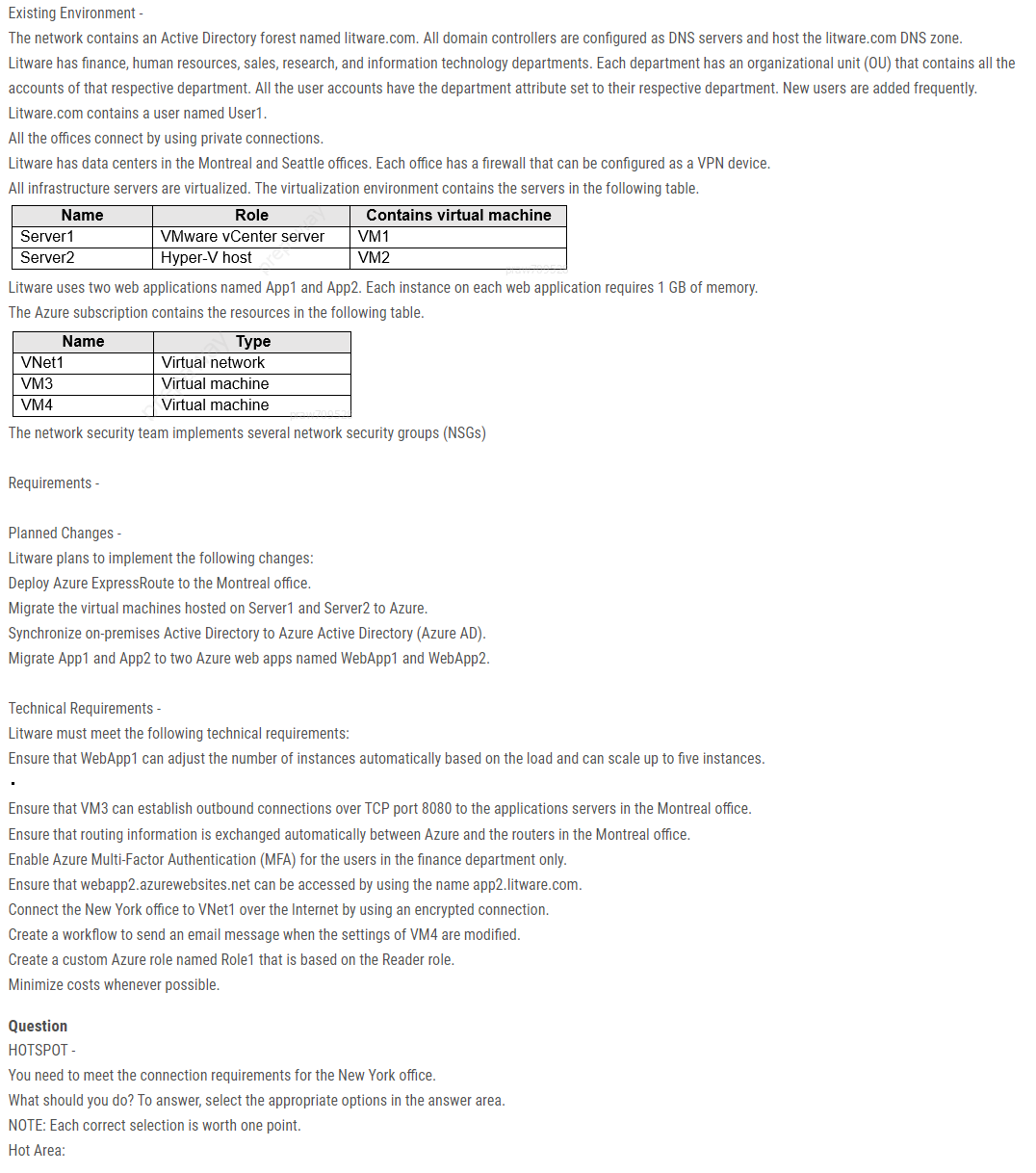
- A
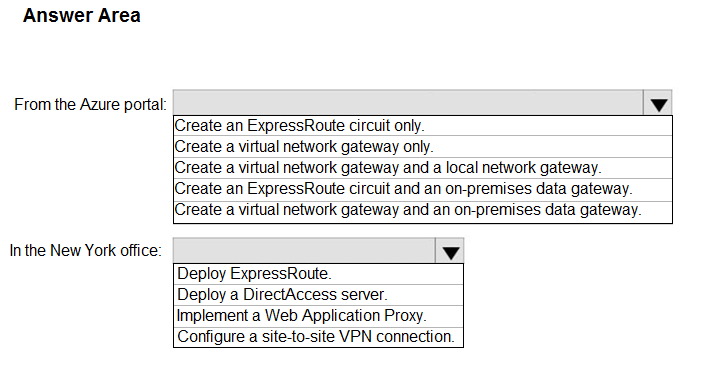
- BBox 1: Create a virtual network gateway and a local network gateway.
Box 2: Configure a site-to-site VPN connection.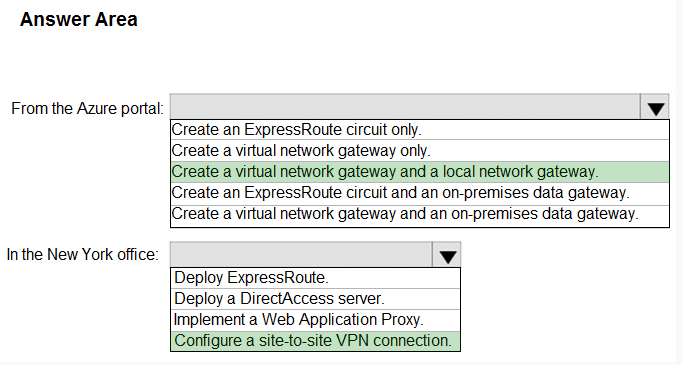
- A
32Question #32 Testlet 5 Pagina49 - 01
Introductory Info
Case study -
This is a case study. Case studies are not timed separately. You can use as much exam time as you would like to complete each case. However, there may be additional case studies and sections on this exam. You must manage your time to ensure that you are able to complete all questions included on this exam in the time provided.
To answer the questions included in a case study, you will need to reference information that is provided in the case study. Case studies might contain exhibits and other resources that provide more information about the scenario that is described in the case study. Each question is independent of the other questions in this case study.
At the end of this case study, a review screen will appear. This screen allows you to review your answers and to make changes before you move to the next section of the exam. After you begin a new section, you cannot return to this section.
To start the case study -
To display the first question in this case study, click the Next button. Use the buttons in the left pane to explore the content of the case study before you answer the questions. Clicking these buttons displays information such as business requirements, existing environment, and problem statements. If the case study has an
All Information tab, note that the information displayed is identical to the information displayed on the subsequent tabs. When you are ready to answer a question, click the Question button to return to the question.
Overview -
Contoso, Ltd. is a manufacturing company that has offices worldwide. Contoso works with partner organizations to bring products to market.
Contoso products are manufactured by using blueprint files that the company authors and maintains.
Existing Environment -
Currently, Contoso uses multiple types of servers for business operations, including the following:
File servers
Domain controllers
Microsoft SQL Server servers
Your network contains an Active Directory forest named contoso.com. All servers and client computers are joined to Active Directory.
You have a public-facing application named App1. App1 is comprised of the following three tiers:
A SQL database
A web front end
A processing middle tier -
Each tier is comprised of five virtual machines. Users access the web front end by using HTTPS only.
Requirements -
Planned Changes -
Contoso plans to implement the following changes to the infrastructure:
Move all the tiers of App1 to Azure.
Move the existing product blueprint files to Azure Blob storage.
Create a hybrid directory to support an upcoming Microsoft 365 migration project.
Technical Requirements -
Contoso must meet the following technical requirements:
Move all the virtual machines for App1 to Azure.
Minimize the number of open ports between the App1 tiers.
Ensure that all the virtual machines for App1 are protected by backups.
Copy the blueprint files to Azure over the Internet.
Ensure that the blueprint files are stored in the archive storage tier.
Ensure that partner access to the blueprint files is secured and temporary.
Prevent user passwords or hashes of passwords from being stored in Azure.
Use unmanaged standard storage for the hard disks of the virtual machines.
Ensure that when users join devices to Azure Active Directory (Azure AD), the users use a mobile phone to verify their identity.
Minimize administrative effort whenever possible.
User Requirements -
Contoso identifies the following requirements for users:
Ensure that only users who are part of a group named Pilot can join devices to Azure AD.
Designate a new user named Admin1 as the service admin for the Azure subscription.
Admin1 must receive email alerts regarding service outages.
Ensure that a new user named User3 can create network objects for the Azure subscription.
Question
HOTSPOT -
You need to recommend a solution for App1. The solution must meet the technical requirements.
What should you include in the recommendation? To answer, select the appropriate options in the answer area.
NOTE: Each correct selection is worth one point.
Hot Area:- A
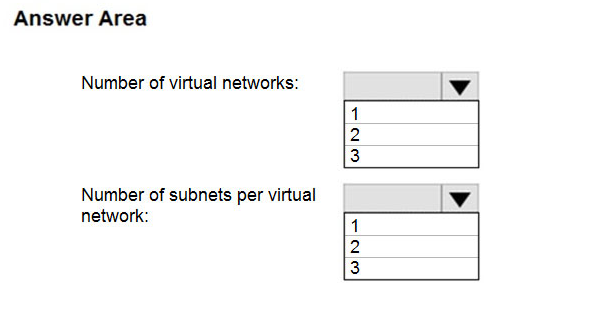
- BBox 1: 1
Box 2: 3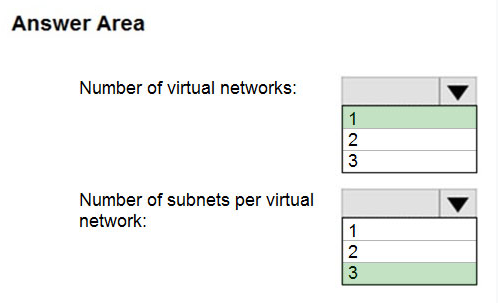
- A
33Question #33 Testlet 5 Pagina49 - 02
Introductory Info
Case study -
This is a case study. Case studies are not timed separately. You can use as much exam time as you would like to complete each case. However, there may be additional case studies and sections on this exam. You must manage your time to ensure that you are able to complete all questions included on this exam in the time provided.
To answer the questions included in a case study, you will need to reference information that is provided in the case study. Case studies might contain exhibits and other resources that provide more information about the scenario that is described in the case study. Each question is independent of the other questions in this case study.
At the end of this case study, a review screen will appear. This screen allows you to review your answers and to make changes before you move to the next section of the exam. After you begin a new section, you cannot return to this section.
To start the case study -
To display the first question in this case study, click the Next button. Use the buttons in the left pane to explore the content of the case study before you answer the questions. Clicking these buttons displays information such as business requirements, existing environment, and problem statements. If the case study has an
All Information tab, note that the information displayed is identical to the information displayed on the subsequent tabs. When you are ready to answer a question, click the Question button to return to the question.
Overview -
Contoso, Ltd. is a manufacturing company that has offices worldwide. Contoso works with partner organizations to bring products to market.
Contoso products are manufactured by using blueprint files that the company authors and maintains.
Existing Environment -
Currently, Contoso uses multiple types of servers for business operations, including the following:
File servers
Domain controllers
Microsoft SQL Server servers
Your network contains an Active Directory forest named contoso.com. All servers and client computers are joined to Active Directory.
You have a public-facing application named App1. App1 is comprised of the following three tiers:
A SQL database
A web front end
A processing middle tier -
Each tier is comprised of five virtual machines. Users access the web front end by using HTTPS only.
Requirements -
Planned Changes -
Contoso plans to implement the following changes to the infrastructure:
Move all the tiers of App1 to Azure.
Move the existing product blueprint files to Azure Blob storage.
Create a hybrid directory to support an upcoming Microsoft 365 migration project.
Technical Requirements -
Contoso must meet the following technical requirements:
Move all the virtual machines for App1 to Azure.
Minimize the number of open ports between the App1 tiers.
Ensure that all the virtual machines for App1 are protected by backups.
Copy the blueprint files to Azure over the Internet.
Ensure that the blueprint files are stored in the archive storage tier.
Ensure that partner access to the blueprint files is secured and temporary.
Prevent user passwords or hashes of passwords from being stored in Azure.
Use unmanaged standard storage for the hard disks of the virtual machines.
Ensure that when users join devices to Azure Active Directory (Azure AD), the users use a mobile phone to verify their identity.
Minimize administrative effort whenever possible.
User Requirements -
Contoso identifies the following requirements for users:
Ensure that only users who are part of a group named Pilot can join devices to Azure AD.
Designate a new user named Admin1 as the service admin for the Azure subscription.
Admin1 must receive email alerts regarding service outages.
Ensure that a new user named User3 can create network objects for the Azure subscription.
Question
You are planning the move of App1 to Azure.
You create a network security group (NSG).
You need to recommend a solution to provide users with access to App1.
What should you recommend?- ACreate an incoming security rule for port 443 from the Internet. Associate the NSG to the subnet that contains the web servers.
- BCreate an outgoing security rule for port 443 from the Internet. Associate the NSG to the subnet that contains the web servers.
- CCreate an incoming security rule for port 443 from the Internet. Associate the NSG to all the subnets.
- DCreate an outgoing security rule for port 443 from the Internet. Associate the NSG to all the subnets.
34Question #34 Testlet 6 Pagina50 - 01
Introductory Info
Case study -
This is a case study. Case studies are not timed separately. You can use as much exam time as you would like to complete each case. However, there may be additional case studies and sections on this exam. You must manage your time to ensure that you are able to complete all questions included on this exam in the time provided.
To answer the questions included in a case study, you will need to reference information that is provided in the case study. Case studies might contain exhibits and other resources that provide more information about the scenario that is described in the case study. Each question is independent of the other questions in this case study.
At the end of this case study, a review screen will appear. This screen allows you to review your answers and to make changes before you move to the next section of the exam. After you begin a new section, you cannot return to this section.
To start the case study -
To display the first question in this case study, click the Next button. Use the buttons in the left pane to explore the content of the case study before you answer the questions. Clicking these buttons displays information such as business requirements, existing environment, and problem statements. If the case study has an
All Information tab, note that the information displayed is identical to the information displayed on the subsequent tabs. When you are ready to answer a question, click the Question button to return to the question.
Overview -
Litware, Inc. is a consulting company that has a main office in Montreal and two branch offices in Seattle and New York.
The Montreal office has 2,000 employees. The Seattle office has 1,000 employees. The New York office has 200 employees.
All the resources used by Litware are hosted on-premises.
Litware creates a new Azure subscription. The Azure Active Directory (Azure AD) tenant uses a domain named litware.onmicrosoft.com. The tenant uses the
Premium P1 pricing tier.
Existing Environment -
The network contains an Active Directory forest named litware.com. All domain controllers are configured as DNS servers and host the litware.com DNS zone.
Litware has finance, human resources, sales, research, and information technology departments. Each department has an organizational unit (OU) that contains all the accounts of that respective department. All the user accounts have the department attribute set to their respective department. New users are added frequently.
Litware.com contains a user named User1.
All the offices connect by using private connections.
Litware has data centers in the Montreal and Seattle offices. Each office has a firewall that can be configured as a VPN device.
All infrastructure servers are virtualized. The virtualization environment contains the servers in the following table.
Litware uses two web applications named App1 and App2. Each instance on each web application requires 1 GB of memory.
The Azure subscription contains the resources in the following table.
The network security team implements several network security groups (NSGs)
Requirements -
Planned Changes -
Litware plans to implement the following changes:
Deploy Azure ExpressRoute to the Montreal office.
Migrate the virtual machines hosted on Server1 and Server2 to Azure.
Synchronize on-premises Active Directory to Azure Active Directory (Azure AD).
Migrate App1 and App2 to two Azure web apps named WebApp1 and WebApp2.
Technical Requirements -
Litware must meet the following technical requirements:
Ensure that WebApp1 can adjust the number of instances automatically based on the load and can scale up to five instances.
Ensure that VM3 can establish outbound connections over TCP port 8080 to the applications servers in the Montreal office.
Ensure that routing information is exchanged automatically between Azure and the routers in the Montreal office.
Enable Azure Multi-Factor Authentication (MFA) for the users in the finance department only.
Ensure that webapp2.azurewebsites.net can be accessed by using the name app2.litware.com.
Connect the New York office to VNet1 over the Internet by using an encrypted connection.
Create a workflow to send an email message when the settings of VM4 are modified.
Create a custom Azure role named Role1 that is based on the Reader role.
Minimize costs whenever possible.
Question
HOTSPOT -
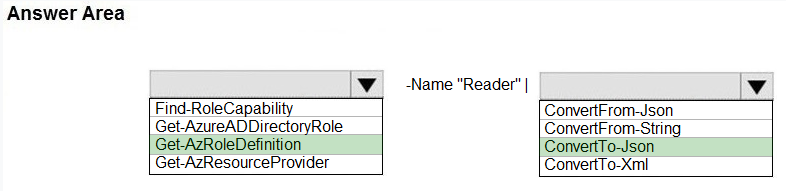
You need to implement Role1.
Which command should you run before you create Role1? To answer, select the appropriate options in the answer area.
NOTE: Each correct selection is worth one point.
Hot Area: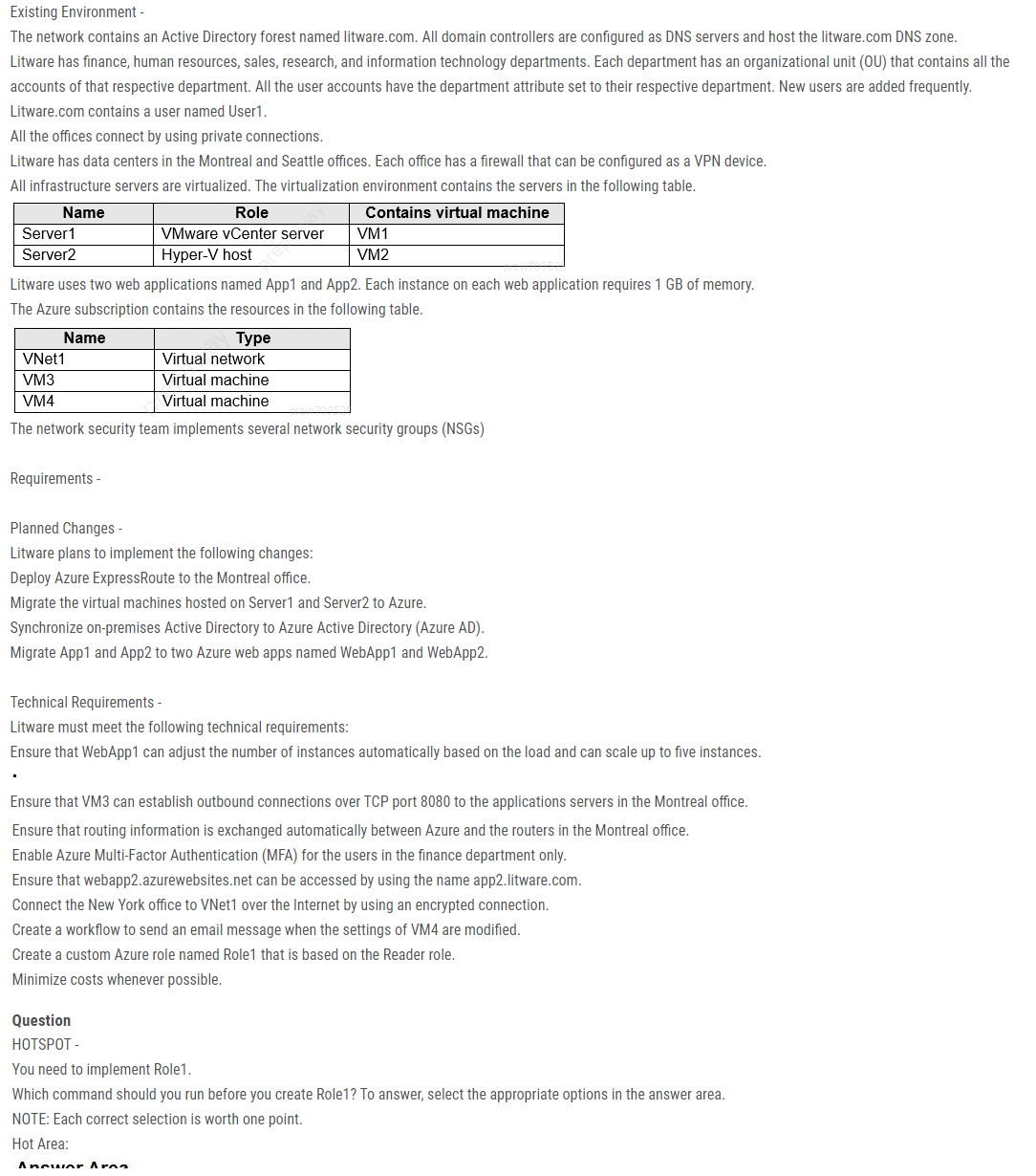
- A
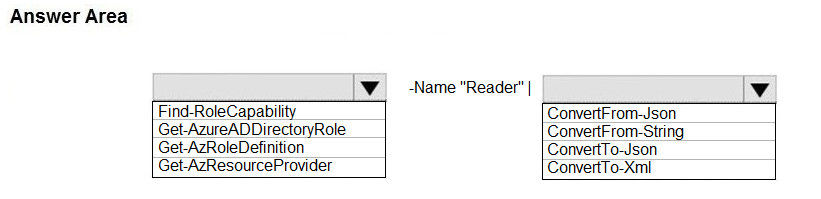
- BGet-AzRoleDefinition -Name "Reader" | ConvertTo-Json
- A
35Question #35 Testlet 6 Pagina50 - 02
Introductory Info
Case study -
This is a case study. Case studies are not timed separately. You can use as much exam time as you would like to complete each case. However, there may be additional case studies and sections on this exam. You must manage your time to ensure that you are able to complete all questions included on this exam in the time provided.
To answer the questions included in a case study, you will need to reference information that is provided in the case study. Case studies might contain exhibits and other resources that provide more information about the scenario that is described in the case study. Each question is independent of the other questions in this case study.
At the end of this case study, a review screen will appear. This screen allows you to review your answers and to make changes before you move to the next section of the exam. After you begin a new section, you cannot return to this section.
To start the case study -
To display the first question in this case study, click the Next button. Use the buttons in the left pane to explore the content of the case study before you answer the questions. Clicking these buttons displays information such as business requirements, existing environment, and problem statements. If the case study has an
All Information tab, note that the information displayed is identical to the information displayed on the subsequent tabs. When you are ready to answer a question, click the Question button to return to the question.
Overview -
Litware, Inc. is a consulting company that has a main office in Montreal and two branch offices in Seattle and New York.
The Montreal office has 2,000 employees. The Seattle office has 1,000 employees. The New York office has 200 employees.
All the resources used by Litware are hosted on-premises.
Litware creates a new Azure subscription. The Azure Active Directory (Azure AD) tenant uses a domain named litware.onmicrosoft.com. The tenant uses the
Premium P1 pricing tier.
Existing Environment -
The network contains an Active Directory forest named litware.com. All domain controllers are configured as DNS servers and host the litware.com DNS zone.
Litware has finance, human resources, sales, research, and information technology departments. Each department has an organizational unit (OU) that contains all the accounts of that respective department. All the user accounts have the department attribute set to their respective department. New users are added frequently.
Litware.com contains a user named User1.
All the offices connect by using private connections.
Litware has data centers in the Montreal and Seattle offices. Each office has a firewall that can be configured as a VPN device.
All infrastructure servers are virtualized. The virtualization environment contains the servers in the following table.
Litware uses two web applications named App1 and App2. Each instance on each web application requires 1 GB of memory.
The Azure subscription contains the resources in the following table.
The network security team implements several network security groups (NSGs)
Requirements -
Planned Changes -
Litware plans to implement the following changes:
Deploy Azure ExpressRoute to the Montreal office.
Migrate the virtual machines hosted on Server1 and Server2 to Azure.
Synchronize on-premises Active Directory to Azure Active Directory (Azure AD).
Migrate App1 and App2 to two Azure web apps named WebApp1 and WebApp2.
Technical Requirements -
Litware must meet the following technical requirements:
Ensure that WebApp1 can adjust the number of instances automatically based on the load and can scale up to five instances.
Ensure that VM3 can establish outbound connections over TCP port 8080 to the applications servers in the Montreal office.
Ensure that routing information is exchanged automatically between Azure and the routers in the Montreal office.
Enable Azure Multi-Factor Authentication (MFA) for the users in the finance department only.
Ensure that webapp2.azurewebsites.net can be accessed by using the name app2.litware.com.
Connect the New York office to VNet1 over the Internet by using an encrypted connection.
Create a workflow to send an email message when the settings of VM4 are modified.
Create a custom Azure role named Role1 that is based on the Reader role.
Minimize costs whenever possible.
Question
You need to recommend a solution to automate the configuration for the finance department users. The solution must meet the technical requirements.
What should you include in the recommendation?- AAzure AD B2C
- Bdynamic groups and conditional access policies
- CAzure AD Identity Protection
- Dan Azure logic app and the Microsoft Identity Management (MIM) client
Información
- Descripción
- Simulado de Certificação do Azure AZ-104.
- Autor
- gabriel ribeiro
- Idioma
- Português
- Visitas
- 305
- Etiquetas
- Valoración
- Aún sin valoraciones Valora este test