
Test
Microft Word
Crea una cuenta gratis para terminar este test
Guarda tu progreso y consulta tu resultado final.
¿Ya tienes cuenta? Inicia sesión
Preguntas del test (8)
1 Which of the following represents the most accurate list of names of tabs on the Ribbon?
- AThe Home Tab, Print Tab, Insert Tab, References Tab, Mailings Tab, Review Tab
- BThe Home Tab, Insert Tab, Page Layout Tab, References Tab, Mailings Tab, Review Tab, View Tab
- CThe Home Tab, Insert Tab, Print Layout Tab, References Tab, Envelopes and Labels Tab, Review Tab, View Tab
- DThe Home Tab, Insert Tab, Page Layout Tab, References Tab, Mailings Tab, Review and View Tab
2Study the screenshot of a Word Screen below. Diane accidentally knocked her mouse off the desk. When she looked at her screen, the Ribbon had disappeared as well as all the groups and function buttons. What should she do to get these back?
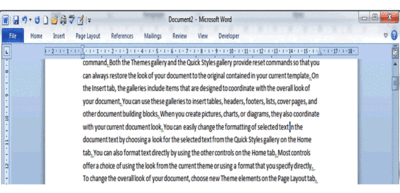
- ARight click on any of the tabs at the top of the screen and click on 'Minimize the Ribbon'.
- BClose Word by pressing the close button (the x in the top right-hand corner). The Ribbon will be restored when she reopens Word.
- CMaximize the Word window so that it fills the screen. The Ribbon will become visible again.
- DAll of the above options are correct.
3Study the orange circled icon in the screenshot below this question. What will happen when you use your mouse to click on this icon?
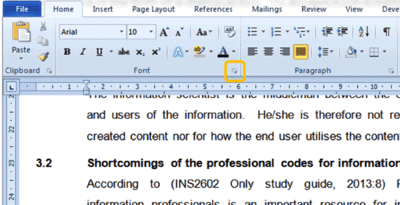
- ANothing will happen.
- BThe Font Group will detach from the Ribbon to form a separate dialogue box.
- CThis will launch the Font dialogue box containing more options pertaining to the group.
- DAll the functions in the Font group will be added to the Quick Access Toolbar for easy access.
4What are contextual tabs?
- AThey are tabs that contain functions allowing you to check the language and context of text in your document.
- BThey are tabs that appear only in the context of specific content that is inserted or selected.
- CThey are tabs that can be added to the Ribbon for when they are needed.
- DThey are tabs that can be created or customized for a business.
5What would you use the Mailings Tab for?
- ATo send email copies of your document to a list of recipients.
- BTo print address labels and envelopes
- CTo send the same letter to a list of people.
- DAll of the above options are correct.
6Which of the following is a method for adding buttons to the Quick Access Toolbar?
- ADrag and drop buttons from the Ribbon onto the Quick Access Toolbar.
- BClick the drop-down arrow located to the right of the Quick Access Toolbar and select "Add All".
- CRight click a button (or function) on the Ribbon and select "Add to Quick Access Toolbar".
- DNone of the above options are correct.
7Study the screenshot below this question. What are the vertical lines in-between some of the buttons on the Quick Access Toolbar called and how are they inserted?
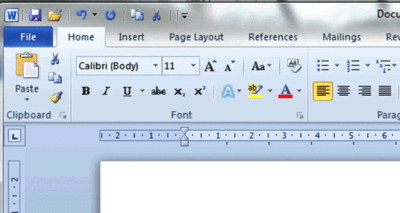
- AThey are called separators. Insert them from the"'Modify the Quick Access Toolbar"' dialogue box.
- BThey are called dividers. Insert them from the"'Modify the Quick Access Toolbar"' dialogue box.
- CThey are called separator lines. Insert them by right-clicking on the Quick Access Toolbar and selecting “Insert Line Break”.
- DThey are called division lines. Insert them by grouping items on the Quick Access Toolbar together by moving them up or down.
8How do you remove any unwanted button from the Quick Access Toolbar?
- ASelect the button and click delete on your keyboard.
- BRight click the button and select “Remove from Quick Access Toolbar”.
- CClick the drop-down arrow next to the Quick Access Toolbar and un-tick the box next to the button you wish to remove.
- DSimply click and drag the button off the Quick Access Toolbar.
Información
- Descripción
- AS level Microsoft Word Test sobre Microft Word, creado por Neville Solomon el 25/11/2016.
- Autor
- Neville Solomon
- Idioma
- English
- Visitas
- 45
- Etiquetas
- Valoración
- Aún sin valoraciones Valora este test