
20054476
Description

Flashcards by Joshua Hall, updated more than 1 year ago

|
Created by Joshua Hall
over 6 years ago
|
|
| Question | Answer |
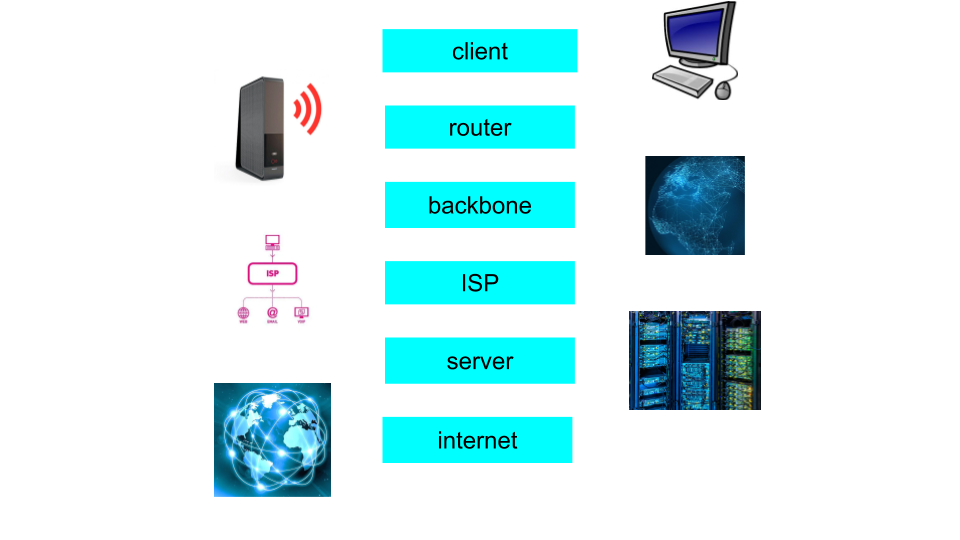
| server | the server is where the data is stored and when you join you can access the data. |
| client | the client is the computer that is receiving the data from the internet/server. |
| router | this is the thing that sends the information/data to the other device and directs the route. |
| backbone | the backbone is a big cable which is normally fibre optic cable and connects more than one device in the core of the internet. |
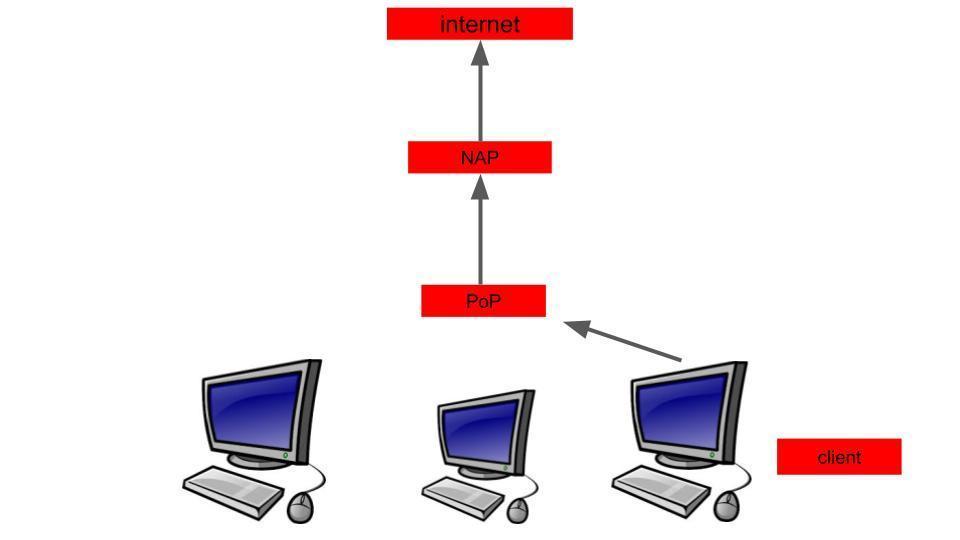
| ISP network diagram | |
| connecting to the internet | |
| ISP | this is the internet service provider which can be businesses like BT, virgin, SKY. |
| point of pressence | this is a point that you can access the internet from, big companies like BT may have a few. |
| network access point | a network access point is where different networks interconnect, like your home network onto the internet. |
| advantage dial up connection | you can use this without broadband, uses existing telephone wires. |
| disadvantages of dial up connections | a disadvantage is that old technology isnt as good service and it is slower than the other methods. |
| advantages of broadband | an advantage is that you will have better service and its faster than dial up. |
| disadvantage of broadband | the disadvantage of this is that it is wired so you cant move around, another problem is that broadband isn't available in lots of rural areas. |
| advantage of wireless | not fixed to the device so you can move around, it can be used whenever wireless internet is available. |
| disadvantages of wireless | a disadvantage of this can be that you need wireless internet to use so you cant use it if there is no wireless internet connection. it can also be less secure and slower than wired. |
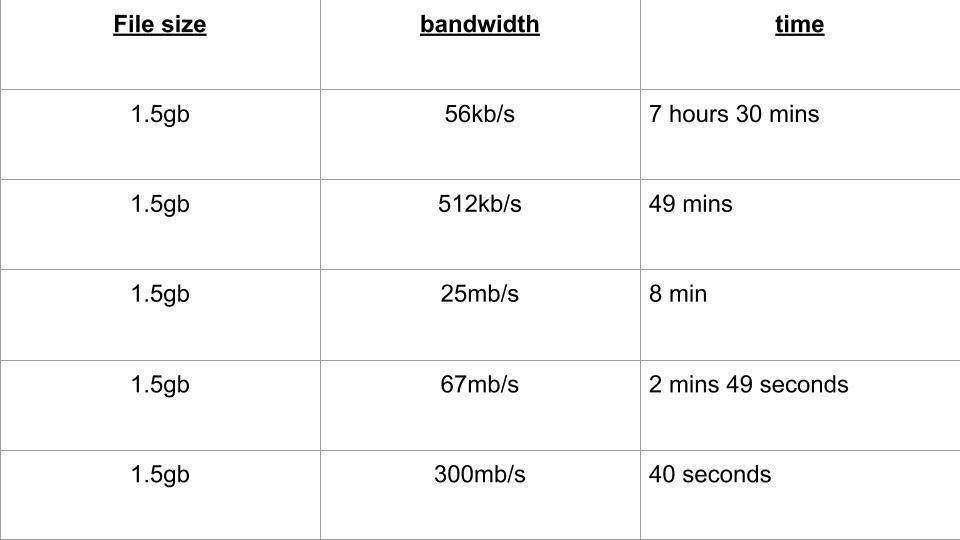
| bandwidth | |
| HTTP | this is hypertext transfer protocol which handles loading the page and downloading something, and pretty much handles everything that we do on there. |
| HTTPS | this means that it is secure and websites like online banking and anything that holds your details will have this. |
| FTP | this is file transfer protocol and this deals with the movement of files and sends them where you want, like from the website onto your own device etc. |
| TCP | tcp stands for transmission control protocol and it breaks up data in packets to be sent and then reassembles them when they are there. |
| IP | this stands for internet protocol and it handles the routing of the packets, sending and receiving packets over the net |
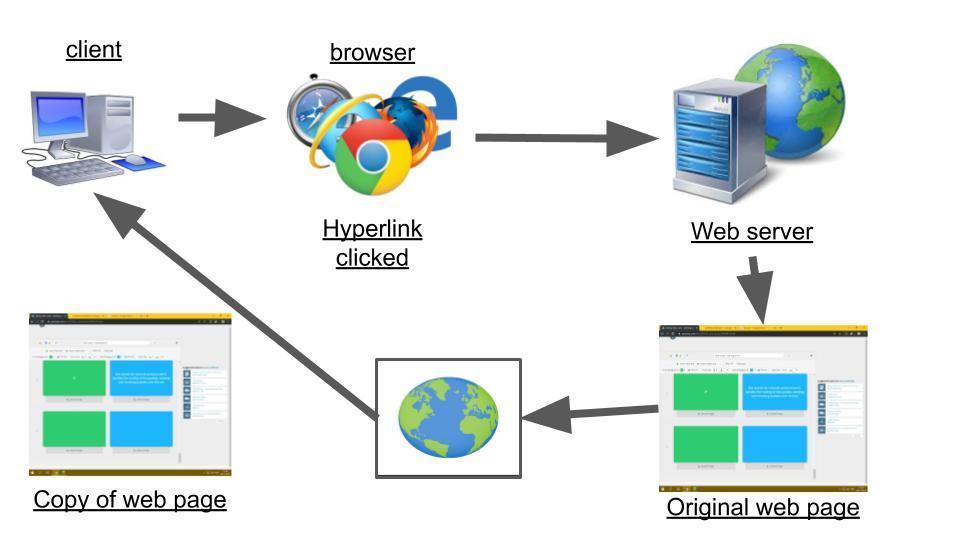
| hyperlinks | |
| browsers | browsers are computer programs that take you to web pages and allows you to view web pages. |
| web server | web servers are the place that all the data is saved to from the web and it is a physical device that holds this information. |
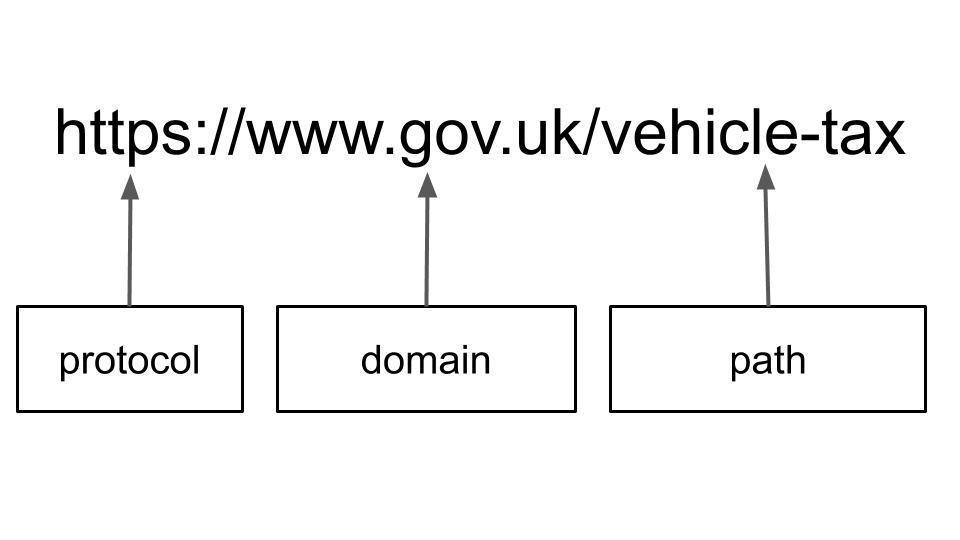
| URL's (uniform resource location) |
Image:
Idek (binary/octet-stream)
|
| protocol | this tells the browser what to do with the URL |
| domain | this is the name of the website, so it knows what website to go to. |
| path | this tells them the specific web page to be sent to. |
| client side | the person that uses the certain device to search something on the web. |
| search engines | this is the thing that gives them access to the data from the website. |
| server side | operations given from the client |
| spider/web crawler | this is a bot that searches/browses the web for the purpose of web indexing, it looks for new pages as well and updates the server database if there is a new website. |
| bcc | bcc is shortened for blind carbon copy which is used to send to multiple people and it makes sure that they dont know who else has relieved the e-mail |
| cc | this is carbon copy and it is when you send an e-mail to a number of people and they can see who else it was sent to. |
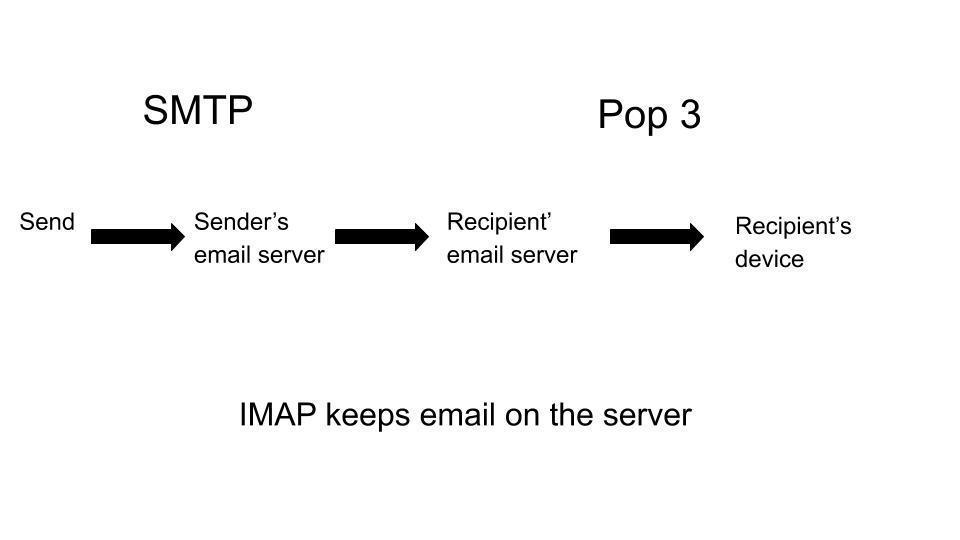
| how an e-mail is transferred | |
| SMTP | simple mail transfer protocol is a communication protocol that sends outgoing e-mails to the e-mail server and if its not sent, it will keep trying until its done. |
| IMAP | Internet Message Access Protocol is where it receives web mail an d then allows you to access the mail from the server when you log on so you can get it anytime anywhere. |
| POP3 | this is post office protocol 3 which allows you to download e-mails from the server and then delete them off the server. |
| web mail | web mail are services like gmail and Hotmail, the e-mails stay on the server, can be accessed on different devices, e-mails are backed up and you must have wifi to access the mail. |
| e-mail client | this is where e-mails are downloaded to a client machine and you dont need wifi to connect and has more features than web mail but if the computer crashes the e-mails can be lost. |
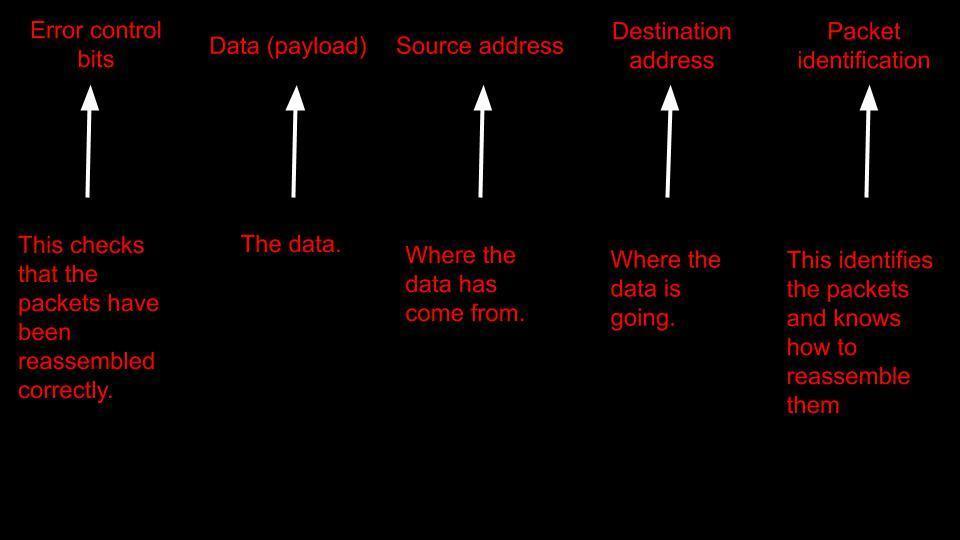
| breakdown of data | |
| packet switching | packet switching is where data is broken up into small packets then sent through a network and reassembled when it reaches the destination. |
| advantages of packet switching | the advantages of packet switching is that they efficient as they are sent down routes where there are no broken areas so it cant go missing. |
| disadvantages of packet switching | the disadvantages of packet switching is that if one packet is missing or corrupted the whole file wont be able to be received properly |
| codecs | codecs can be used by VoIP so that it speeds up the transmission of the audio and video by encoding and decoding. |
| simplex | a simplex is a transmission mode that sends signals in one direction at a time like a TV remote. |
| full duplex | this is a transmission mode that sends signals in both directions at the same time like how you would communicate using a phone by calling someone but only one person. |
| half duplex | this is another transmission mode that goes in both directions but only at one time, not simultaneous. |
| serial transmission | the serial is when bits of data is transferred one at a time over a wire. |
| parallel transmission | this is when bits of data are sent simultaneously and a whole byte can be transferred at the same time. |
| advantage of serial | an advantage of this is that it is effective over long distance. |
| advantage of parallel | an advantage of parallel is that it is faster than serial as more than one bit of data is being transferred at the same time. |
| disadvantages of serial | a disadvantage of serial is that it is complex as it has to break the data into small bits then send them. |
| disadvantages of parallel | a problem with parallel is that it is only effective over small distance like 5 meters. |
| unshielded twisted wires | this is when there are normal wires that dont have much protection around them and can interfere with the other wires nearby therefore not getting signal. |
| shielded twisted pair | this is a wire with a lot of protection around it so that it doesn't interfere with other cables nearby. |
| advantage of unshielded twisted wire | an advantage is that they are a lot cheaper and reliable. |
| infrared | this is a way of sending data without using cables it does this by using infrared lights which is high frequency light. |
| uses of infrared | uses of infrared are things like TV remotes controllers for games, wireless keyboard and wireless mouse. |
| advantages of infrared | an advantage is that they are reliable to use. |
| disadvantages of infrared | they dont have a long range and they have to be in the line of sight to whatever they are connecting to and might suffer from interference. |
| microwave | this uses waves by sending short wavelengths to transmit the data. |
| uses of microwave | some of the uses can be things like wireless headphones and speakers etc. |
| advantages of microwave | an advantage of Bluetooth is that they are good for medium ranges. |
| disadvantages of microwave | a disadvantage of Bluetooth is that they can get interference from other devices like other Bluetooth devices in your home. |
| satellites | the satellites are in space and orbit around the earth to relay data between different points of the earth. |
| uses of satellites | the uses of satellites are things like sat navs and gps and TV signals, radio communication. |
| advantages of satellites | an advantage of satellites are that they are good for long distance signal transmissions. |
| disadvantages of satellites | dis advantages of satellites are that they are extremely expensive to build and also expensive to send up into space. |
| network interface card | also known as NIC is used to let the computer connect to the network and it cant connect without one. |
| client side processing | this is when you are viewing something on a web page and when you are interacting with their web page, it is run by using the client side script. there is also a special code in the client script. |
| server side processing | this means processing data at the back end of the web page, this is run by using scripts and server side language like PHP, this happens when you have done something/interacted with the web page. |
| use of client side | this comes into use when you hover over an image and it will show the hover effect and when you can pause or change the photo (usually on shop websites) |
| use of server side | it is used to send the data like a form you have filled out or something you have searched for. |
| advantage of client side | the security is better on the client side and the speed is quicker as it does not have to sen data over the network. |
| advantages of server side | some of the advantages are that it is efficient and there is no browser involved plus the servers are big powerful computers therefore reliable. |
| disadvantage of client side | some of the disadvantages are that you have to rely on your own computer as you are not using their servers and they dont know how there page will look on your screen as they are different browsers. |
| disadvantage of server side | some of the disadvantages of the server side is that it could get overloaded therefore crashing and the security isn't as good as client side this is because it has to go through the internet, being exposed to more threats. |
| database | this is a structured collection of data, this is rows of data about a number of people. |
| table | a table stores a set of data about all the students in the school. |
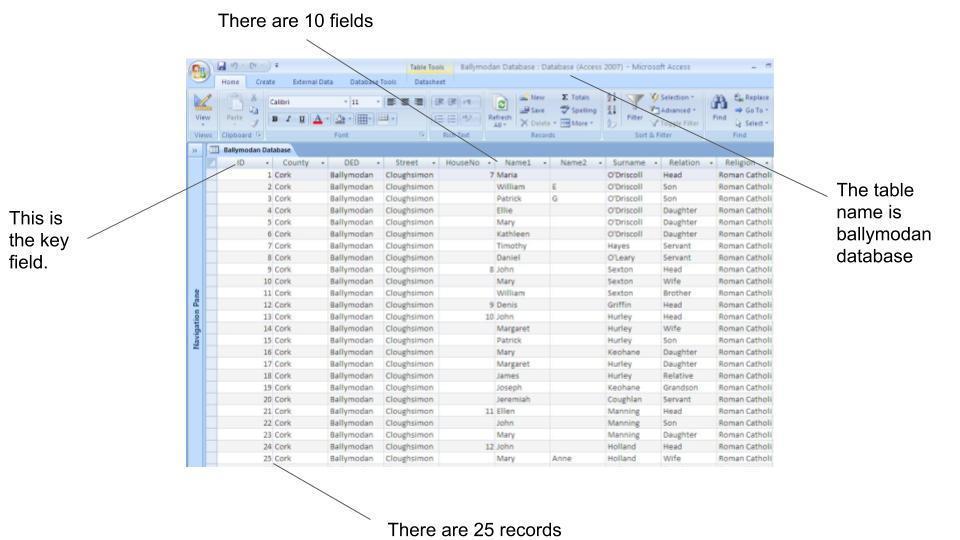
| a record | this is one row that stores data about a single item or person. |
| a field | these are the columns in the table that include data like date of birth, surname and forename. |
| primary key | this is a special field with a unique identifier like a pupils ID |
| foreign key field | a foreign key field is where the number comes up in another table and its not really product data so it becomes foreign key field. |
| relationships | this is where your records is in link with a few tables and they come in three ways: one-to-many, one-to-one and |
| text | this can be used to save data like where they come from and address or name. |
| numeric | this can be used to save data like your phone number or card pin. |
| date/time | this sort of data is used to save things like date of birth. |
| Boolean | this can be data that is answered with yes or no and have questions like do you work. |
| key field diagram | |
| online database | this is just a database that runs online and can be accessed anywhere in the world where there is WiFi |
| local database | this is just a normal database that helps inside a network to keep it secure. |
| DBMS | this is called database management system and is a software that allows you to create and use your own database. |
| SQL | this is short for structured query language and this is the language that is used by the DBMS to actually create and search a database. |
| <B> | this means bold text |
| <i> | this is normally to indicate a technical term, phrase for another language, a thought. |
| <p> | this is used to create a paragraph. |
| <img> | this is used to create images |
| <a href> | this is used to link to another website. |
| <lis> | this is used to show things as a list. |
| <ul> | this stands for a list that isnt in order |
| <html> | this is used to tell the computer what language you are using. |
| <body> | this is to show that you are making a website on a page. |
| <H1> | this is to make a heading. |
| <td> and <tr> | these are both used in html language to make titles for a web page |
Want to create your own Flashcards for free with GoConqr? Learn more.