
38888087
Description

Flashcards by Aydin Keyf, updated more than 1 year ago

|
Created by Aydin Keyf
over 2 years ago
|
|
| Question | Answer |
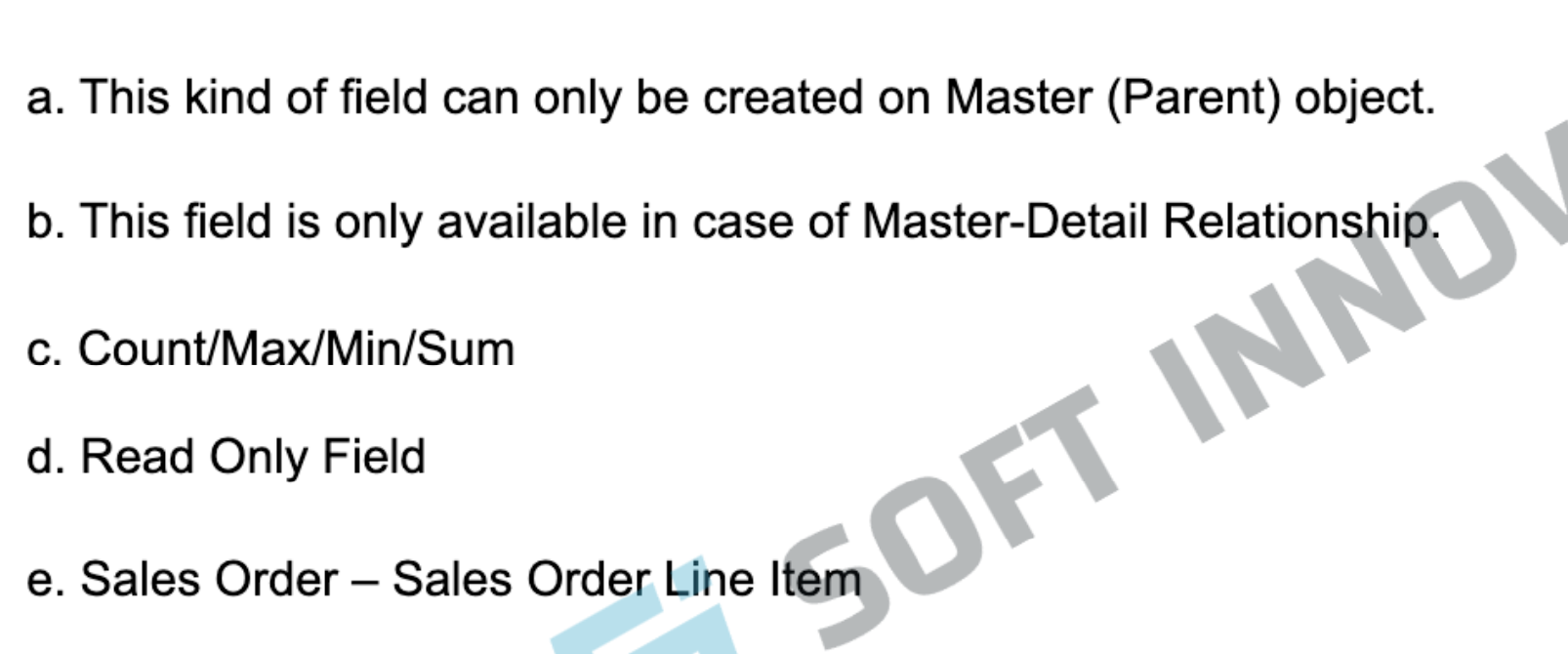
| 1) What is Rollup Summary Field? | |
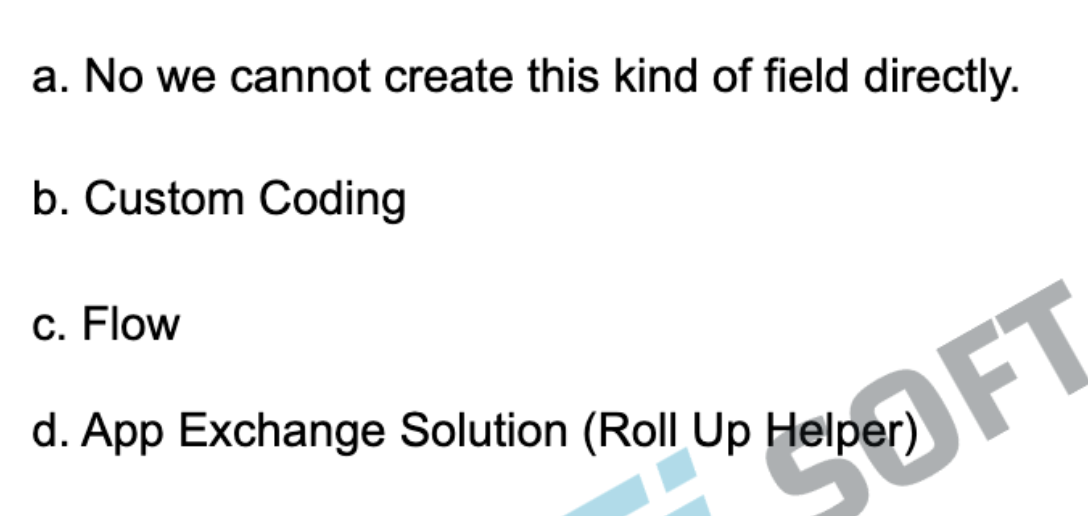
| 2) How can you create the Roll Up Summary types of fields in Lookup Relationship? | |
| 3) PROD vs Sandbox | a. PROD is a live environment where any kind of changes may impact your real business. b. Sandbox is like a playground or testing environment which can be used for Dev, QA, UAT or user training. |
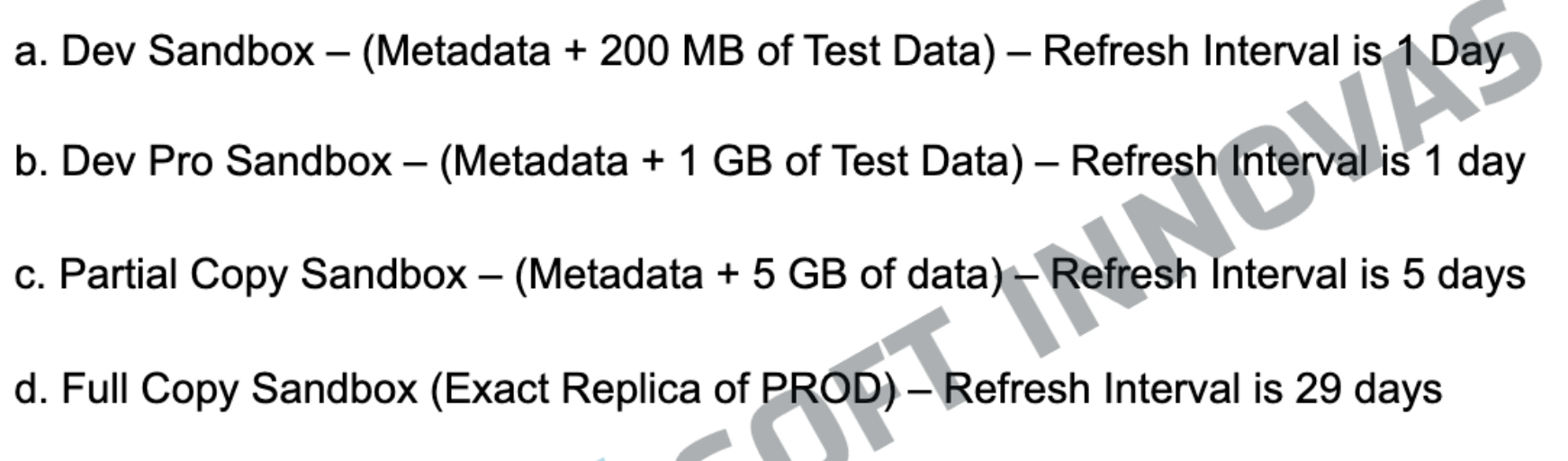
| 4) Types of Sandbox | |
| 5) How many types of editions are available in Salesforce? | a. Group/Essential Edition b. Professional Edition c. Enterprise (Most Used) Edition d. Unlimited Edition |
| 6) What is Object & Field & Record? | a. Object is like a database table b. Fields are like table's column c. Rows are considered as records. |
| 7) How can we create 1000 records in the Opportunity object? | a. We cannot use the data import wizard. b. We can use the data loader to upload these records. c. 3rd party application like workbench. |
| 8) How can we create 1000 records in the Lead object? | a. Data Import Wizard (Lead, Account, Contact, Campaign Members and Solution &all the custom objects) b. Data Loader c. 3rd Party Application |
| 9) How can we create 1M Accounts & 10M Contacts records? | a. Data Import Wizard b. Data Loader |
| 10) How many tools are available in the market for Data Import? | a. Data Import Wizard b. Data Loader c. 3rd Party tools (Like workbench, Salesforce Inspector, etc.) |
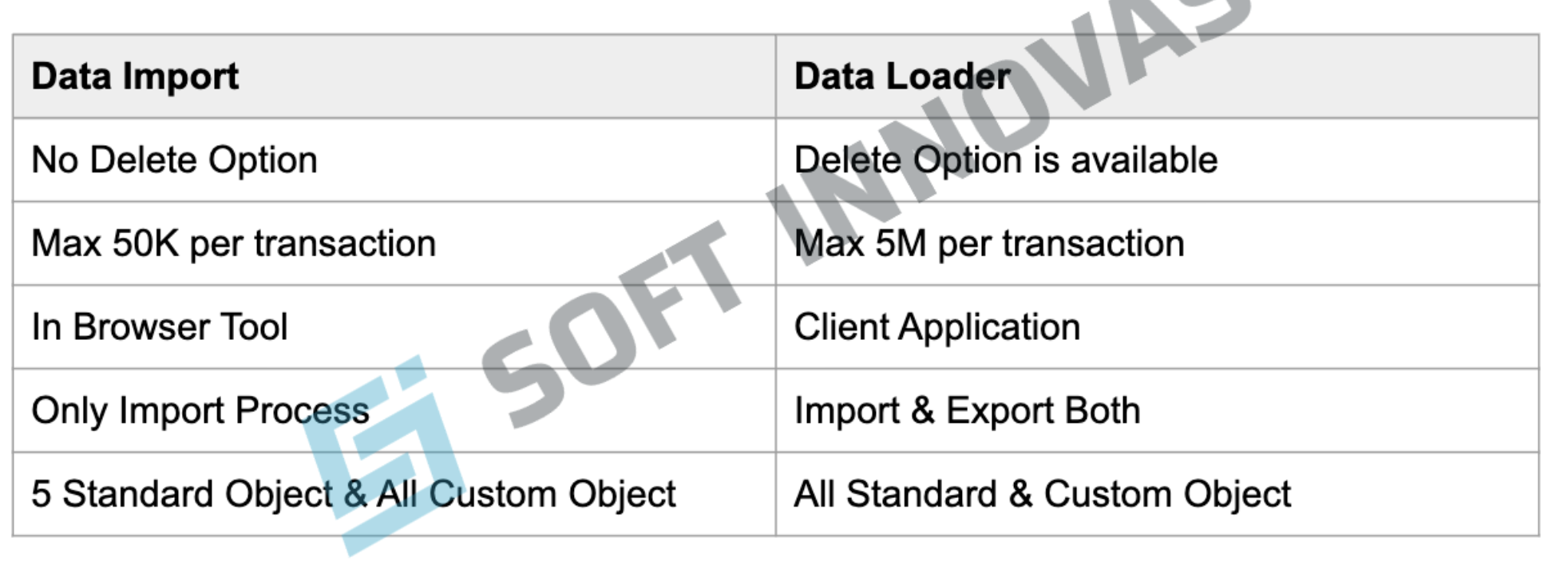
| 11) Difference Between Import Wizard and Data Loader | |
| 12) What is Relationship in Salesforce? | Connection between 2 objects - which works like a foreign key in database tables. In Salesforce, we call it as a Relationship Field. And we always create this relation field on child object. |
| 13) Types of Relationship is Salesforce | a. Master-Detail b. Lookup c. Many to Many d. Self e. Hierarchical (User and role) |
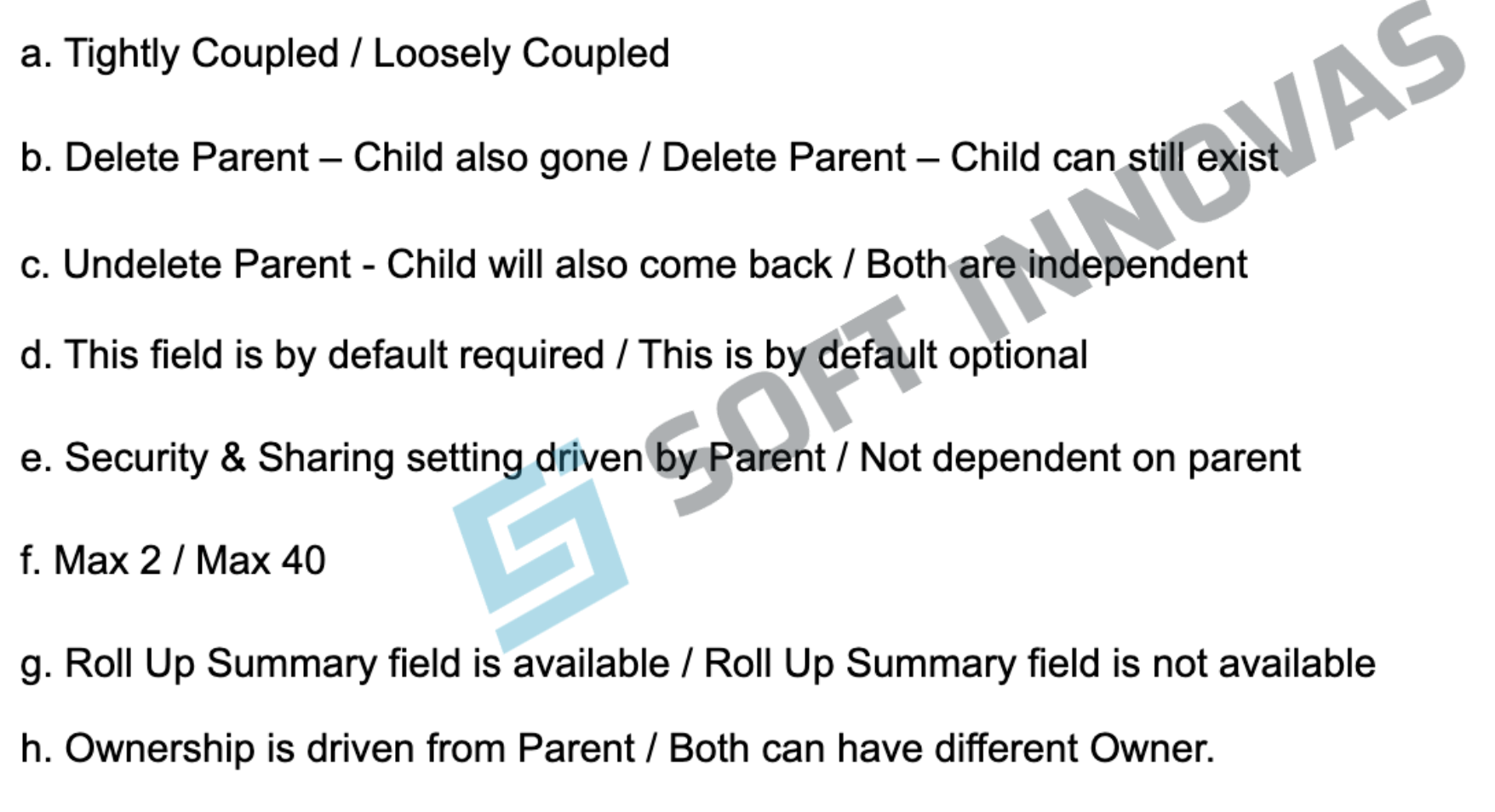
| 14) Master-Detail Vs Lookup | |
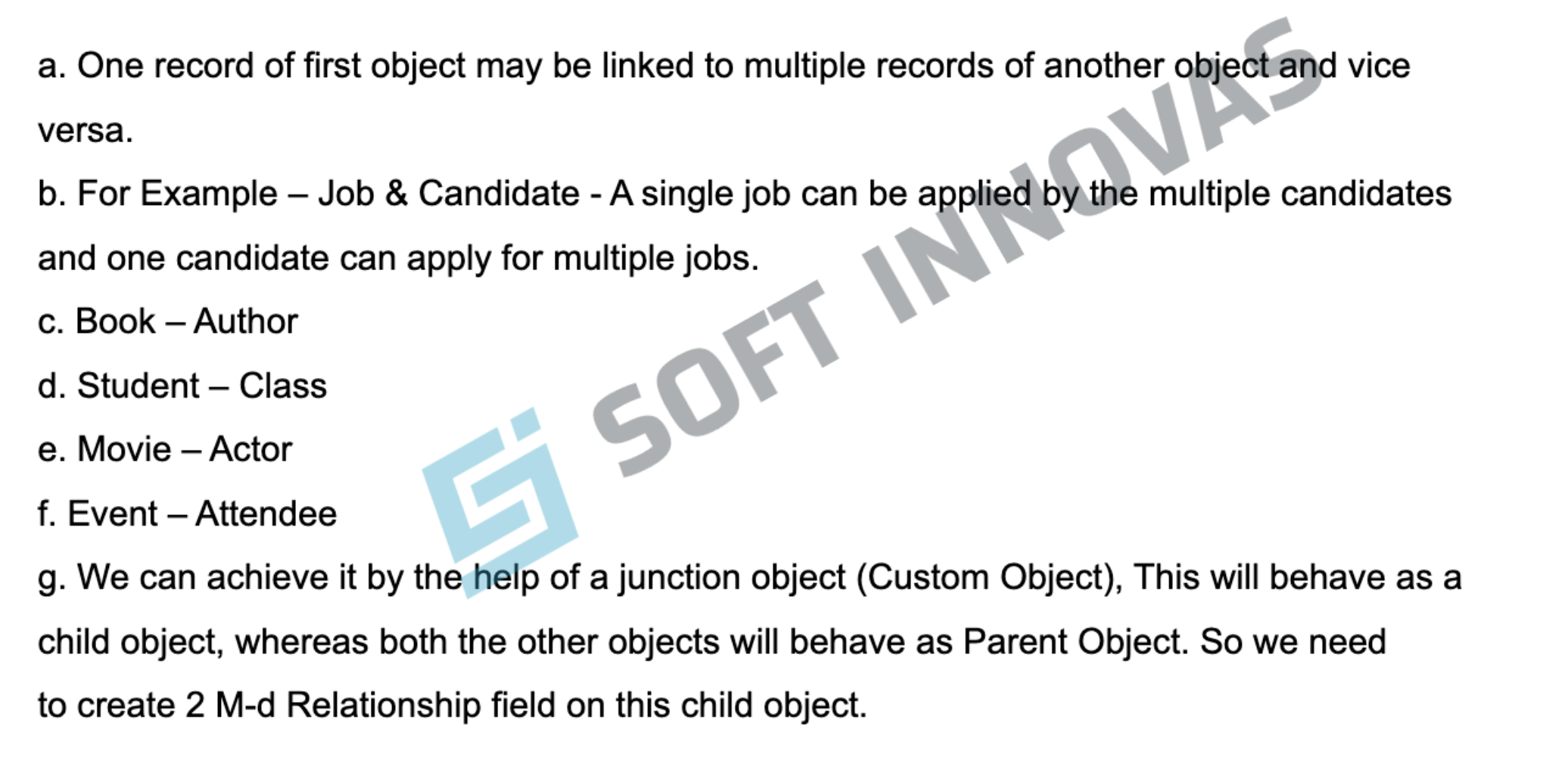
| 15) What is Many to Many? | |
| 16) Self-Relationship? | a. It is a lookup relationship of one object with the same object. b. For Example, In a student object, if we want to track that any student was referred by whom, that time we can create that kind of field. |
| 17) Hierarchical? | a. It is a special kind of self-relationship, which is available only for the user object. b. We want to track the Hiring manager for every employee (User), that time we can create such field on the User Object. |
| 18) What is the relationship available between Account & Opportunity? | a. These objectshave hybrid kind of relationship, which has both properties (M-D & Lookup) b. For example, you can create an opportunity without linking to any Account. (LookUp) c. You can create Roll Up Summary field on Account to summarize the Opp Record. (M-D) |
| 19) What is Report & Its Format Type? | a. Tabular (Most basic table with rows of records which can give you only grand total) b. Summary (Most Widely Used, Allow grouping on the row, Sub Total &Grand Total) c. Matrix (Most Complex Report, Allow Grouping on the rows &column both) d. Joined (Connect multiple reports together which may or may not be linked to each other, Maximum 5 blocks can be added in a single joined report). |
| 20) A user is not able to create the report chart on a report, what could be the possible reason? | a. It means, they are using either Tabular or Joined report, because Report Chart is only supported for Summary & Matrix report. |
| 21) Difference between Profile & Permission Set | a. A single user can have only 1 profile at a time / A single User can have multiple Permission sets at a time. b. Profile is mandatory for Every User / Permission set is optional for the user. c. Profile decides that what a user can see and do in salesforce / Permission set is used to enhance the access provided by Profile for a particular user. d. For example, one of the Marketing User needs to work as a Sales Person for few days, for that he needs to have access for 2 extra object, in that case we wil create a permission set and put the access of those 2 extra objects and assign it this marketing user. |
| 22) Difference between Profile & Role | a. Profile controls the object & field security, it's mandatory for every user b. Role is optional, Role is used to enhance the Record level access for managers. This always used to enhance the access on top of the OWD settings. |
| 23) What is OWD? | a. Baseline level of access of records of an object. b. Private / Public Read Only / Public Read Write c. Organization Level Security >>> Object Level Security >>> Field Level Security >> Record Level Security |
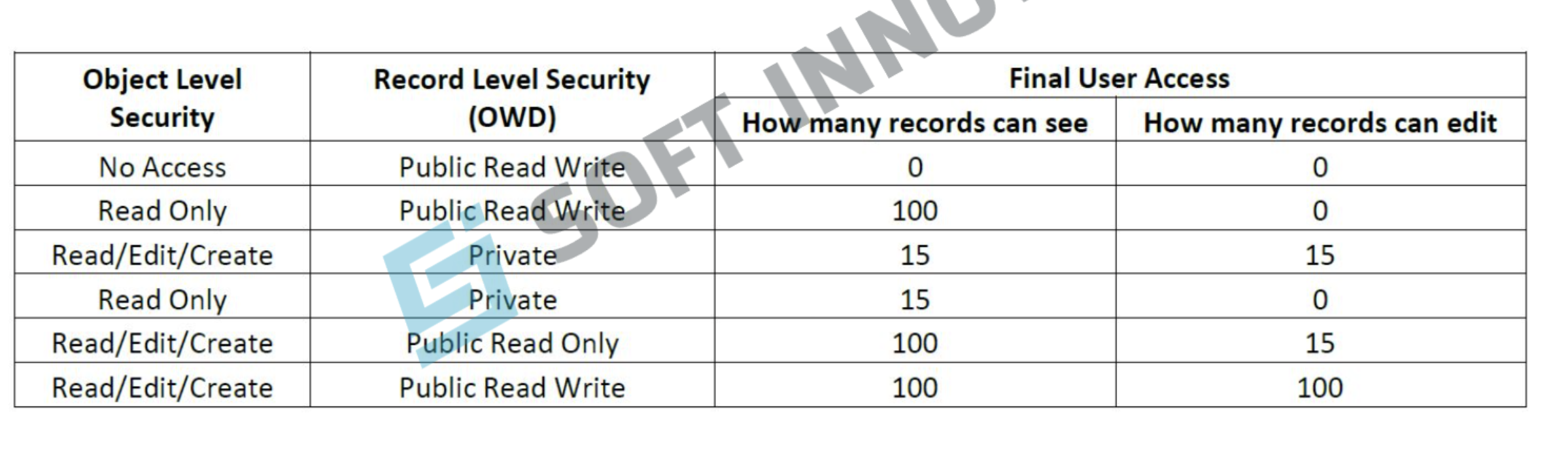
| 24) If my Object Level Access in Read Only and OWD is set as Public Read/Write, what will be the final User Access for this Obiect? | a. Read Only |
| 25) What is sharing rule, why do we use it? | a. Whenever A user/group of user needs the access of records, which we can not share with Role hierarchy, that time we use sharing rules. |
| 26) How many types of sharing rule we have in salesforce? | a. Criteria Based (Share the Opportunity, where Stage = "Closed Won" with Project Manager) b. Owner Based (Share the records of Sales Executive with Project Manager) |
| 27) What type of access we can provide through Sharing Rules? | a. Public Read Only & Public Read/Write |
| 28) If my OWD is Public Read Write, Do I need Role Hierarchy &Sharing Rule? | No, Because Public Read Write is the highest level of access in terms of records. |
| 29) What is difference between Role Hierarchy &Sharing Rule | a. Both of these are used to enhance the record level access, which we got from OWD. b. Role hierarchy is used to enhance the record level access in vertical direction, which means a manager will be able to view/edit the records owned by their sub-ordinates. c. Whenever it is not possible to provide the record access via role hierarchy, that time we need to use sharing rule. Lateral Access. |
| 30) How we can share a record manually? | a. First we need to go to record b. Click on Sharing button c. Choose that with whom you want the share the record d. Choose the access level |
| 31) If my OWD is Public Read Write, Do I need the sharing button? | No |
| 32) What is data export? | a. Extracting the data from Salesforce for some external use or for backup purpose. b. We can use below tools for data export i. Data Export Wizard i. Data Loader li. Any other 3rd part tool (like Workbench) |
| 33) Difference between Record Type and Page Layout. | a. Page layout controls the visibility of multiple things like Fields/Related List/Actions/Buttons/Custom Links b. you can assign only one-page layout per object per profile c. Suppose we have multiple business processes for a single object, where you need to show different fields and different picklist values for the picklist/multi-select picklist. That time we use record types. For example - Commercial Property & Residential Property. d. You can one-page layout per object per profile per record type. |
| 34) What is field dependency? | a. When one field's available values with be drive from the another field's selected field value. For example - Country - State |
| 35) Can Multi-select picklist field be on Controlling Side? | a. No, because this kind of field can only be on dependent side. |
| 36) Can Checkbox field be on Dependent Side? | a. No, because checkbox can only be on controlling side. |
| 37) What is cross object formula field? | a. It is also a read only field. b. It flows the data from Parent to Child Object. c. We can create this kind of field in case of M-D &Lookup both. For Example- Branch Object (HOD Name, HOD Phone) >>> Student () |
| 38) With Cross object formula field, we can reference fields from objects that are up to how many relationships away??? | 10 |
| 39) What is compact page layout and how many max fields we can have in compact layout? | a. We use compact layout to show the key field values on the highlight panel in lightning experience and in Mobile App. b. We can have up to max 10 fields on compact layout |
| 40) Compact Layout does not support which field Types? | a. Text Area b. Long Text Area c. Rich Text Area d. Multi-Select Picklist |
| 41) What is validation rule? | a. Validation rule is used to maintain the quality of the data/records in Salesforce. With the help of validation rule, you can avoid any kind of junk from the database. b. In Validation Rule, we have error condition, Error Message &Error Location. c. SSN should not be less or greater than the 9 digit. i. LEN(SSN_C) != 9 i . L E N ( S S N C ) > 9 or L E N ( S S N C ) <9 d. Annual Revenue can never be negative. i. AnnualRevenue < 0 |
| 42) What is Action in Salesforce and its type? | a. With the help of actions we can do more things in the salesforce, like create a new record or update an existing record. b. We have 2 types of actions in salesforce: 1. Global Actions - These actions can be accessed anywhere from the salesforce. We can use action layout for certain important field to create a new record. 2. Object specific Actions - These actions can be accessed from the specific object record, we use these actions to create a new (child record) and update the existing same record. |
| 43) Can we delete a User from Salesforce? | No, we can deactivate or freeze the user. |
| 44) Difference between Deactivate & Freeze? | a. We need to deactivate the user as a final goal, as after deactivating the user license will get released and we can use it for any other employee. b. Due to couple reason, if we are not able to deactivate the user instantly, that time we freeze the user and resolve the issues. If you freeze the user, your user license will not get released. |
| 45) Why do we freeze the user? | a. May be this user has some records/email alert/Approval process assigned to him/her. b. User's name has been used in any custom hierarchical field, either remove their name from that field or replace with some other name. |
| 46) What is App? | a. Collection of the tabs, which works together as a function like sales, Marketing or support. b. Standard app & Custom App. c. We cannot update the label, description &logo in the standard apps. d. Standard navigation app & Console navigation app. |
| 47) What is Company Profile/Information? | a. Company Name b. Address c. Fiscal Year d. Default Currency e. Default Time Zone f. Default Locale g. Number of licenses h. Storage information (Data space or file space) i. Salesforce Edition j. Salesforce Org ID |
| 48) Can 2 users have the same profile? | Yes, A single profile can be assigned to multiple Users. |
| 49) Can a single user have multiple profiles? | No, A single user can have only one profile at a time. |
| 50) Can a single user have multiple permission sets? | a. Yes, We can assign multiple permission sets to a single user. b. User &Permission sets have many to many relationship, and permission set assignment is working as Junction Object. |
| 51) Can we edit the value of a formula field/Roll Up Summary Field/Auto Number Fields directly? | No, because all of these fields are read only. |
| 52) What is workflow Rule? | a. It is a declarative automation tool, which help us to automate various business processes, which are being executed manually as of now. b. It supports 4 different actions: i. Email Alert ii. Field Update i . Create Task iv. Outbound Message |
| 53) What is Process Builder? | a. It is also a declarative automation tool, however more advanced than workflow rule. b. It supports below actions: 1. Email Alert 2. Create a new record 3. Field update 4. Flow 5. Apex 6. Process 7. Chatter Post 8. Submit for Approval 9. Quick Action |
| 54) Difference between WF & PB? | a. Outbound Message / No Outbound Message b. Create only task /Create record for any object c. Order of execution cannot be defined / Can Control the order of execution d. Support 4 Actions / Support 10 Actions e. No Visual Representation / Good Visual Representation f. Only one Criteria Node / Supports multiple criteria nodes g. Can Update Only Same or parent object record / Can update any related record. |
| 55) What is the difference between Immediate actions and time dependent Actions? | a. Immediate Action - These actions should run immediately after meeting the criteria. For Example, If any attendee has registered for an event, they should get a confirmation email instantly. b. Time Dependent Action - In this action, we want first for a specific time and then want to trigger our action, for example, If we want to collect the feedback from the attendees, so we will configure a time dependent action like 7 days after the event date. |
| 56) How can we convert the 15-digit id to 18-digit id? | a. CASESAFEID() b. Steps: 1. Split the 15 digit is into 3 parts. 2. Reverse the order of all 3 parts. 3. Upper Case= 1&other= 0 Uppercase A-21 4. Assign the Letter 5. Append those 3 letters in the end of 15-digit id. |
| 57) How can we convert the 18-digit id to 15-digit id? | Remove the last 3 letter from 18-digit id. |
| 58) What is dynamic Dashboard? | a. Running as a logged in user / The dashboard which will show the records, as per the security & Sharing setting of logged in user. b. You don't need to create multiple dashboards for different teams. |
| 59) Recycle bin contains the records for how many days? | 15 days |
| 60) Can we create Master Detail relationship on existing records? Can we convert the look up relationship to Master Detail relationship? If so How can we convert? | a. Not Directly, first we need to create the lookup relationship, then fill the value in this field for the existing child records, and then convert the lookup relationship into Master- Detail. b. We can also delete all the child records and then create the master detail relationship. |
| 61) What is Approval Process and its Example? | a. It is an automation tool to automate the manual approval process for any record in salesforce. b. For Example, Quote Approval or Leave Approval c. fI Quote Discount =< 10% - It should be auto approved, fI Quote Discount > 10 & <20% then it requires the Sales Manager Approval. If discount >=20% then We need additional Director level approval. |
| 62) What cloud computing service does Salesforce Support? | a. SAAS &PAAS are supported by Salesforce. b. SAAS- Where almost everything is managed by Vendor (Salesforce) c. PAAS - Apart from Application & Data, everything else will be managed by Vendor (Salesforce). In PAAS License, you get Account &Contact as a standard object. |
| 63) What is difference between Export & Export All in Data Loader? | a. Export - When we use the export option, it will export only those records which are available under the object right now. b. Export AlI - When we use the export Al option, it will export those records which are available under the object right now also it will export those records which are sitting in recycle bin from the same object. |
| 64) Can we use sharing rules to restrict data (record) access? | No, Because only OWD is restrictive. And other things like Role Hierarchy/Sharing Rule/Manual Sharing are additive. |
| 65) Difference between Private/Public Read Only/Public Read Write? | a. Private - A user can view/edit their own records only. b. Public Read Only- A user can view all the records, however can edit their own records only. c. Public Read Write - A user can view/edit all the records. |
| 66) Scenario based Questions for Object/Record Level Security (Total 100 Records on Object, and I am the owner of 15 records out of these 100 records.) | |
| 67) Is it possible to create sharing rules for detail object? | No, Because Security &Sharing Settings of detail Object is being driven from the master object. |
| 68) How can you change the setting "Grant Access Using Hierarchies" for Standard Objects? | No, We cannot change this setting for any of the standard object, however we can enable/disable this setting for custom objects. |
| 69) What is the max number of components we can add in a dashboard? | 20 |
| 70) What is UPSERT? | Basically it is a combination of Insert + Update, So first it will look for the existing records, if it finds the records, it will update, otherwise it will create a new record. |
| 71) What are Assignment Rules? | a. Basically whenever a lead or case is being created in the system, you want to assign them to a particular User/Queue on the basis certain of conditions. b. With the help of Assignment rule, you can assign the Lead or Case to the correct queue or user without any manual effort. c. Maximum one rule can be active at a time on any of these object. One Active rule on Lead & One Active rule on Case. |
| 72) Do we use salesforce to replace the ERP(Enterprise Resource Planning)? | No, Salesforce is not there to replace the ERP, however it will work along with the ERP after making an integration between both the systems. |
| 73) How we can get our Security Token and when we use it? | a. When we need to access Salesforce from a 3rd party system, that time we need to use another level of security, which is Security Token. b. Personal Information >Security Token > Reset my Token |
| 74) What are all fields indexed by default in Salesforce? | a. ID, b. Owner, c. Name, d. Audit Fields(like Last Modified by) e. All relationship fields (MD and Lookup) |
| 75) What is the Process in Sales Cloud? | Campaign > Lead >Account/Contact/Opportunity (Prospect Deal) > Quote (First it goes through the internal approval and then customer Approval) >After getting approval we create an order. |
Want to create your own Flashcards for free with GoConqr? Learn more.