
Mind map
stats
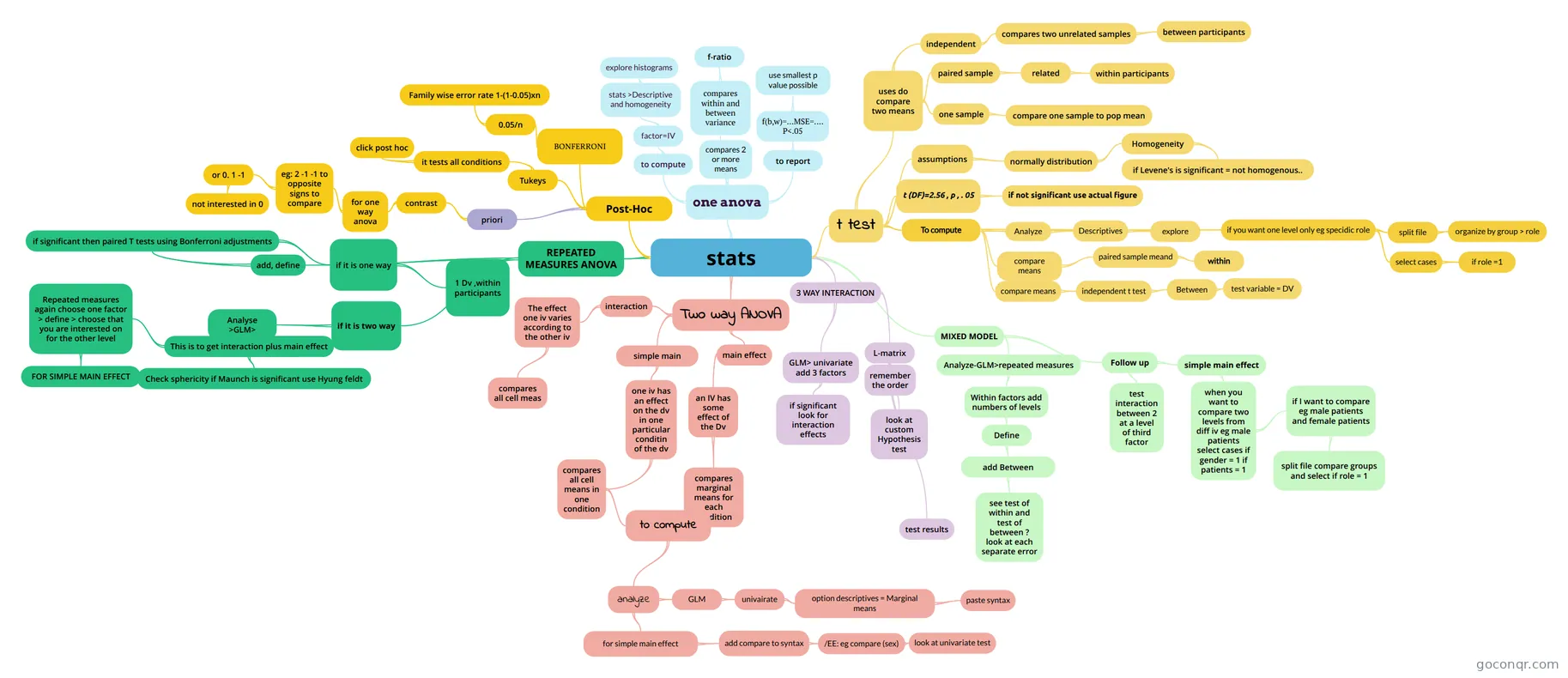
Mind map: stats ANOVA and t test
Map content
stats
one anova
- compares within and between variance
- f-ratio
- to report
- f(b,w)=...MSE=.... P<.05
- use smallest p value possible
- f(b,w)=...MSE=.... P<.05
- compares 2 or more means
- to compute
- factor=IV
- stats >Descriptive and homogeneity
- explore histograms
- stats >Descriptive and homogeneity
- factor=IV
- compares within and between variance
Post-Hoc
- BONFERRONI
- 0.05/n
- Family wise error rate 1-(1-0.05)xn
- 0.05/n
- Tukeys
- it tests all conditions
- click post hoc
- it tests all conditions
- priori
- contrast
- for one way anova
- eg: 2 -1 -1 to opposite signs to compare
- or 0. 1 -1
- not interested in 0
- or 0. 1 -1
- eg: 2 -1 -1 to opposite signs to compare
- for one way anova
- contrast
- BONFERRONI
REPEATED MEASURES ANOVA
- add, define
- if significant then paired T tests using Bonferroni adjustments
- if it is one way
- 1 Dv ,within participants
- if it is one way
- if significant then paired T tests using Bonferroni adjustments
- if it is two way
- Analyse >GLM>
- This is to get interaction plus main effect
- Repeated measures again choose one factor > define > choose that you are interested on for the other level
- FOR SIMPLE MAIN EFFECT
- Check sphericity if Maunch is significant use Hyung feldt
- Repeated measures again choose one factor > define > choose that you are interested on for the other level
- This is to get interaction plus main effect
- Analyse >GLM>
- add, define
Two way ANOVA
- interaction
- The effect one iv varies according to the other iv
- compares all cell meas
- The effect one iv varies according to the other iv
- simple main
- one iv has an effect on the dv in one particular conditin of the dv
- compares all cell means in one condition
- to compute
- analyze
- GLM
- univairate
- option descriptives = Marginal means
- paste syntax
- option descriptives = Marginal means
- univairate
- for simple main effect
- add compare to syntax
- /EE: eg compare (sex)
- look at univariate test
- /EE: eg compare (sex)
- add compare to syntax
- GLM
- analyze
- to compute
- compares all cell means in one condition
- one iv has an effect on the dv in one particular conditin of the dv
- main effect
- an IV has some effect of the Dv
- compares marginal means for each condition
- an IV has some effect of the Dv
- interaction
t test
- uses do compare two means
- independent
- compares two unrelated samples
- between participants
- compares two unrelated samples
- paired sample
- related
- within participants
- related
- one sample
- compare one sample to pop mean
- independent
- assumptions
- normally distribution
- Homogeneity
- if Levene's is significant = not homogenous..
- Homogeneity
- normally distribution
- t (DF)=2.56 , p , . 05
- if not significant use actual figure
- To compute
- Analyze
- Descriptives
- explore
- Descriptives
- compare means
- paired sample meand
- within
- paired sample meand
- compare means
- independent t test
- Between
- test variable = DV
- Between
- independent t test
- if you want one level only eg specidic role
- split file
- organize by group > role
- select cases
- if role =1
- split file
- Analyze
- uses do compare two means
3 WAY INTERACTION
- GLM> univariate add 3 factors
- if significant look for interaction effects
- L-matrix
- remember the order
- test results
- look at custom Hypothesis test
- GLM> univariate add 3 factors
MIXED MODEL
- Analyze-GLM>repeated measures
- Within factors add numbers of levels
- Define
- add Between
- see test of within and test of between ? look at each separate error
- add Between
- Define
- Within factors add numbers of levels
- Follow up
- test interaction between 2 at a level of third factor
- simple main effect
- when you want to compare two levels from diff iv eg male patients select cases if gender = 1 if patients = 1
- if I want to compare eg male patients and female patients
- split file compare groups and select if role = 1
- if I want to compare eg male patients and female patients
- when you want to compare two levels from diff iv eg male patients select cases if gender = 1 if patients = 1
- Analyze-GLM>repeated measures