
28722571
Description

Mind Map by Eve Harley, updated more than 1 year ago

|
Created by Eve Harley
almost 5 years ago
|
|
Data Representation
- Binary Numbers
- Binary = base 2
- Denary= base 10
- Using 8 bits we can represent up to 255
numbers
- 2^n = quantity of numbers that can be displayed
- 2^n = quantity of numbers that can be displayed
- Binary = base 2
- Representing Data
- More transistors = more bits (1/0) = more values can be stored
- Bit (b) = 1/0
- Nibble = 4 bits
- Byte (B) = 8 bits
- Kibibyte (KiB) = 1024B
- Mebibyte (MiB) = 1024KiB
- Gibibyte (GiB) = 1024MiB
- Tebibtye (TiB) = 1024GiB
- Tebibtye (TiB) = 1024GiB
- Gibibyte (GiB) = 1024MiB
- Mebibyte (MiB) = 1024KiB
- Kibibyte (KiB) = 1024B
- Byte (B) = 8 bits
- Nibble = 4 bits
- More transistors = more bits (1/0) = more values can be stored
- Representing Text
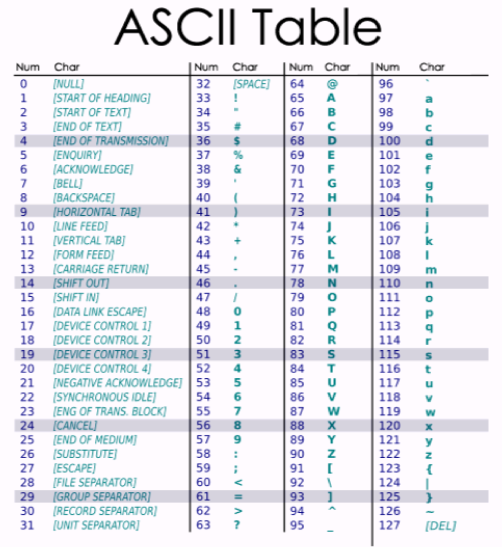
- ASCII is an american based way to represent
text which uses 7 bits
- Limited to only 128 characters (not enough
for other languages)
- Stands for American Standard for
Computer Information Interchange
- Limited to only 128 characters (not enough
for other languages)
- Other character sets
exist (Unicode etc.)
- ASCII is an american based way to represent
text which uses 7 bits
- Representing Images
- To store images on a computer, we need to find a way to represent an image as a sequence of
numbers
- Bitmaps
- In a bitmap, the image is split up into
a grid Each section of that grid is
then assigned a colour that most
closely matches its contents If we
only use a small number of rows and
columns, the sections are large, and
the result doesn’t look much like the
picture
- In a bitmap, the image is split up into
a grid Each section of that grid is
then assigned a colour that most
closely matches its contents If we
only use a small number of rows and
columns, the sections are large, and
the result doesn’t look much like the
picture
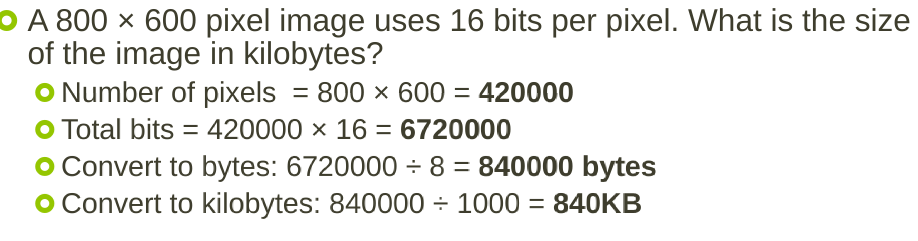
- The grid segments are called pixels and the
number of pixels in an area is called the
resolution
- Higher resolution images (more pixels) better represent the original image
- Higher resolution images (more pixels) better represent the original image
- By combining different intensities of red, green and blue lights, we can create all visible colours
- Colours on a computer are usually stored as RGB (Red Green Blue) values
- Colours on a computer are usually stored as RGB (Red Green Blue) values
- To store images on a computer, we need to find a way to represent an image as a sequence of
numbers
- Representing Audio
- Sound is the vibration of air particles – the air particles themselves don’t travel, but the pattern of
vibration does
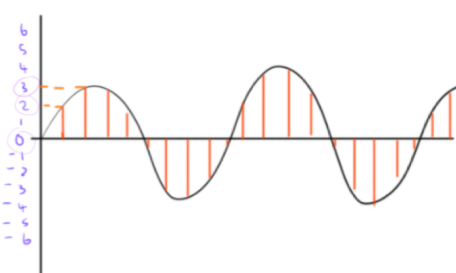
- When the air is compressed, the graph has a high amplitude, when it is stretched, the graph is low
The resultant graph is called a waveform
- If we can capture a waveform as numbers, then we can represent a sound in binary
- If we can capture a waveform as numbers, then we can represent a sound in binary
- When the air is compressed, the graph has a high amplitude, when it is stretched, the graph is low
The resultant graph is called a waveform
- The amplitude (height) of the waveform is measured at regular intervals. This is called sampling
- Sound is the vibration of air particles – the air particles themselves don’t travel, but the pattern of
vibration does
Media attachments

Want to create your own Mind Maps for free with GoConqr? Learn more.