
6460371
Description

Mind Map by Connor Bernard, updated more than 1 year ago

|
Created by Connor Bernard
over 9 years ago
|
|
Computer Systems
- What is a computer system?
- A computer system is usually a wide system of
interconnected computers, these computers
share the same central storage system while
also sharing the same peripherals like a printer
or a router. Each computer that is connected to
this system can operate on their own but they
also have the ability to communicate with
other devices and computers.
- A computer system is usually a wide system of
interconnected computers, these computers
share the same central storage system while
also sharing the same peripherals like a printer
or a router. Each computer that is connected to
this system can operate on their own but they
also have the ability to communicate with
other devices and computers.
- Computers in the modern world.
- In the modern world there are computer systems everywhere, some examples that you
might not expect would be in your everyday life, like a microwave or a cooker, these are
which appliances that you rely on everyday, these appliances are able to do this because
they have a embedded computer systems in them to carry out their functions. However
computer systems are not just limited to things in your kitchen they are also in your
televisions and smart phones, these things are also appliances that people use daily.
Something that you might expect would be that these systems are also trusted and
used in more important things for example traffic lights. These computer systems will
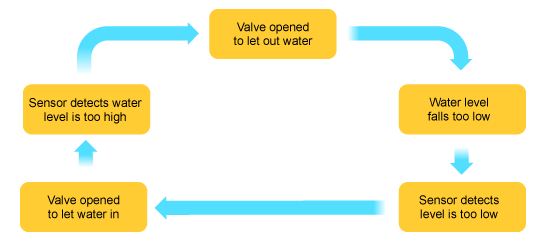
most of the time follow a cycle, this is called the feedback cycle. A example of a
feedback cycle would be a fish tank.
- In the modern world there are computer systems everywhere, some examples that you
might not expect would be in your everyday life, like a microwave or a cooker, these are
which appliances that you rely on everyday, these appliances are able to do this because
they have a embedded computer systems in them to carry out their functions. However
computer systems are not just limited to things in your kitchen they are also in your
televisions and smart phones, these things are also appliances that people use daily.
Something that you might expect would be that these systems are also trusted and
used in more important things for example traffic lights. These computer systems will
most of the time follow a cycle, this is called the feedback cycle. A example of a
feedback cycle would be a fish tank.
- Reliability in computer systems.
- When we are using these computer systems we need them to be reliable this is so
that we can trust them with important jobs and files. Despite this there are lots of
things that can go wrong with a computer system, some examples are: hardware
failure, human errors, natural disasters. Those are just a few examples of what could
go wrong, even though there are all these rick and even more we still use computer
systems for critical jobs like emergency services and air traffic control, they are also
only a few examples. If one of these critical jobs fail then it would have a huge
impact on peoples lives, for example if emergency services are not able to take in
calls then peoples lives would be at risk. However the system will not be the
problem, sometimes they are susceptible to cyber attacks which makes the risk of
using them even higher.
- When we are using these computer systems we need them to be reliable this is so
that we can trust them with important jobs and files. Despite this there are lots of
things that can go wrong with a computer system, some examples are: hardware
failure, human errors, natural disasters. Those are just a few examples of what could
go wrong, even though there are all these rick and even more we still use computer
systems for critical jobs like emergency services and air traffic control, they are also
only a few examples. If one of these critical jobs fail then it would have a huge
impact on peoples lives, for example if emergency services are not able to take in
calls then peoples lives would be at risk. However the system will not be the
problem, sometimes they are susceptible to cyber attacks which makes the risk of
using them even higher.
- Laws and Ethics
- When using a computer there are certain rules that you
have to follow so that you use the computer safely and to
make sure that you don't don anything illegal. Things like
this also apply for your privacy when using a computer, for
example you are able to search the web in private and only
your ISP can see what you have searched and what links you
have clicked. There are also laws in place so that music, film
etc can't be uploaded as that is classed as copyright, for
example ripping a film and uploading it to youtube
- When using a computer there are certain rules that you
have to follow so that you use the computer safely and to
make sure that you don't don anything illegal. Things like
this also apply for your privacy when using a computer, for
example you are able to search the web in private and only
your ISP can see what you have searched and what links you
have clicked. There are also laws in place so that music, film
etc can't be uploaded as that is classed as copyright, for
example ripping a film and uploading it to youtube
- Standards
- When using a computer there are agreed ways of
doing things (etiquette), Standards also make it easier
for people to do things, like making a program. When
you are using standards there are positive effects for
example if you make a program widely available it
will undoubtedly become popular as a result of its
availability. In Standards there are two ways to do
things, either Propriety or open.
- Propriety Standards
- Propriety standards are
designed, created,
maintained and then
controlled by a licence
agreement which can be
owned by a individual or
company. The most
Proprietary files include
DOC files and MP3
- Propriety standards are
designed, created,
maintained and then
controlled by a licence
agreement which can be
owned by a individual or
company. The most
Proprietary files include
DOC files and MP3
- Open standards
- Open standards are usually controlled by by a CCC - Creative
Commons Licence or are unlicensed, this standard unlike
Proprietary can be used by anyone as they are not owned by a
person or organisation. This type of standard us usually created by
experts that have come together online.
- Open standards are usually controlled by by a CCC - Creative
Commons Licence or are unlicensed, this standard unlike
Proprietary can be used by anyone as they are not owned by a
person or organisation. This type of standard us usually created by
experts that have come together online.
- Propriety Standards
- When using a computer there are agreed ways of
doing things (etiquette), Standards also make it easier
for people to do things, like making a program. When
you are using standards there are positive effects for
example if you make a program widely available it
will undoubtedly become popular as a result of its
availability. In Standards there are two ways to do
things, either Propriety or open.
Media attachments
Want to create your own Mind Maps for free with GoConqr? Learn more.