
Notas
Basics
Conteúdo das notas (6)
Página 1
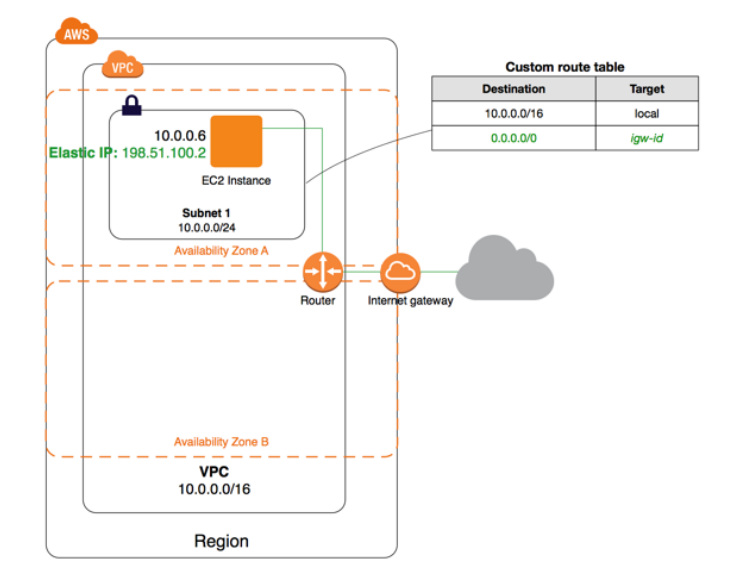
Single Public subnet.
The configuration for this scenario includes the following:
A virtual private cloud (VPC) with a size /16 IPv4 CIDR block (example: 10.0.0.0/16). This provides 65,536 private IPv4 addresses.
A subnet with a size /24 IPv4 CIDR block (example: 10.0.0.0/24). This provides 256 private IPv4 addresses.
An Internet gateway. This connects the VPC to the Internet and to other AWS services.
An instance with a private IPv4 address in the subnet range (example: 10.0.0.6), which enables the instance to communicate with other instances in the VPC, and an Elastic IPv4 address (example: 198.51.100.2), which is a public IPv4 address that enables the instance to be reached from the Internet.
A custom route table associated with the subnet. The route table entries enable instances in the subnet to use IPv4 to communicate with other instances in the VPC, and to communicate directly over the Internet. A subnet that's associated with a route table that has a route to an Internet gateway is known as a public subnet.
The first entry in the custom route table is the default entry for local IPv4 routing in the VPC; this entry enables the instances in this VPC to communicate with each other. The second entry routes all other IPv4 subnet traffic to the Internet gateway (for example, igw-1a2b3c4d).
Página 2
VPC with Public and Private Subnets (NAT)
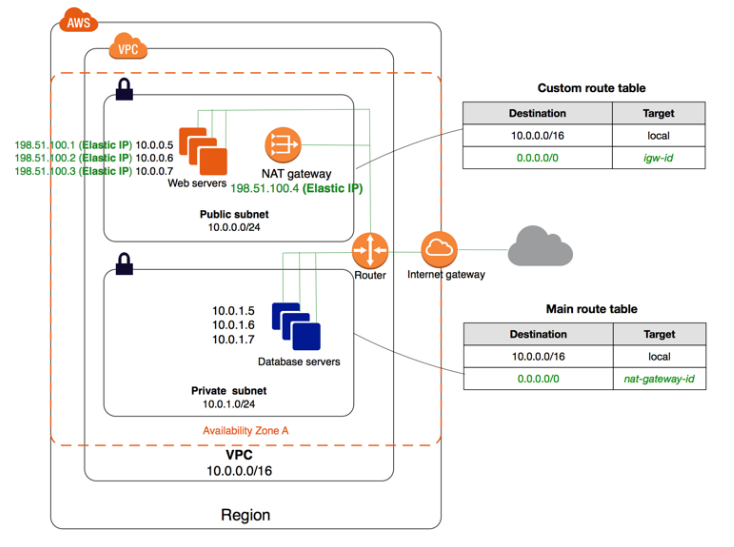
The configuration for this scenario includes the following:
A VPC with a size /16 IPv4 CIDR block (example: 10.0.0.0/16). This provides 65,536 private IPv4 addresses.
A public subnet with a size /24 IPv4 CIDR block (example: 10.0.0.0/24). This provides 256 private IPv4 addresses. A public subnet is a subnet that's associated with a route table that has a route to an Internet gateway.
A private subnet with a size /24 IPv4 CIDR block (example: 10.0.1.0/24). This provides 256 private IPv4 addresses
An Internet gateway. This connects the VPC to the Internet and to other AWS services.
Instances with private IPv4 addresses in the subnet range (examples: 10.0.0.5, 10.0.1.5). This enables them to communicate with each other and other instances in the VPC.
Instances in the public subnet with Elastic IPv4 addresses (example: 198.51.100.1), which are public IPv4 addresses that enable them to be reached from the Internet. The instances can have public IP addresses assigned at launch instead of Elastic IP addresses. Instances in the private subnet are back-end servers that don't need to accept incoming traffic from the Internet and therefore do not have public IP addresses; however, they can send requests to the Internet using the NAT gateway (see the next bullet).
A NAT gateway with its own Elastic IPv4 address. Instances in the private subnet can send requests to the Internet through the NAT gateway over IPv4 (for example, for software updates).
A custom route table associated with the public subnet. This route table contains an entry that enables instances in the subnet to communicate with other instances in the VPC over IPv4, and an entry that enables instances in the subnet to communicate directly with the Internet over IPv4.
The main route table associated with the private subnet. The route table contains an entry that enables instances in the subnet to communicate with other instances in the VPC over IPv4, and an entry that enables instances in the subnet to communicate with the Internet through the NAT gateway over IPv4.
Página 3
VPC with Public and Private Subnets and AWS Managed VPN Access
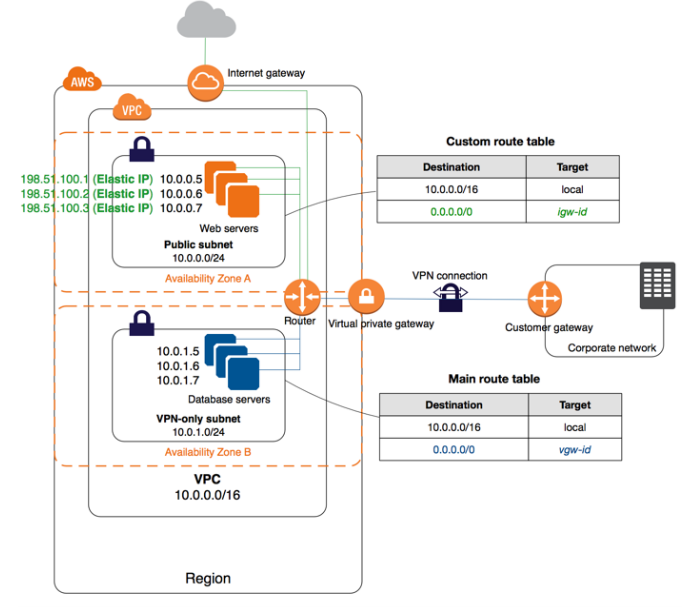
The configuration for this scenario includes the following:
A virtual private cloud (VPC) with a size /16 IPv4 CIDR (example: 10.0.0.0/16). This provides 65,536 private IPv4 addresses.
A public subnet with a size /24 IPv4 CIDR (example: 10.0.0.0/24). This provides 256 private Ipv4 addresses. A public subnet is a subnet that's associated with a route table that has a route to an Internet gateway.
A VPN-only subnet with a size /24 IPv4 CIDR (example: 10.0.1.0/24). This provides 256 private Ipv4 addresses.
An Internet gateway. This connects the VPC to the Internet and to other AWS products.
A VPN connection between your VPC and your network. The VPN connection consists of a virtual private gateway located on the Amazon side of the VPN connection and a customer gateway located on your side of the VPN connection.
Instances with private IPv4 addresses in the subnet range (examples: 10.0.0.5 and 10.0.1.5), which enables the instances to communicate with each other and other instances in the VPC.
Instances in the public subnet with Elastic IP addresses (example: 198.51.100.1), which are public IPv4 addresses that enable them to be reached from the Internet. The instances can have public Ipv4 addresses assigned at launch instead of Elastic IP addresses. Instances in the VPN-only subnet are back-end servers that don't need to accept incoming traffic from the Internet, but can send and receive traffic from your network.
A custom route table associated with the public subnet. This route table contains an entry that enables instances in the subnet to communicate with other instances in the VPC, and an entry that enables instances in the subnet to communicate directly with the Internet.
The main route table associated with the VPN-only subnet. The route table contains an entry that enables instances in the subnet to communicate with other instances in the VPC, and an entry that enables instances in the subnet to communicate directly with your network.
Página 4
VPC with a Private Subnet Only and AWS Managed VPN Access
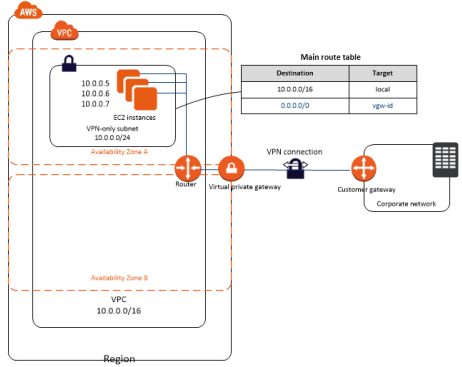
The configuration for this scenario includes the following:
A virtual private cloud (VPC) with a size /16 CIDR (example: 10.0.0.0/16). This provides 65,536 private IP addresses.
A VPN-only subnet with a size /24 CIDR (example: 10.0.0.0/24). This provides 256 private IP addresses.
A VPN connection between your VPC and your network. The VPN connection consists of a virtual private gateway located on the Amazon side of the VPN connection and a customer gateway located on your side of the VPN connection.
Instances with private IP addresses in the subnet range (examples: 10.0.0.5, 10.0.0.6, and 10.0.0.7), which enables the instances to communicate with each other and other instances in the VPC.
The main route table contains a route that enables instances in the subnet to communicate with other instances in the VPC. Route propagation is enabled, so a route that enables instances in the subnet to communicate directly with your network appears as a propagated route in the main route table.
The VPN connection is configured either as a statically-routed VPN connection or as a dynamically routed VPN connection (using BGP). If you select static routing, you'll be prompted to manually enter the IP prefix for your network when you create the VPN connection. If you select dynamic routing, the IP prefix is advertised automatically to your VPC through BGP.
The instances in your VPC can't reach the Internet directly; any Internet-bound traffic must first traverse the virtual private gateway to your network, where the traffic is then subject to your firewall and corporate security policies.
If the instances send any AWS-bound traffic (for example, requests to
Amazon S3 or Amazon EC2), the requests must go over the virtual private gateway to your network and then to the Internet before reaching AWS.
Currently, IPv6 for VPN connections is not supported.
Página 5
VPCs and Subnets
A VPC spans all the Availability Zones in the region.
After creating a VPC, one or more subnets can be added in each Availability Zone.
When a subnet is created, the CIDR block for the subnet should be spicified, which is a subset of the VPC CIDR block.
Each subnet must reside entirely within one Availability Zone and cannot span zones.
Availability Zones are distinct locations that are engineered to be isolated from failures in other Availability Zones. By launching instances in separate Availability Zones, you can protect your applications from the failure of a single location. A unique ID is assigned to each subnet.
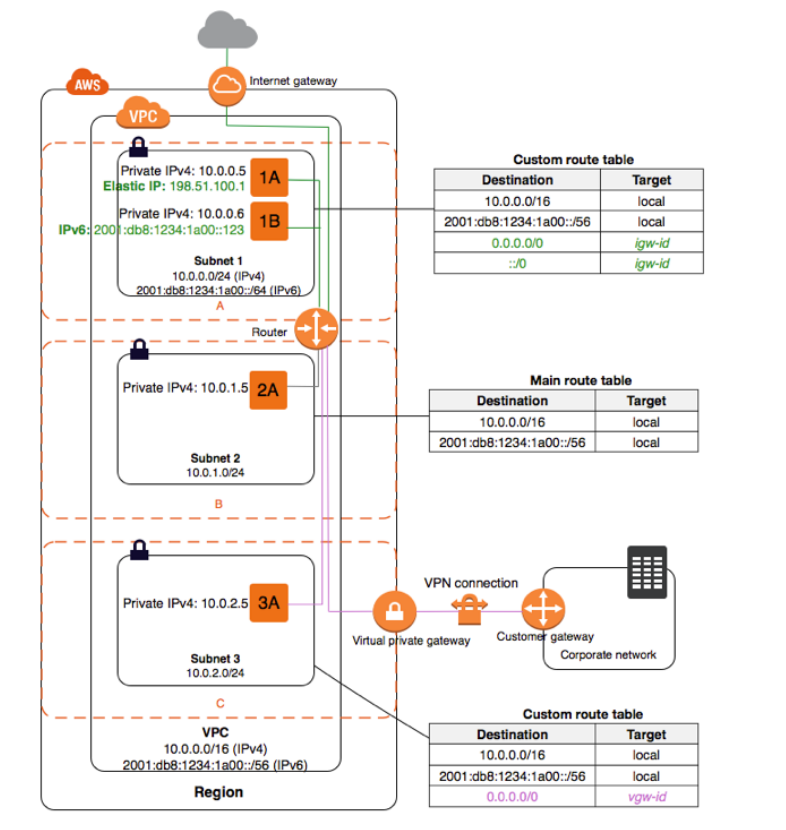
The following diagram shows a VPC that has been configured with subnets in multiple Availability Zones.
1A, 1B, 2A, and 3A are instances in your VPC. An IPv6 CIDR block is associated with the VPC, and an IPv6
If a subnet's traffic is routed to an internet gateway, the subnet is known as a public subnet. In the diagram below, subnet 1 is a public subnet. If you want your instance in a public subnet to communicate with the internet over IPv4, it must have a public IPv4 address or an Elastic IP address (IPv4). If you want your instance in the public subnet to communicate with the internet over IPv6, it must have an IPv6 address.
If a subnet doesn't have a route to the internet gateway, the subnet is known as a private subnet. In this diagram, subnet 2 is a private subnet.
If a subnet doesn't have a route to the internet gateway, but has its traffic routed to a virtual private gateway for a VPN connection, the subnet is known as a VPN-only subnet. In this diagram, subnet 3 is a VPN-only subnet. Currently, we do not support IPv6 traffic over a VPN connection.
Página 6
VPC and Subnet Sizing
Amazon VPC supports IPv4 and IPv6 addressing, and has different CIDR block size limits for each. By default, all VPCs and subnets must have IPv4 CIDR blocks—you can't change this behavior. You can optionally associate an IPv6 CIDR block with your VPC.
When a VPC is created, an IPv4 CIDR ( Classless Inter-Domain Routing ) block should be speficied. The allowed block size is
between a /16 netmask (65,536 IP addresses) and /28 netmask (16 IP addresses).
One or more secondary CIDR blocks can be associated with the VPC.
It is recommended to created a CIDR block of /16 or smaller from the follwing private IPv4 address range
• 10.0.0.0 - 10.255.255.255 (10/8 prefix)
• 172.16.0.0 - 172.31.255.255 (172.16/12 prefix)
• 192.168.0.0 - 192.168.255.255 (192.168/16 prefix)
The CIDR block of a subnet can be the same as the CIDR block for the VPC (for a single subnet in the VPC), or a subset of the CIDR block for the VPC (for multiple subnets).
The allowed block size is between a /28 netmask and /16 netmask. If you create more than one subnet in a VPC, the CIDR blocks of the subnets cannot overlap.
For example, if you create a VPC with CIDR block 10.0.0.0/24, it supports 256 IP addresses. You can break this CIDR block into two subnets, each supporting 128 IP addresses. One subnet uses CIDR block 10.0.0.0/25 (for addresses 10.0.0.0 - 10.0.0.127) and the other uses CIDR block 10.0.0.128/25 (for addresses 10.0.0.128 - 10.0.0.255).
The first four IP addresses and the last IP address in each subnet CIDR block are not available for use, and cannot be assigned to an instance.
Each subnet must be associated with a route table, which specifies the allowed routes for outbound traffic leaving the subnet. Every subnet that you create is automatically associated with the main route table for the VPC. Assoications can be changed.
(IPv4 only) The Elastic IPv4 address or public IPv4 address that's associated with your instance is accessed through the internet gateway of your VPC. Traffic that goes through a VPN connection between your instance and another network traverses a virtual private gateway, not the internet gateway, and therefore does not access the Elastic IPv4 address or public IPv4 address.
Informações
- Descrição
- AWS Solutions Architect - Associate AWS (VPC) Notas sobre Basics, criado por Numaan Shareef em 25-08-2018.
- Criado por
- Numaan Shareef
- Visualizações
- 4
- Avaliação