
Quiz
Examen abril - Microsoft Word
Este quiz tem tipos de pergunta que abrem no player de sempre.
Perguntas do quiz (5)
1Completa los siguientes keyboard shortcuts que hemos estado utilizando en la clase (tomando word en inglés). Arrastra la opción correcta:
Ctrl+N = [blank_start]Create a new document[blank_end]
Ctrl+S = [blank_start]Save a document[blank_end]
Ctrl+A = [blank_start]Select all[blank_end]
Ctrl+X = [blank_start]Cut selection[blank_end]
Ctrl+C = [blank_start]Copy selection[blank_end]
Ctrl+V = [blank_start]Paste[blank_end]
Ctrl+Z = [blank_start]Undo[blank_end]
Ctrl+G = [blank_start]Go to specific page[blank_end]
Ctrl+U = [blank_start]Underline selection[blank_end]
Ctrl+B = [blank_start]Bold selection[blank_end]
Ctrl+I = [blank_start]Italicize selection[blank_end]- ACreate a new document
- BSave a document
- CSelect all
- DCut selection
- ECopy selection
- FPaste
- GUndo
- HGo to specific page
- IUnderline selection
- JBold selection
- KItalicize selection
- LInsert a image
2Coloca en cada círculo el tipo de alineación correspondiente a cada botón de word:
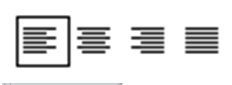
- ALeft alignment
- BCentered alignment
- CRight alignment
- DJustified alignment
- EBlock alignment
3En el siguiente índice (o tabla de contenido), arrastra el nivel al que pertenece cada título:
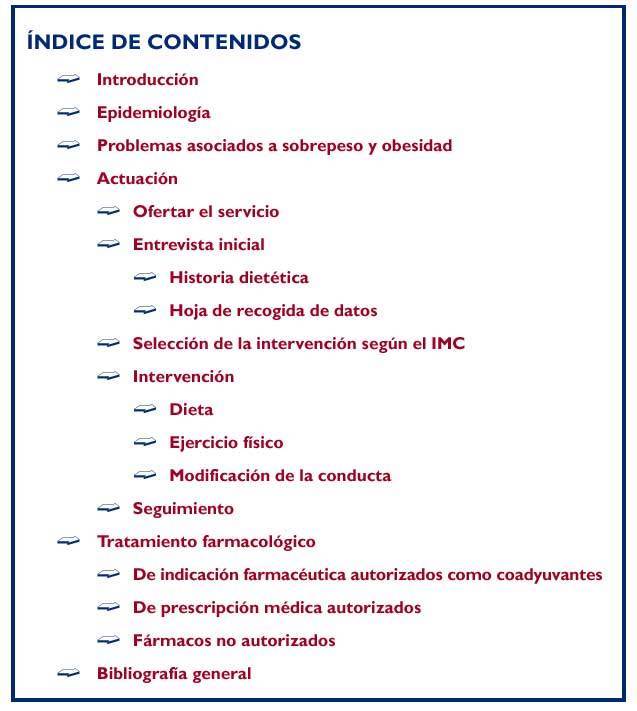
- ANivel 2
- BNivel secundario
- CNivel 3
- DNivel terciario
- ENivel 1
- FNivel primario
4La única forma para agregar un Screenshot o captura de pantalla es: utilizamos el botón del teclado (Imp Pt o Print Screen), luego pegamos la imagen en paint, seleccionamos lo que deseamos agregar a nuestro archivo de word, le damos copiar, luego vamos a word y presionamos pegar.

- AVerdadeiro
- BFalso
5En la siguiente imagen del menú Insertar, arrastra el nombre de cada botón. Si tienes alguna duda, guíate por las imágenes y recuerda las prácticas hechas en el aula (Todas las opciones están en inglés)

- ABlank Page
- BFull page
- CTable
- DGrid
- EPicture
- FShapes
- GCircle
- HSmartArt
- IWordArt
- JHyperlink
- KVideo
- LText box
- MCapital letter
- NBig letter
- OHeater
- PIlustration
- QFooter
- RLine
- SPage number
- TCharacters number
- UChapter number
Informações
- Descrição
- Este es el examen correspondiente al mes de abril de 2016, de los estudiantes de primer año, sección B, del programa empresarial Supérate-Merlet, de la asignatura computación.
- Autor
- lucreciaviana
- Idioma
- Español
- Visualizações
- 71
- Etiquetas
- Avaliação
- Ainda sem avaliações Avalie este quiz