
Quiz
CET_TARDE - MTA Windows OS Fundamentals 2
Este quiz tem tipos de pergunta que abrem no player de sempre.
Perguntas do quiz (50)
1Which Windows feature will allow you to run automated scripts on a remote computer?
- AWindows Remote Management
- BRemote Access Services
- CRemote Desktop Connection
- DVirtual Private Network
2Which Windows 7 feature should you use to ensure that only administrators can install new software?
- ANetwork and Sharing Center
- BUser Account Control
- CMicrosoft Management Console
- DEase of Access
3You need to manage service dependencies on your Windows 7 computer. Which feature should you use?
- AAction Center
- BEvent Viewer
- CTask Scheduler
- DComputer Management Console
4The Windows Action Center allows you to:
- Achoose options during system startup.
- Bview alerts and take appropriate actions to keep Windows running smoothly.
- Cview and modify settings of installed programs.
- Dmanage the documents in the print queue.
5Which feature allows you to run applications hosted on network file servers or web servers?
- AWindows Virtual PC
- BRemote Desktop Connection
- CWindows Installer
- DApplication Virtualization Client
6Which is the fastest way to ensure that new desktop icons align into straight columns and rows?
- ARight-click Desktop, select Properties, and then click Appearance.
- BRight-click Desktop, select View, and then clickAuto arrange icons.
- CRight-click Taskbar, select Tile Vertically, and then click Tile Horizontally.
- DRight-click Desktop and select Refresh.
7Which prevents you from establishing a Remote Desktop connection to a remote computer?
- AIncorrect monitor settings in Device Manager.
- BIncorrect screen resolution in the Display Properties dialog box.
- CIncorrect port settings in Windows Firewall.
- DIncorrect security settings in Internet Explorer.
8The Remote Desktop Connection is used to:
- Asearch the Internet.
- Battend a webinar.
- Caccess another personal computer.
- Dconduct a Lync Online Meeting.
9You need to configure a mouse for a left-handed user. What should you do?
- AConfigure alternate input devices.
- BUse Device Manager to modify settings in the Mouse Properties dialog box.
- CUse Control Panel to modify settings in the Mouse Properties dialog box.
- DUse the manufacturer's website to update the mouse driver.
10Your computer is running slower than usual. Where should you look to find out which applications are consuming the maximum number of resources?
- AAdministrative Tools
- BDevice Manager
- CSystem Tray
- DTask Manager
- ENetwork and Sharing Center
11You want to connect to a wireless access point. You need to view a list of available networks.
Which two actions should you perform? Each correct answer presents a complete solution. (Choose two)- AClick the network icon in the notification area.
- BFrom Control Panel, use Windows Mobility Center.
- CFrom Control Panel, use Network and Sharing Center.
- DFrom Control Panel, use Sync Center.
- EFrom Control Panel, use Ease of Access.
12What is the maximum size of a virtual hard disk?
- A2 terabytes
- B5terabytes
- C16 terabytes
- D500GB
13Which online service allows you to store and retrieve files over the Internet?
- AWindows Future Storage
- BWindows Live SkyDrive
- CWindows Media Center
- DWindows Storage Server
14Which feature allows you to manually configure a hardware device?
- AWindows Task Manager
- BEase of Access
- CDevice Manager
- DRegistry Editor
15Drag and Drop Question
You need to install a new webcam on your personal computer. What should you do?
(To answer, move the four appropriate actions from the list of actions to the answer area and arrange them in the correct order.)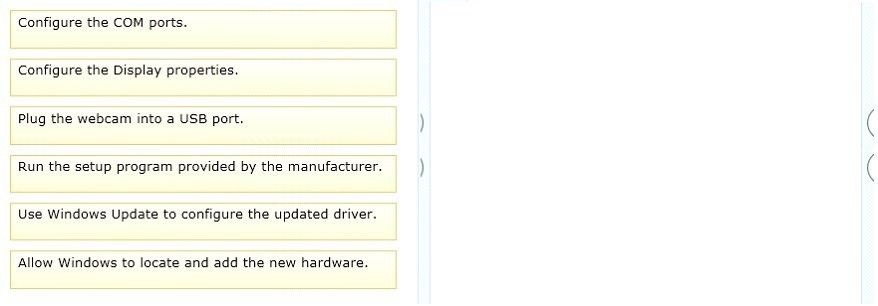
- APlug the webcam into a USB port.
- BConfigure the COM ports.
- CAllow Windows to locate and add the...
- DConfigure the Display properties.
- EUse Windows Update to configure the up..
- FRun the setup program provided by the...
- GNULL1
- HNULL2
- INULL3
16You have several active jobs in the print queue. You need to view the print queue. What should you do?
- AUse the Printer icon on the system tray.
- BUse the Windows Task Manager.
- CClick the Print button in the application that is printing.
- DUse the Computer Management console.
17Where should you view the list of services on your Windows 7 computer?
- AFrom the Windows Task Manager dialog box
- BFrom the Windows Registry
- CFrom the System Properties dialog box
- DFrom the Windows Action Center
18Which Windows feature allows you to run a program on your computer that is installed on another computer?
- AWindows Virtual PC
- BMicrosoft Application Virtualization
- CRemote Desktop Connection
- DSystem Center Service Manager
19Which feature should you use to restrict certain actions only to an administrator account on a Windows 7 computer?
- AWindows Experience Index
- BUser Account Control
- CBitLocker
- DComputer Management
20You have a legacy application that must be used in Windows 7. Which feature should you use if the legacy application runs poorly or fails to run?
- APrograms in Control Panel
- BWindows Installer
- CWindows Easy Transfer
- DProgram Compatibility Assistant
21You need to find out whether your computer can run a program that performs resource- intensive tasks. Which Windows feature should you use?
- ASystem Configuration Utility
- BMemory Diagnostics Tool
- CReliability and Performance Monitor
- DWindows Experience Index
22Which feature ensures that the latest device drivers are installed on your computer?
- AReliability and Performance Monitor
- BWindows Update
- CTask Scheduler
- DSystem configuration Utility
23Which feature should you use to install the most recent definitions for Windows Defender?
- AWindows Update
- BSync Center
- CWindows Installer
- DPrograms and Features
24Which Windows feature allows you to roll back your computer's settings to a previous date and time?
- ASystem Restore
- BSafe Mode
- CDisk Cloning
- DDisk Mirroring
25Which feature allows you to transfer information from your computer to your mobile phone?
- AWindows Mobility Center
- BDevice Manager
- CSync Center
- DWindows Easy Transfer
26You have a document that you update regularly. To access it directly from a/an:
- Afolder.
- Bicon.
- Clibrary.
- Dshortcut.
27You need to prevent specific users from logging on to a computer from 24:00 hours to 07:00 hours. Which Control Panel feature should you use?
- AUser Account Control
- BAdministrative Tools
- CClock, Language, and Region
- DParental Controls
28Which Windows feature allows you to manually control another Windows computer?
- ARemote Control Monitor
- BRemote Desktop Connection
- CRemote Power Management
- DRemote Procedure Call
29You plan to upgrade your computer to Windows 7. You need to view a report that identifies potential compatibility problems with your computer's hardware, devices, and programs. Which tool should you use?
- ASync Center
- BWindows Anytime Upgrade
- CWindows Upgrade Advisor
- DWindows Easy Transfer
30Which two versions of Windows 7 support the Encrypting File System (EFS) functionality?
Each correct answerpresents a complete solution. (Chose two)- AUltimate Edition
- BHome Premium Edition
- CProfessional Edition
- DStarter Edition
31You need to remotely control another computer by using a Remote Desktop connection.
Where should you start the Remote Desktop Connection client?- AFrom the Actions menu in Windows Live Messenger
- BFrom the User Accounts settings in Control Panel
- CFrom the Accessories folder in All Programs
- DFrom the Internet Options dialog box in Internet
32Which is a potential risk when redirecting a USB storage device during a Remote Desktop session?
- AAccess can be slower.
- BThe device can stop working.
- CThe session can stop responding.
- DData can be lost.
33You want to change the default printer used by the Quick Print feature in some applications.
Where should you change the Windows default printer?- AIn the printer's Properties window
- BIn the print queue
- CWithin the Print Setup page
- DWithin the Devices and Printers user interface
34What should you do to secure and protect the connection to a Bluetooth device?
- ATurn off make device discoverable after connecting your devices.
- BReset the Bluetooth device to factory default settings after making a connection.
- CTurn off the Bluetooth device when not in use.
- DUse unique pairing codes when connecting your devices.
35You want to upgrade your Windows operating system to Windows 7. Which feature should you use to find out whether the existing devices will work after the upgrade?
- ASystem Manager
- BWindows 7 Compatibility Center
- CDevice Manager
- DWindows Update
36Which Windows technology increases system performance by using flash memory?
- ADirect Memory Access
- BFile compression
- CConnect Now
- DReadyBoost
37Which Windows feature should you use to assign a drive letter to a shared folder on the network?
- APublic Folder Sharing
- BComputer Management Console
- CAdvanced Sharing
- DMap Network Drive
38You attempt to print to a network printer, but you are unable to find the printer when you search for available printers.
What is a reason that you might not be able to find the printer?- AWindows Firewall is blocking network discovery.
- BThe computer that the printer is connected to is turned off.
- CThe printer does not have the Plug and Play functionality.
- DThe printer is out of paper.
39Which program will run on a 64-bit version of the Windows operating system?
- AA 32-bit laser printer driver
- BA 32-bit video card driver
- CA 32-bit version of Microsoft Office
- DA 32-bit wireless network adapter driver
40Fill in the blank with the appropriate word.
Windows [blank_start]_____________[blank_end] is a command-line shell and scripting language designed especially for system administration.- APowerBank
- BPowerSaver
- CPowerShell
41Fill in the blank with the appropriate word.
A [blank_start]__________[blank_end] printer is a type of printer that is connected directly to a computer.- ALocal
- BNetwork
- CPort
42You work as a Network Administrator for www.company.com Inc. You have implemented the registry-based group policy on your network.
Which of the following policies provides easy access points for users to re-scope searches to the default Internet search engine from the Start Menu?- AAdd Search Internet link to the Start menu
- BPin Library and Search Connectors to the "Search again" links and the Start menu
- CPin Internet search sites to the "Search again" links and the Start menu
- DDisable Known Folders
43You work as a desktop technician for McRoberts Inc. Rick, a Sales Manager, has a desktop computer that runs Windows 7 Ultimate.
He wants to configure remote access on his computer. He does not want to allow remote users to connect to the computer unless he requests help.
The computer has only one user account (Rick) configured as Administrator.
(Select the all options)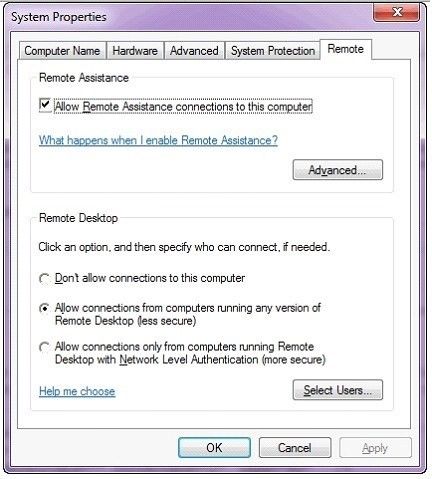
- AChange
- BNo Change
- CNo Change
- DSelect Don't allow connections to this..
- ESelect Allow connetions only from...
- FNo Change
- GNo Change
- HUnchecked
44Fill in the blank with the appropriate word.
[blank_start]______[blank_end] is a file system supported by Windows NT.- AexFAT
- BFAT
- CexFAT64
45Which of the following are the advantages of the group policy?
Each correct answer represents a complete solution. (Choose all that apply)- AIt is very secure because only the administrator is authorized to make changes.
- BIt provides streamlined deployment because installation is fully automated without interaction.
- CIts domain, site, and organizational unit settings reflect all associated users and computers.
- DIt is possible to change the policy settings by removing the old one and rewriting the changes.
46Choose and reorder the steps to start Windows in Safe Mode.
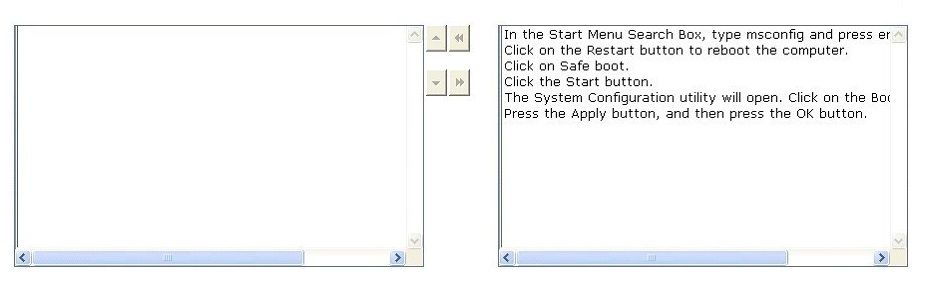
- AClick the Start button.
- BIn the Start Menu Search Box, type...
- CThe System Configuration utility will...
- DPress the Apply button, and then...
- EClick on the Restart button to reboot...
- FClick on Safe boot.
47You have the Windows 7 operating system running on your computer. You want to minimize many open windows at once to check something on your desktop. Which of the following shortcuts will you use to accomplish the task?
- AWindows logo key+D
- BWindows logo key+H
- CWindows logo key+A
- DWindows logo key+C
48Which of the following file systems handles large files and enables interoperability between desktop PCs and devices?
- AVFAT
- BexFAT
- CNTFS
- DFAT
49You work as a network administrator for www.company.com Inc. The computers on the network run Windows 7. The organization has managed networks based on Windows Server. The organization has more than 500 client computers and one location with more than 25 users.
Which strategy will you deploy for your organization?- AHigh-Touch with Retail Media
- BLite-Touch, High-Volume Deployment
- CHigh-Touch with Standard Image
- DZero-Touch, High-Volume Deployment
50Choose and reorder the correct steps to run Windows 7 Upgrade Advisor.
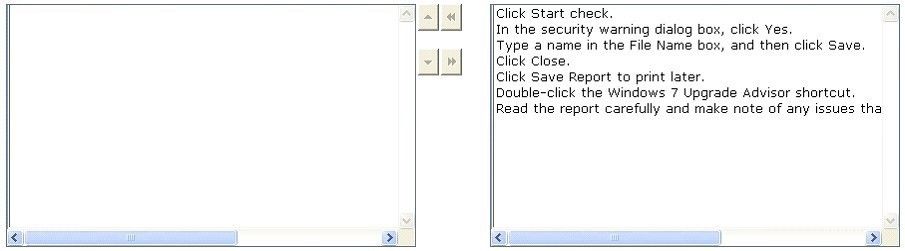
- ADouble-click the Windows 7 Upgrade...
- BIn the security warning dialog box...
- CClick Start check.
- DRead the report carefully and make...
- EClick Save Report to print later.
- FType a name in the File Name box, and...
- GClick Close.
Informações
- Descrição
- windows Operating System Fundamentals Quizzes preparing to certification
- Autor
- Hawerth Castro
- Idioma
- Português
- Visualizações
- 68
- Etiquetas
- Avaliação
- Ainda sem avaliações Avalie este quiz