
GoConqr Getting Started Guide
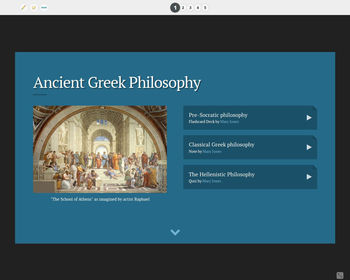
Slides do conjunto (10)
-
- Thank you for joining our community. Are you ready to transform your learning into an active process? Let's Go!
- On GoConqr you will find a number of tools that empower you to create your own learning resources. You will also find features that will allow you to track your progress, learn in groups, share and discover great content.
- In this guide we'll give you an overview on the main learning tools on Goconqr and how to get started.
- Click on the sample resources on the right to see what's possible with GoConqr.
- Click on the arrow below for more on Getting Started
- Geography Quiz
- Statistics Equations & Graphs
- Indigenous Australians (Aboriginal)
- Creating Mind Maps with GoConqr
-
Getting Started - Your Dashboard
- When you log in you'll be greeted by your Dashboard.
- This allows you to:
- keep up-to-date with everything happening in your learning community
- access all GoConqr tools and features quickly
- Let's start creating. Click on the Create button on the Menu Bar to access the learning tools
- Mind Maps
- Flashcards
- Slides
- Notes
- Quizzes
- We'll now quickly look at each of the tools..
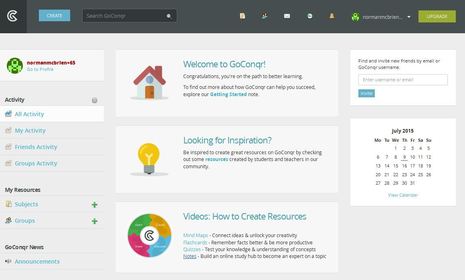
- Legenda: GoConqr Dashboard
-
- https://www.youtube.com/watch?v=TwAU0Sy_O0Q (Incorporar)
- Legenda: How to Create a Mind Map with GoConqr
- Using Mind Maps to visually represent information improves your learning in a number of ways
- Understand the context of your learning material
- Make connections between different areas
- Plan your projects or subject topics
- Dive in-depth into a learning area
- Take a look at the video on the left to see how easy it is to start creating Mind Maps with GoConqr
-
- Whilst visual learning is great for understanding, combining visual with text makes details stick. That is why Flashcards have proven time and time again to be successful memory aids.
- GoConqr Flashcards are perfect for studying and recalling all those verbs, grammar points, history dates, quotes, formulas and everything in-between.
- Watch the video on the right to help you get started with GoConqr flashcards
- https://www.youtube.com/watch?v=VM8n3-i2oTk (Incorporar)
- Legenda: How to Create Flashcards with GoConqr
-
- https://www.youtube.com/watch?v=7PXoQYHK0-I (Incorporar)
- Legenda: How to Create a Quiz with GoConqr
- There is no better way to demonstrate your knowledge than to test yourself. Building regular reviews into your learning practice will give you the confidence that you're on the right track and reduce learning stress.
- Multiple formats allows you to test your knowledge in a number of ways. Plus our Quiz tool tracks your learning progress over time, by capturing your scores.
- Click on the video on the left to learn more about getting started.
-
- Creating a Note on GoConqr couldn't be simpler. Just start typing into the boxes provided. It's ideal for taking notes on the go, in the classroom, lecture hall or at home studying.
- Once you have your initial thoughts captured, it is easy to expand them. Provide more in-depth information by adding images or video clips.
- Check out the video on the right to learn more about creating your first notes.
- https://www.youtube.com/watch?v=O4eZzMHtOAM (Incorporar)
- Legenda: How to Create Notes using GoConqr
-
- Slides helps you bring all your learning together in one place. Create and display your knowledge with our user friendly templates.
- Whether you want to create Slides for your own recall, or to
- present to a wider audience, our tool makes it easy to do:
- Defined templates for quick creation
- Insert GoConqr resources for in-depth knowledge
- Embed on external sites or platforms
- Multiple learning formats supported
-
- As you are building your learning resources using these tools, the material is starting to become part of your internal knowledge base. When you review and test yourself, your top of mind memory will be improved.
- At this early stage, it's vital that you organise your resources by creating "Subjects" as this will make the remainder of the process easier and help give your learning context. Within each Subject you can organise your study further by creating "Topics" and assigning your resources accordingly.
-
Getting Started - More Features
- We've just given you the basics on how to get started creating. But this is just the tip of the iceberg.
- Other great GoConqr features to explore:
- Calendar: Click into the Calendar and start mapping out your priority tasks and study schedule. This plan will dictate any learning activities which follow and how you will study going forward. Plan your study with our calendar feature.
- Search: Looking for inspiration on a learning topic? Use the wisdom of others by searching for resources from our millions of resources available on the GoConqr library.
- Groups: You've created and discovered great learning resources . What's the next step? It's sharing with your learning group through GoConqr Groups. Share, collaborate, discuss and track scores, all with flexible privacy controls.
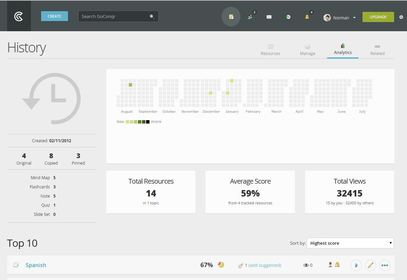
- Track Learning: GoConqr records scores and activities. You can view your average score and other stats in the 'Analytics' area of your Subjects.
- Mobile Apps: Learn on the go with our Mobile Apps. Available on iOS and Android, visit your App Store today and download GoConqr.
-
- Now its time to for you to get started:
- Dive in and start Creating your resources
- Invite your friends and class to join GoConqr to build your learning community
- Share your resources amongst your learning community
- Discover great new insights from the millions of resources in our GoConqr resource library
- We'd love to hear what you think. Let us know by dropping us a message on Twitter @goconqr or mailing at feedback@goconqr.com
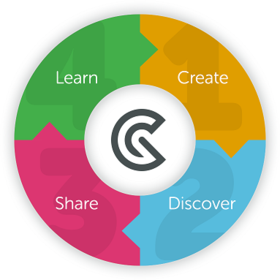
- Legenda: Create, Discover, Share & Learn with GoConqr
Informações
- Descrição
- All you need to know to get started with GoConqr.
- Criado por
- Norman McBrien
- Visualizações
- 35.010
- Tags
- Avaliação