
Mapa mental
BTECH 1 - 6
Conteúdo do mapa
BTECH 1 - 6
LESSON 2
- online advertising - promoting a product, service or brand using the internet
- search engine results pages
- Banner / pop-up advertisements
- email marketing
- pay-per-click advertising
- A form of online advertising where websites/pages host ads for other companies
- a surfer clicks on the ad and are directed to advertisers website
- website provider gets a payment for every ad that os clicked on
- uses an affliate model
- the affliate is the host website e.g. google
- A form of online advertising where websites/pages host ads for other companies
- online advertising - promoting a product, service or brand using the internet
LESSON 3
- Information exchanges
- Web logs
- frequently updated online journals with diary-like entries. typically has text, photos, videos
- Microblogging sites
- allow users to create and exchange short text entries
- WIkis
- websites that provide info which visitors can extend and edit.
- chatrooms
- online communication within communities is chat. large interactive communities where people take place in same conversations are chatrooms
- Web logs
- Key Terms
- newsgroup
- site where groups of people with common interests can meet & write info
- conferencing
- groups of people in different areas meeting online to discuss matters
- Social networkking
- sites where you can meet and interact with people all over the world
- newsgroup
- VoIP
- allows people to interact in real time using voice or video messaging between any 2 points in the world
- reliability voice quality security
- low costs, less travel time, no cost of hiring venue
- allows people to interact in real time using voice or video messaging between any 2 points in the world
- Information exchanges
LESSON 4
- Key terms
- upload
- moving a file from one system to another
- download
- moving files from a system to personal computer
- algorithm
- mathematical step-by-step sequence used to work out calculations
- version control
- way of tracking changes to documents & making sure you are working on up-to-date version
- Locked
- can't open a document when locked. only becomes unlocked when no users accessing document
- File permissions
- access rights granted to specific users
- Read-only
- user can only look at document
- Read/write
- user can read and change document
- Full controll
- users can retrieve, read, edit, add new document, archive/ delete existing doucment
- upload
- Zip files
- files converted to these to compress and expand documents before and after trasnmission
- Winzip normally used
- files converted to these to compress and expand documents before and after trasnmission
- Online Software Packages
- can allow many people to share/ work on document at same time
- can access content wherever here is internet access
- can access content on different operating devices
- Key terms
LESSON 5
- cloud computing
- using computer services on other organisation's computers (hosts)
- cloud storage
- Cost and convenience
- only pay for storage you've used, don't have to provide and maintain hardware
- availability
- available anywhere with internet connection
- reliability of network
- need to be able to get through to host
- security of data
- files stored by host - no control over them
- software
- host may not be using latest most up to date version
- lower performance
- speed of retrieval of data may be slower than if it would be on a local database
- Cost and convenience
- ubiquitous
- existing everywhere
- computer systems - connecting devices to the internet so data is generated by processors is readily availible
- RFID- radio frequency identification
- uses radiowaves to transfer data to a tag on a person/object so they can be identified and tracked
- tags contain info that is stored electronically and can be transmitted
- cloud computing
LESSON 6
- Key terms
- Point of Presence
- access point to internet. location which contains all hardware which allows users to access internet.
- Network Access Point
- interchange between networks within internet. allows ISPs to interconnect
- Internet Protocol
- protocol used to route packets of info across internet
- Transmission Control Protocol
- protocol which takes data from users application program and passes it onto IP for transfer across internet. TCP reassembles and forwards data to user's aapplication program.
- File Transfer Protocol
- protocol which allows files to be transferred between 2 computers on TCP-based network. used to download programs to computer from servers & upload web pages which you've created to server that hhosts them.
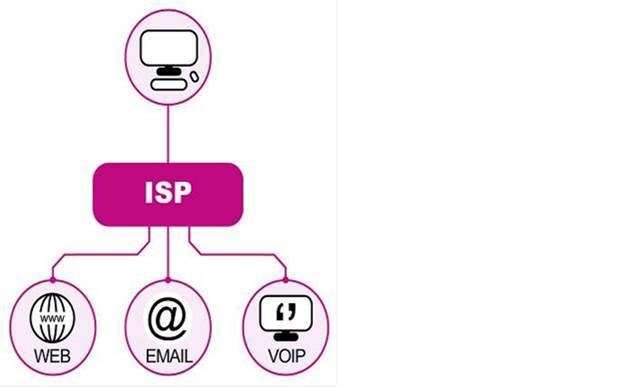
- Internet Service Provider
- companies which provide cost effective gateway for people & organisations to get onto internet e.g. virgin, BT
- Point of Presence
- connection to internet
- wireless
- not fixed to stationary computer, can be used wherever accessible wireless hub availible
- need access to wireless hub, less secure with wireless connections, slower transmission speeds than wired broadband
- broadband
- better reception and faster than dial-up
- needs base which is wired in
- dial-up
- can use existing telephone circuits
- older technology gives poor reception, can be errors, slower
- wireless
- Key terms
LESSON 1
- communication
- email, messaging, newsgroups, social networking, conferencing, blogs/ vlogs
- Real-time Info.
- timetables, news, sports updates, weather reports, travel news
- commerce
- banking, auctions, online sales/ purchasing, poublishing
- government
- tax returns, e-voting, applications for grants/ benefits
- education
- online learning/ training
- buisness
- business networks, collaborative working
- entertainment
- multi-user games, radio & tv players
- download services
- music, films, new software
- communication
Imagens e arquivos do mapa
Informações
- Descrição
- Mapa Mental sobre BTECH 1 - 6, criado por parsonagej10 em 15-06-2014.
- Criado por
- parsonagej10
- Visualizações
- 50
- Avaliação