
Mapa mental
DHCPv4
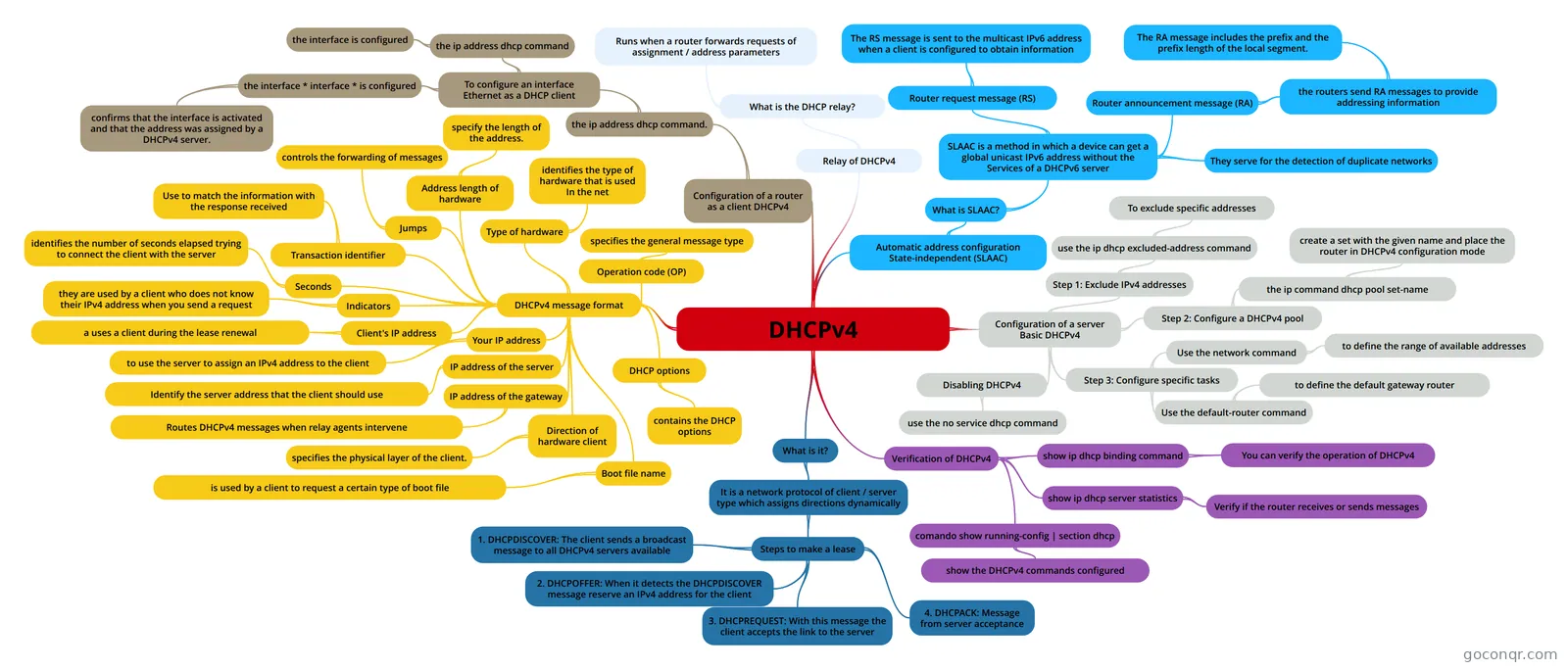
Mind map: DHCPv4
Conteúdo do mapa
DHCPv4
What is it?
- It is a network protocol of client / server type which assigns directions dynamically
- Steps to make a lease
- 1. DHCPDISCOVER: The client sends a broadcast message to all DHCPv4 servers available
- 2. DHCPOFFER: When it detects the DHCPDISCOVER message reserve an IPv4 address for the client
- 3. DHCPREQUEST: With this message the client accepts the link to the server
- 4. DHCPACK: Message from server acceptance
- Steps to make a lease
- It is a network protocol of client / server type which assigns directions dynamically
DHCPv4 message format
- Operation code (OP)
- specifies the general message type
- Type of hardware
- identifies the type of hardware that is used In the net
- Address length of hardware
- specify the length of the address.
- Jumps
- controls the forwarding of messages
- Transaction identifier
- Use to match the information with the response received
- Seconds
- identifies the number of seconds elapsed trying to connect the client with the server
- Indicators
- they are used by a client who does not know their IPv4 address when you send a request
- Client's IP address
- a uses a client during the lease renewal
- Your IP address
- to use the server to assign an IPv4 address to the client
- IP address of the server
- Identify the server address that the client should use
- IP address of the gateway
- Routes DHCPv4 messages when relay agents intervene
- Direction of hardware client
- specifies the physical layer of the client.
- Boot file name
- is used by a client to request a certain type of boot file
- DHCP options
- contains the DHCP options
- Operation code (OP)
Configuration of a server Basic DHCPv4
- Step 1: Exclude IPv4 addresses
- use the ip dhcp excluded-address command
- To exclude specific addresses
- use the ip dhcp excluded-address command
- Step 2: Configure a DHCPv4 pool
- the ip command dhcp pool set-name
- create a set with the given name and place the router in DHCPv4 configuration mode
- the ip command dhcp pool set-name
- Step 3: Configure specific tasks
- Use the network command
- to define the range of available addresses
- Use the default-router command
- to define the default gateway router
- Use the network command
- Disabling DHCPv4
- use the no service dhcp command
- Step 1: Exclude IPv4 addresses
Verification of DHCPv4
- comando show running-config | section dhcp
- show the DHCPv4 commands configured
- show ip dhcp binding command
- You can verify the operation of DHCPv4
- show ip dhcp server statistics
- Verify if the router receives or sends messages
- comando show running-config | section dhcp
Relay of DHCPv4
- What is the DHCP relay?
- Runs when a router forwards requests of assignment / address parameters
- What is the DHCP relay?
Automatic address configuration State-independent (SLAAC)
- What is SLAAC?
- SLAAC is a method in which a device can get a global unicast IPv6 address without the Services of a DHCPv6 server
- Router request message (RS)
- The RS message is sent to the multicast IPv6 address when a client is configured to obtain information
- They serve for the detection of duplicate networks
- Router announcement message (RA)
- the routers send RA messages to provide addressing information
- The RA message includes the prefix and the prefix length of the local segment.
- the routers send RA messages to provide addressing information
- Router request message (RS)
- SLAAC is a method in which a device can get a global unicast IPv6 address without the Services of a DHCPv6 server
- What is SLAAC?
Configuration of a router as a client DHCPv4
- the ip address dhcp command.
- To configure an interface Ethernet as a DHCP client
- the ip address dhcp command
- the interface is configured
- the interface * interface * is configured
- confirms that the interface is activated and that the address was assigned by a DHCPv4 server.
- the ip address dhcp command
- To configure an interface Ethernet as a DHCP client
- the ip address dhcp command.
Informações
- Descrição
- Mapa Mental sobre DHCPv4, criado por NICOLAS TORRES em 31-10-2018.
- Criado por
- NICOLAS TORRES
- Visualizações
- 2
- Avaliação
Mais sobre DHCP and address allocation