
Mapa mental
Policy 3
Conteúdo do mapa
Policy 3
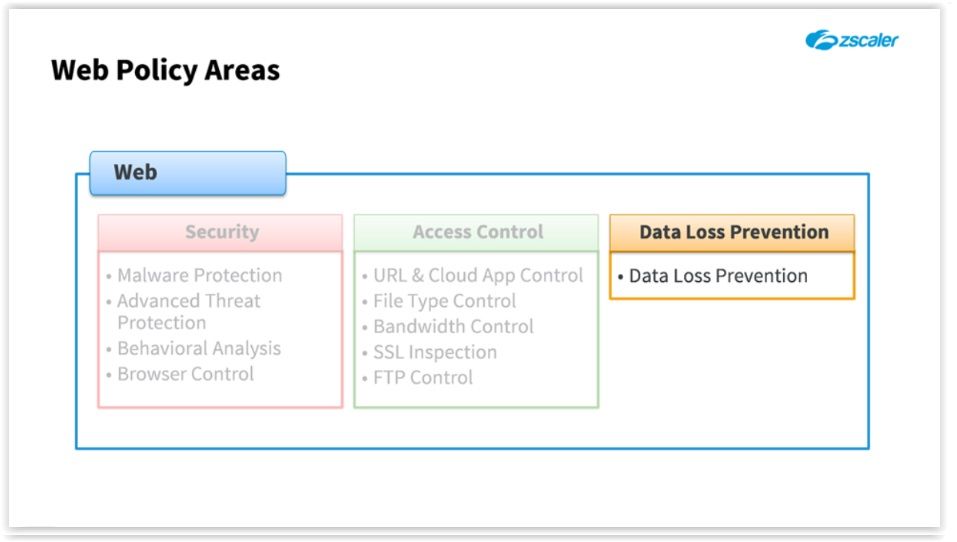
Data Loss Prevention
- https://en.wikipedia.org/wiki/Data_loss_prevention_software
- Data Loss Prevention
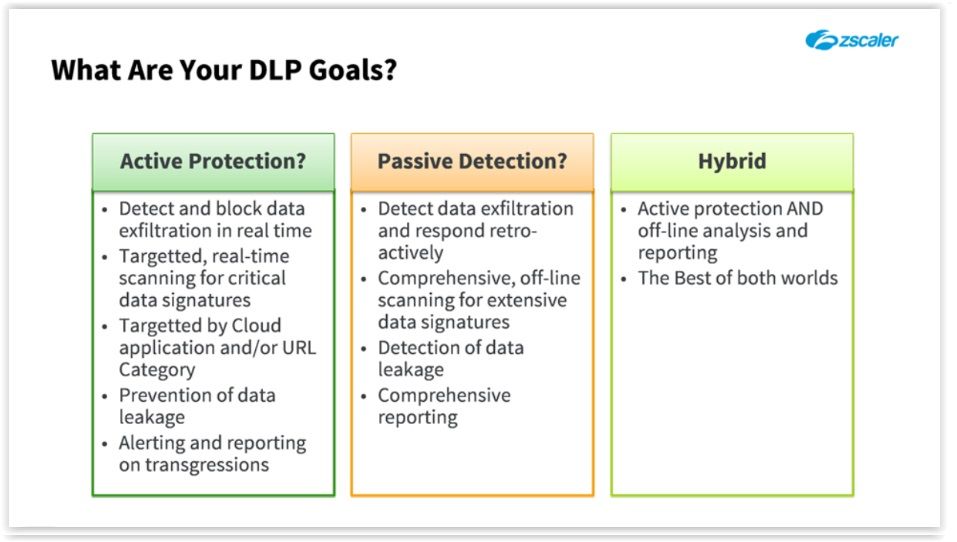
- Goals?
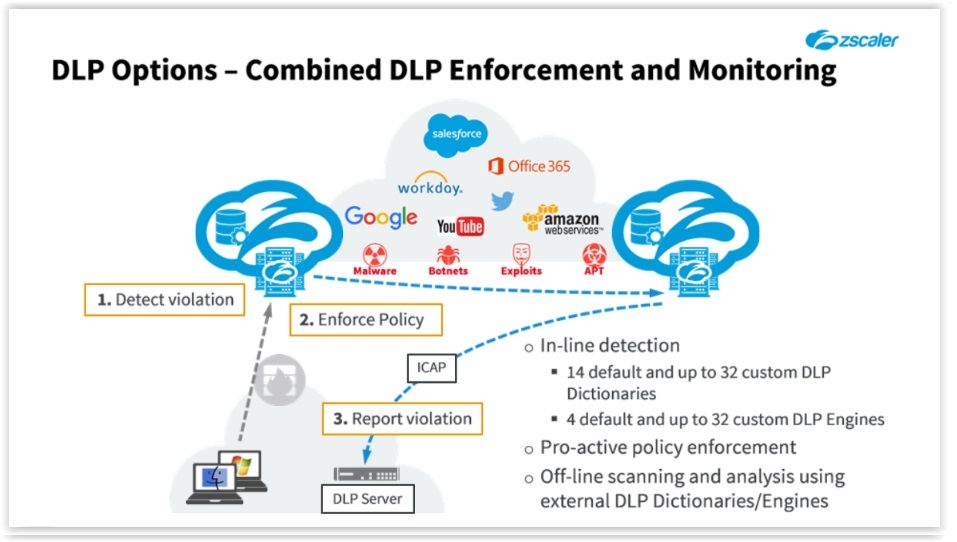
- Active: REAL TIME protection wuth targeted traffic being scanned for critical data signatures on exit from the corporate environment and any offending data blocked BEFORE it can leaving the organization
- Passive: PASSIVELY MONITOR data on EXIT, and forward suspect transctions to an EXTERNAL SYSTEM OFF-LINE scanning with a more comprehensive set of data signatures? This option only allows you to respond RETRO-ACTIVELY
- Hybrid: REAL time protection AND detailed off-line scanning and reporting
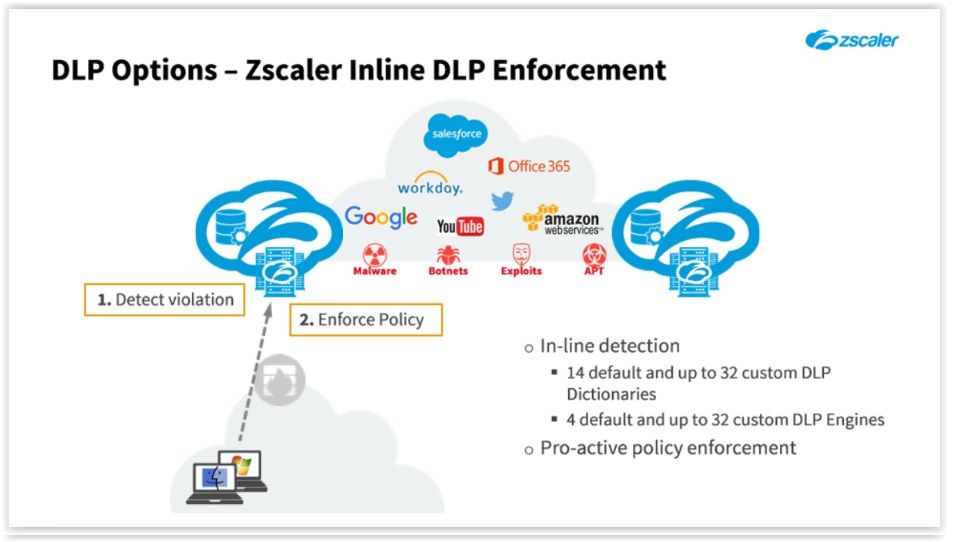
- Active
- You can use Zscaler's DLP engines alone to scan for key data signatures in real-time as data exits the organization. You can create granular policy controls based on our 14 standard DLP ‘Dictionaries’, and 4 default ‘Engines’, or easily create custom definitions that you can tailor for your industry, and propagate through the Zscaler cloud in minutes.
- Using Zscaler DLP you can: allow transactions, or block them before the data has actually left the company; detailed logs are accessible for you in REAL TIME
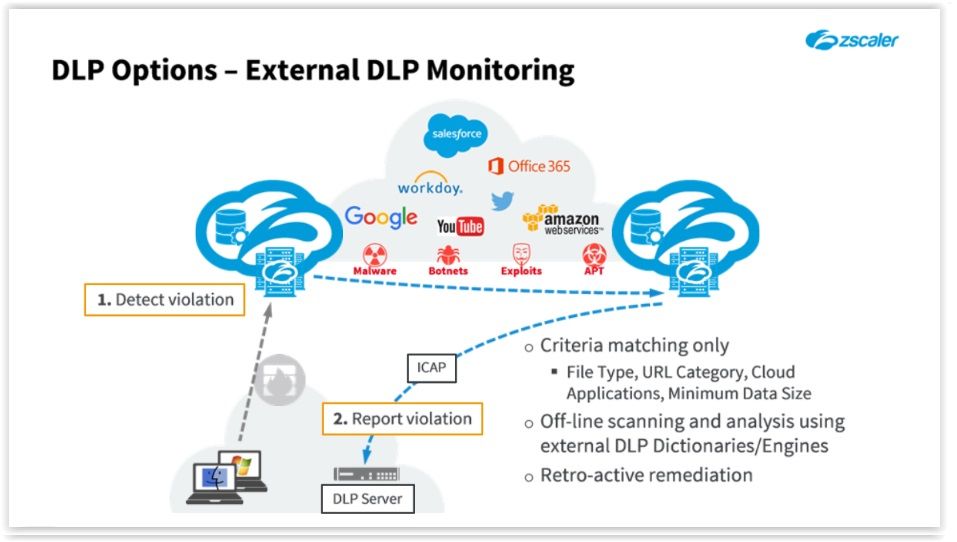
- Passive
- Detect a possible transgression and report it to an existing on-premise, or cloud-based DLP system using the Internet Content Adaptation Protocol (ICAP)
- In this scenario, Zscaler does not scan the content with its own DLP engines but simply acts as a filter, and triggers based on the configured criteria.
- Suspect traffic is forwarded to your existing on premise (or cloud-based) DLP server, so that your organization can perform detailed analysis off-line as necessary. The forwarding is actually done through a ZEN on another cloud that we use for sending communications to your DLP servers. Zscaler recommends to use secure ICAP
- As many DLP servers can only read unencrypted information, Zscaler recommends installing an open-source application called stunnel.
- Hybrid
- Use Zscaler DLP Engines to scan in real time, to enforce policy immediately and forwarding any matching transactions to your on premise DLP solution for detailed analysis and reporting
- Detection, Scale and Inspection
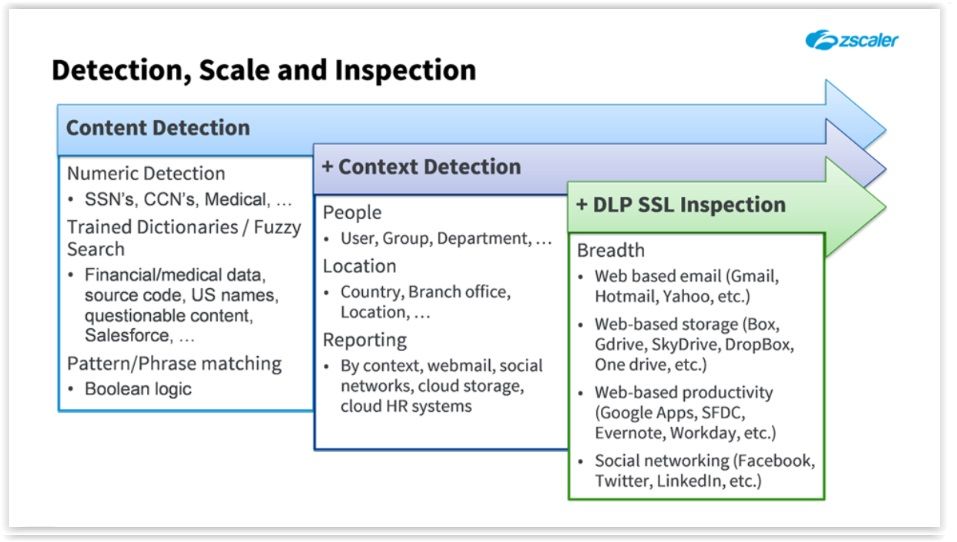
- Both content, and context criteria can be combined in a Zscaler DLP policy rule to match keywords, phrases, or patterns generated by specific ‘Users’, ‘Groups’, ‘Departments’ or ‘Locations’, and within defined ‘Time’ intervals if necessary.
- In addition, with SSL Inspection enabled, Zscaler DLP can detect data signatures and apply policy to all traffic, whether it is encrypted or not
- Goals?
- Web Policy Overview
- Where are we?
- DLP Configuration Options
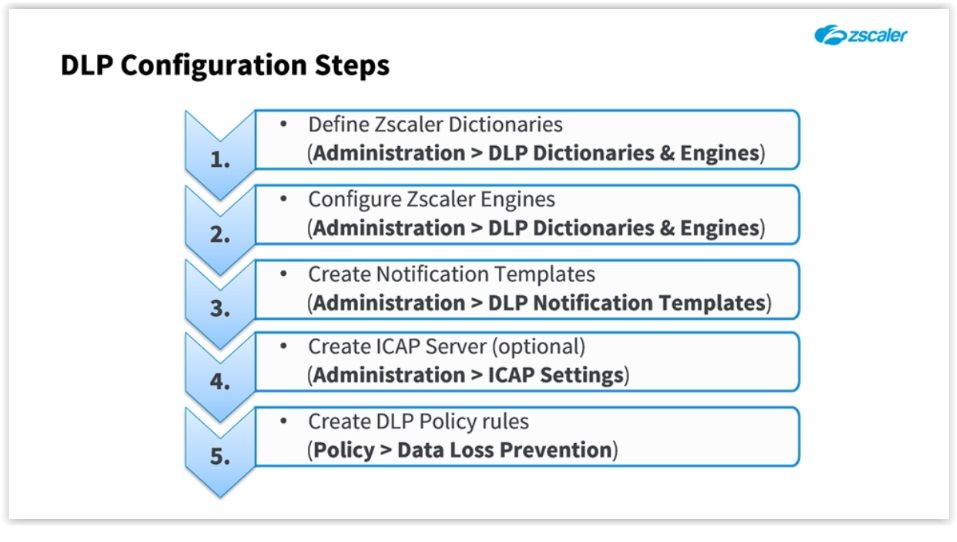
- DLP CONFIGURATION STEPS
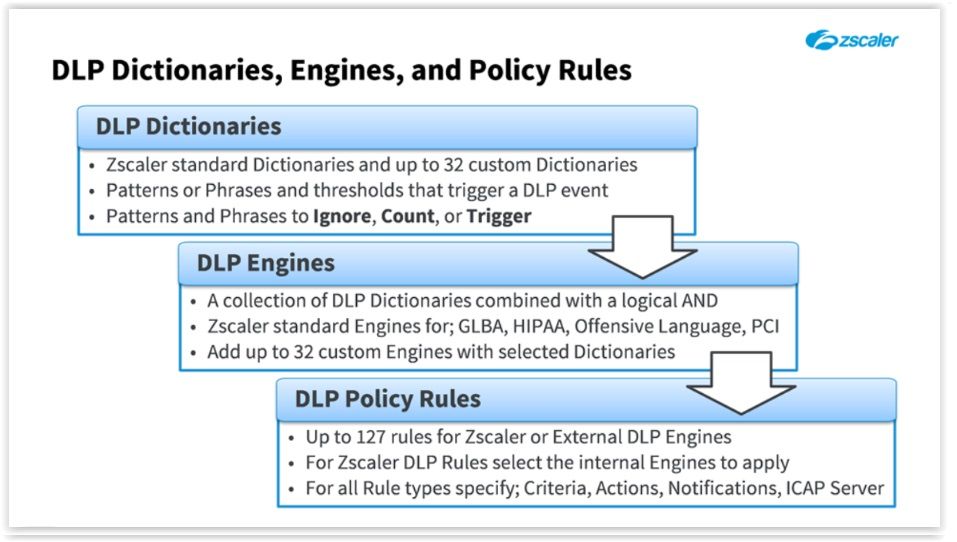
- Dictionaries, Engines and Policy Rules
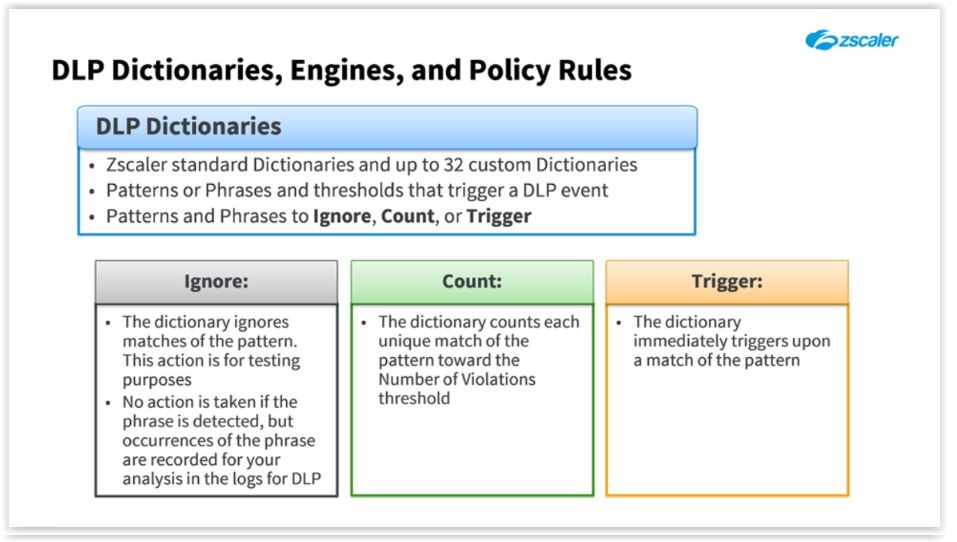
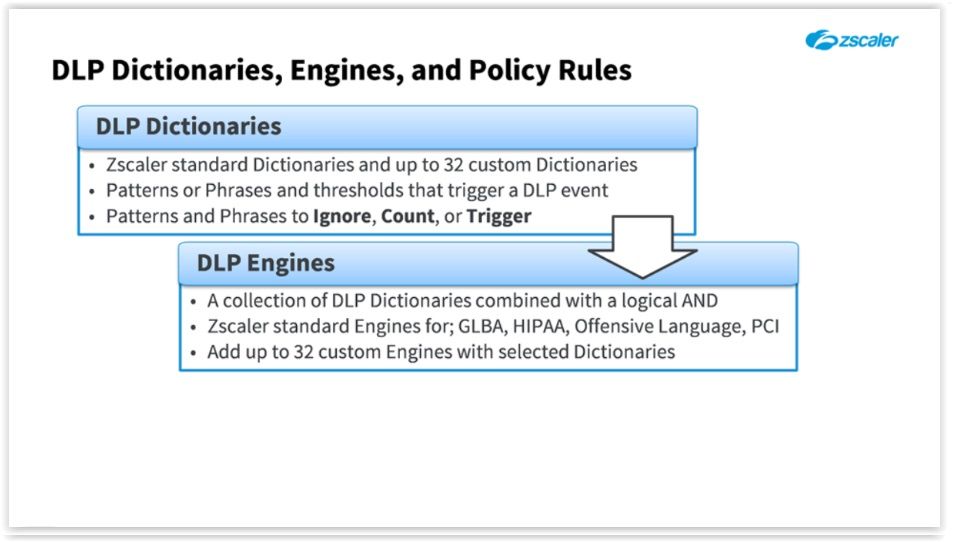
- Dictionaries
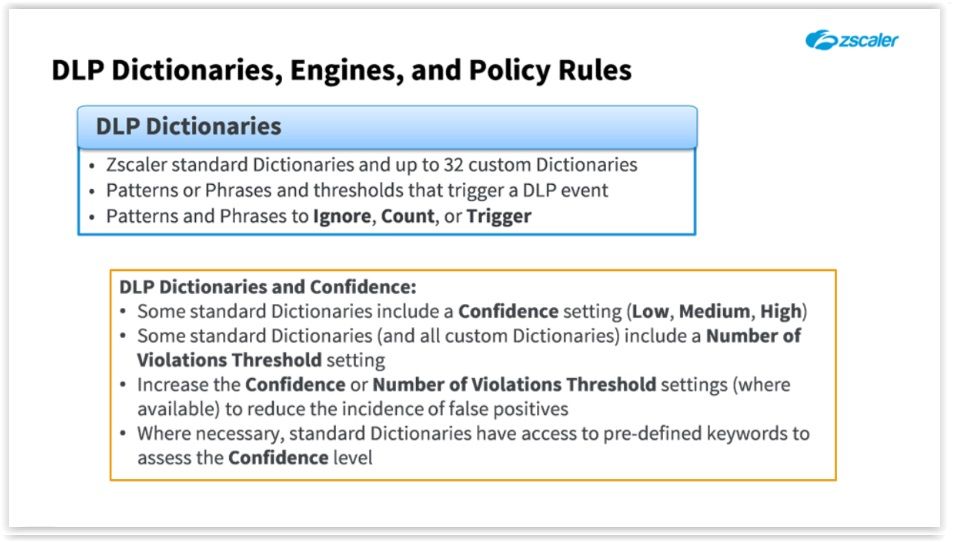
- Some of the standard Dictionaries include a ‘CONFIDENCE’ setting (‘Low’, ‘Medium’, or ‘High’), plus some of the standard Dictionaries (and all your custom ones) also contain a ‘Number of VIOLATIONS THRESHOLD’ configuration.
- Example: For example, the standard rule named ‘Credit Cards’ is set to the Confidence level ‘Medium’, and requires ‘5 Violations’ before it will trigger. If this still results in too many false positives, you have the option to either increase the ‘Number of Violations Threshold’, or the ‘Confidence’ level.
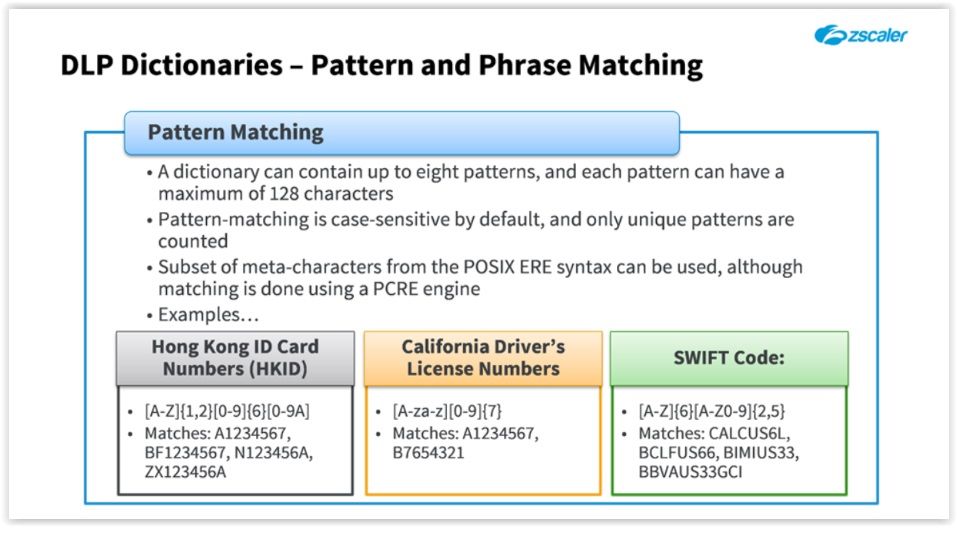
- 3rd Slide: You can add up to 8 alphanumeric ‘Patterns’ that represent the content you want to protect, and which the Dictionary is to detect. You can use a subset of the POSIX Extended Regular Expression (ERE) syntax to create the Patterns to match.
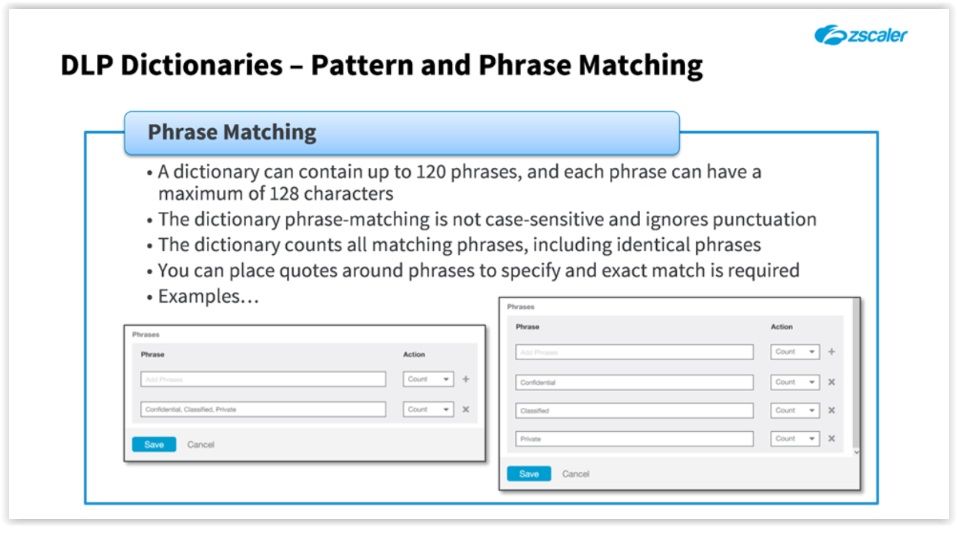
- 4th Slide: In the examples shown, each line is treated as a separate Phrase, so on the left the rule will only trigger if a Phrase contains all three words. In the example on the right each word is treated as a separate Phrase
- POSIX (ERE) ???
- https://en.wikibooks.org/wiki/Regular_Expressions/POSIX-Extended_Regular_Expressions
- Engines
- A DLP ‘Engine’ is a collection of one or more DLP Dictionaries. By using a DLP Engine, you can create rules to detect content that encompasses more than one Dictionary. Uses "AND" Boolean logic
- Policy Rule
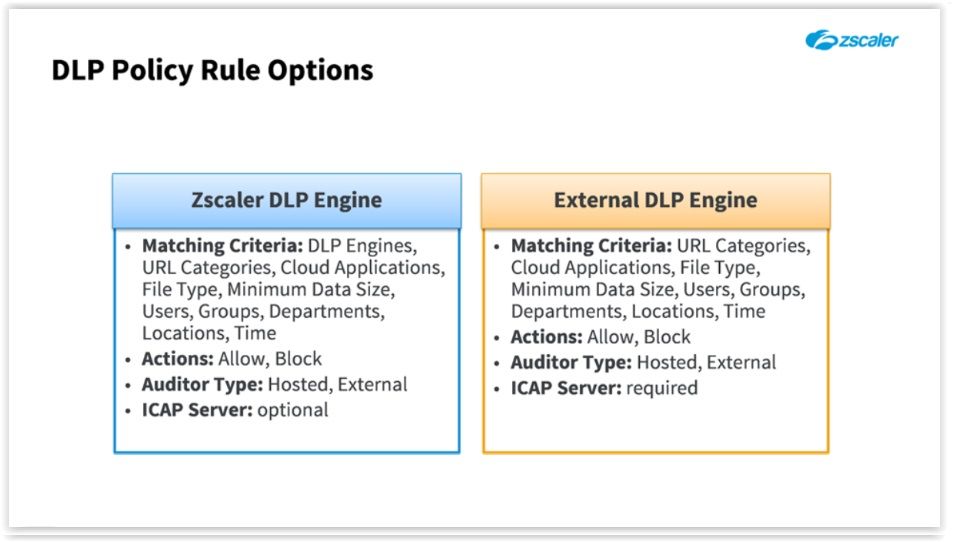
- This then allows you to DETECT matching data patterns, ALLOW or BLOCK the transactions containing them, and notify your organization's auditor as required.
- Plus, if you have an on-premise DLP solution, you can also forward content to it using secure ICAP so that external DLP Engines can perform further analysis of the data.
- LDP by the Numbers
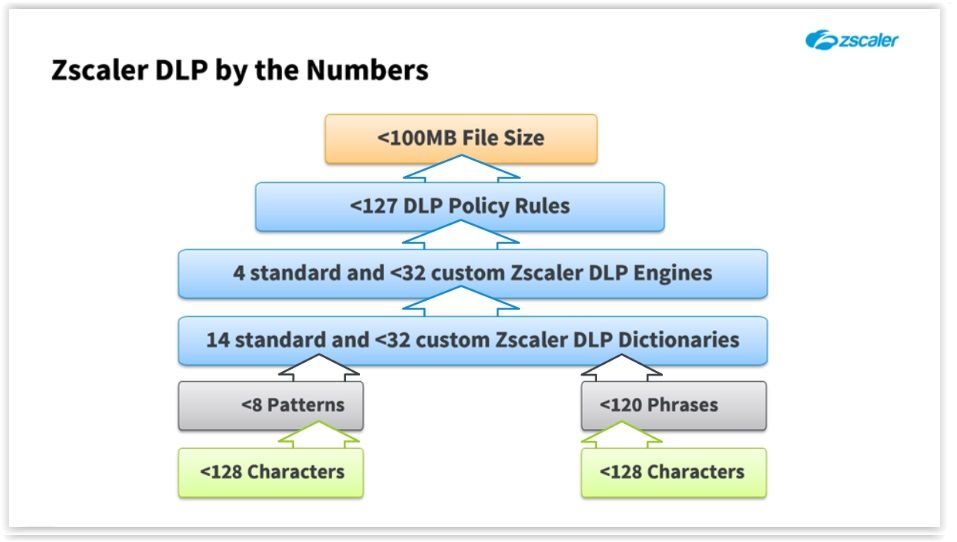
- Starts on the third tile from the bottom, then click on the arrow above: The Zscaler DLP environment provides 14 pre-defined DLP Dictionaries (for things like ‘Adult Content’, ‘Credit Cards’, and ‘Medical Information’), and we allow you to create up to 32 custom Dictionaries. Each of the custom Dictionaries may contain up to 120 ‘Phrases’, and/or up to 8 ‘Patterns’, with each ‘Phrase’ or ‘Pattern’ containing a maximum of 128 Characters.
- We provide 4 standard DLP Engines for you (‘GLBA’, ‘HIPAA’, ‘Offensive Language’, and ‘PCI’), and you may combine any of the DLP Dictionaries in up to 32 custom Engines. *** ALL dictionaries must trigger for the Engine to trigger
- Up to 127 DLP Policy rules may be created, and for the ‘Zscaler DLP Engine’ rules, you may add whatever combination of the standard or custom Engines that meets your needs. *** Policy will trigger if ANY engine trigger
- One thing to note is that the Zscaler DLP Engines can scan files with a maximum size of 100 MB. Or, for an archived file, the maximum size of an individual decompressed file is 50 MB.
- Dictionaries
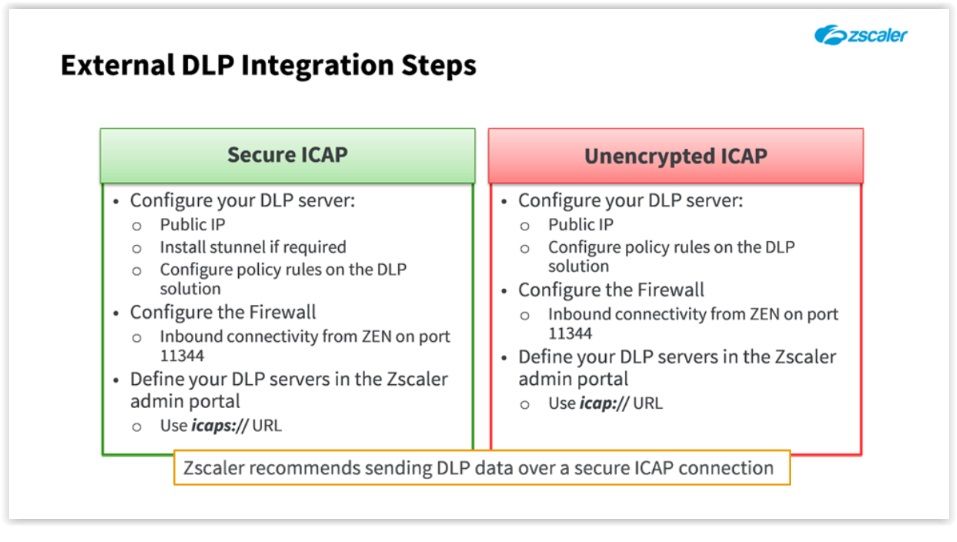
- External DLP Integration
- Your DLP system must be available on a public IP address, and if it doesn’t support secure ICAP natively we recommend that you install the open source ‘stunnel’ application on the DLP appliance. You will of course also need to configure appropriate policy rules on the external system. The Firewall in front of the DLP server must be configured to allow inbound connections from Zscaler, usually on port 11344. Then, as mentioned at step 4 in the previous slide, you must create the ICAP server in the Zscaler admin portal on the ‘Administration > ICAP Settings’ page. When creating the ICAP server, the URL for the external system must be configured using the protocol definition ‘icaps://’.
- To send suspect transactions in an unencrypted form to your external DLP system; you can omit the installation of 'stunnel', and you need to configure the URL for the ICAP server in the Zscaler admin portal using the protocol definition ‘icap://’.
- Notice: Secure ICAP: icapS://URL UNsecure ICAP: icap://URL
- Demo Notes
Imagens e arquivos do mapa
Informações
- Descrição
- Zscaler (Zscaler) Mapa Mental sobre Policy 3, criado por Rafael Santos em 11-02-2017.
- Criado por
- Rafael Santos
- Visualizações
- 0
- Avaliação