
Mapa mental
Computing Hardware - CPU and Memory
Conteúdo do mapa
Computing Hardware - CPU and Memory
Processing
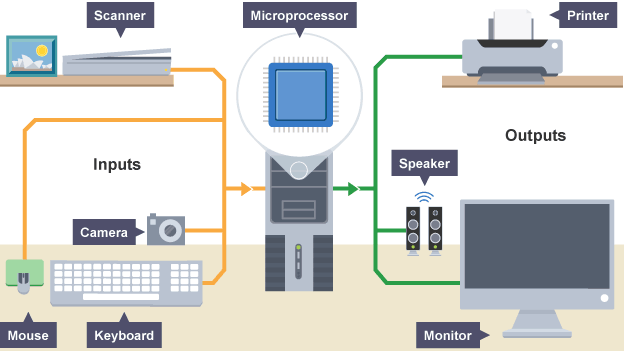
- Computers require an input hardware, processing hardware and output hardware.
- CPU
- executes programs using the fetch-decode-execute cycle
- Memory
- Stores program operations and data while the program is being executed. Types: Registers, cache, RAM, ROM and Virtual Memory
- Storage
- Stores programs and files long term, even when not in use. Types include: USB, SD Cards, Hard-Drives and SSDs
- Graphics
- Most computers have a separate GPU and CPU
- Using the GPU to render images, frees up the CPU for other tasks
- Performance
- Benchmarking
- A test used to access the performance of a computer. Different types of software are used depending on the computers purpose.
- CPU speed (cycles per second) measured in Hertz
- GHz
- MHz
- KHz
- Hz
- Benchmarking
CPU and Memory
- Factors that affect performance
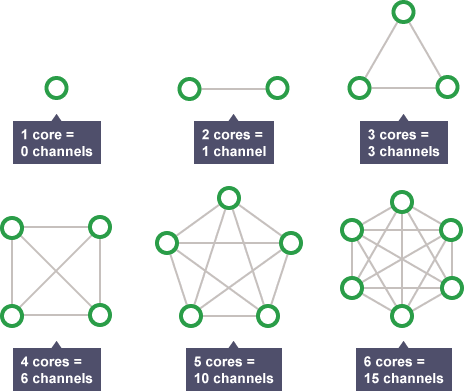
- Cores
- CPU can contain one or more processing units (cores). A core contains a ALU, Control Unit and Registers.
- Cores communicate through channels therefore doubling cores does not double speed
- Clock Speed
- The clock speed - also known as clock rate - indicates how fast the CPU can run. This is measured in megahertz (mHz) or gigahertz (gHz) and corresponds with how many instruction cycles the CPU can deal with in a second.
- Cache Size
- Cache is a small amount of memory which is a part of the CPU - closer to the CPU than RAM. It is used to temporarily hold instructions and data that the CPU is likely to reuse.
- The CPU control unit checks the cache for instructions before the RAM.
- Larger the Cache = the more data can be stored closer to the CPU
- L! - part of the CPU chip, smallest and fastest to access (between 8KB and 64KB
- L2/3 - larger, extra cache built between the CPU and RAM. More L2/3 = faster a computer can run
- Processor Type
- CISC
- Complex Instruction Set Computing
- Used by most laptops/desktops - made by Intel/AMD
- RISC
- Reduced Instruction Set Computing
- Used in tablets/smartphones
- Differences
- RISC have less instructions. RISC more efficient at simpler tasks
- Physical Size - CISC are larger and require more silicon
- Speed - RISC run at a lower clock speed
- Energy Consumption - CISC are larger and therefore use more energy
- Design - RISC combines architecture onto one chip (SOC), whereas CISC are built seperatly a system with heat sinks and fans - RISC do not.
- Cost - RISC use less power and are cheaper to make
- CISC
- Cores
- Factors that affect performance
Bridges
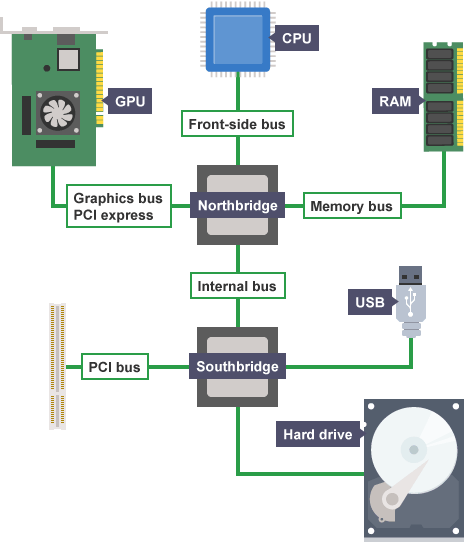
- Bridges manage how data and instructions are transferred between devices
Memory
- Memory is the area where the computer stores or remembers data. Memory provides the CPU with its instructions. AKA Primary Storage
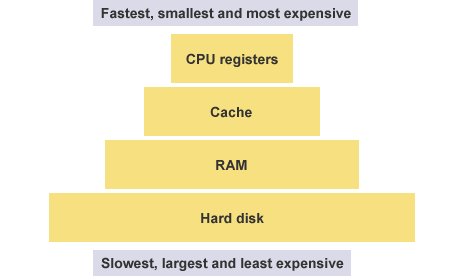
- Closer to CPU = quicker the CPU can access instructions
- VOLATILE
- Only stores information to run programs while the PC is on. Reset when the PC is turned off. Requires electricity to store data using transistors and capacitors
- NON-VOLITILE
- Retains data even when the computer is off. Examples in old computers: paper, punched tape and floppy disks
- Latency is the time for components to respond to a request
- Memory is the area where the computer stores or remembers data. Memory provides the CPU with its instructions. AKA Primary Storage
Imagens e arquivos do mapa
Informações
- Descrição
- OCR Computing - Hardware
- Criado por
- Usuário eliminado · jul 2018
- Atualizado
- 15 jul 2018
- Visualizações
- 7
- Tags
- Histórico
-
- Criado por ollietablet123 · 12 mar 2015
- Copiado por Fras Byhno · 15 jul 2018
- Avaliação