
Quiz
ch10 midterm
Este quiz tem tipos de pergunta que abrem no player de sempre.
Perguntas do quiz (44)
1There are two types of virtualization:
- AApplication
- BDesktop
- CVirtual
- DOpen
- EClosed
2[blank_start]Application[blank_end] virtualization. One computer can serve up multiple applications such as web servers, email servers, file servers, and desktop applications such as Microsoft Office and Adobe Acrobat. Later in the chapter you learn more about application virtualization.
[blank_start]Desktop[blank_end] virtualization. Also called client-side virtualization, client virtualization, and client-side desktop virtualization, is when one computer provides multiple desktops for users. Each virtual desktop is contained in its own virtual machine.- AApplication
- BDesktop
3Label the types of hypervisors:
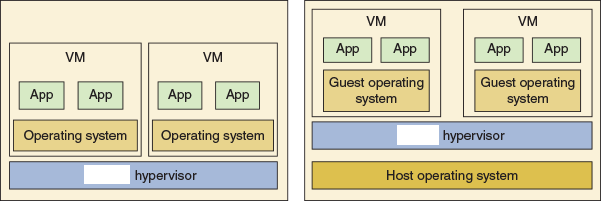
- AType 1
- BType 2
4A Type [blank_start]1[blank_end] hypervisor installs on a computer before any operating system, and is therefore called a bare-metal hypervisor. After it installs, it partitions the hardware computing power into multiple VMs. A different OS can be installed in each VM. When a server provides virtual desktops or VMs to multiple users over the local network or the cloud, this is called remote or server-hosted desktop virtualization. For server-hosted desktops, most likely the hypervisor used is this hypervisor.
A Type [blank_start]2[blank_end] hypervisor installs in a host operating system as an application and is sometimes called a hosted hypervisor. When a workstation is used to host a hypervisor with its VMs, this is called local or client-hosted desktop virtualization. For the most part, client-hosted desktops are provided by this hypervisor.- A2
- B1
5What do you need for your computer to run a hypervisor software?
- Amax cpu cores
- Bmax ram
- Clots of storage
- Dmax gpu
6Securing a VM includes:
- ASecure the VM within the VM
- BVMs should be isolated for best security
- CSecure the files that hold a VM
- DSecure the host computer
- ESecure the wireless connection in the VM
7A service where server-side virtualization is delegated to a third-party service, and the Internet is used to connect server and client machines.
- ACloud computing
- BCloud virtualization
- CVirtual service
- DHypervisor
8In a [blank_start]public[blank_end] cloud, services are provided over the Internet to the general public. Google or Yahoo! email services are examples.
In a [blank_start]private[blank_end] cloud, services are established on an organization’s own servers or established virtually for a single organization’s private use.
In a [blank_start]community[blank_end] cloud, services are shared between multiple organizations with a common interest, but the services are not available publicly.
A [blank_start]hybrid[blank_end] cloud is a combination of public, private, and community clouds used by the same organization. For example, a company might store inventory databases in a private cloud but use a public cloud email service.- Apublic
- Bprivate
- Ccommunity
- Dhybrid
9 [blank_start]Rapid elasticity[blank_end] refers to the service’s ability to be scaled up or down as the need level changes for a particular customer without requiring hardware changes that could be costly for the customer.
- ARapid elasticity
- BOn-demand
- CPlatform
- DResource pooling
- EMeasured service
10Resources offered by a cloud computing vendor, such as storage, applications, bandwidth, and other services, are measured, or metered, for billing purposes and/or for the purpose of limiting any particular customer’s use of that resource according to the service agreement.
- AMeasured service
- BOn-demand
- CRapid elasticity
- DResource pooling
11Cloud service models
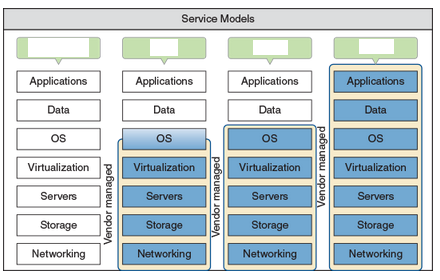
- Aiaas
- Bpaas
- Csaas
- Dtraditional
12With [blank_start]IaaS[blank_end] (Infrastructure as a Service), the customer rents hardware, including servers, storage, and networking, and can use these hardware services virtually. Customers are responsible for their own application installations, data management, and backup. In most situations, customers are also responsible for their own operating systems. IaaS is ideal for fast-changing applications, to test software, or for startup businesses looking to save money by not having to invest in hardware.
- AIaaS
13With [blank_start]PaaS[blank_end] (Platform as a Service), a customer rents hardware, operating systems, and some applications that might support other applications the customer may install. Popular with software developers who require access to multiple platforms during the development process.
- APaaS
14With [blank_start]SaaS[blank_end] (Software as a Service), customers use applications hosted on the service provider’s hardware and operating systems, and typically access the applications through a web browser. Applications are provided through an online user interface and are compatible with a multitude of devices and operating systems. Online email services, such as Gmail and Yahoo!, are good examples.
Except for the interface itself (the device and whatever browser software is required to access the website), the vendor provides every level of support from network infrastructure through data storage and application implementation.- ASaaS
15Cloud-based applications is an application installed on a server on the Internet; the user can access the software through a browser. The application is a type of [blank_start]SaaS[blank_end].
- ASaaS
- BIaaS
- CPaaS
16A good example of application streaming is Android’s Instant Apps, which allows a user to tap an app in Google Play and try the app without first having to install it.
- AVerdadeiro
- BFalso
17A presentation of a virtual desktop made to a client computer by a hypervisor on a server in the cloud.
- AVirtual Desktop Infrastructure (VDI)
- BVirtualization
- CHypervisor
- DVirtual NIC
18A [blank_start]thick[blank_end] client, also called a fat client, is a regular desktop computer or laptop that is sometimes used as a client by a hypervisor server.
A [blank_start]thin[blank_end] client is a computer, such as a Chromebook, that has an operating system but little computing power of its own and might only need to support a browser used to communicate with the server.
A [blank_start]zero[blank_end] client, also called a dumb terminal, such as the Wyse Zero Client by Dell, does not have an OS and is little more than an interface to the network with a keyboard, monitor, and mouse.- Athick
- Bthin
- Czero
19With [blank_start]persistent[blank_end] VDI, the user owns the virtual desktop, which can be customized for the user and saved for future use. Each time the user signs on, he picks up the desktop where it left off the last time he signed off.
- Apersistent
- Bnonpersistent
20With [blank_start]nonpersistent[blank_end] VDI, a user receives a desktop from a pool of desktops; each time the user signs on, she gets a desktop that reverts to its original state.
- Anonpersistent
- Bpersistent
21[blank_start]Flatbed[blank_end] scanners must be fed one page at a time, with each page being lined up on a glass surface.
[blank_start]ADF (automatic document feeder)[blank_end] scanners can automatically process a stack of papers, cards, or envelopes, pulling each page individually into a roller system for scanning and then spitting it out into a separate tray.- AFlatbed
- BADF (automatic document feeder)
22Laser printers require the interaction of mechanical, electrical, and optical technologies. They work by placing toner on an electrically charged rotating drum called the imaging drum, transferring the toner onto paper as the paper moves through the system, and then fusing the toner to the paper.
- AVerdadeiro
- BFalso
23[blank_start]5[blank_end]. Transferring. During transfer, a strong electrical charge draws the toner off the drum onto the paper. This is the first step that takes place outside the cartridge and the first step that involves the paper. The soft, black transfer roller puts a positive charge on the paper to pull the toner from the drum onto the paper. Then the static charge eliminator weakens the charges on both the paper and the drum so that the paper does not stick to the drum.
[blank_start]1[blank_end]. Processing the image. A laser printer processes and prints an entire page at one time.
[blank_start]3[blank_end]. Exposing or writing. A laser beam controlled by motors and a mirror scans across the drum until it completes the correct number of passes. The laser beam is turned on and off continually as it makes a single pass down the length of the drum, once for each raster line, so that dots are exposed only where toner should go to print the image.
[blank_start]7[blank_end]. Cleaning. A sweeping blade cleans the drum of any residual toner. The charge left on the drum is then neutralized. Some printers use erase lamps in the top cover of the printer for this purpose. The lamps use red light so they won’t damage the photosensitive drum.
[blank_start]4[blank_end]. Developing. The developing cylinder applies toner to the surface of the drum. The toner is charged between -200 V and -500 V, and sticks to the developing cylinder because of a magnet inside it. A control blade prevents too much toner from sticking to the cylinder surface.
[blank_start]6[blank_end]. Fusing. The fuser assembly uses heat and pressure to fuse the toner to the paper. Up to this point, the toner is merely sitting on the paper. The fusing rollers apply heat to the paper, which causes the toner to melt, and the rollers apply pressure to bond the melted toner into the paper.
[blank_start]2[blank_end]. Charging or conditioning. During charging, the drum is conditioned by a roller that places a high uniform electrical charge of -600 V to -1000 V on the surface of the drum. The roller is called the primary charging roller or primary corona, which is charged by a high-voltage power supply assembly.- A5
- B1
- C3
- D2
- E4
- F7
- G6
24An inkjet printer uses a print [blank_start]head[blank_end] that moves across the paper, creating one line of the image with each pass. The printer puts ink on the paper using a matrix of small dots. Different types of inkjet printers form their droplets of ink in different ways.
- Ahead
- Btail
- Caccuator
- Dtop
- Esurface
25An [blank_start]impact[blank_end] printer creates a printed page by using some mechanism that touches or hits the paper. They use continuous tractor feeds and fanfold paper (also called computer paper) rather than individual sheets of paper, making them useful for logging ongoing events or data.
- Aimpact
- Blaser
- Cink
- Dthermal
26Thermal printers use heat to create an image. Two types of thermal printers are a direct thermal printer and a thermal transfer printer. The older [blank_start]direct thermal[blank_end] printer burns dots onto specially coated paper called thermal paper. A [blank_start]thermal transfer[blank_end] printer uses a ribbon that contains wax-based ink. The heating element melts the ribbon (also called foil) onto special thermal paper so that it stays glued to the paper as the feed assembly moves it through the printer.
- Adirect thermal
- Bthermal transfer
27 A [blank_start]local[blank_end] printer connects directly to a computer by way of a USB port, serial port, or wireless connection (Bluetooth or Wi-Fi). Most printers these days support more than one method.
A [blank_start]network[blank_end] printer has an Ethernet port to connect directly to the network or uses Wi-Fi to connect to a wireless access point.- Alocal
- Bnetwork
28Connect a local printer to a computer on the network, and then share the printer through the computer’s network connection.
- AShared local printer
- BShared network printer
- CWireless printer
29A network printer can connect directly to a network with its own NIC (see the network printer in Figure 10-21), and is identified on the network by its IP address or host name.
- ANetwork printer
- BShared printer
- CShare local printer
- DShared network printer
30In [blank_start]infrastructure mode[blank_end], Wi-Fi devices connect to a Wi-Fi access point, such as a SOHO router.
- Ainfrastructure mode
- Bad hoc mode
- Cbluetooth
31Apple computers and mobile devices can use an AirPrint printer without you having to install it.
- AVerdadeiro
- BFalso
32[blank_start]Ad hoc mode[blank_end] is a peer-to-peer wireless network between computers where each wireless computer serves as its own wireless access point and is responsible for securing each connection.
- AAd hoc mode
- BInfrastructure mode
- CWiFi mode
- DWireless mode
33A printer feature that allows it to connect to a network, manage print jobs from multiple computers, monitor printer maintenance tasks, and perhaps send email alerts when a problem arises.
- Aintegrated print server
- Bnetwork printer
- Clocal printer server
- Dad hoc printer
34When a computer shares its local printer with other computers on the network, the computer is considered to be a print server.
- AVerdadeiro
- BFalso
35Securing a printer:
- Auser authentication
- Bphysical lock
- Cfirewall
- Dpasscode
36If you don’t see a shared printer in the list of printers, consider that the printer might be shared by a Mac computer on the network. [blank_start]Bonjour[blank_end] is an Apple program that is used to interface between computers and devices and share content and services between them; it is used by Windows to discover a printer shared by a Mac computer.
- ABonjour
- BWinApp
- CApple Connect
37Printing to a file rather than directly to a printer.
- Avirtual printing
- Bopen printing
- Cfile printing
- Ddigital printing
38Printing to a printer anywhere on the Internet from a personal computer or mobile device connected to the Internet.
- Acloud printing
- Bwireless printing
- Cuniversal printing
- DIoT printing
39An inkjet printer might require [blank_start]calibration[blank_end] to align and/or clean the inkjet nozzles, which can solve a problem when colors appear streaked or out of alignment.
- Acalibration
- Breadjusted
- Creset
- Dcleaning
40Ink printers automatically calibrate themselves periodically.
- AVerdadeiro
- BFalso
41If you have concluded you have connectivity with the printer, stop and restart the Windows Print Spooler service.
- AVerdadeiro
- BFalso
42For laser printers, poor print quality can include printing blank pages or faded, smeared, wavy, speckled, or streaked printouts with vertical lines down the page. These problems often indicate that the toner is [blank_start]low[blank_end].
- Alow
- Bhigh
43If the page has a gray background or gray print, the image drum is worn out and needs to be replaced.
- AVerdadeiro
- BFalso
44Streaks or lines down the page can be caused by dust or dirt in the print head assemblage.
- AVerdadeiro
- BFalso
Informações
- Descrição
- Quiz sobre ch10 midterm, criado por Ari Gu em 11-03-2020.
- Autor
- Ari Gu
- Idioma
- English
- Visualizações
- 8
- Avaliação
- Ainda sem avaliações Avalie este quiz