
Arrays in Java
Slides do conjunto (7)
-
-
- An array is a group of variables of the same type that is referred to by a common name
- Arrays are objects
- Indexing is 0-based, meaning that the variables contained in arrays are ordered with indexes 0 to n-1, where n is the number of elements or size of the array
- The size of an array must be specified by an int value
- They may contain primitive data types as well as objects of a class
- There are two types of arrays: single dimensional and multidimensional
- Arrays: Groups of Same-Type Variables
-
- The Good
- An array optimizes the code, making it easy to sort or retrieve data
- Any data located at any index position can be accessed
- Arrays provide fast access to data
- The Bad
- An array can store only a fixed number of elements
- Arrays can hold only a collection of similar items; the items cannot be of different types
- Insertion and deletion in the middle of arrays are tedious (causes shifts)
- Requires a large enough block of memory; non-ideal if the size of the data grows exceedingly large
- Arrays are easily corrupted
-
- Declaring and instantiating a one-dimensional array can be combined as shown in the format below:
- type name[] = new type[size];
- type is the data type the array will store
- name is the reference of the array
- size is the number of elements the array will contain
- Examples:
- double numbers[] = new double[12];
- String names[] = {"Pam", "Jim", "Dwight", "Michael"}
- int heights[] = new int[6];
- Understanding Declarations
-
- public static void sort(Object[] a)
- Sorts the specified array in ascending order
- public static void fill(int[] a, int val)
- Assigns every index of the array to the specified value; can be utilized with other types (boolean, byte, char, double, etc.)
- public static List asList(type[] a)
- Returns a fixed-size list backed by the specified array
- Sorting an Array
- Fill Method
- asList Method
-
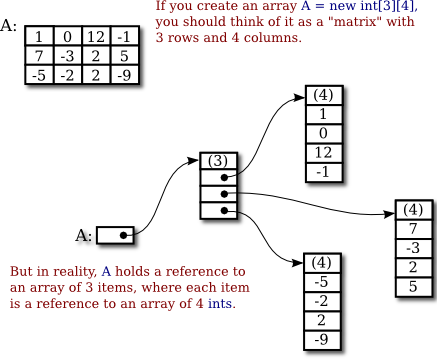
- The easiest multidimensional array to understand is a two-dimensional array, which is an array of arrays
- Think of the number of rows in a 2-D array as the number of arrays found within the array
- The picture to the right provides a visual representation of a 2-D array; this one array contains 3 (rows) arrays, with each additional array containing 4 elements
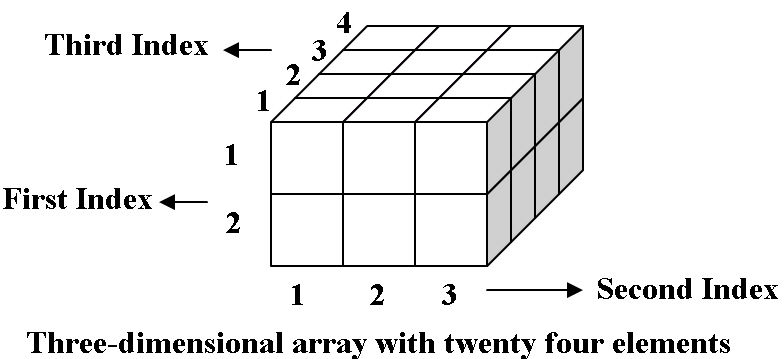
- A three-dimensional array is an array of arrays of arrays
- This pattern continues with every additional dimension you wish to add
-
- 2-D arrays are declared and instantiated using the format below:
- type[][] name = new type[rows][columns];
- type is the data type the array will contain
- name is the name of the array which will reference it
- rows is the number of rows in the array
- columns is the number of columns in the arry
- Examples:
- int[][] calories = new int[5][7];
- double[][] height = {{46.2, 48.3, 52.1}, {51.4, 49.9, 54.6}, {61.3, 64.2, 49.8}};
- Visualizing a 2-D Array
- Examples of 2-D Declarations
Informações
- Descrição
- Slides sobre Arrays in Java, criado por Olivia B em 31-05-2018.
- Criado por
- Olivia B
- Visualizações
- 2
- Avaliação