
4281928
Computer Networks


Resource summary
Slide 1
Peer-to-Peer Network
Peer-to-Peer is a network arrangement where each computer is of an equal status.Benefits:- Saves on cost as no server is needed- No need to hire a network manager, users have the responsibility- Easy to set up- No reliance on a server- Lower operating costs- Users can decide what resources other users can use on their computerDrawbacks:- Backups cannot be made centrally- Users need more IT knowledge- Less efficient security- Some computers may run slowly- Users may find it difficult to find files as they are not held centrally- Only suitable for small networks, around 15 networked computers
Caption: : Peer to Peer video
Slide 2
Client-server Networks
Benefits:- Security is more efficient because it is centralised- The data is stored centrally, all users have access to the same set of data- Faster access to programs and files because servers are used, they are powerful computers- All the administration of the network, such as username and passwords, is performed centrally. This is so that users do not have to worry about that.Disadvantages:- Servers are expensive- Need to be an expert on networked systems- If the server breaks down it renders the network unusable until it can be repaired.
Caption: : Client-server networks video
Slide 3
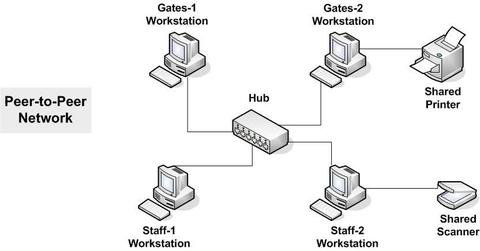
Peer to Peer network
Caption: : In a Peer to Peer network all the computers are of equal status
Slide 4
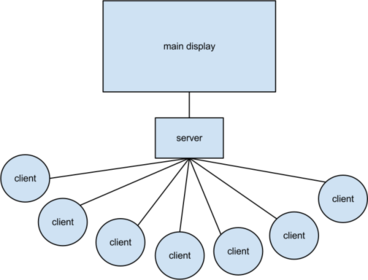
Client-server network
Caption: : With Client-server networks a more powerful computer is in charge of the networking facilities
Slide 5
Ring Topology
Caption: : Ring Topology Network video
Ring network's are also peer-to-peer networks because there is no server. About the Ring Topology:- All the computers are arranged in a circle- Data sent by one computer passes around the ring until it reaches the correct computerAdvantages: - Does not depend on a central computer- Each computer has the same access, so no computer can traffic the network.Disadvantages:- If there is a break in the connection, whether wires or wireless, the whole network will fail.- Faults are difficult to locate- The network cannot be kept running whilst new equipment is being added or removed as there is only one path the data can follow.
Slide 6
Bus Topology
Caption: : Bus Topology Network video
About Bus Topology:All the devices are connected to the network by a common shared cable called the backbone. Signals are passed in either direction along the backbone.Advantages:- Cost effective, small amount of cable needed- Simple cables make it easy to install- Easy to add extra devices to the networkDisadvantages:- If more than 12 devices are connected to the network it degrades the performance of the network.- If there is a break in the backbone cable then the network is unable to be used.
Slide 7
Star Topology
Caption: : Star Topology Network video
About Star Topology:It uses a central connection point to connect all the devices on the network together. The central connection point can be a hub, a switch or a router.Advantages:- If one of the cables fails, other computers can still be used- Extra computers can be added without much affect to performance, this is because the computers have their own path to the server.- It is easy to add extra computers without disturbing the networkDisadvantages:- Higher cost as there is a large amount of cabling- Depend on central router, so if the router fails then the whole network will fail.
Slide 8
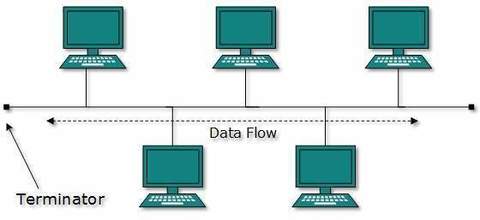
Bus Topology Diagram
Slide 9
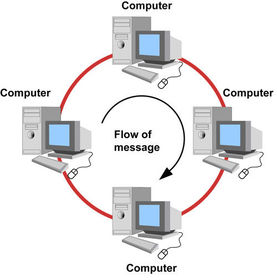
Ring Topology Diagram
Slide 10
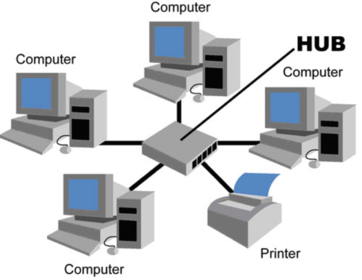
Star Topology Diagram
Slide 11
Wireless Networks
About Wireless Networking:Majority of computers are now able to connect to the Internet or communicate with other computers in a LAN wirelessly. Wireless connection allows data to be transferred through the medium that is the air, where radio waves travel.Wireless networks allow people to connect to the Internet or to a LAN wirelessly. This enables them to work anywhere where they can get a radio signal for their network. Many people, especially people who travel a lot, will need to access the Internet on a regular basis. There are many public places available where the Internet can be accessed wirelessly using a laptop of computer, or any other portable devices such as a mobile phone. Places where you can access the Internet using Wi-Fi are called HOTSPOTS.
Slide 12
Advantages & Disadvantages
- It allows inexpensive LANS to be set up without the need for cables- Gives people the freedom of working anywhere a signal can be received - It is ideal for networks in older buildings where cables would not have been installed- You can use it all over the world.
- Power consumption is high, laptops soon exhaust their rechargeable batteries- Might be health problems involved with using Wi-Fi- Chance of security problems, whether encryption has been used or not- Home networks have a very limited range for devices that want to connect, such as 150 ft and cannot hold more than say 20 devices. A school would have to have more than one access point. - There can be interference if wireless network signals start to overlap.
Slide 13
How Wi-Fi works
Want to create your own Slides for free with GoConqr? Learn more.