
Karteikarten
Ohne Titel
Karten in diesem Stapel (27)
- 1Syntax ErrorOccurs when there are mistakes with how the programming instructions are formatted (program fails to obey one of the grammar rules)
E.g. forgetting speech marks or brackets
Autocomplete can help programmers avoid these errors. - 2Run-Time ErrorsErrors that cause the program to crash while its running, when formulas are wrong or the computer cannot carry out an operation it is not designed to do or slow to do. Can be found in iterations and if the wrong data type is used (the word two instead of 2)
- 3Logic ErrorsHardest type of error to detect as it will not stop the program from running. Occurs when a valid but incorrect command is given.
Reasons for logic errors are that the programmer was carless or didn't understand how the command worked or the programmer misunderstood how the program should work. - 4Ways to test for errors1. Breakpoint - stop the program in certain places, can check the status of any variables at any point in program.
2. Steps - step through the code line by line, lets us see how the commands are working one at a time.
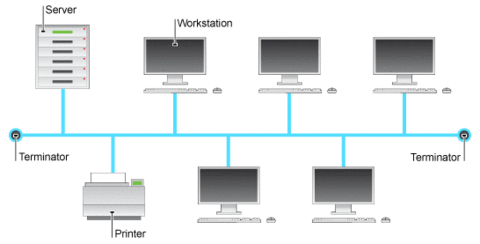
3. Watches - to check the values held in any variables or arrays while the program is paused. - 5—Bus topology:
Uses a backbone which all the devices are connected to. They are the cheapest type of network to set up (only requires small amount of cable). If one node breaks then the topology works as normal so it is good for small networks. However it is not secure as each packet passes through other nodes and it is slow as collisions of data, especially with lots of devices. - 6—Ring topology:
Every node is connected to 2 other nodes. All messages pass around in the same direction. Found in offices or schools. Speed is good as no chance of collisions, cope with large amounts of traffic, inexpensive (more costly than bus) and the security is poor as all of the devices see the tokens. It is difficult to add new nodes to the ring and if there is a fault then the whole network fails and can be difficult to find the fault.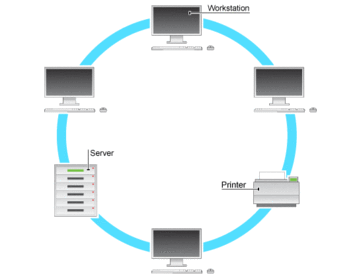
- 7—Star topology:
Each device is connected to the central node/hub/server. The packets are either sent to all of the devices by the hub or to individual devices (using a switch).
They are secure as not all devices will see the packets and it is fast as it copes with large amounts of traffic. If one of the nodes fail then still works and easy to find fault.
However if the hub breaks then the whole network breaks, it is expensive as large amount of cabling and hard to add another node.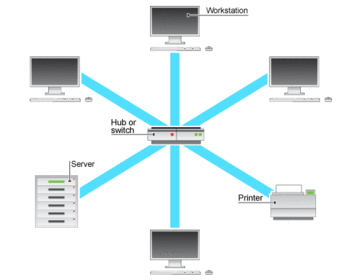
- 8—Mesh topology:
Each node is connected to several others along the networks. These are really expensive to set up due to the amount of cable required, however they are fault tolerant as there are always many paths by which the packets can travel, so if one node fails then none of the others are effected.
Cope with high amounts of traffic but not as secure as packets pass through more than one node. The internet uses a mesh topology.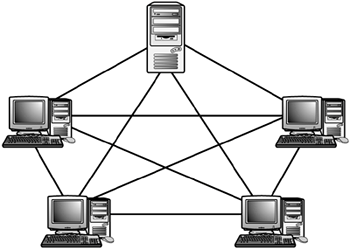
- 9ProtocolsThe rules that devices on the networks must all follow to enable communication to happen (rules that govern how we communicate).
- 10Volatile memoryComputer memory that requires a power supply in order to maintain stored data.
The moment the power is turned off the information is lost. RANDOM ACCESS MEMORY (RAM) in your computer is volatile memory. Volatile memory cannot store data when the device is turned off. - 11Non-volatile memoryComputer memory that retains its information whether the power is being supplied to it is turned on or off.
READ ONLY MEMORY (ROM), flash memory, magnetic hard disks and optical disks are examples of non-volatile memory. - 12How memory is usedThe CPU works much faster than hard disk therefore the CPU cannot fetch the data it needs directly from hard disk. So CACHE is used as it is the fastest memory, it is very high speed memory and it draws the data from the RAM as it is needed.
- 13Cache memoryVery high speed memory. It is the closest to the CPU and it is limited in size so has a limit to how much it can store. Cache memory is taken fro the RAM when needed. Cache has memory controllers to try and predict what piece of data the CPU is going to need next. The size of the cache refers to the size of the data store. The more cache memory the faster it will operate.
- 14Random Access Memory (RAM)RAM is fast (not as fast as cache). It is used to store data that the processor will need before it is put into cache.
By keeping data in RAM the processor can access it quickly. However RAM is volatile (so is lost when power is off). When we run out of space on RAM the computer uses VIRTUAL MEMORY which is a section on the hard disk drive for back up RAM, works slower. - 15Read Only Memory (ROM)This memory doesn't forget data when it is switch off. ROM chips have data pre-installed on them, the information is stored on them permanently and cant ever be changed.
- 16Flash MemorySmall portable devices (phones, mp3 players etc.) need small portable memory, so they use special chips called flash memory to store information permanently.
Flash memory is non -volatile as it remembers information when it is turned off but it can also be erased and rewritten many times. Memory sticks have flash memory. - 17—Waterfall life cycle model:
Most common of the life cycle models. There is no overlap between phases therefore each phase must be completed before the next phase can start. At the end of each of the phases, reviews are carried out to determine if the project is proceeding correctly and a decision is made weather the project should be continued or discarded.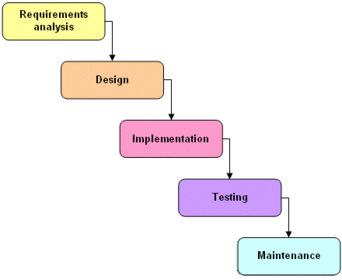
- 18Advantages of waterfall life cycle model•It is simple and easy to use.
•It is easy to manage due to the rigidity of the model – each phase has specific = deliverables and a review process.
•Phases are processed and completed one at a time.
•It works well for smaller projects – clear requirements. - 19Disadvantages of waterfall life cycle model•Not useful if the requirements are likely to change – no flexibility
•No working software is produced until near the end of the cycle.
•There are high amounts of risks and uncertainty.
•Not good for large complex projects or long ongoing projects. - 20—Incremental Model
Similar to waterfall model, but within this model more than one development cycle occurs at the same time. Cycles are divided into smaller, more easily managed iterations and each iteration passes through the requirements, design, testing and implementation. A working version of the software is developed after first build and then developed/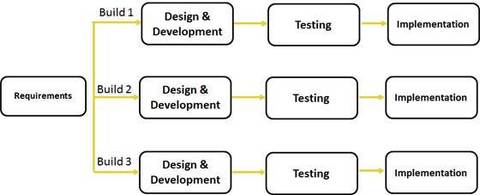
- 21Advantages of incremental life cycle model•It produces working software quickly and early on during the software life cycle.
•It is more flexible – less costly to change scope and requirements.
•It is easier to test and debug during smaller iterations.
•It is easier to manage risks as risky pieces are identified and handled in smaller iterations.
•Each iteration can be easily managed. - 22Disadvantages of incremental life cycle model•Each phase of iteration id rigid and doesn't overlap.
•Problems associated with software architecture could arise due to not all of the requirements worked out at the start. - 23—Spiral model:
Emphasis on risk analysis and has 4 phases: planning, risk analysis, engineering and evaluation. The software repeatedly passes through each of the phases in iterations. It starts with planning where design requirements are gathered. In the risk analysis phase, risks are identified and alternative solutions, a prototype is produced at end of risks. The actual software is produced and tested in engineering phase, The evaluation allows evaluation of output before next spiral.
The angular component represents progress and the radius represents cost.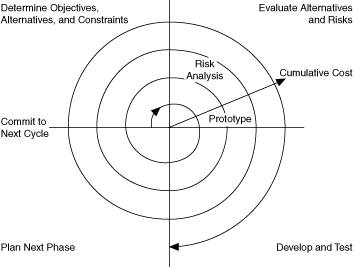
- 24Advantages and disadvantages of spiral modelAdvantages:
•It has a high degree of risk analysis.
•It is an excellent model for large and mission critical projects.
•Software is produced early.
Disadvantages:
•It can be a costly model.
•Risk analysis required highly specific expertise.
•Not appropriate for smaller projects. - 25—V shaped model:
Similar to the waterfall model, it follows a sequential path of task execution and each phase must be completed before the next phase starts. For each phase of the life cycle that comes before the coding a separate test is carried and reviewed to ensure that everything is working correctly.
There are three types of testing carried out:
unit testing - testing individual programs
Integration testing - testing that all the individual programs work when put together.
Operational testing - tests system works as required by specification.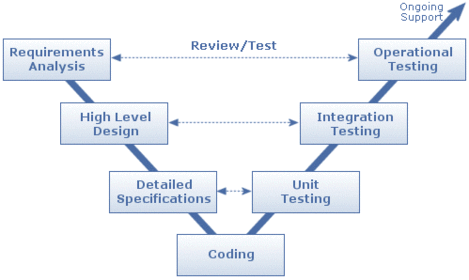
- 26Advantages of V Shaped life cycle model•It is simple and easy to use.
•Each phase has specific deliverables.
•There is a higher chance of success than waterfall model as consequence of test plans early on during the life cycle.
•Works well for smaller projects. - 27Disadvantages of V shaped model•It is very rigid.
•There is little flexibility and adjusting scope is difficult and expensive.
•Software is developed during implementation phase – not very early and no prototypes.
Informationen
- Beschreibung
- Karteikarten am Ohne Titel, erstellt von lgmain264 am 07/05/2015.
- Erstellt von
- lgmain264
- Aufrufe
- 0
- Bewertung