
Karteikarten
DM final
Karten in diesem Stapel (38)
- 1AndroidAndroid is an open-source software stack that includes an operating system, middleware, and key applications for mobile and embedded devices
- 2Android Software StackApplication Layer
Support/Compatibility/Proprietary Libraries
Application Framework
Native (C/C++) Libraries & Android Runtime
Hardware Abstraction Layer (HAL)
Linux Kernel - 3ActivitiesYour application’s presentation layer
Activities use Fragments and Views to lay out and display information, and to respond to user actions. - 4ServicesService components run without a UI, updating your data sources, triggering Notifications, and broadcasting Intents.
- 5IntentsA powerful inter-application message-passing framework
Start and stop Activities and Services, to broadcast messages system-wide or to a specific Activity, etc - 6Broadcast receiversBroadcast Receivers (or just “Receivers”) are used to receive broadcast Intents, enabling your application to listen for Intents that match the criteria you specify
- 7Content ProvidersContent Providers are the preferred means to share data across application boundaries
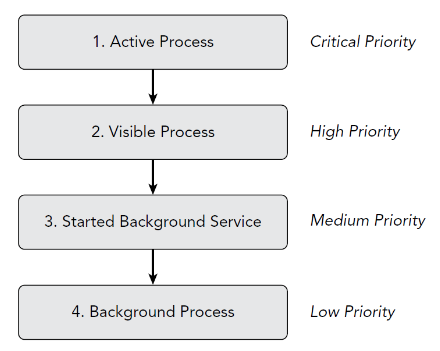
can configure your application’s Content Providers to allow access from other applications, and you can access the Content Providers exposed by others - 8Process Priorities
- 9Android Application ClassYour application’s Application object remains instantiated whenever your application is running—unlike Activities, the Application is not restarted as a result of configuration changes
- 10Extending the Application classExtending the Application class with your own implementation enables you to respond to application-level events broadcast by the Android run time
- 11Activity Life CycleFull Lifetime from onCreate() until onDestroy()
Visible Lifetime from onStart() until onStop()
Active Lifetime from onResume() until onPause() - 12FragmentEach Fragment is an independent module that is loosely coupled but tightly bound to the Activity into which it is added
Fragments can either contain a UI or not, and can be used within multiple Activities - 13Fragment Life Cycletriggered as the Fragment is created, started, resumed, paused, stopped, and destroyed
also include a number of additional callbacks:
onAttach()
onDetach()
onActivityCreated() - 14Fragment TransactionsEach Activity includes a Fragment Manager to manage the Fragments it contains.
The Fragment Manager provides the methods used to access the Fragments currently added to the Activity, and to perform Fragment Transactions to add, remove, and replace Fragment - 15Communicating between Fragments and ActivitiesWhen a Fragment needs to share events with its host Activity (such as signaling UI selections), it’s good practice to create a callback interface within the Fragment that a host Activity must implement
- 16Fragments Without User Interfacesmost circumstances, Fragments are used to encapsulate modular components of the UI; however, you can also create a Fragment without a UI to provide background behavior that persists across Activity restarts caused by configuration changes
- 17Fragments Without User InterfacesYou can choose to have an active Fragment retain its current instance when its parent Activity is re-created using the setRetainInstance method. After you call this method, the Fragment’s life cycle will change
- 18Density-Independent DesignDensity-independent pixels represent physical sizes—two UI elements of the same size measured in dp, will appear to users as the same size on screen whether they are on a low-density device or newest super high-density screen
For font sizes, we use the scalable pixel (sp) - 19Simple LayoutsFrameLayout—The simplest of the Layout Managers, the Frame Layout pins each child View within its frame
LinearLayout—The Linear Layout aligns its child Views in either a vertical or a horizontal line - 20Relative and Constraint LayoutsRelativeLayout—lets you define the positions of each child View relative to the others, and to the layout’s boundaries
ConstraintLayout—positions its child Views through a series of constraints—requiring child Views be positioned according to a boundary - 21Explicit and Implicit IntentsExplicit - starts a specific Activity
Implicit - Asks system to find an Activity that can handle this request - 22Using an Explicit IntentCreate an Intent
Intent intent = new Intent(this, ActivityName.class)
Use the Intent to start the Activity
startActivity(intent) - 23Using an Implicit IntentCreate an intent for an action and uri
Intent intent = new Intent(action, uri)
use the Intent to start the activity
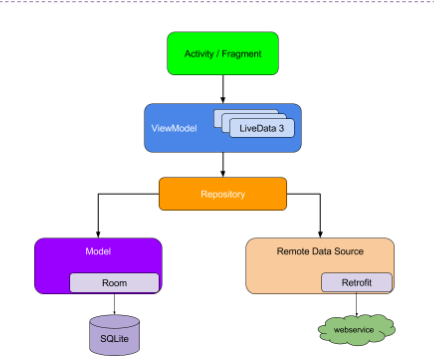
startActivity(intent) - 24Recommended app architecture
- 25User Interface LayerUser interface consists of Fragments and Activities
UI consists of a fragment, UserProfileFragment, and its corresponding layout file, user_profile_layout.xml - 26View BindingNull safety: Since view binding creates direct references to views, there's no risk of a null pointer exception due to an invalid view ID
Type safety: The fields in each binding class have types matching the views they reference in the XML file - 27View Binding vs. Data Bindingview binding is intended to handle simpler use cases and provides the following benefits over data binding
Faster compilation
Ease of use - 28View Binding vs. Data Bindingview binding has the following limitations compared to data binding
View binding doesn't support layout variables or layout expressions
View binding doesn't support two-way data binding - 29ViewModeA ViewModel object provides the data for a specific UI component, such as a fragment or activity, and contains data-handling business logic to communicate with the model
- 30LiveDataLiveData is an observable data holder
advantages of using LiveData:
Ensures your UI matches your data state
No memory leaks
No more manual lifecycle handling
Always up to date data - 31Use of CoroutinesKotlin coroutines provide an API that enables you to write asynchronous code
- 32ViewModelScopedefined for each ViewModel in your app. Any coroutine launched in this scope is automatically canceled if the ViewModel is cleared
- 33LifecycleScopedefined for each Lifecycle object. Any coroutine launched in this scope is canceled when the Lifecycle is destroyed
- 34Navigation ComponentHandling fragment transactions
Handling Up and Back actions correctly by default
Implementing and handling deep linking
Safe Args- a Gradle plugin that provides type safety when navigating and passing data between destinations - 35Dependency InjectionDependency injection (DI) is a technique widely used in programming and well suited to Android development
- 36Dependency Injection advantagesReusability of code
Ease of refactoring
Ease of testing - 37two major ways to do dependency injection in AndroidConstructor Injection. You pass the dependencies of a class to its constructor
Field Injection, dependencies are instantiated after the class is created - 38Implementations of dependency injectionDagger 2 is a popular dependency injection library
Hilt is Jetpack's recommended library for dependency injection in Android
Informationen
- Beschreibung
- Karteikarten am DM final, erstellt von Duncan Levings am 17/12/2020.
- Erstellt von
- Duncan Levings
- Aufrufe
- 3
- Bewertung