
Karteikarten
Ohne Titel
Karten in diesem Stapel (76)
- 1Open Source SoftwareSoftware with source code that anyone can use, study, modify, and share
- 2Linus TorvaldsDeveloped Linux in 1991
- 3Command LineA text-based interface which can be used to input instructions to a computer system
- 4Bourne Again Shell (BASH)Default shell for users in RHEL; Improved version of the Bourne Shell (sh)
- 5File System HierarchyThe inverted tree of directories that contain all files on a Linux system
- 6Absolute PathA fully qualified name, beginning at the root(/) directory and specifying each subdirectory traversed to reach and uniquely represent a single file
- 7Relative PathSpecifies only the path necessary to reach the file from the current working directory
- 8[[:alpha:]]Globbing wildcard to match any alphabetic character
- 9man -k passwdKeyword search of man page titles and descriptions
- 10GNU InfoTypically cover particular software packages as a whole; tend to have more practical examples of how to use the software
- 11pinfoCommand used to the Info document viewer
- 12Processa running instance of a launched, executable program; consists of address space, security properties, execution threads, and process state
- 13Pipelinea sequence of one or more commands separated by the | (pipe character)
- 14Pipeconnects the standard output of the first command the the standard input of the next command
- 15teeUsed in a pipeline to copy its standard output and also redirect its standard output to the files named as arguments to the command
- 16vimAn improved version of the vi editor; highly configurable and efficient for practiced users
- 17vim Edit ModesCommand Mode - default mode
Insert Mode - i - text typed becomes file content
Visual Mode - v, V(multi-line), or Ctrl+v(Block selection)
Extended Command Mode - : - tasks like saving and quitting vim - 18:wqUsed to save and quit vim
- 19Environment of a ProcessIncludes:
- local and global variables
- a current scheduling context
- allocated system resources - 20idCommand to show info about the currently logged-in user; use username as argument to find info on the user
- 21psCommand to list current processes; a option to view all processes with a terminal; u option to view user associated with a process
- 22Primary GroupThe group that will own new files created by the user; every user has exactly 1
- 23Secondary (Supplementary) GroupAdditional group given access to the users files; determined by the /etc/group file; user can have many
- 24Password PolicyEncrypted passwords moved to a separate /etc/shadow file which is readable only by root; allows password aging and expiration to be implemented
- 25chmod 775 *filename*command will set the read, write, and execute permissions for user and group, and the read and execute permissions for other on the file given; default directory permissions
- 26Octal NotationNumeric notation used to set permissions
- 27chmod -Rrecursively sets permissions on the files in an entire directory tree
- 28chmod g+sSets group for file or directory given
- 29Job ControlA feature of the shell which allows a single shell instance to run and manage multiple commands
- 30Daemonsprocesses that wait or run in the background performing various tasks
- 31Socketthe primary communication channel with local or remote clients; used by daemons to listen for connections
- 32ServiceOne or more daemons
- 33systemdinit system in RHEL 7 and 8;
- 34systemctlCommand used to manage different types of systemd objects (units)
- 35restartsystemctl restart *file*
stops process and then starts it again with new process ID - 36reloadsystemctl reload
Does not change the process ID; only configuration files are reloaded - 37enablesystemctl enable
Enables service to start at boot - 38disablesystemctl disable
Stops service from starting at boot - 39sshOpenSSH Secure Shell - command used to securely run a shell on a remote system
- 40known_hosts~/.ssh/known_hosts
the user file where the ssh command stores the server's public key - 41public/private key pair2 keys generated (public key and private key); private key file used as the authentication credential and must be kept secret and secure; public key is copied to systems the user wants to log into and is used to verify the private key
- 42ssh-keygenCommand generates a new set of keys
- 43ssh-copy-idCommand copies the public key of the SSH keypair to the destination system
- 44rsyslogA service that sorts syslog messages by type and priority and writes them to persistent files in the /var/log directory
- 45/etc/rsyslog.confConfiguration file used by the rsyslogd service
- 46loggerCommand that can send messages to the rsyslog service; *instructor likes using logger for logging entries when administrative scripts run*
- 47timedatectlCommand shows an overview of the current time-related system settings, including current time, time zone, and NTP synchronization settings of the system
- 48America/New_YorkOur time zone
- 49/etc/chrony.confConfiguration file for server and peer time sources
- 50chronyc sources -vActs as a client to the chronyd service; this command shows the sources being used by the chronyd command with a more verbose output with additional explanations about the output
- 51Broadcast AddressWith IPv4 addresses, it is the last host of the subnet; used to communicate with all hosts of the subnet
- 52ip addrCommand to view device and address information
- 53Network ManagerA daemon that monitors and manages network settings
- 54tarCommand for creating and working with backup archives
- 55scpSecure Copy command - copies files from a remote system to the local system or vice versa
- 56sftpSecure File Transfer Program - interactively upload or download files from a SSH server
- 57rsyncTool to securely copy files from one system to another; if 2 files or directories are similar, it only needs to copy the differences between the systems
- 58rpmLow-level utility that can get information about the contents of package files and installed packages
- 59rpm options-p option - info about a downloaded package file
-q option - List what version of the package is currently installed
-qa option - List all installed packages
-qf* option - Find out what package provides FILENAME*
-qi option - Get detailed information about the package
-ql option - List the files installed by the package
-qc option - List just the configuration files installed by the package
-qd option - List just the documentation files installed by the package
-q --scripts option - List shell scripts that run before or after the package is installed or removed
-q --changelog option - list change information for the package - 60RepositoryPlace where software is stored
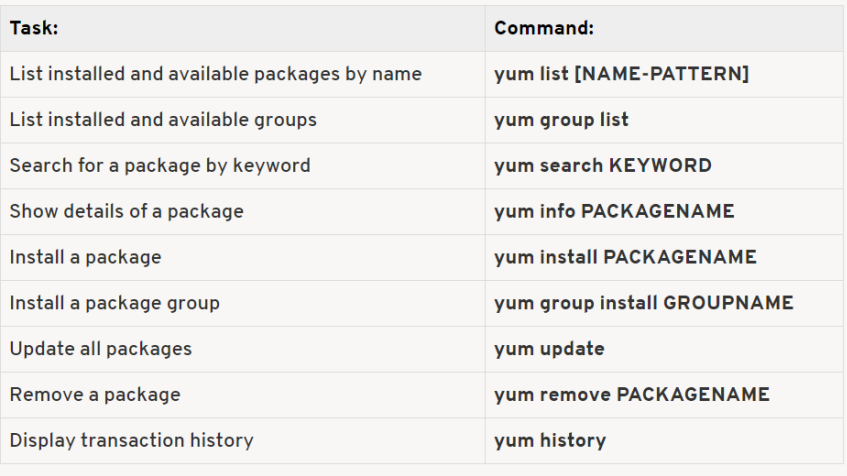
- 61yumCommand allows you to install, update, remove, and get information about software packages and their dependencies
- 62yum subcommands and options
- 63Modularityallows a single repository to host multiple versions of an application's package and its dependencies
- 64Module StreamsEach module can have one or more streams; each stream receives updates independently; like a virtual repository in the Application Stream
- 65Application StreamRepository that contains 2 types of content: Modules and traditional RPM packages
- 66/dev/sda1The first partition on the first disk on SATA-attached storage
- 67dfCommand that gives an overview of local and remote file system devices and the amount of free space available
- 68duCommand that gives more detailed info about space used by a certain directory tree
- 69umountCommand to unmount a file system
- 70mountCommand to mount a file system
- 71locateCommand searches a pre-generated index for file names or file paths and returns the results instantly
- 72findCommand searches for files in real time by crawling through the file-system hierarchy
- 73Web ConsoleWeb-Based management interface for RHEL8 designed for managing and monitoring your servers
- 74CockpitOpensource service that Web Console is based on
- 75redhat-support-toolUtility that provides a text-based interface that allows you to search Knowledgebase articles and to file support cases on the Customer Portal from the system's command line
- 76sosreportDiagnostic reports that can be attached to support cases
Informationen
- Beschreibung
- College IST 190 Linux Essentials Karteikarten am Ohne Titel, erstellt von Jansen Ford am 29/11/2022.
- Erstellt von
- Jansen Ford
- Aufrufe
- 0
- Bewertung