
Karteikarten
E3_3 EtherChannel

Karten in diesem Stapel (23)
- 1Link aggregation Is the ability to create one logical link using multiple physical links between two devices. This allows load sharing among the physical links, rather than having STP block one or more of the linksAn EtherChannel can be manually configured or can be negotiated by using the Cisco-proprietary protocol Port Aggregation Protocol (PAgP) or the IEEE 802.3ad-defined protocol:
Link Aggregation Control Protocol (LACP) - 2Introduction to Link Aggregation It may be possible to use faster links, such as 10 Gb/s, on the aggregated link between the access and distribution layer switches. However, adding faster links is expensive. Additionally, as the speed increases on the access links, even the fastest possible port on the aggregated link is no longer fast enough to aggregate the traffic coming from all access links.
- 3Advantages of EtherChannel EtherChannel technology was originally developed by Cisco as a LAN switch-to-switch technique of grouping several Fast Ethernet or Gigabit Ethernet ports into one logical channel. * When an EtherChannel is configured, the resulting virtual interface is called a port channel. The physical interfaces are bundled together into a port channel interface

- 4Advantages of EtherChannel 1. Most configuration tasks can be done on the EtherChannel interface instead of on each individual port, ensuring configuration consistency throughout the links. 2. EtherChannel relies on existing switch ports. There is no need to upgrade the link to a faster and more expensive connection to have more bandwidth.3. Load balancing takes place between links that are part of the same EtherChannel. Depending on the hardware platform, one or more load-balancing methods can be implemented.
These methods include source MAC to destination MAC load balancing, or source IP to destination IP load balancing, across the physical links. - 5Advantages of EtherChannel 4. EtherChannel creates an aggregation that is seen as one logical link. When several EtherChannel bundles exist between two switches, STP may block one of the bundles to prevent switching loops. When STP blocks one of the redundant links, it blocks the entire EtherChannel. This blocks all the ports belonging to that EtherChannel link. Where there is only one EtherChannel link, all physical links in the EtherChannel are active because STP sees only one (logical) link.5. EtherChannel provides redundancy because the overall link is seen as one logical connection. Additionally, the loss of one physical link within the channel does not create a change in the topology; therefore a spanning tree recalculation is not required.
Assuming at least one physical link is present; the EtherChannel remains functional, even if its overall throughput decreases because of a lost link within the EtherChannel. - 6Implementation Restrictions ** Note: Interface types cannot be mixed; for example, Fast Ethernet and Gigabit Ethernet cannot be mixed within a single EtherChannel. The EtherChannel provides full-duplex bandwidth up to 800 Mb/s (Fast EtherChannel) or 8 Gb/s (Gigabit EtherChannel) between one switch and another switch or host. Currently each EtherChannel can consist of up to eight compatibly-configured Ethernet ports. The Cisco IOS switch can currently support six EtherChannels

- 7Implementation Restrictions ** The original purpose of EtherChannel is to increase speed capability on aggregated links between switches. However, this concept was extended as EtherChannel technology became more popular, and now many servers also support link aggregation with EtherChannel. EtherChannel creates a one-to-one relationship; that is, one EtherChannel link connects only two devices. * An EtherChannel link can be created between an EtherChannel-enabled server and a switch.** The individual EtherChannel group member port configuration must be consistent on both devices. If the physical ports of one side are configured as trunks, the physical ports of the other side must also be configured as trunks within the same native VLAN. Additionally, all ports in each EtherChannel link must be configured as Layer 2 ports.
* Note: Layer 3 EtherChannels can be configured on Cisco Catalyst multilayer switches, such as the Catalyst 3560, but these are not explored in this course. A Layer 3 EtherChannel has a single IP address associated with the logical aggregation of switch ports in the EtherChannel. - 8Port Aggregation Protocol EtherChannels can be formed through negotiation using one of two protocols, PAgP or LACP. These protocols allow ports with similar characteristics to form a channel through dynamic negotiation with adjoining switches. * Note: It is also possible to configure a static or unconditional EtherChannel without PAgP or LACP** The "on" mode manually places the interface in an EtherChannel, without any negotiation. It works only if the other side is also set to on.
If the other side is set to negotiate parameters through PAgP, no EtherChannel forms, because the side that is set to "on" mode does not negotiate. - 9PAgP PAgP is a Cisco-proprietary protocol that aids in the automatic creation of EtherChannel links. When an EtherChannel link is configured using PAgP, PAgP packets are sent between EtherChannel-capable ports to negotiate the forming of a channel. When PAgP identifies matched Ethernet links, it groups the links into an EtherChannel. The EtherChannel is then added to the spanning tree as a single port.* When enabled, PAgP also manages the EtherChannel. PAgP packets are sent every 30 seconds. PAgP checks for configuration consistency and manages link additions and failures between two switches
It ensures that when an EtherChannel is created, all ports have the same type of configuration.
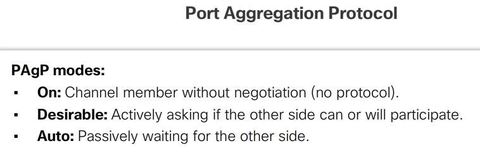
** Note: In EtherChannel, it is mandatory that all ports have the same speed, duplex setting, and VLAN information. Any port modification after the creation of the channel also changes all other channel ports. - 10PAgP PAgP helps create the EtherChannel link by detecting the configuration of each side and ensuring that links are compatible so that the EtherChannel link can be enabled when needed: 1. On - This mode forces the interface to channel without PAgP. Interfaces configured in the on mode do not exchange PAgP packets.2. PAgP desirable - This PAgP mode places an interface in an active negotiating state in which the interface initiates negotiations with other interfaces by sending PAgP packets.
3. PAgP auto - This PAgP mode places an interface in a passive negotiating state in which the interface responds to the PAgP packets that it receives, but does not initiate PAgP negotiation. - 11—

- 12Link Aggregation Control Protocol LACP is part of an IEEE specification (802.3ad) that allows several physical ports to be bundled to form a single logical channel. LACP allows a switch to negotiate an automatic bundle by sending LACP packets to the peer. It performs a function similar to PAgP with Cisco EtherChannel. Because LACP is an IEEE standard, it can be used to facilitate EtherChannels in multivendor environments. On Cisco devices, both protocols are supported. Note: LACP was originally defined as IEEE 802.3ad. However, LACP is now defined in the newer IEEE 802.1AX standard for local and metropolitan area networks.The modes for LACP.
1. On - This mode forces the interface to channel without LACP. Interfaces configured in the on mode do not exchange LACP packets.
2. LACP active - This LACP mode places a port in an active negotiating state. In this state, the port initiates negotiations with other ports by sending LACP packets.
3. LACP passive - This LACP mode places a port in a passive negotiating state. In this state, the port responds to the LACP packets that it receives, but does not initiate LACP packet negotiation - 13—


- 14Configuration Guidelines * EtherChannel support - All Ethernet interfaces on all modules must support EtherChannel with no requirement that interfaces be physically contiguous, or on the same module. * Speed and duplex - Configure all interfaces in an EtherChannel to operate at the same speed and in the same duplex mode** VLAN match - All interfaces in the EtherChannel bundle must be assigned to the same VLAN, or be configured as a trunk
* Range of VLAN - An EtherChannel supports the same allowed range of VLANs on all the interfaces in a trunking EtherChannel. If the allowed range of VLANs is not the same, the interfaces do not form an EtherChannel - 15Configuration Guidelines If these settings must be changed, configure them in port channel interface configuration mode. After the port channel interface is configured, any configuration that is applied to the port channel interface also affects individual interfaces. * However, configurations that are applied to the individual interfaces do not affect the port channel interface. Therefore, making configuration changes to an interface that is part of an EtherChannel link may cause interface compatibility issues.

- 16Configuring EtherChannel with LACP * Step 1. - Specify the interfaces that compose the EtherChannel group using the "interface range (interface)" global configuration mode command. A good practice is to start by shutting down those interfaces, so that any incomplete configuration does not create activity on the link * Step 2. Create the port channel interface with the "channel-group (#identifier) mode active" command in interface range configuration mode. Note: EtherChannel is disabled by default. * To change Layer 2 settings on the port channel interface, enter port channel interface configuration mode using the: "interface port-channel (#identifier)"

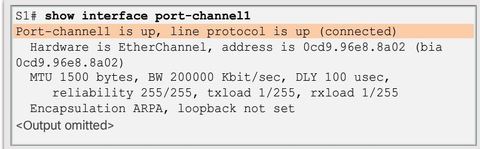
- 17Verifying EtherChannel "show interface port-channel" Displays the general status of the port channel interface.
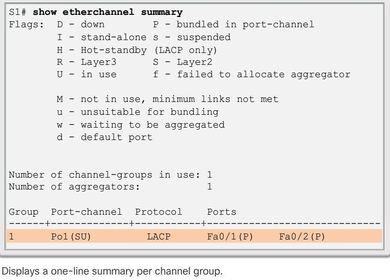
- 18Verifying EtherChannel When several port channel interfaces are configured on the same device, use the: "show etherchannel summary" command to simply display one line of information per port channel. * The group is a Layer 2 EtherChannel and that it is in use, as indicated by the letters SU next to the port channel number
- 19Verifying EtherChannel " show etherchannel port-channel" display information about a specific port channel interface Ej: It uses LACP in active mode. It is properly connected to another switch with a compatible configuration, which is why the port channel is said to be in use.

- 20Verifying EtherChannel " show interfaces etherchannel" command can provide information about the role of the interface in the EtherChannel

- 21Troubleshooting EtherChannel Ej: interfaces F0/1 and F0/2 on switches S1 and S2 are connected with an EtherChannel. The output indicates that the EtherChannel is down. * Assign all ports in the EtherChannel to the same VLAN, or configure them as trunks. * When configuring an EtherChannel from trunk ports, verify that the trunking mode is the same on all the trunks. Inconsistent trunk modes on EtherChannel ports can cause EtherChannel not to function and ports to be shut down (errdisable state).

- 22Troubleshooting EtherChannel Ej: more detailed output indicates that there are incompatible PAgP modes configured on S1 and S2. * An EtherChannel supports the same allowed range of VLANs on all the ports. If the allowed range of VLANs is not the same, the ports do not form an EtherChannel *** Note: It is easy to confuse PAgP or LACP with DTP, because they both are protocols used to automate behavior on trunk links. DTP is used for automating the creation of trunk links. When an EtherChannel trunk is configured, typically EtherChannel (PAgP or LACP) is configured first and then DTP.

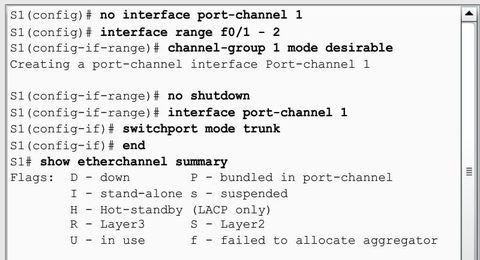
- 23Troubleshooting EtherChannel Ej: the PAgP mode on the EtherChannel is changed to desirable and the EtherChannel becomes active. *** Note: EtherChannel and spanning tree must interoperate. For this reason, the order in which EtherChannel-related commands are entered is important, which is why the interface Port-Channel 1 removed and then re-added with the channel-group command, as opposed to directly changed. ** If one tries to change the configuration directly, spanning tree errors cause the associated ports to go into blocking or errdisabled state.
Informationen
- Beschreibung
- CCNA CCNA Karteikarten am E3_3 EtherChannel, erstellt von John Dedios am 28/07/2016.
- Erstellt von
- John Dedios
- Aufrufe
- 13
- Tags
- Bewertung
Mehr zu EtherChannel and Link Aggregation