
Karteikarten
Ohne Titel
Karten in diesem Stapel (70)
- 13 Units of BUSData
Control
Address - 2DataTO CARRY INFORMATION
- 3CONTROLTo determine operation
- 4ADDRESSTO DETERMINE WHERE IT SHOULD BE SENT
- 5PC POWER SUPPLY CABLES AND CONNECTORSIDENTIFICATION
- 6BERG FLOPPY DISK POWER CONNECTORThe four pin floppy Drive cable showed up when PC'S started including Floppy Drives.
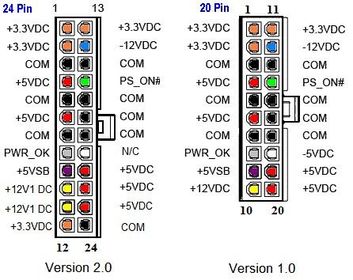
- 7ATX 20 PIN MAIN POWER CABLEIt allows the motherboard to turn the power supply ON and OFF rather than depend on the user to flip a power switch.
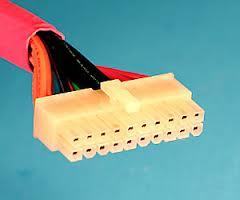
- 8ATX 24 PIN MAIN POWER CABLEThe 24 pin was added in ATX 12V 2.0 to provide extra power needed by PCI Express slots.
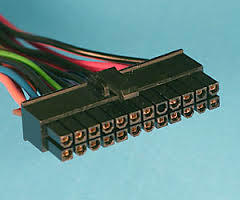
- 9MOLEX 4-PIN PERIPHERAL POWER CABLEUsed for all kinds of things including add-on fans, extra video card power, supplemental motherboard power, and case lighting. It's old as the hills but is still very widely used.
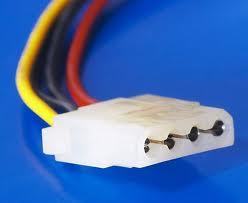
- 10SATA ( SERIAL ADVANCED TECHNOLOGY ATTACHMENT)was introduced to upgrade the ATA interface ( also called IDE) to more advanced design, SATA include both a data cable and a power cable.
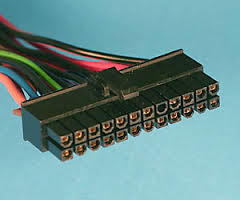
- 114 Pin ATX+12 Volt Power Cablesometimes called "ATX 12V" cable of "P4" cable although neither of those are technically accurate descriptions. This cable added 12 volt line so more of the load could be shifted to 12 volts.
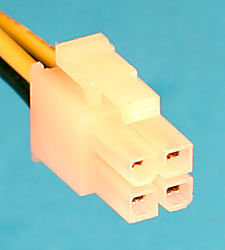
- 12Original PC Main Power Cablesused two cables to connect the Power supply to the mother board. It's either "BLACK TO BLACK OR SMOKE TO SMOKE..
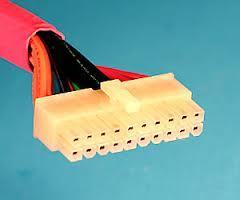
- 136 Pin Auxiliary Power Cablethe aux power cable was added to provide extra wattage to motherboards for 3.3 and 5 volts. This connector is rarely used anymore.
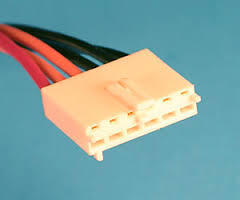
- 146 Pin PCI Express Power Cableused to provide extra 12 volt power to PCI. Express expansion cards. PCI express motherboard slots can provide a maximum of 75 watts so the 6 pin express power cable was created.
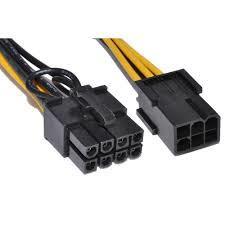
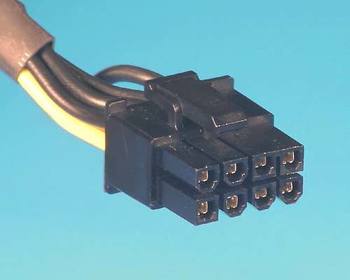
- 158 Pin PCI Express Power CableIt's just an 8 pin version of the 6 Pin PCI Express power cable. Both are primarily used to provide supplemental power to video cards.
- 16POWER SUPPLY VOLTAGE
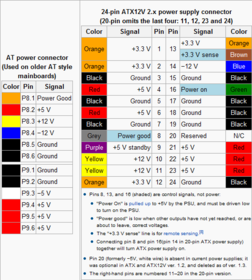
- 1724 pin and 20 pin
- 18HARDWARE COMPONENTS1. DATA PRESENTATION
2. MEMORY
3. DATA STORAGE SYSTEM
4. INPUT AND OUTPUT DEVICES - 19DATA REPRESENTATION1. NUMERIC
2. ALPHABETIC
3. PICTURES AND SONGS- digitized format - 20NUMERIC- CHIPS MAY MINITURIZED AND CLASSIFIED AS SSI, LSI,V LSI, ULSI
- 21DIP (dual-in line package)for connecting IC circuitry to board.
- 22DIMM (Dual in-line memory module)used for memory.
- 23PGA (pin grid Array)for microprocessors (square chips surrounded by pins.)
- 24SEC ( Single Edge Contact) cartidgeused to house microprocessors
- 25motherboardmain circuit board
- 26MEMORYinternal storage areas in computer
- 27virtual memoryexpanding physical memory onto a hard disk.
- 28* MEMORY TYPES* 1. RAM-Random ACCESS MEMORY.
- volatile memory
- store given instructions which can be changed.
- READ AND WRITE MEMORY - 29SRAM- static ram
- implemented entirely with transistors
- faster than a dynamic cell
-typical access time is 5 nano seconds. - 30DRAM- Dynamic Ram
- uses transistors and capacitors
- Very high packaging density, higher density than SRAM - 31Cached DRAMalso called enhanced DRAM (EDRAM)
- 32RDRAM(Rambus Dynamic Ram)
Found in high performance workstation. - 33ROMREAD - ONLY - MEMORY
* type of memory circuit that hold computer start up routine.
*permanent and non-volatile
*read only RAM. Firmware. - 34ROM BIOSBASIC INPUT AND OUTPUT - tells the computer to get the OS in hard disk and place OS in RAM.
- 35MASK ROMUser can not add any programs or data
- used in the memories of game cassettes and IPL (initial program loader - program used to start the computer) - 36USER PROMuser programmable ROM is where user write data into it once.
- 37PROMProgrammable ROM
_once data has been written, it cannot be erased. - 38EPROMErasable PROM
- manufactured BLANK, is programmed (written) with special EPROM writer and can be erased with exposure to ultra violet light. - 39EEPROM- Electrically Erasable PROM
- it can be erased through the application of electrical voltage and rewritten, hence it can be programmed, erased and reprogrammed. - 40Flash MEMORY or FLASH RAMas special type of EEPROM that can be erased and re-programmed in blocks instead of one byte at a time, usually used for BIOS and modems.
- 414. CMOS memory- complementary metal oxide semiconductor memory.
- type of chip that requires very little power to hold data. - 42CACHEusually 5 to 10 times faster than RAM but has a smaller capacity in KB.
- 43DISK CACHE- a portion of RAM used to speed up access to data on a disk. *MUCH MORE EXPENSIVE* sometimes called hardisk cache or buffer.
- 44DATA STORAGE SYSTEMBasic components - storage medium & storage device.
-IT has a direct pipeline to RAM. - 45Writing DATA or SAVING DATAprocess of Storing data
- 46reading data or loading dataprocess of retrieving data
- 47Types of Storage techniques1. Magnetic Storage
2. Optical Storage
3. Solid State Storage - 48Magnetic- stores data by magnetizing microscopic particles on the disk or tape surface.
ex. hard disk , floppy disk, tape storage - 49OPTICALstores data in microscopic light (lands) and dark spots (pits) on the disk surface.
data is read using a laser light.
ex. CD , DVD - 50SOLID STATEstores data in a non volatile, erasable, lower power chip.
-requires a device called card reader to transfer data.
- more expensive than magnetic or optical storage. - 51Criteria in Choosing the BEST STORAGE TECHNOLOGY1. Versatility
2. Durability
3. Speed
4. Capacity
5. Volatility
6. Access Method. - 52Versatility- ability to access data from several different media, like a DVD drive which can access computer DVD's, DVD movies, audio CDs and CD-Rs
- 53Durability- less susceptible to damage from handling or environmental factors.
- 54Speed- time required to read and write a bit,byte or larger unit of data.
- 55Capacityamount of data that can be stored on a medium- usually in terms of words or bytes.
- 56Volatility- ability to hold data indefinitely.
- 57Access Method= serial is the least expensive.
- 58PortabilityAbility to remove and re-install the storage media from the device or the device from the computer.
- 59TYPES OF DATA ACCESSRAM
DAM
SAM - 60SAMSequential Access Memory - reading through data from the beginning of the tape.
- 61DAMDirect Access Memory- Ability to go directly to a specific storage location without having to search sequentially form the beginning of the location
- 62RAMRandom Access memory-
ability to go directly to a specific storage location. - 63Magnetic storage- Magnetic Tape
- Floppy Disk
- removable magnetic disk
- Hard Disk - 64Ultra ATA- Advance Technology Attachment
- is simply next generation ATA with improved transfer speed and architecture. Twice as fast as EIDE. - 65EIDE- ENHANCED INTEGRATED DRIVE ELECTRONICS
- sometimes referred to as Fast ATA or Fast IDE. - 66SCSI- Small computer system interface. or SCSI
a set of standards for physically connecting and transferring data between computers and peripheral devices. - 67Optical Storage *Optical Disk*covered with hard plastic that makes it resistant to scratches and dust,
- 68CDCompact disc
-originally developed by Sony and Philips for storing and distributing music fomat known as DISC Digital Audio.. - 69CD- ROMincludes additional formatting information to store directory and file info.
- 70CD-R- Manufactured blank and can be written to once
Informationen
- Beschreibung
- Karteikarten am Ohne Titel, erstellt von imgoohara20 am 24/01/2015.
- Erstellt von
- imgoohara20
- Aufrufe
- 1
- Bewertung