
Karteikarten
15: Software Development
Karten in diesem Stapel (42)
- 1What are the 4 stages in program development life cycle?Analysis
Design
Coding/implementation
testing - 2Describe Analysis1. Problem clearly defined, requirment specication drawn up.
2. Plan solution - best one
3. Decide how to solve problem:
- bottom-up: start with small sub-problem then build
- top-down: stepwise refinement using pseudecode, flowcharts or structure charts - 3Describe Designidentifier table good start, think about data strucutres, file to store long term? plan algorithm - pseudecoe of flowchart
- 4Desrcibe Coding/Implementationchoose language, compile then execute, debug
- 5Describe Testing What are the Differetn development methodologies? 3 the 3 modelsDifferent development methodolgies:
waterfall
iterative
rapid application development model - 6Give a diagram of the program development life cycleanalysis - design - coding - testing- maintenance - back to analysis (loop)
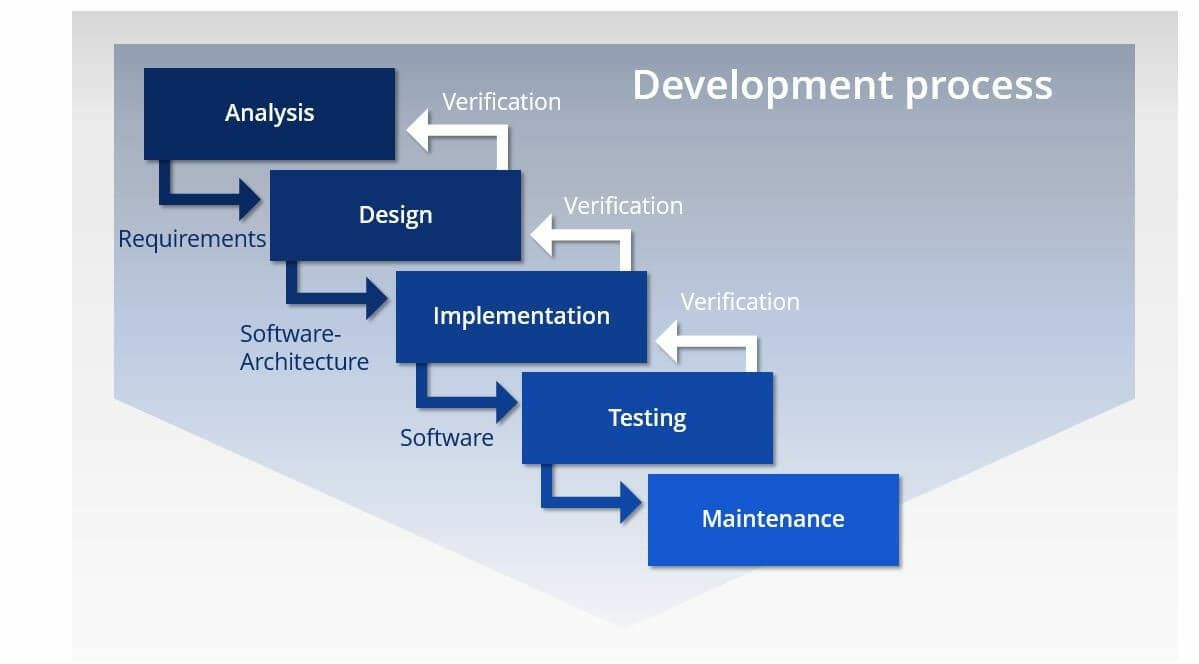
when maintenance no longer resulsts in program fit for purpose, development starts again - 7Give a digaram of the Waterfall Model
- 8Watrfall model: reflect often more qork required at earlier stage to complete current stage. What are 4 benefits of the waterfall model?- simple to understand as stages clearly defined
- easy to manage - fixed stages - each stage has specific outcomes
- stages are processed and completed 1 at a time
- works well for smaller projects where requrements understand very well - 9What are 6 drawbacks of the waterfall model?- no working software produced until late during cycle life
- not good model for complex and object-oriented projects
- poor for long and ongoing projects
- can't accomedate changing requirements
- difficult to measure prograess within stages
- integration at very end doesn't allow identifying potential technical or business issues early - 10What is the Iterative model?implementation of small subset of program requrirements. Repeated reviews to identifiy further requriements results to complete system.
- 11What are 11! benefits of the iterative model?-working model of systm at very early stage of development - easier to find functional or design flaws - corrective measures can be taken more quickly
-working functionality can eb developed quickly and early in life cycle
-resulst obtained early and periodicalyl
-parallel development can be planned
-prograess can be measures
-less $ to change scope/requirements
-testing and debugging of a smaller subset of program is easy
-risks identified and resluved during iteration
-easier to manage risk - high risk part done first
-every increment, operaitonal product delivered
-better suited for large and mission-critical projects
-during life-cycle, softearw produced early - customer evaluation and feedback - 12What are 4 drawbacks of the iterative model?- only large software development projects can benefit - hard to break small software system into smaller servicable models
-more resources may be required
-design issues as not all requirements gather at beggingng of life cylce
-defining increments may require definition of complet system - 13Describe the Rapid Application Development RAD modeluses minimal planning - protoytping - working model of part of the solution - models develope din parallel as prototypes and integerated to mke complete proudct faster. No detailed preplanning. Changes in development. Analysis, design, code and test phases incorportated into series of short, iterative devleopment cycles.
- 14What are the benefits of the RAD model? 8- can have changing requirement
- progress can be measured
-reduces development time
- productivity increase with fewer ppl in shrot time
- increase resuability of components
-quick initial reviews
-encourages customer feedback
- integration from beginning solves lot of integration issues - 15What are some drawbacks of the RAD model? 5- only systems that can be modularised can be built using RAD
-needs highly skilled developers/designers
-component based and scalable systems
-requries user involvement though cycle
-projects requring shorter devlopment times - 16Structure ChartA graphical representaiton of the modular structure of a solution.
- 17ParameterA value passed between modules.
- 18What is another approach to modular design?choose the sub-tasts then construct a structure chart to show interrelations between modules. Each box represents a module. Each level is a reinement of the level above. Chart alos shows varaibels (interface between modueles) - parameters - if supplying value to a lower leve moduel decreases.
Help visualise how modules are interrelate and how interface with each other.
filled in dot with arrow = boolean value
two arrows opposite from non filled in dot = updateed varibale value wtihtin moduel - 19Go over strucutre chart questionsie filling in arros...
- 20Finite State Machine FSMA machine that consists of a fixed set of possible states with a set of inputs that change the state and a set of possible outputs.
- 21State-Transition TableA table that gives information about the states of an FSM.
- 22State-Transition DiagramA diagram that describes the behavior of an FSM
- 23transition diagram notes0 | 1 -if change depending on state - what to change to.
tarnsiation arros.
start = solid dot with arrow
accepted state is double circle
circle arror = have condtion - causes change
go over diagram practice - 24Why errors may be found 5- programmer coding mistake
-software deesigner - design error
-requirment specification not drawn up correctly
- UI poorly designed and user makes mistakes
-computer hardware failure - 25Syntax ErrorAn error in which a program statment doesnt' follow the rules of the language.
- 26Logic ErrorAn error in the logic of the solution that causes it not to behave as intended.
- 27Run-time ErrorAn error that causes program execution to crash or freeze.
- 28What ar ethe testing methods? 4StubTesting (stub for each procedure)
Black-box testing
White-box testing
Dry-running an algorithm - 29Black-box TestingComparing expected results with actual results when a program is run.
- 30Test Data (what are the test data types?)Carefully chosen values that wil test a program
(usually normal values, extreme/boundary data values, erroneous/abnormal) - 31White-box TestingTesting every path through the program code.
- 32Dry-run (walk through)The process of checking the execution of an algorithm or program by recording variable values in a trace table.
- 33Trace TableA table with a colomn for each variable that records their changing values.
- 34Integration TestingIndividually tested modules are joined into one program and tested to ensure the modules interact correctly.
- 35Alpha testingTesting of software in-house by dedicated testers.
- 36Acceptance TestingTesting of software by cusomters before sign-off.
- 37Beta TestingTesting of software by a limited number of chosen users before general release (send feedback).
- 38What are the types of test daya and explanation?Normal (valid): typical data values that are valid
Abnormal (erroneous): Data values system shouldn't accept
Boundry (extreme): at boundry end of range of normal. - 39What are some ways to use to prevent errors? 3- tried and tested design technies ie strucutred programming or object-oriented design
- conventions ie identifier tables, data structures and standard algorithms
- tried and tested modules or objects from program libraries - 40Corrective MaintenanceCorrecting identified errors.
(logic error or runtime error) - 41Adaptive MaintenanceAmending a program to enhance funcitonality or in respons to specification changes.
- 42Perfective MaintenanceModifying a program to imporve performance or maintainability.
Informationen
- Beschreibung
- A Level AS Computer Science (Unit 2: Fundamental Problem-solving and Programming Skills) Karteikarten am 15: Software Development, erstellt von HRYN red am 17/05/2017.
- Erstellt von
- HRYN red
- Aufrufe
- 5
- Bewertung