
Mindmap
Spanning Tree Protocol (STP)
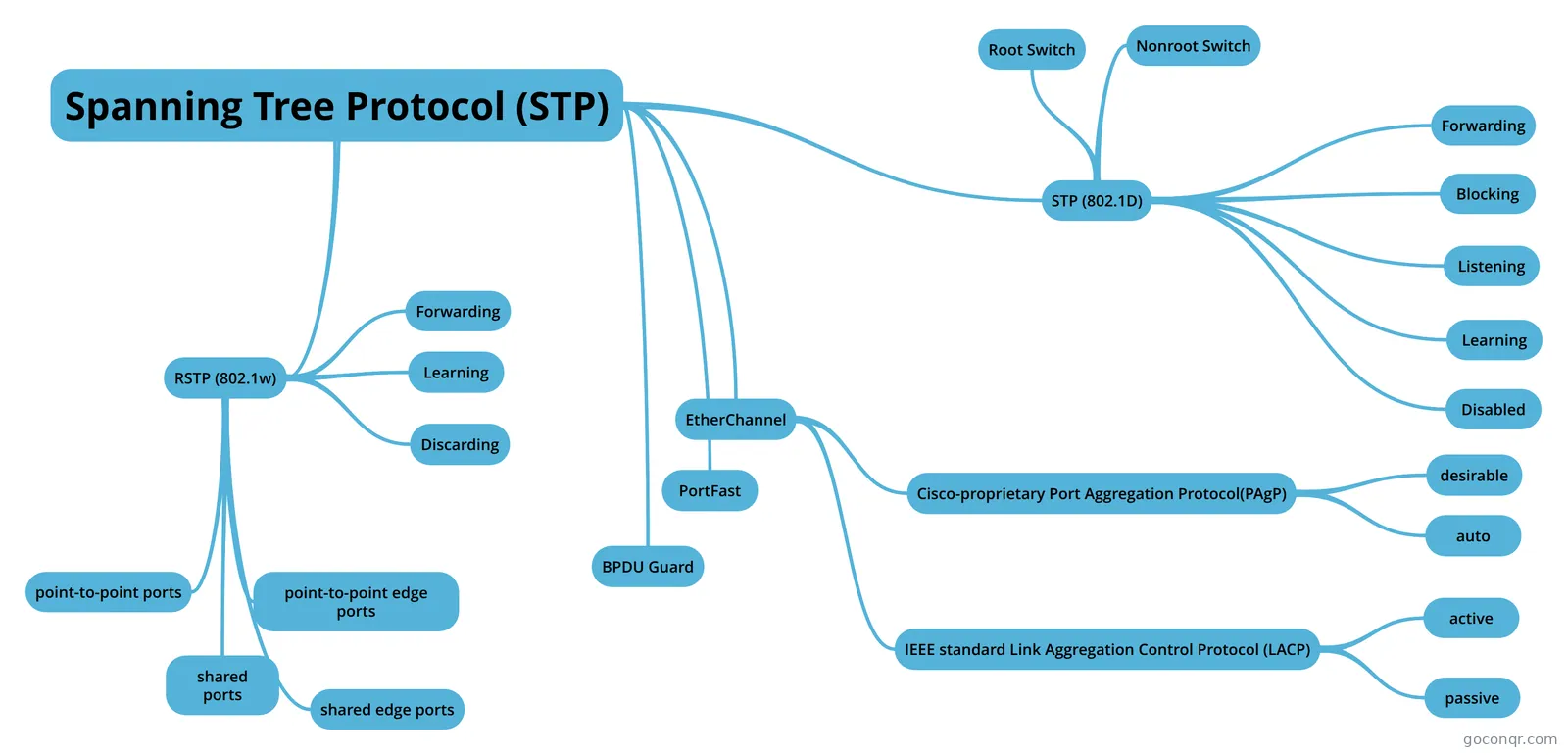
Mind map: Spanning Tree Protocol STP
Inhalt der Mindmap
Spanning Tree Protocol (STP)
- Three Classes of Problems Caused by Not Using STP in Redundant LANs 1. Broadcast storms. The forwarding of a frame repeatedly on the same links, consuming significant parts of the link's capacities. 2. MAC table instability. The continual updating of a switch's MAC address table with incorrect entries, in reaction to looping frames, resulting in frames being sent to the wrong locations. 3. Multiple frame transmission. A side effect of looping frames in which multiple copies of one frame are delivered to the intended host, confusing the host.
STP (802.1D)
- STP: Reasons for Forwarding or Blocking All the root switch's ports. Forwarding. The root switch is always the designated switch on all connected segments. Each nonroot switch's root port. Forwarding. The port through which the switch has the least cost to reach the root switch (lowest root cost). Each LAN's designated port. Forwarding. The switch forwarding the Hello on to the segment, with the lowest root cost, is the designated switch for that segment. All other working ports. Blocking. The port is not used for forwarding user frames, nor are any frames received on these interfaces considered for forwarding.
- The STP brigde ID (BID) is an 8-byte value unique to each switch. The BID consists of a 2-byte priority field and a 6-byte system ID, with the system ID being based on a universal (burned-in) MAC address in each switch.
- BPDU (Bridge Protocol Data Unit) Fields in the STP Hello BPDU: Root bridge ID. The bridge ID of the switch the sender of this Hello currently believes to be the root switch. Sender's bridge ID. The bridge ID of the switch sending this Hello BPDU. Sender's root cost. The STP cost between this switch and the current root. Timer values on the root switch. Includes the Hello timer, MaxAge timer, and forward delay timer.
- There are two versions of 802.1D regarding default port costs according to IEEE. IEEE Cost: 1998 (and Before) Ethernet Speed Cost 10Mbps......................100 100Mbps.....................19 1Gbps..........................4 10Gbps........................2 100Gpbs....................N/A 1Tbps.........................N/A IEEE Cost: 2004 (and After) Ethernet Speed Cost 10Mbps..................2,000,000 100Mbps..................200,000 1Gbps........................20,000 10Gbps.........................2,000 100Gbps..........................200 1Tbps.................................20 The newer standard, useful when using links faster than 10 Gbps, can be used by adding a single configuration command to each switch (spanning-tree pathcost method long)
- The root switch sends a new Hello BPDU every 2 seconds by default. The following steps summarize the steady-state operation when nothing is currently changing in the STP topology: Step 1. The root switch creates and sends a Hello BPDU, with a root cost of 0, out all its working interfaces. Step 2. The nonroot switches receive the Hello on their root ports. After changing the Hello to list their own BID as the sender's BID, and listing that switch's root cost, the switch forwards the Hello out all designated ports. Step 3. Steps 1 and 2 repeat until something changes.
- STP Timers Hello. 2 seconds. The time period between Hellos created by the root.MaxAge. 10 times Hello. How long any switch should wait, after ceasing to hear Hellos, before trying to change the STP topology.Forward delay. 15 seconds. Delay that affects the process that occurs when an interface changes from blocking state to forwarding state. A port stays in an interim listening state, and then an interim learning state, for the number of seconds defined by the forward delay timer.
- Forwarding
- It forwards data frames. It learns MACs based on received frames. Stable State.
- Blocking
- No forwards data frames. No learns MACs based on received frames. Stable state.
- Listening
- Listening: Like the blocking state, the interface does not forward frames. The switch removes old stale (unused) MAC table entries for which no frames are received from each MAC address during this period. These stale MAC table entries could be the cause of the temporary loops.
- No forwards data frames. No learns MACs based on received frames. Transitory state.
- Learning
- Learning: Interfaces in this state still do not forward frames, but the switch begins to learn the MAC addresses of frames received on the interface.
- No forwards data frames. It learns MACs based on received frames. Transitory state.
- Root Switch
- STP puts all working interfaces on the root switch in forwarding state. All its working interfaces will become DPs.
- STP elects the root switch based on: -The lowest priority -If that ties, the lowest switch MAC address
- spanning-tree vlan vlan-id root primary spanning-tree vlan vlan-id root secondary This command chooses the base priority as follows: -If the current root has a base priority higher than 24576, the local switch uses a base priority of 24576. -If the current root's base priority is 24576 or lower, the local switch sets its base priority to the highest multiple of 4096 that still results in the local switch becoming the root.
- Nonroot Switch
- Each nonroot switch considers one of its ports to have the least administrative cost between itself and the root switch. The cost is called that switch's root cost. STP places its port that is part of the least root cost path, called that switch's root port (RP), in forwarding state.
- Many switches ca attach to the same Ethernet segment, but in modern networks, normally two switches connect to each link. The switch with the lowest root cost, as compared with the other switches attached to the same link, is placed in forwarding state. That switch is the designated switch, and that switch's interface, attached to that segment, is called the designated port (DP).
- To elect the root port (RP) on nonroot switches, the switches add their local interface STP cost to the root cost listed in each received Hello BPDU on the interface. The port with the lowest cost becomes the root port (RP).
- The switch with the lower cost to reach the root, among all switches connected to a segment, becomes the DP on that segment.
- The election of the root port depends on the cost to the root. But the are other tiebreakers in case the cost ties over several interfaces. The tiebreakers are: 1-Choose based on the lowest neighbor bridge ID. 2-Choose based on the lowest neighbor port priority. 3-Choose based on the lowest neighbor internal port number.
- Configuration of the port priority for tiebreaker when choosing the root port: spanning-tree vlan vlan-id port-priority x (x between 0-255)
- Election of the Designated Port: 1-For switches connected to the same LAN segment, the switch with the lowest cost to reach the root, as advertised in the Hello they send onto the link, becomes the DP on that switch. 2-In case of a tie, among the switches that tie on cost, the switch with the lowest BID becomes the DP.
- Disabled
- No forwards data frames. No learns MACs based on received frames. Stable State.
RSTP (802.1w)
- RSTP works just like STP in several ways: -It elects the root switch using the same parameters and tiebreakers. -It elects the root port on nonroot switches with the same rules. -It elects designated ports on each LAN segment with the same rules. -It places each port in either forwarding or blocking state, although RSTP calls the blocking state the discarding state.
- MaxAge Timer reduced to three times Hello timer.
- Port Roles in 802.1w RSTP Root port: Nonroot switch's best path to the root. Alternate port: Replaces the root port when the root port fails. Designated port: Switch port designated to forward onto a collission domain. Backup port: Replaces a designated port when a designated port fails. Disabled port: Port that is administratively disabled.
- Forwarding
- Discarding
- Learning
- point-to-point ports
- Point-to-point ports are ports that connect two switches. RSTP use port type point-to-point on full duplex ports.
- point-to-point edge ports
- Point-to-point edge ports are ports that connects a switch to a single endpoint like a PC or server. RSTP uses edge port on ports with PortFast enabled.
- shared ports
- Shared ports are ports connected to a hub. RSTP uses shared ports on half-duplex ports.
- shared edge ports
- Shared edge ports are full-duplex ports and with PortFast enabled. Cisco recommends against using this combination.
EtherChannel
- STP treats an EtherChannel like one STP port.
- 1- channel-group number on command in interface config mode under each physical interface that should be in the channel 2-Use the same number for all commands on the same switch, but the channel-group number on the neighboring switch can differ. Using the command: channel-group number mode on disables negotiation
- show etherchannel number summary show etherchannel number port-channel (shows the protocol in use for the creation of the etherchannel)
- For an Etherchannel to work, switches need the following items to match on: -Speed -Duplex -Operational access or trunking state (all must be access, or all must be trunks) -If an access port, the access VLAN -If a trunk port, the allowed VLAN list (per the switchport trunk allowed command) -If a trunk port, the native VLAN. -STP interface settings.
- Cisco-proprietary Port Aggregation Protocol(PAgP)
- desirable
- channel-group number mode desirable
- auto
- channel-group number mode auto
- desirable
- IEEE standard Link Aggregation Control Protocol (LACP)
- IEEE standard 802.3ad
- active
- channel-group number mode active
- passive
- channel-group number mode passive
PortFast
- PortFast allows a switch to immediately transitiion from blocking to forwarding, bypassing listening and learning states. PortFast is most appropriate for connections to end-user devices.
- spanning-tree portfast
BPDU Guard
- The Cisco BPDU Guard feature disables a port if any BPDU are received on the port. So, this feature is particularly useful on ports that should be used only as an access port and never connected to another switch.
Informationen
- Beschreibung
- Ingeniería Mindmap am Spanning Tree Protocol (STP), erstellt von Alejandro Castillo am 21/09/2018.
- Erstellt von
- Alejandro Castillo
- Aufrufe
- 0
- Bewertung