
Mindmap
Security + SY0 501
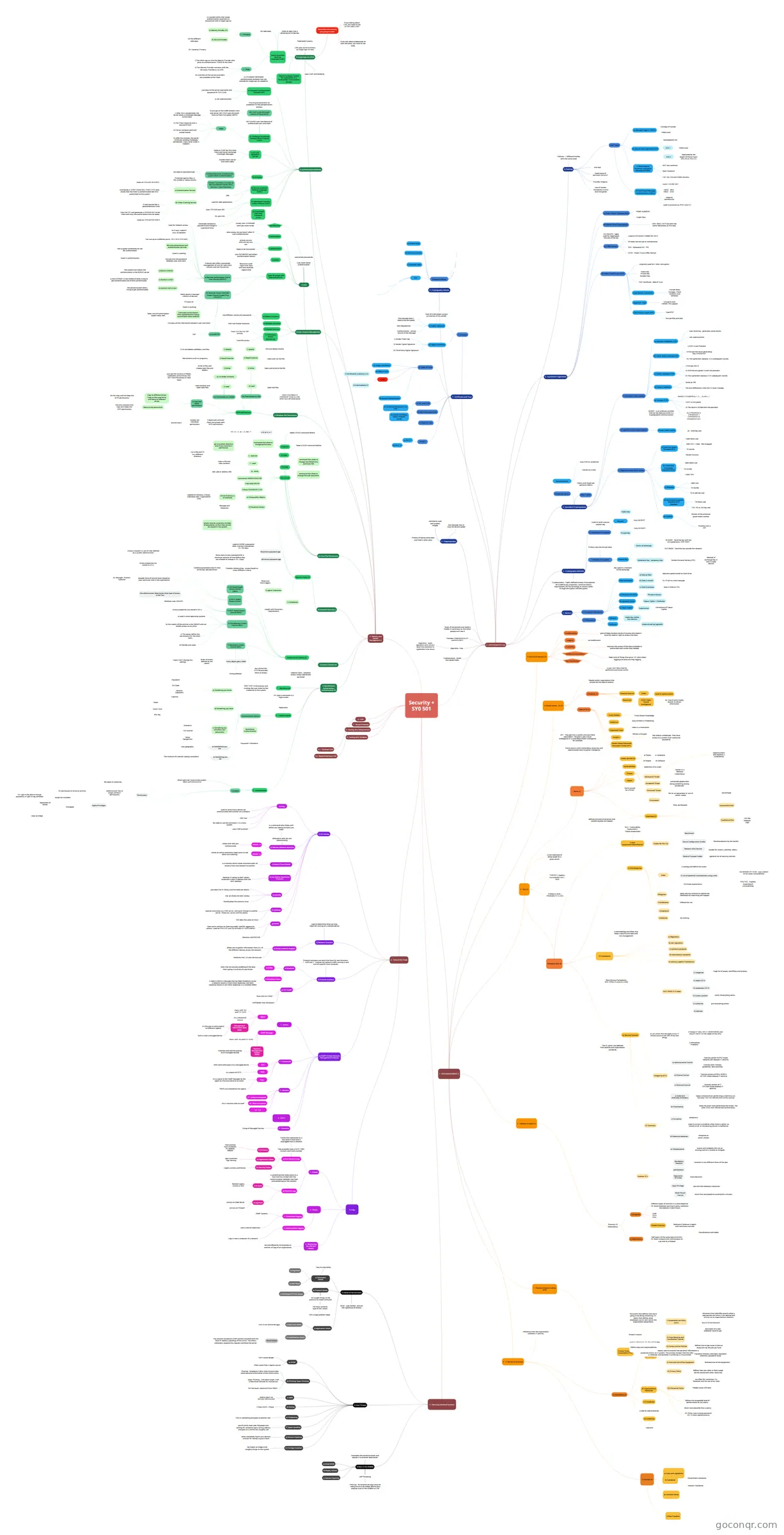
Mind map: Security+ SY0 501
Inhalt der Mindmap
Security + SY0 501
1 - RISK MANAGEMENT ()
- 1) The CIA of Security (5)
- Confidentiality
- goal of Keep the data secret of anyone who doesn't have the need or right to access that data
- Integrity
- no modification
- Availability
- maintain the access of the data available to authorized users when they needed
- Audition/Accountability
- Keep track of things that go on. EX: who's been logging and what are they logging
- Non Repudiation
- a user can't deny that he performe a particular action
- Confidentiality
- 2) Threat Actors - TA (2)
- Attributes (5)
- Intent
- OSINT (Open Source Intelligence)
- ex: Use of social media records to obtain information
- Resources
- Level of sophistication
- Internal/External
- Types of TA (5)
- Hacktivist
- Intent is a motivation
- Organized Crime
- Money is the goal
- Insiders
- Not always a employee. They have access to a system (user name and password)
- Nation States/Advanced Persistent Threat (APT)
- Entire country with tremendous resources and sophisticated tools to gather intellgence
- APT - They get into a system and stay there (persistent). The goal is get a naval intelligence or a state department intelligence for example
- Script Kiddies
- Trivial attack knowledge
- easy to block or firewalling
- Hacktivist
- People and/or organization that actualy do the type of attacks
- Attributes (5)
- 3 - Risk (2)
- Managing Risk (4)
- 2) Risk Response
- Mitigation
- apply security controls to reduce the likelihood of a bad thing will happen
- Avoidance
- do nothing
- Transference
- Offload the risk
- Acceptance
- Mitigation
- 1) Risk Assessment/Identification
- Guides for RA/I (4)
- Secure Configuration Guides
- Recomendations by the Vendor
- General Purpose Guides
- (general) list of security controls
- Network Infra Devices
- Guides for routers, switches, wlans...
- Benchmark
- Secure Configuration Guides
- RA/I = Vulnerability Assessment + Threat Assessment
- Steps
- I) catalog and define the assets
- II) List of potential vulnerabilities using a tool.
- VULNERABILITY SCAN - use a toolkit to list (new) vulnerabilities
- PEN TEST - Exploits know/found vulnerabilities
- III) threat assessments
- Guides for RA/I (4)
- 3) Frameworks
- a methodology/workflow that helps a security pro deal with risk management
- a) Regulatory
- c) national standards
- b) non-regulatory
- d) international standards
- e) industry sspeciic frameworks
- Most famous frameworks: NIST SP800-37 and ISO 27000
- NIST SP800-37 6 steps
- I) Categorize
- Huge list of assets, workflows and process
- II) Select (SC'S)
- IV) Assess (avaliar)
- verify if everything works
- III) Implement (SC'S)
- V) Authorize
- pull everything online
- VI) Monitor
- I) Categorize
- 4) Security Controls
- The SC came ( are defined) from policies and organization standards
- it's an action that we apply to our IT infrastructure to do ONE of the two things
- 1) Protect IT infra: APLLY, MONITORING and ADJUST the SC on the needs of the infra
- 2) Remediate Problems
- Categories of SC
- c) Technical Control
- Controls actions of IT SYSTEMS make towards IT security
- b) Phisical Control
- Controls actions of REAL WORLD ACTORS make towards IT security
- a) Administrative Control
- Controls action PEOPLE make towards (em relação) IT security
- Controls with: Policies, guidelines, best practices
- c) Technical Control
- SC Functions
- c) Corrective
- used to correct a condition when there is either no control at all, or the existing control is ineffective
- temporary
- e) Compensative
- assists and mitigates the risk an existing control is unable to mitigate
- d) Detective (detectar)
- recognize an actor's threat
- b) Preventative
- Stops the actor from performing the threat. The actor DOES NOT KNOW that control exists
- a) Deterrent (Dificultar/Intimidar)
- keeps someone from performing a malicious act. The actor HAS THE KNOWLEDGE of this control
- c) Corrective
- Another SC's
- Mandatory Vacation
- Vacation in any different times of the year
- Multi-Person Control
- more than one people to accomplish a mission
- Least Privilege
- use only the necessary resources
- Separation of Duties
- Dual execution
- Job Rotation
- Mandatory Vacation
- 2) Risk Response
- Is the likelihood of being target by a given attack
- Terms (5)
- Assets (ativos) (4)
- a) Places
- b) People
- c) Hardware
- d) Software
- Vulnerabilities
- weakness of an asset
- Threats
- negative event who exploits a vulnerability
- Structural Threat
- fail on an equipment or lost of power supply
- Accidental Threat
- Authorized people who doing something wrong accidentaly
- Adversarial Threat
- Hacker or a Malware (intentional)
- Enviroment
- fires, earthquake
- Likelihood (2)
- defines the level of certainty that something bad will happen
- Quantitative Risk
- porcentage
- Qualitative Risk
- risk low, medium, high
- Impact
- Harm caused by a threat
- Assets (ativos) (4)
- THREATS + (applys) VULNERABILITIES = RISK
- FORMULA RISK = PROBABILITY X LOSS
- Managing Risk (4)
- 5 - Defense in Depth (2)
- Diversity VS Redundancy
- 1) Diversity
- ADM TECH PHIS
- Different types of controls in a same objective. EX: block facebook warning in policy and block the website in work hours
- Vendor Diversity
- Method of Defense in depth with technicals controls
- 2) Redundancy
- Add layers of the same type of control. EX: block malware with antimalware on a pc and on a firewall
- 1) Diversity
- Diversity VS Redundancy
- 6 - IT Secure Governance
- 1) Sources (4)
- a) Laws and regulations
- b) Standards
- Government standards
- Industry Standards
- d) Common Sense
- c) Best Practices
- Influences how the organization conducts IT security
- 2) Documents (4)
- b) Organizational Standards
- Defines the acceptable level of performance for our policy
- Much more detailed than a policy
- EX: Policy: use a strong password. OS: 12 chars alphanumerics
- c) Procedures
- a step by step processes
- d) Guidelines
- Optional
- a) Policies (7)
- I) Acceptable Use Policy (AUP)
- document that identifies exactly what is appropriate and what is not appropriate activity on an organization’s network
- RULES OF BEHAVIOUR
- document of a new employer have to sign
- used as directives. EX: this will do this
- VI) Privacy Policy
- defines how your data, or data usage will be shared with other resources
- are often for customers. Ex: facebook and the use of our data
- V) Care and Use of the Equipment
- Maintenance of the equipment
- IV) Password Policy
- Password recovery, bad login, password retention, password reuse
- III) Access control Policies
- defines how to get acces to data or resourcers by the job you have
- II) Data Sensitive and Cassification Policies
- Classifications and labels
- VII) Personnel Policy
- People using OUR data
- Document that defines how we're going to be doing something. EX: policy that defines what employers can or can't do on the organization equipments
- Broad in nature
- Define roles and responsabilities
- I) Acceptable Use Policy (AUP)
- b) Organizational Standards
- 1) Sources (4)
- 7 - Business Impact Analisys (BIA)
- Privacy Threshold Assessment (PTA)
- is a process that a company uses to analyze how personal information is protected within an IT system. This process reviews how the information is collected, manipulated, transferred, or transmitted.
- Privacy Threshold Assessment (PTA)
- 1) The CIA of Security (5)
2 - CRYPTOGRAPHY (10)
- 1 - Basics ()
- 2) Encryption/Decryption
- a) Cesar Cipher
- Substitution
- Cornestone of Caesar Cypher
- Substitution
- c) Exclusive OR (XOR)
- Phrase to binary
- b) Vigenere Cipher
- Caesar Cipher + Confusion
- Data encryption
- a) Data at Rest
- data encrypted stored on hard drive
- c) Data in process
- data in RAM or CPU
- b) Data in transit
- Ex: IP call or a text message
- a) Data at Rest
- a) Cesar Cipher
- 1) Obfuscation
- Diffusion
- make less visible, less obvious
- Confusion
- make stirred up (agitado)
- Diffusion
- 2) Encryption/Decryption
- Study of taking data and make it hidden in some way so that other people can't see it
- Provides CONFIDENTIALITY and INTEGRITY
- 2 - Cryptography Methods
- 1) Simetric Encryption
- Primary way we encrypt data
- Session Key
- Key used in a moment of the exchange
- Forms of exchange
- OUT-BAND - Send the key outside the network
- IN-BAND - Send the key with the encrypted data. VERY RISKY
- Ephemeral Key - temporary key
- Perfect Forward Secrecy (PFS)
- Method of exchange key in every single session
- Perfect Forward Secrecy (PFS)
- 2) Asymmetric Encryption
- Key pair
- Public Key
- Only ENCRYPT
- Private Key
- Only DECRYPT
- Public Key
- Used to send a secure session key
- Key pair
- Cryptosystems - Highly defined process tha programs do to define key properties, communications requirements for key exchange an actions taken through encryption and decryption
- 1) Simetric Encryption
- 4 - Asymmetric Algorithms
- b) Elliptic Curve Cryptography
- VERY SMALL KEYS but with the same robustness as RSA keys
- a) Rivest Shamir Edelman (RSA)
- PRIME NUMBERS
- Larger keys
- c) Diffie-Helman
- Used to EXCHANGE SYMMETRIC KEYS
- DH GROUPS - table used for negotiation the size of the key
- DH does not encrypt or authenticate
- EDH - Ephemeral DH - PFS
- ECDH - Elliptic Curve Diffie-Helman
- d) Pretty Good Privacy (PGP)
- originally used for E-MAIL encryption
- Public Key Private Key Random Key
- PGP Certificate - Web of Trust
- Payd Version (Symantec)
- Encrypt Mass Storages, Cloud Solutions and bitlocker
- OpenPGP - Free
- Encrypt e-mail, S/MIME, PKI support
- GNU Privacy Guard (GPG)
- Encrypt files and disk
- OpenPGP
- b) Elliptic Curve Cryptography
- 5) Hashing
- Provides Integrity
- Fixed Value of MESSAGE DIGGEST
- one way
- Hash Types
- a) Message Diggest 5 (MD5)
- Grandpa of Hashes
- 128bit hash
- c) Race Integrity Primitives Evaluation Message (RIPEMD)
- Open Standard
- NOT very common
- 128, 160, 256 and 320bit versions
- b) Secure Hash Algorithm (SHA)
- Developed by NIS
- SHA 1
- 160bit hash
- SHA 2
- Separated by the lenght of the bit hash: SHA 256 or SHA 512
- d) Hash Based Message Authentication (HMAC)
- HMAC - MD5 HMAC - SHA1
- Integrity authenticity
- used in protocols as IPSEC and TLS
- HASH + SECRET KEY
- a) Message Diggest 5 (MD5)
- Collision - 2 different hashes with the same value
- Use of Hashes - PASSWORD CHECK and Encryption
- 6 - Steganography
- Process of taking some data and hide in other data
- the message may or may not be encrypted
- commonly used with graphic images
- 7 - Certificates and Trust
- 2) Types of Trust
- c) PKI
- I) Certification Authority (CA)
- II) Intermediate CA
- b) Web of Trust
- a) Unsign Certificate
- d) Mutual Authentication
- c) PKI
- 1) Concepts
- a) Digital Signature
- Hash of a document using a private key of the sender
- Authentication - proves source of the message
- Non-Repudiation
- the message dosn't need to be encrypted
- b) Digital Certificate
- I) Sender Public key
- II) Sender Digital Signature
- III) Third Party Digital Signature
- a) Digital Signature
- 3) CRL and OCSP
- a) Certificate Revocation List (CRL)
- b) Online Certificate Status Protocol (OCSP)
- 5) Chain of Trust
- 4) Key escrow (garantia)
- 6) PKCS
- a) PKCS 7
- B) PKCS 12
- 2) Types of Trust
- 8 - Cryptography Attacks
- Password Attacks
- a) Brutte Force
- b) Dictionary Attack
- c) Rainbow Table
- Salt
- Password Attacks
- Algorithm + key
- Algorithm - math operation who convert data from plaintext to cyphertext (vice versa)
- Cryptoanalysis - break encrypted codes
- 3 - Symmetric Cryptosystems
- Block Cipher
- Blocks with fixed size (generaly 64bits)
- 1) Algorithms with block cypher
- b) Triple Data Encryption Standard (3DES)
- 64bit block size
- 16 rounds
- 128BIT KEY
- a) Data Encryption Standard (DES)
- 64bit block size
- 56BIT KEY = 64bit - 8bit dropped
- Feistel Function
- 16 rounds
- d) Advanced Encryption Standard (AES) (Rijndael)
- 128 block size
- 128, 192 or 256 key size
- Winner of the american government contest
- c) Blowfish
- 64bit size
- 16 rounds
- 32 to 448 key size
- e) Twofish
- Finalista com o AES
- b) Triple Data Encryption Standard (3DES)
- Streaming Ciphers
- Randomization
- One bit at a time
- Uses XOR to randomize
- Randomization
- 2) Algorithm with stream cypher
- Rivest Cipher 4 (RC4)
- 40 - 2048 key size
- Rivest Cipher 4 (RC4)
- 3) Symmetric Block Modes
- a) Eletronic CodeBook (ECB)
- uses Same key - generates same results
- not used anymore
- c) Cipher Feedback (CFB)
- I) Encrypt the I.V
- II) XOR the encrypted I.V with the plaintext
- III) The cyphertext replaces I.V in subsequent rounds
- b) Cipher Block Chaining (CBC)
- I) XOR I.V and Plaintext
- II) Encrypt the result generating the CYPHERTEXT
- III) The cyphertext replaces I.V in subsequent rounds
- d) Output Feedback
- Same as CFB
- The only difference is that the I.V never changes
- e) Counter (CTR)
- I) N+C is Encrypted
- NONCE + COUNTER (0, 1, 2, ..., N, N+1...)
- II) The result is XORed with the plaintext
- III) CYPHERTEXT 0 CYPHERTEXT 1 CYPHERTEXT N CYPHERTEXT N+1
- NONCE - is an arbitrary number that can be used just once in a cryptographic communication
- a) Eletronic CodeBook (ECB)
- Block Cipher
- 1 - Basics ()
4 - Tools of the Trade
- 1) OS Utilities
- a) Ping
- No need to use the command -t in a linux system
- used to verify that a device can communicate with another on a network
- uses ICMP protocol
- DNS Tool
- b) Netstat (network statistics)
- netstat - n
- shows with who you communicate
- is a command who shows with whom you talking and who you listen
- show ports who you are comunicating
- netstat - a
- shows all active conections (open ports to see which are listening)
- netstat - n
- c) tracert (Trace Route)
- is a function which traces the entire path (of routers) from one network to another.
- d) Arp (Adress Resolution Protocol)
- Resolves IP adress to MAC adress (associate a local IP address with the MAC address)
- e) ipconfig
- providest the IP Adress and the ethernet details
- the -all shows the MAC Adress
- Ifconfig does the same on linux
- g) netcat
- Open ports and put on listening mode. Used for aggressive actions. Used for PEN TEST and VULNERABILITY ASSESSMENT
- Become a BACKDOOR
- f) nslookup
- queries (consultas) to a DNS server, and quick change to another server. Shows our server and the adress
- DIG does the same on linux
- a) Ping
- 2) Network Scanners
- a) Nmap (network mapper)
- allows you to gather information from ALL of the different devices across the network
- Performs Port, OS and Service scan
- used to determine what services might be running on a remote device
- a) Nmap (network mapper)
- 3) Protocol Analizers
- a) Wreshark
- I) Sniffer
- Tools that are actually grabbing all the data that's going in and out of a particular
- II) Broadcast Storm
- A state in which a message that has been broadcast across a network results in even more responses, and each response results in still more responses in a snowball effect
- I) Sniffer
- Protocol analyzers are tools that have for two functions: 1 - Sniff and 2 - Analyze the network traffic coming in and out of a specific host computer
- b) TCP DUMP
- Runs only on LINUX
- Sniff better than Wireshark
- a) Wreshark
- 4) SNMP (Simple Network Management Protocol)
- 1 - Actors
- SNMP Manager
- Ports: UDP 162 and TLS 10162
- Network Management Station (NMS)
- Interface who did the queries to all managed devices
- Agent
- It's a MANAGED DEVICE
- Ports: UDP 161 and TLS 10161
- Management Information Base (MIB)
- Built in every managed device
- it's the way to talk properly to differents agents
- SNMP Manager
- 4 - CACTI
- 3 - Versions
- V1 - without encryption
- V2 - Basic Encryption
- v3 - TLS
- this 3 versions talks to itself
- 2 - Commands
- Walk
- It's a batch of GETS
- GET
- NMS send some query to a managed device
- Trap
- TRAPS are initiated by the Agents
- It is a signal to the SNMP Manager by the Agent on the occurrence of an event
- Walk
- 5 - Comunity
- Group of Managed Devices
- 1 - Actors
- 5) Logs
- 1 - Groups
- a) Non-Network Logs
- I) OS Events
- Host starting Host shutdown OS updates Reboot
- Events that take place on a host even if that host is unplugged from a network
- II) Application Events
- App Instalation App Starting
- III) Security Events
- Logons success and falures
- They probably have a DATE, TIME, Account and Event number
- I) OS Events
- b) Network Logs
- Is something that takes place on a host that has to deal with the communication between that host and something on the network
- I) OS level
- Remote Logons (succes or fail)
- II) App level
- Activity on Web Server
- Activity on Firewall
- a) Non-Network Logs
- 2 - Forms
- 2 - Decentralized Logging
- Logs in every computer of a network
- 1 - Centralized Logging
- uses a central repository
- SNMP Systems
- 2 - Decentralized Logging
- 3 - Monitoring as a Service (MaaS)
- Service offered by third parties to monitor all logs of an organization
- 1 - Groups
- 1) OS Utilities
5 - Securing Individual Systems
- 1) Denial of Service (DoS)
- a) Volumetric Attack
- I) Ping Flood
- II) UDP Flood
- Easy to stop today
- b) Protocol Attack
- I) SYN Flood/TCP SYN Attack
- Do naught things to the protocol to create confusion
- The most common type of DoS Attack
- Still a huge problem today
- c) Application Attack
- I) Slow Loris attack
- Loris é um animal devagar
- II) Amplification Attack
- Smurf Attack
- The attacker broadcasts ICMP packets attached with the false IP address (spoofing) of the victim. The others computers respond this request and flood the server.
- Smurf Attack
- I) Slow Loris attack
- DDoS - uses BotNet, and are the nightmare of attacks
- a) Volumetric Attack
- 2) Host Threats
- a) SPAM
- Can't cause danger
- Often came from a legitm source
- b) Phishing/ Spear Phishing
- For the exam, came only from EMAIL
- Phishing - broadcast E-MAIL that trying to take some personal information of the victm/victms.
- Spear Phishing - individual target, craft a fake email tailored for that person
- c) SpIM
- receive spam via INSTANT MESSAGING
- d) Vishing
- V from VOICE - Phone
- e) ClickJacking
- Click in something and goes to another site
- f) Typpo Squading
- use of similar web sites like gogle.com, waiting for someone type a wrong address and goes to a similar but naughty site
- g) Domain Hijacking
- when somebody hijack your domain and ask for money to give it back
- h) Privilege Scalation
- Get higher privilege to do naughty things on the system
- a) SPAM
- 3) Man-in-the-Middle
- a) Wired MitM
- Intercepts the communication and passes it to another destination
- ARP Poisoning
- Ettercap - ferramenta de segurança de rede gratuita e de código aberto para ataques man-in-the-middle na LAN
- b) Replay Atttack
- c) Seesion Hijacking
- 1) Denial of Service (DoS)
7 - Secure Protocols
8 - Testing Your Infrastructure
9 - Dealing with Incidents
3 - Identity and Access Management ()
- 1) Identification, Authorization, Authentication (3)
- 1 - Identification
- FIRST STEP in the process and involves the user show his/her credential to the system
- EX: type a username in a logio screen
- 2 - Authentication
- Authentication factors
- b) Something you have
- Token
- Smart Card
- RSA Key
- a) Something you know
- Password
- Pin Code
- Captcha
- Security Questions
- c) Something you are/about you (physically)
- Biometric
- Iris Scanner
- Facial Recognition
- e) Something you do
- The rhythym of a person typing a password
- d) Somewhere you are
- uses geography
- Multifactor Authentication
- Password + Biometric
- b) Something you have
- Federation
- Authentication factors
- 3 - Authorization
- What rights do I have to the system, ONCE AUTHENTICATED
- Concepts
- Permissions
- Administrator has to assign (atribuir) permissions
- EX: permission to write an archive
- We apply to resources
- Administrator has to assign (atribuir) permissions
- Rights/Privileges
- assign to a systems
- EX: right to be able to change password, or right to log remotely
- Strategies
- Least privilege
- Separation of duties
- assign to a systems
- Permissions
- 1 - Identification
- 2) Access Control List
- Authorization Models (5)
- 1) Mandatory Access Control (MAC)
- the OPERATING SYSTEM provides limits of access
- Every object gets a label
- Rules of access defined by the admin
- Users CAN'T change this settings
- Rules of access defined by the admin
- Strong Method
- 2) Discretionary Access Control (MAC)
- a) used in most operating systems
- b) the creator of the archive is the OWNER and can modify access at any time
- c) The owner define the permissions for the other users
- d) Flexible and weak
- Access properties are stored in ACL's
- 3) ROLE Based Access Control (RBAC)
- Windows uses GROUPS
- broader form of control that’s based on your particular role in the organization
- Ex: Manager, Director, Operator
- the administrator determines what type of access a user has
- 4) RULE Based Access Control
- Access is based in a set of rules defined by a system administrator
- Access properties are stored in ACL's
- 5) Attribute Based Access Control (ABAC)
- Complex relationships - access based on many different criteria
- Combine parameters like IP, time of the day, desired action
- Implicity Deny - prevents access unless specifically permited
- 1) Mandatory Access Control (MAC)
- Authorization Models (5)
- 3) Password Security ()
- Security Policy (3)
- 1) Complexity
- Length and characters requirements
- 2) Age or Expiration
- Reset and time triggers
- Minimum password age
- force users to use a password for a minimum amount of time before they are allowed to change it. EX: 2 days
- Maximum password age
- used to EXPIRE a password after a certain time period.: EX: 180 days
- 3) Password History
- Reusage and Retention
- simply records a previous number of passwords, so that they cannot be reused in the system
- 4) Group policy objects
- Active Directory is an example
- Applied to Domains, Groups, Individual sites, Organization Units
- Active Directory is an example
- 1) Complexity
- Security Policy (3)
- 4) Linux File Permissions
- rwxrwxrwx
- 3 primeiros OWNER/CREATOR
- 3 do meio GROUP
- 3 finais EVERYBODY ELSE
- r - read
- w - write
- edit, add or delete a file
- x - execute
- run a file and CD to a different directory
- go to another directory only if you have the X permission
- Open a file and view contents
- w - write
- CHMODE
- command that allow to change permissions
- r=4; w=2; x=1
- EX: r-x = 5; -w- = 2; rwx= 7
- Need a SUDO command before
- CHOWN
- command that allow to change the OWNER of a particular file
- Need a SUDO command before
- PASSWD
- command that allow to change the user password
- rwxrwxrwx
- 5) Windows File Permissions
- NTFS permissions
- Accepts set individual permissions
- Create users and put them into groups with NTFS permissions
- INHERITANCE
- 1a) Commands to a folder
- 4) List folder contents
- Just see the contents of folder, subfolders and archives, but NOT have the access to read them
- 1) Modify
- R, W and delete subfolders and files
- 2) Read/Excecute
- See contents and run programs
- 3) Write
- write to files and creates new files and folders
- 5) read
- view contents and open data files
- 4) List folder contents
- 1b) Commands to a file
- 1) Modify
- R,W and delete the file
- 2) Read/Excecute
- Open and run the file
- 3) Write
- Open and write to the file
- 4) read
- Open the files
- DENY CHECKBOX IS STRONGER THAN ALLOW. DENY turn off inheritance
- 1) Modify
- 2) copy and move permissions
- Copy to different drives Copy to the same drive and Move to different drives
- Do the copy and not keep the NTFS permissions
- Move to the same drive
- The only situation that copy and keeps the NTFS permissions
- Copy to different drives Copy to the same drive and Move to different drives
- NTFS permissions
- 6) User Account Management
- 1) Continuous Access Monitoring
- Track LOG IN/LOG OFF activity
- Track file access
- 2) Shared Accounts
- Don't do Shared Accounts!
- 4) Default Accounts
- 3) Multiple Accounts
- Use different names and passwords
- 1) Continuous Access Monitoring
- 7) AAA
- Identification
- Usualy your USERNAME (who you claim to be)
- Authentication
- Need to be Centralized
- proves you are who you say you are
- your PASSWORD and others authentication factors
- Authorization
- what access do you have? (after ID and Authentication)
- Audition
- Resources used: Login time, data sent and received, Logout time
- usernames/passwords
- Uses Multi-factor authentication
- Types of system who took care of AAA:
- b) Terminal Access Controler Assess-Control System Plus (TACACS+)
- Really good in manager a bunch of devices
- Decouples authorization from authentication taking care of both more carefully
- Takes care of authorization aspect really well
- TCP port 49
- Good in auditing
- Encrypts all the information betwenn user and client
- c) DIAMETER
- EAP
- a) Remote Authorization Dial-In User Service (RADIUS)
- As it says, support DIAL-IN network
- I) RADIUS SERVER
- The system that checks the authentication is the RADIUS server
- II) RADIUS CLIENT
- is the GATEWAY in the middle of whos trying to get authenticated and of who authenticates
- III) RADIUS SUPLICANT
- the person/system who's triyng to get authenticated
- Protocol who offers centralized management of AAA for users who connect and use the service
- Used for network access
- Can use up to 4 different ports: 1812 1813 (TCP/UDP)
- Mix the authorization and authentication services
- Not so good (sometimes do not do) authorization
- Good in authentication
- Good in Auditing
- Encrypt only the password between user and client
- b) Terminal Access Controler Assess-Control System Plus (TACACS+)
- Identification
- 8) Authentication Methods
- a) Password Authentication Protocol (PAP)
- Just pass to the server username and password IN THE CLEAR
- Is not used anymore
- b) Challenge-Handshake Authentication Protocol (CHAP)
- First to give some form of protection to the authentication process
- MS-CHAP is the Microsoft version of the protocol
- To encrypt all the traffic btween cient and server, MS-CHAP uses Microsoft Point-to-Point Encryption (MPPE)
- Steps
- I) After link is established, the Server sends a challenge message to the client
- II) The Client responds with a password hash
- III) Server compare send and stored hashes
- IV) after this process, the server continues sending challenges periodically. Users never know it happens
- MS-CHAPV2 uses new feature of authenticate user and client
- c) NT LAN MANAGER (NTLM)
- Same as CHAP but this time, Client and Server exchange Challenger Messages
- Double check (server and client sides)
- d) Kerberos
- Domain Controlers is known as Key Distribution Center (KDC) who has 2 main functions:
- a) Authentication Service
- listen on TCP/UDP 88 PORTS
- Distributes a TICKET GRANTING TICKET (TGT) who shows that the client is authenticated (but NOT authorized) to the system
- b) Ticket Granting Service
- listen on TCP/UDP 88 PORTS
- Gets the TGT and generates a SESSION KEY to the client with only the authorization that he needs
- A new session key is generated every time
- a) Authentication Service
- Authenticate once, trusted by the system (Multi-Authentication)
- No need to reauthenticate
- Protected aganist Man in the middle or replay attacks
- Domain Controlers is known as Key Distribution Center (KDC) who has 2 main functions:
- e) Securty Assertion Markup Language (SAML)
- used for web applications
- XML
- f) Lightweight Directory Access Protocol (LDAP)
- Uses TCP/UDP port 389
- SSL port 636
- g) Time-based One-Time Password (TOTP)
- Generates temporary password and change in a period of time
- a) Password Authentication Protocol (PAP)
- 9) Single Sign-On (SSO)
- Secure Assertion Mark-up Language (SAML)
- 1 - Concepts
- a) Identity Provider (IP)
- is a system entity that issues authentication assertions in conjunction with a single sign-on
- b) Service Provider
- All the different web apps
- EX: Cameras, Printers,
- a) Identity Provider (IP)
- For web apps
- Allow to login into a whole bunch of devices
- 2 - Steps
- I) The client sign on into the Identity Provider who gives an authentication TOKEN to the client
- III) And then all the service providers are available to the Client
- II) The Identity Provider connects with the Service(s) Provider(s) via VPN
- 1 - Concepts
- Federated Systems
- LAN uses Active Directory as Single Sign-On tool
- Remember the security you going to need:
- if you talking about LAN, you have to use ACTIVE DIRECTORY
- If you talk about widespread all over the place, you have to use SAML
- (Secure European System for Applications in a Multivendor Environment) SESAME
- is a European-developed authentication protocol that can provide for single sign-on capability
- Uses LDAP and Kerberos
- Secure Assertion Mark-up Language (SAML)
- 1) Identification, Authorization, Authentication (3)
6 - LAN
- 6.1 - The Basic LAN
- 6.2 -Beyond the Basic LAN
Informationen
- Beschreibung
- Mapa mental para estudo de certificação Security + SY0 501(inglês)
- Erstellt von
- Sérgio Proba
- Aufrufe
- 276
- Tags
- Bewertung