
Mindmap
Computer
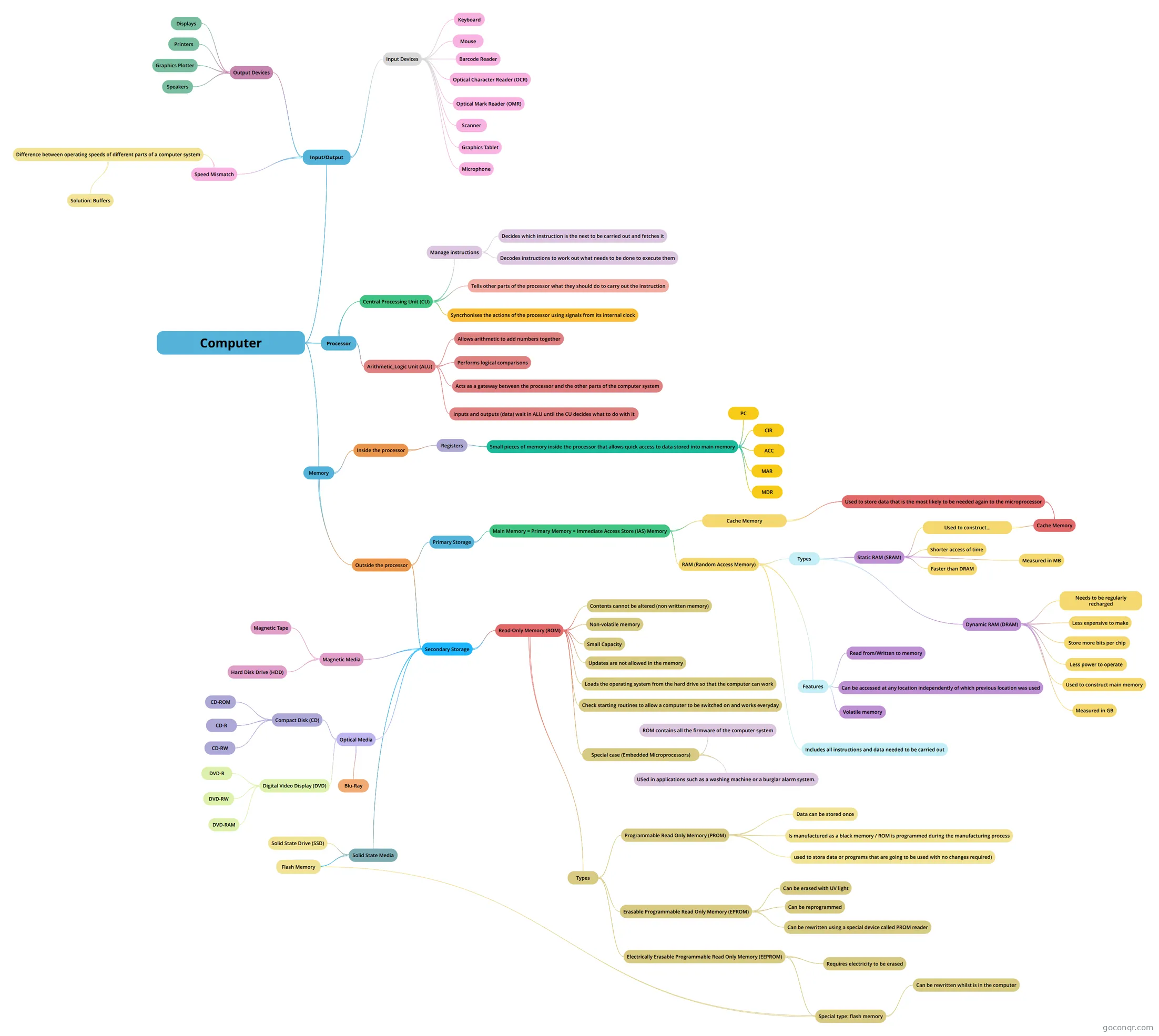
Mind map: Computer
Inhalt der Mindmap
Computer
Input/Output
- Input Devices
- Keyboard
- Mouse
- Barcode Reader
- Optical Character Reader (OCR)
- Optical Mark Reader (OMR)
- Scanner
- Graphics Tablet
- Microphone
- Output Devices
- Displays
- Printers
- Graphics Plotter
- Speakers
- Speed Mismatch
- Difference between operating speeds of different parts of a computer system
- Solution: Buffers
- Difference between operating speeds of different parts of a computer system
- Input Devices
Processor
- Central Processing Unit (CU)
- Manage instructions
- Decides which instruction is the next to be carried out and fetches it
- Decodes instructions to work out what needs to be done to execute them
- Tells other parts of the processor what they should do to carry out the instruction
- Syncrhonises the actions of the processor using signals from its internal clock
- Manage instructions
- Arithmetic_Logic Unit (ALU)
- Allows arithmetic to add numbers together
- Performs logical comparisons
- Acts as a gateway between the processor and the other parts of the computer system
- Inputs and outputs (data) wait in ALU until the CU decides what to do with it
- Central Processing Unit (CU)
Memory
- Inside the processor
- Registers
- Small pieces of memory inside the processor that allows quick access to data stored into main memory
- PC
- CIR
- ACC
- MAR
- MDR
- Small pieces of memory inside the processor that allows quick access to data stored into main memory
- Registers
- Outside the processor
- Primary Storage
- Main Memory = Primary Memory = Immediate Access Store (IAS) Memory
- Cache Memory
- Used to store data that is the most likely to be needed again to the microprocessor
- Cache Memory
- Used to store data that is the most likely to be needed again to the microprocessor
- RAM (Random Access Memory)
- Includes all instructions and data needed to be carried out
- Features
- Read from/Written to memory
- Volatile memory
- Can be accessed at any location independently of which previous location was used
- Types
- Dynamic RAM (DRAM)
- Needs to be regularly recharged
- Less expensive to make
- Store more bits per chip
- Less power to operate
- Used to construct main memory
- Measured in GB
- Static RAM (SRAM)
- Shorter access of time
- Used to construct...
- Faster than DRAM
- Measured in MB
- Dynamic RAM (DRAM)
- Cache Memory
- Main Memory = Primary Memory = Immediate Access Store (IAS) Memory
- Secondary Storage
- Read-Only Memory (ROM)
- Contents cannot be altered (non written memory)
- Non-volatile memory
- Small Capacity
- Updates are not allowed in the memory
- Loads the operating system from the hard drive so that the computer can work
- Check starting routines to allow a computer to be switched on and works everyday
- Special case (Embedded Microprocessors)
- USed in applications such as a washing machine or a burglar alarm system.
- ROM contains all the firmware of the computer system
- Types
- Programmable Read Only Memory (PROM)
- Data can be stored once
- Is manufactured as a black memory / ROM is programmed during the manufacturing process
- used to stora data or programs that are going to be used with no changes required)
- Erasable Programmable Read Only Memory (EPROM)
- Can be erased with UV light
- Can be reprogrammed
- Can be rewritten using a special device called PROM reader
- Electrically Erasable Programmable Read Only Memory (EEPROM)
- Requires electricity to be erased
- Special type: flash memory
- Can be rewritten whilst is in the computer
- Flash Memory
- Programmable Read Only Memory (PROM)
- Magnetic Media
- Magnetic Tape
- Hard Disk Drive (HDD)
- Optical Media
- Compact Disk (CD)
- CD-ROM
- CD-R
- CD-RW
- Digital Video Display (DVD)
- DVD-R
- DVD-RW
- DVD-RAM
- Blu-Ray
- Compact Disk (CD)
- Solid State Media
- Solid State Drive (SSD)
- USB Sticks
- Read-Only Memory (ROM)
- Primary Storage
- Inside the processor
Informationen
- Beschreibung
- Computer Science Mindmap am Computer, erstellt von Jose Esteve am 12/10/2019.
- Erstellt von
- Jose Esteve
- Aufrufe
- 99
- Bewertung