
Mindmap
Chapter 6: Static Routing
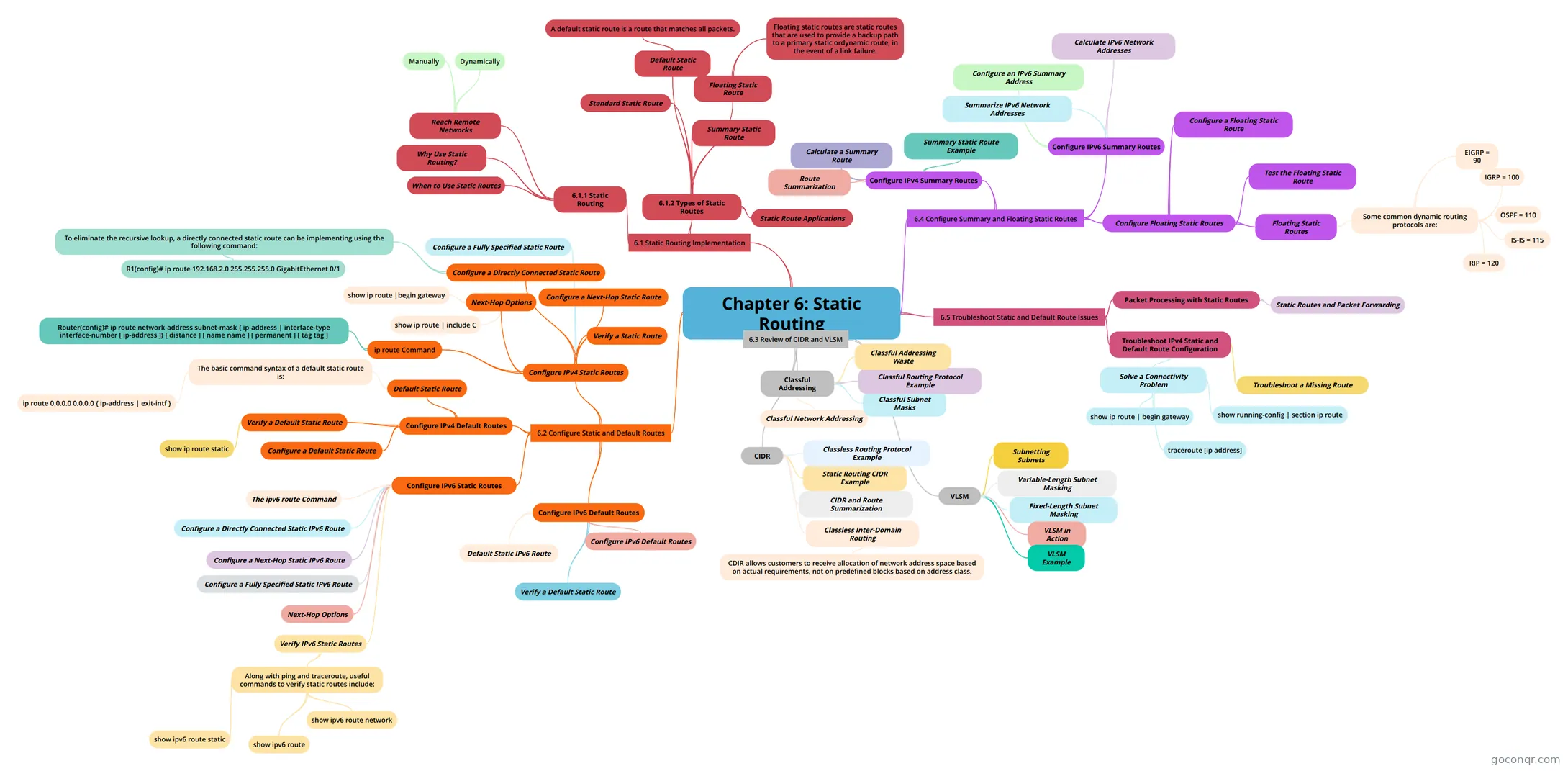
Mind map: Chapter 6 static routing
Inhalt der Mindmap
Chapter 6: Static Routing
6.1 Static Routing Implementation
- 6.1.1 Static Routing
- Reach Remote Networks
- Manually
- Dynamically
- Why Use Static Routing?
- When to Use Static Routes
- Reach Remote Networks
- 6.1.2 Types of Static Routes
- Static Route Applications
- Standard Static Route
- Default Static Route
- A default static route is a route that matches all packets.
- Summary Static Route
- Floating Static Route
- Floating static routes are static routes that are used to provide a backup path to a primary static ordynamic route, in the event of a link failure.
- 6.1.1 Static Routing
6.2 Configure Static and Default Routes
- Configure IPv4 Static Routes
- ip route Command
- Router(config)# ip route network-address subnet-mask { ip-address | interface-type interface-number [ ip-address ]} [ distance ] [ name name ] [ permanent ] [ tag tag ]
- Next-Hop Options
- show ip route |begin gateway
- show ip route | include C
- Configure a Next-Hop Static Route
- Configure a Directly Connected Static Route
- To eliminate the recursive lookup, a directly connected static route can be implementing using the following command:
- R1(config)# ip route 192.168.2.0 255.255.255.0 GigabitEthernet 0/1
- To eliminate the recursive lookup, a directly connected static route can be implementing using the following command:
- Configure a Fully Specified Static Route
- Verify a Static Route
- ip route Command
- Configure IPv4 Default Routes
- Default Static Route
- The basic command syntax of a default static route is:
- ip route 0.0.0.0 0.0.0.0 { ip-address | exit-intf }
- The basic command syntax of a default static route is:
- Configure a Default Static Route
- Verify a Default Static Route
- show ip route static
- Default Static Route
- Configure IPv6 Static Routes
- The ipv6 route Command
- Next-Hop Options
- Configure a Next-Hop Static IPv6 Route
- Configure a Directly Connected Static IPv6 Route
- Configure a Fully Specified Static IPv6 Route
- Verify IPv6 Static Routes
- Along with ping and traceroute, useful commands to verify static routes include:
- show ipv6 route
- show ipv6 route static
- show ipv6 route network
- Along with ping and traceroute, useful commands to verify static routes include:
- Configure IPv6 Default Routes
- Configure IPv6 Default Routes
- Default Static IPv6 Route
- Verify a Default Static Route
- Configure IPv4 Static Routes
6.3 Review of CIDR and VLSM
- Classful Addressing
- Classful Network Addressing
- Classful Subnet Masks
- Classful Routing Protocol Example
- Classful Addressing Waste
- CIDR
- Classless Inter-Domain Routing
- CDIR allows customers to receive allocation of network address space based on actual requirements, not on predefined blocks based on address class.
- CIDR and Route Summarization
- Static Routing CIDR Example
- Classless Routing Protocol Example
- Classless Inter-Domain Routing
- VLSM
- Fixed-Length Subnet Masking
- Variable-Length Subnet Masking
- VLSM in Action
- Subnetting Subnets
- VLSM Example
- Classful Addressing
6.5 Troubleshoot Static and Default Route Issues
- Packet Processing with Static Routes
- Static Routes and Packet Forwarding
- Troubleshoot IPv4 Static and Default Route Configuration
- Troubleshoot a Missing Route
- Solve a Connectivity Problem
- show running-config | section ip route
- show ip route | begin gateway
- traceroute [ip address]
- Packet Processing with Static Routes
6.4 Configure Summary and Floating Static Routes
- Configure IPv4 Summary Routes
- Route Summarization
- Calculate a Summary Route
- Summary Static Route Example
- Configure IPv6 Summary Routes
- Summarize IPv6 Network Addresses
- Calculate IPv6 Network Addresses
- Configure an IPv6 Summary Address
- Configure Floating Static Routes
- Floating Static Routes
- Some common dynamic routing protocols are:
- EIGRP = 90
- IGRP = 100
- OSPF = 110
- IS-IS = 115
- RIP = 120
- Some common dynamic routing protocols are:
- Configure a Floating Static Route
- Test the Floating Static Route
- Floating Static Routes
- Configure IPv4 Summary Routes
Informationen
- Beschreibung
- CCNA 2 Mindmap am Chapter 6: Static Routing, erstellt von sgurung9 am 21/04/2015.
- Erstellt von
- sgurung9
- Aufrufe
- 4
- Bewertung