
Mindmap
Network and communications
Inhalt der Mindmap
Network and communications
A network is more than one computer are connected to each other in order to communicate and share data. To do this they need network protocols. These are a set or rules and procedures on how to share data such as HTTP and TCP/IP.
Data Transmission occurs down wires, wireless, bluetooth, infrared, laser. This is called the transmission media and means the physical path between the transmitter and receiver, they can be guided (wired) or (wireless). The communication is done by electromagnetic waves make sure you know about different guided and unguided.
- Serial data transmission- This is when the signal are sent down one line one after another. To represent a one or a zero different frequencies are used. It is used for long distance communication as there only needs to be a single cable going each way, it is easier to regenerate the signals as they lose quality over distance, its easier to route the signals through through telecommunication signals and it costs less for cables. An example is a USB, universal serial bus.
- A simplex transmission channel is a one way signal like a one way road. One is the transmitter and the other the receiver. An example is a radio signal where your car receives the signal and cannot send one back.
- Duplex transmission channel- This is a two way communication between two computers signals can be sent either way and at the same time like a two way road.
- Half Duplex- This is a two way communication between two computers signals can be sent either way but one at a time like a narrow road that can only fit one car at once.
- Synchronicity- Serial transmission can either be synchronous or asynchronous. Synchronous is when the bits are grouped and sent as frames and the frames are sent continuously with or without bits. Asynchronous is when the bits are sent as independent units with start and stop bits with no synchronization to allow for gaps between the data. However once detected start, stop bits maintain a physical bit level synchronization.
- Asynchronous serial transmission- This is when the transmitter and receiver are not constantly synchronized but temporary synchronize when the data arrives. To do this when the data is sent it also has start and stop bits, the start bit shows the start of the data but also synchronizes the transmitter and receiver and the stop bit tells the receiver there is no more data and resets the synchronization. Again a clock is used for the synchronization when the start bit is received. Stop bits are very important as without them the computer will generate an error as it will read bits it wasn't supposed to. Most of the data across the internet is sent like this. For transmission a parity bit is also used which is an extra bit added to the front of the data to ensure that the number of ones in the data is odd or even. For example if even parity is used then there should be an even number of ones in the data so if there is the parity bit will be a 0 or else a 1.
- Then the receiver can look at the number of ones, if it is even it has been sent correct else it needs to be sent again. This is obviously vice versa with odd parity.
- Handshaking protocols- This is occurs when a computer is about to communicate with a foreign device and occurs before the sending of data. It is done to set up the communication between the devices and decide on the rules of the communication. For asynchronous serial transmission this means to make sure that both the transmitter and the receiver are using the same encoding and decoding as well as where to look for the signal. A protocol is an agreed set of rules, signals and functions to ensure successful communication between two devices. Between a computer and a printer the signals RTS and CTS are sent for the handshaking. RTS is ready to send and CTS is clear to send.
- On a LAN there will be more than one computer connected to the same cable so there needs to be ways to make sure there is not collisions between the sending of data as one computer could be sending signals to another and so could two others. There are two ways to deal with this baseband and broadband. Baseband is when one signal uses the full bandwidth of the transmission media so the computers need to take it on turns to use it, this is used for short distance LAN's. Broadband is when there is multiple channels to carry the signals and is used in long distance for example WAN's.
- Asynchronous serial transmission- This is when the transmitter and receiver are not constantly synchronized but temporary synchronize when the data arrives. To do this when the data is sent it also has start and stop bits, the start bit shows the start of the data but also synchronizes the transmitter and receiver and the stop bit tells the receiver there is no more data and resets the synchronization. Again a clock is used for the synchronization when the start bit is received. Stop bits are very important as without them the computer will generate an error as it will read bits it wasn't supposed to. Most of the data across the internet is sent like this. For transmission a parity bit is also used which is an extra bit added to the front of the data to ensure that the number of ones in the data is odd or even. For example if even parity is used then there should be an even number of ones in the data so if there is the parity bit will be a 0 or else a 1.
- Parallel transmission signal- This is when multiple bits, usually 8 a byte, are sent down multiple parallel channels in one cable or radio path synchronized by a clock. They use a wider data bus than serial so can send more data at once. This means they are faster are transmitting but are more costly due to more cables. Over a long distance the synchronization can become skewed. The timing is done by a constant clocking signal which is sent down another channel in the cable so parallel is seen as synchronous.
- An example is the communication between a printer and a computer. Their is multiple wires and one of them is the ready/busy wire. When the computer wants to send data to the printer it looks at the ready/busy wire where 5 volts is ready and 0 is busy. If it ready it put the data on the data wires and looks at the strobe where again one volt means wait and another receive. If it is receive it sends the data to the printer and the printer receives the data and sets the ready/busy to busy. When it finishes reading it sets the ready/busy to ready and the strobe to wait
- Parallel is used for short distances are it requires more than one pathway each way so is also expensive, over distance the signals on the wires start to become skew which means they're not all in line and it is hard to route the signals through telecommunication switches. They are mainly used for computer buses and computer-printer.
- An example is the communication between a printer and a computer. Their is multiple wires and one of them is the ready/busy wire. When the computer wants to send data to the printer it looks at the ready/busy wire where 5 volts is ready and 0 is busy. If it ready it put the data on the data wires and looks at the strobe where again one volt means wait and another receive. If it is receive it sends the data to the printer and the printer receives the data and sets the ready/busy to busy. When it finishes reading it sets the ready/busy to ready and the strobe to wait
Internet Security
- Malware- This is the generic name for threats to your computers security such as viruses and spyware that download on you computer without you permission. They can cause your computer to crash and can monitor and control your online activity.
- Viruses- These are self-replicating programs that attach themselves to other prgrams. To minimise the threat keep up to date virus software, don't open links on emails from unknown senders, only download links from trusted websites.
- SPAM- Is unwanted emails that are considered a security threat due to the shear volume of them. They can also contain viruses and fraudulent requests for personal details. They can be minimised by using the spam filter on your email provider.
- Worm- Is a self-replicating program that can replicate through networks using security vulnerabilities. It can be minimised by educating about SPAM and phishing, using up-to-date virus checkers and using the spam filter
- Trojan- Is a malicious program hide inside another program or masquerading as another program. It can be minimised by using up to date virus checkers, educating about SPAM and phishing and using spam filter.
- Spyware- Is a program that collects information from a computer without the user knowing. It can be minimised by educating about SPAM and phishing, using up to date virus checkers and using spam filters.
- Remote Login- This is the ability to login to a computer via the Internet. It can be minimised by authentication to login to the computer, enforce strong passwords that need to be changed regularly, use a firewall to filter packets between the private network and the internet, keep log files.
- Phishing- Is targeting customers of big organisation to give up their personal information such as passwords and credit card details. To do this they send emails directing them to none trustworthy websites, it is called phishing as it has parallels to fishing where the emails and websites are the base and the customer details are the fish. To minimise this people need to be educated about the scam and how to know if a website can be trusted or not, don't send personal details by email, access banking websites by typing in the URL and not by clicking links. and check your accounts
- Pharming- This is the misdirection of a user to a fake website. This can be done by changing the IP address on DNS servers so when the URL is changed into an IP it sends you to the wrong website, compromised DNS servers are called poisoned. It can also be done by changing the host file on the user computer. As the computer system is attacked to minimise it you need to be educated about it and use strong passwords.
- Encryption
- Public Key Encryption- When data is sent between a computer and a banking website it is encrypted using the sites public key and it encrypts it using SSL, secure socket layer, and then the site can decrypt it using its private key.
- Public key and private key are two interchangeable keys with no difference between them. HOWEVER when one is assigned the public and the other the private they always stay the same. The public key is available to everyone but the private key only belongs to one person and should be kept private.
- A digital certificate is a certificate are issued by an independent and trusted third party that guarantee that the website is who they say they are. The third party is called the certificate authority. A digital certificate is used so that you know the widely available public keys have legitimate owners. A digital certificate is a public key that is approved by the CA and they contain the businesses name, their public key, the expiry date of the public key, the name of the company who distributed the certificate and the signature of the CA.
- How it is sent- The message to be sent is put through a hashing algorithm to create a digest. The digest is then encrypted using the senders private key so you know it has come from the right person. The encrypted digest, the digital signature, is then put with the original message and they are encrypted using the receivers public key so only the receiver can decrypt it. This is then sent to the to the receiver. The receiver then uses their private key to decrypt back to the message and the signature and then uses the senders public key to decrypt the signature back to the digest. Finally they put the message through a hashing algorithm to create a new digest and compare the new one to the received one. If they are the same then the message has been received properly.
- Malware- This is the generic name for threats to your computers security such as viruses and spyware that download on you computer without you permission. They can cause your computer to crash and can monitor and control your online activity.
Speed of transmission
- Baud Rate- Is the rate at which the signals on a wire or line can change. 1s between signal changes 1 baud rate, 0.5s between signal changes then 2 baud rate.
- Bit Rate- The number of bits per second that can be sent down a line. It is linked to baud rate as the changes in voltage represent a change in bits. Its units is bps, bits per second. More than 1 bit can be sent at a time if a range of voltages are used instead of just one. For example if the voltages used are 0, 2.5, 5, 7.5, these could represent 00,01,10,11 so one signal is two bits. If the baud rate was 2 the bit rate would be 4..
- Bandwidth- Is the measure of the range of frequencies/number of channels and transmission media can use without a significant reduce in strength. So it refers to the throughput capacity of any communication media i.e. the amount of data you can send. Bandwidth is directly linked to bit rate. The higher the bandwidth the higher the bit rate. A good analogy is water flowing through a pipe, the wider the pipe the more water can flow through it at a quicker rate.
- Latency is the measure of time delay in a system. In data transmission it can be measured in two ways. One way is the time taken to get from the sender to the receiver and the round trip is the one way from the sender to destination plus the one way from the destination to source. Round trip latency is usually quoted as it can be measured from one location. Many services provide a service called ping as a way to measure round trip latency which is where a packet is sent to the destination and then it sends a response when it receives it. This is a very accurate way of measuring it as no packet processing is involved.
LAN- Local Area Network and is when two or more computers are connected using cables or short wireless and are in the same geographical location. WAN- Wide Area Network and is when two or more computers are connected using telecommunication system and are in different geographical locations.
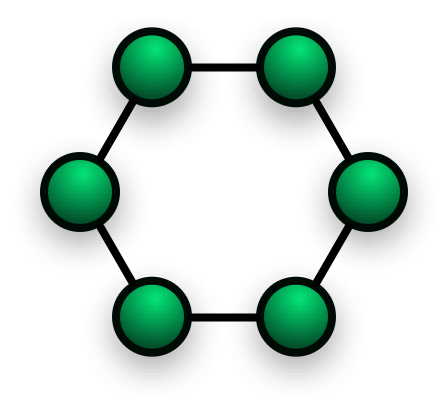
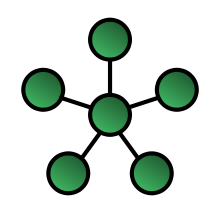
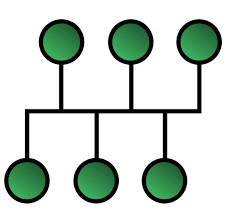
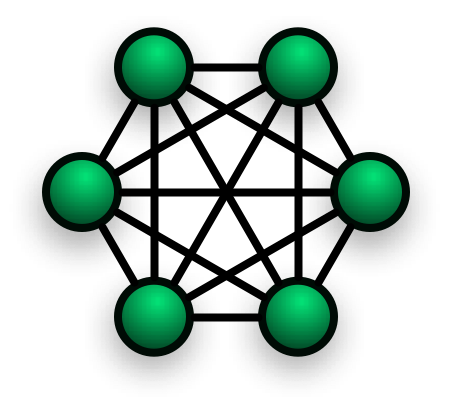
- LAN Topologies- A network topology is the structure of the physical layout of the interconnections of the elements of a computer network.
- Ring-Peer to peer
- Star- Client to server
- Bus
- Mesh-Internet every computer connected to each other
- LAN Topologies- A network topology is the structure of the physical layout of the interconnections of the elements of a computer network.
TCP/IP Stack
- End to End principle- To connect two computers across the internet two different types of network need to be connected. To do this the end to end principle was created. This is the idea that when there is communication between two computers X and Y that these are the end points for the communication and at the two ends the computers are in charge. This means that the role of internet, which is the channel through which the communication is carried, is to pass on the packets helping them get to their destination. This is what we call Communication Oriented which means when devices communicate handshaking must take place in order to establish an end to end connection and error checking. In order establish a connection the devices must be able to communicate. This is the suite of protocols called Transmission Control Protocol, TCP. Connectionless is when no effort is made to set up and end to end connection. This is the suite of protocols called User Datagram Protocol, UDP.
- IPv4 Address- Every device connected to the internet has a unique one and it is broken into two parts. The NetID is the address of the network connected to the internet and the HostID is the address of the actual computer on the network. 32 bits, Net 24 and Host is 8. Ipv4 running out so IPv6 is 8 sets of four hexadecimal numbers and can be written in short hand using two rules. Zero Suppression, leading zeros can be gotten ride of, Zero Compression, as all contain 8 segments then following full segments of zeros can be collapsed to a double colon. Using the two rules 2001:0db8:0000:0000:0000:0000:0002 collapses to 2001:db8::2.
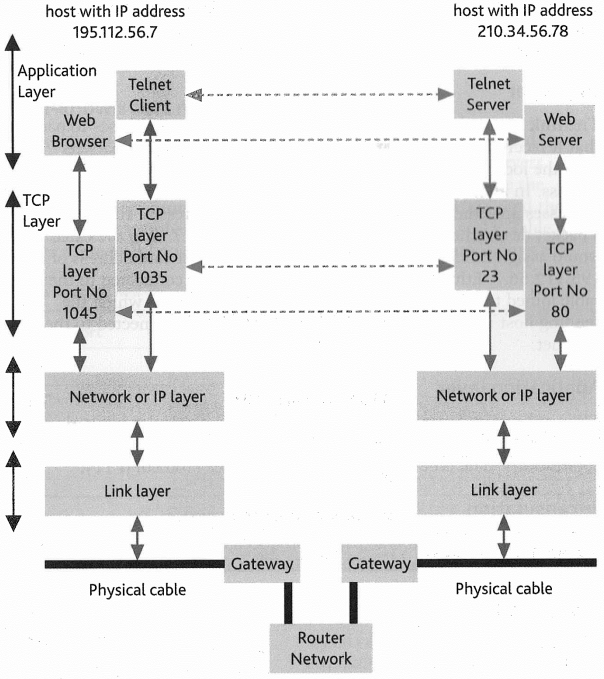
- Application Layer- Provides the user with an interface for the communication. This is your web browser or email. It sends and receives data from the transport layer. It encodes the data being sent.
- Transport Layer- Provides the means of transporting the data across the network layer and is concerned with the end to end communication. This is where TCP and UDP is involved. When receiving data it sends data to the application layer but when sending it sends it to the network layer. It breaks the data down to manageable chunks and adds a port number.
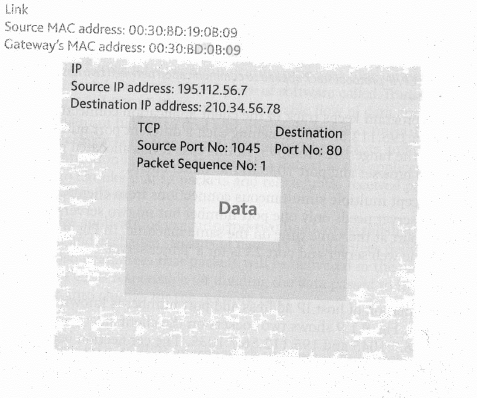
- Network Layer- Provides a connectionless communication between one or more networks, a global, logical addressing scheme and packetization and is concerned with network to network communication. The network layer is responsible for packetization , addressing and routing data on the network. IP is responsible for packetization, local addressing and forwarding packets from one computer to another. It communicates with the transport layer when receiving and the physical when sending. Adds the IP address of the sender and destination.
- Physical Layer or Network Access- Provides access to the physical network the network interface card. Its purpose is to allow your computer to access the wire, wireless or fibre optic when sending data to other computers. When sending it transmits data to the physical cable but when receiving to the network layer. Adds the MAC address to specify which hardware device the data came from and where it is going.
- The link layer has a network adaptor which converts packets to something that can be transmitted across networks by encapsulating it with network headers. It adds its own physical address and the destinations address. On a PC this is called the MAC address which stands for Media Access Control. Encapsulation refers to the way that a data packet is packed as it passes through the TCP/IP stack becoming a frame, shown on the right.
Large Networks
- Dealing with collisions- On a baseband bus network all the computers transmit data to each other down one wire for this frames are required. If there were no frames then if multiple computers were transmitting data at the same time then there would be collisions. The signals sent down the wire are different frequencies so the voltages will interfere with each other causing an incorrect reading. The computer sending the signals will detect this and then wait a period of time before tying again. Frames contain the data and can be of varying sizes but have a minimum and maximum size. To reduce the effects of the collisions one frame is sent at a time and a protocol is used called Carrier Sense Multiple Access with Collision Detection (CSMA/CD).
- The rules of the protocol are: 1. If the bus is quiet transmit a frame, 2. If it is not quite wait until it is and then transmit a frame immediately, 3. While transmitting listen to the bus for any collisions, if there is then transmit a jamming signal to make all the other computers aware of the collision and then stop transmitting, 4. After transmitting the jamming signal wait a random amount of time and then start again from step 1.
- Managing LANS-On a normal baseband ethernet network, segmenting is used. This is when the network is split into smaller parts to improve performance. A segment is a physical link of computers. To connect segments bridging and routers are used. A bridge reads the outer most data on a packet and the sends it to the required segment. It reduces traffic on network segments as it doesn't send all the packets. Bridges can be programmed to not accept packets from certain networks and network with different architectures are not normally connected.
- It can only read the MAC address and not the IP so needs to know what segment the MAC address belongs to, it does this in two ways. Transparent Bridging- The bridge keeps a table of the MAC addresses and what segment they belong to, if the MAC address is not in the table it sends the packet to all segments apart from where it came from, this is used in ethernet networks. Source Route Bridging- This is where the packet contains the information of the route it needs to take and is used in Token ring networks. A router occurs at the network layer of the TCP/IP stack so can read IP addresses. If the packet is for a network that the router is connected to it will readdaress it with the proper MAC address and transmit it to that network else it needs to send it to another router so repackages the outer data of the packet and forwards it on.
- Like the bridge it builds a bridging table with IP addresses and there segments if its not in the table it forwards it on to all other segments apart from where it came from. Routers can connect networks with different architecture. A repeater connects two parts of your network cable and regenerates the signal and forwards it on. In ethernet topology the repeater will be a hub and time is required to regenerate the signal.
- It can only read the MAC address and not the IP so needs to know what segment the MAC address belongs to, it does this in two ways. Transparent Bridging- The bridge keeps a table of the MAC addresses and what segment they belong to, if the MAC address is not in the table it sends the packet to all segments apart from where it came from, this is used in ethernet networks. Source Route Bridging- This is where the packet contains the information of the route it needs to take and is used in Token ring networks. A router occurs at the network layer of the TCP/IP stack so can read IP addresses. If the packet is for a network that the router is connected to it will readdaress it with the proper MAC address and transmit it to that network else it needs to send it to another router so repackages the outer data of the packet and forwards it on.
- Sub-networks- Are smaller logical network split up from a big network like to form a LAN within a WAN and is done by splitting up the IP addresses. A subnet mask is used and this shows what part of the IP address is the network and what part is the host. Classful IP addressing splits the IP addresses into different classes and the class is represent by what the MS bits are which is the first four bits of the IP address. There are 5 classes A,B,C,D,E where D and E are special and each one allows for different networks and different hosts, A is N.h.h.h and allows for 256 networks and 16,777,214 whereas C is 16,777,216 networks and 254 hosts. Subnetting can improve security and performance by splitting the hosts into logical groups which improves the flow of network traffic.
- Subnet Masks- Like IP they contain 32 bits and are split into 4 sections using dots, a common one is 255.255.255.0. The subnet mask and IP address work together and applying the mask to the IP splits it into two parts the extended network address and the host address, for a mask to be valid the left most bits must be 1's and the right most 0's. A valid subnet mask contains two parts the left hand side with all bits set to one, the extended network address, and the right hand side with all the bits set to 0, the host address. The extended network address contains the network address and some bits for the subnet number this with the host is a three level address scheme.
- Dealing with collisions- On a baseband bus network all the computers transmit data to each other down one wire for this frames are required. If there were no frames then if multiple computers were transmitting data at the same time then there would be collisions. The signals sent down the wire are different frequencies so the voltages will interfere with each other causing an incorrect reading. The computer sending the signals will detect this and then wait a period of time before tying again. Frames contain the data and can be of varying sizes but have a minimum and maximum size. To reduce the effects of the collisions one frame is sent at a time and a protocol is used called Carrier Sense Multiple Access with Collision Detection (CSMA/CD).
Switched ethernet
- The network is split into star networks connected to a bus backbone, although parts of the network are stars it behaves as a bus. If two computers A and B are on the same star and want to communicate then A will broadcast a frame and the switch will set up a temporary exclusive path of connection between A and B. If another computer C also transmits a frame at the same time then the switch will buffer, hold, the frame until the backbone becomes free, this eliminates collisions. Inside the switch, there must be a separate line card for each connection with a cable running to it.
- Connecting two LANs by routers- If a computer one one LAN communicates with a computer on another LAN the frames must pass through two networks, its own and the other LAN router. A router has two IP addresses as it has two network cards, one to connect to the network and one to connect to the other router. The movement of a packet between routers is called a hop. In this example the packets make 3 hops, one from the network router to the router that is connected to the other router on the other segment, one between the two routers, and then the final to the router connected to the network. On each hop the destination and recipient MAC addresses are removed and replaced by the new destination and recipient MAC so they can make the link, but the IP's never change
- Connecting LANs to WANs- To do this a gateway is used which translates information between different network architectures and data formats as LANs and WANs use different frames. It also has two cards like a router and can translate TCP/IP to AppleTalk so the computers using TCP/IP can communicate with Apple brand. Most gateways operate at the application layer but can operate at the network layer. To confuse things when talking about a router that is used to interface to another network the term gateway is used. This doesn't mean it works like the gateway defined here although it could.
Bilder und Dateien der Mindmap
Informationen
- Beschreibung
- Mindmap am Network and communications, erstellt von Callum21 am 31/05/2015.
- Erstellt von
- Callum21
- Aufrufe
- 0
- Bewertung