
Computer Networks
407 resources created by 369 users
This Computer Networks page on GoConqr gathers community-made mind maps, quizzes, flashcards and notes, from LANs, WANs and network topologies to TCP/IP layers, protocols and data transmission. It's built for school students revising a topic and teachers after ready-made material. There are over 4,400 resources here, including more than 170 quizzes, over 2,800 mind maps and more than 1,300 flashcards, mostly at secondary level. Pick a topic, try a quiz to find your gaps, then build your own revision set.
Top Computer Networks resources
-
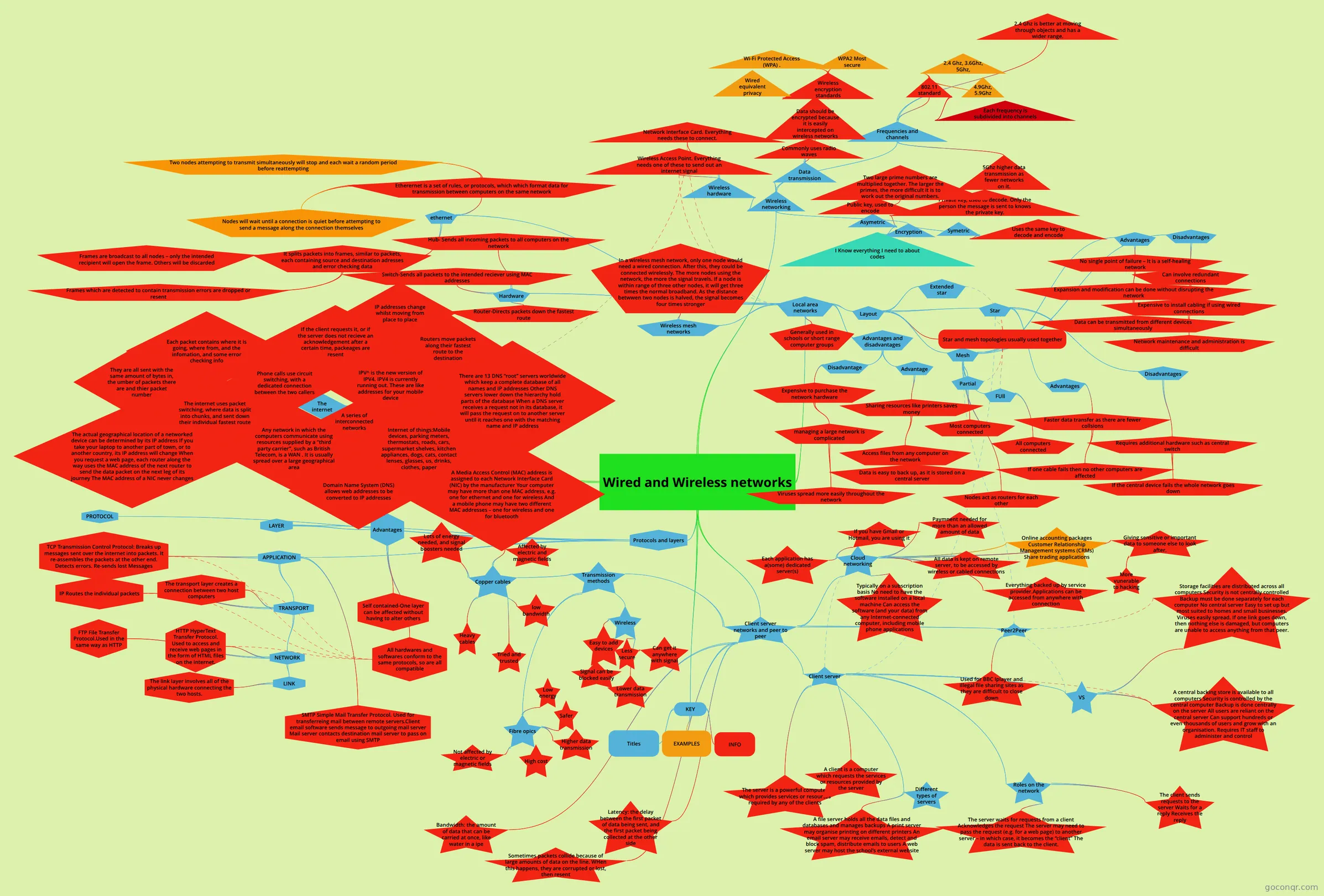 Mind map Wired and Wireless networks
-
75 questionsCISCO Which device performs the function of determining the path that messages should take through internetworks?
-
100 questions801 Lead 2 Pass A system board has six slots for memory chips, aligned in two banks. Which of the following is the optimal ...
-
100 questions801 practice volume 1 Which of the following is the correct pin out for T568B?
-
36 questionsDevOps Module 5-6 Which statement describes the ping and tracert commands?
-
42 questionsA+ 802 Exam E A user wishes to access their contacts from their Android phone. Which of the following methods will provid...
-
82 cardsA2 CCEA Digital Technology (Whole course) The whole A2 ccea course for digital technology - if I don't forget to upload it lol. Spec from 2017
-
22 questions2.1.6 Networks A Local Area Network (LAN) is...
Quizzes
See all 48 quizzes-
75 questionsCISCO Which device performs the function of determining the path that messages should take through internetworks?
-
100 questions801 Lead 2 Pass A system board has six slots for memory chips, aligned in two banks. Which of the following is the optimal ...
-
100 questions801 practice volume 1 Which of the following is the correct pin out for T568B?
-
36 questionsDevOps Module 5-6 Which statement describes the ping and tracert commands?
-
42 questionsA+ 802 Exam E A user wishes to access their contacts from their Android phone. Which of the following methods will provid...
-
22 questions2.1.6 Networks A Local Area Network (LAN) is...
-
23 questionsIT ESSENTIALS CHAPTER 6 REVIEW Which network device makes forwarding decisions based on the destination MAC address that is contained in t...
-
14 questions[CTI-120] Ch.1-5 Checkpoint Exam Practice An application layer protocol for email clients to retrieve email and attachments from an email server. By ...
Mind maps
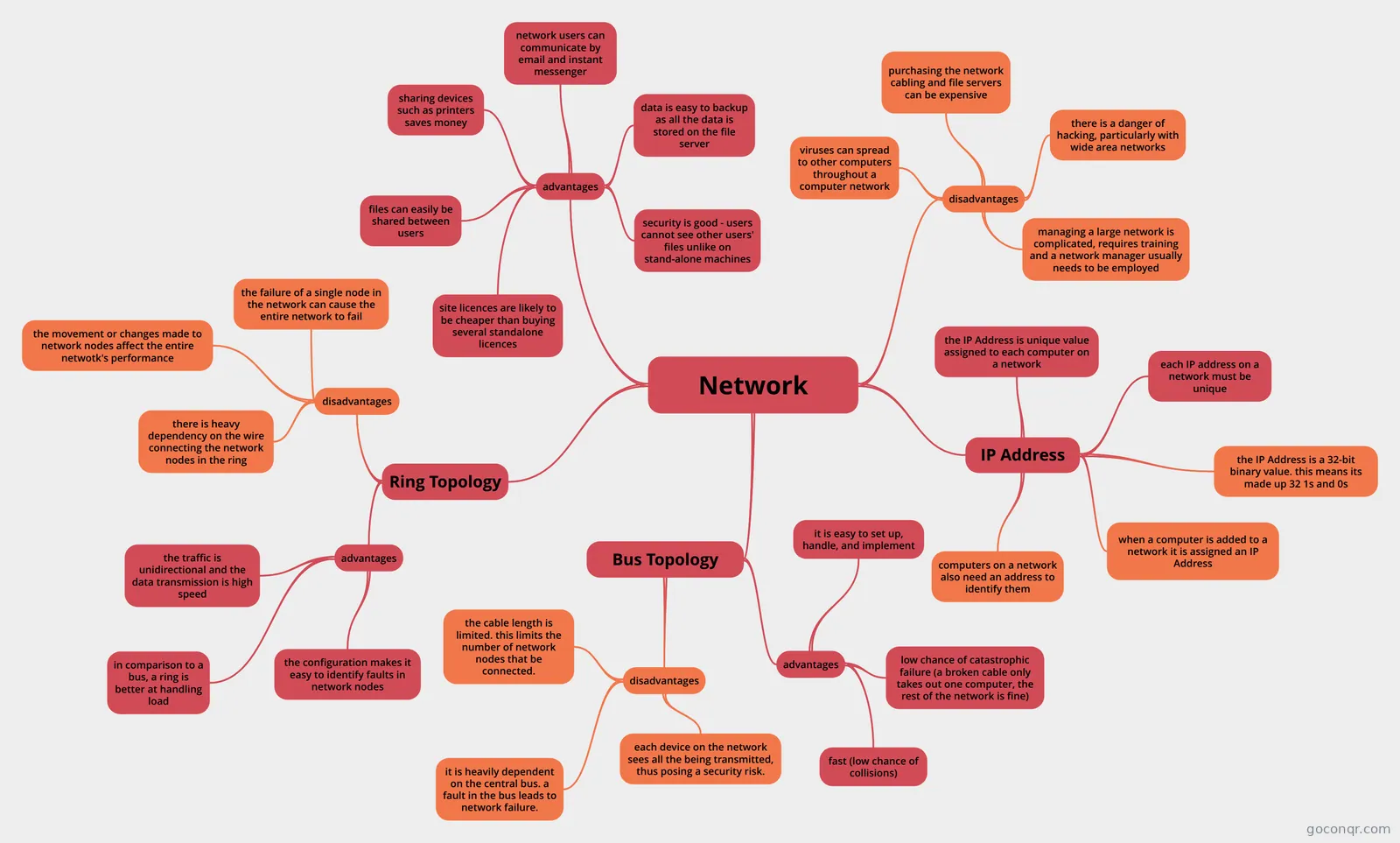
See all 210 mind maps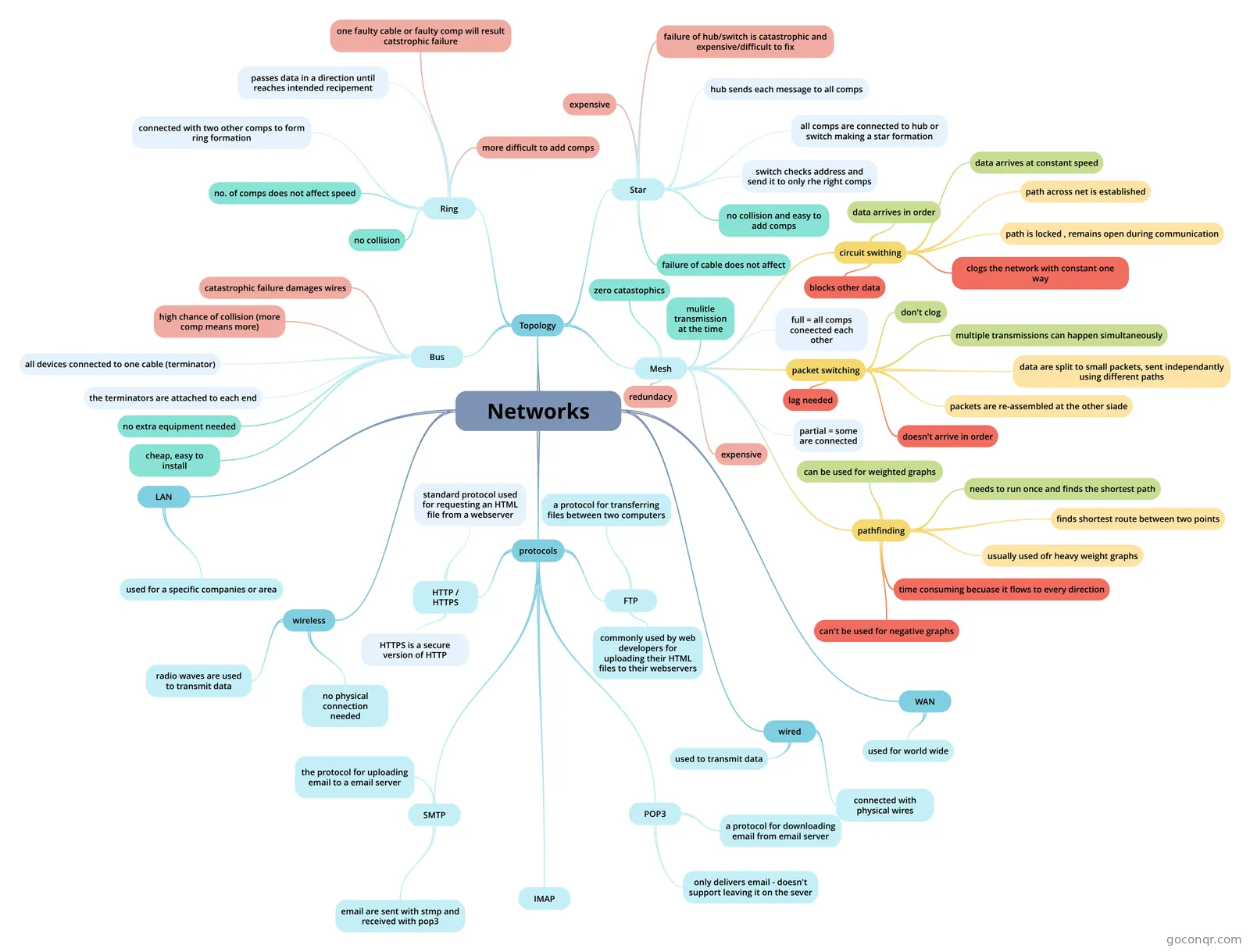
Flashcards
See all 134 flashcards-
82 cardsA2 CCEA Digital Technology (Whole course) The whole A2 ccea course for digital technology - if I don't forget to upload it lol. Spec from 2017
-
17 cardsCS TOPIC 3 - NETWORK TOPIC 3 OF COMPUTER SCIENCE
-
21 cardsProtocols What is the purpose of a Computer Protocol?
-
12 cardsFlash Cards Networks Give 2 advantages and disadvantages of a Star Network
-
3 cardsTopology Flash Cards In the lonely town of Harpenden one boy has to break the norm and create the world best flash card in exist...
-
6 cardsnetwork flash cards What is this ?
-
8 cardsCPS TEST Name an advantage of the RING Topology Method
-
4 cardsBus Topology Bus Topology. What is it?
Flowcharts
Notes
-
Introduction Introduction - So, how did the internet begin? A precursor network to the internet was created in 1969 by the Department of Defense, called ARPANET (Advanced Research Projects Agency Network). Its initial purpos...
-
Error Checking Error Checking: Parity Bits Parity Bits: Parity Bits are an extra bit added to a string of bits to ensure that a number is correct There are two types of Parity: Odd Parity: In this you will set parity to a 1 when you...
-
revision for peer to peer and client server client server lan = local area network wan = wide area network one or more servers may be part of a local area network a server may also be a part of a wide area network google has massive servers in several dif...
-
Conectivity Page 20) A) The benifits of using a wireless network in the home is freedom of moving around the house staying connected; genrally cheaper only the cost of the router to set up a wirless network (and a modem to connec...
-
ICT Revision Notes for ICTlocal area networkto create a home network you need to set up a local area network or LAN.this connects all the computers in the house so that resources can be shared benefits of a home network includes s...
-
WI-FI WiFi (also spelled WiFi or WiFi) is a popular technology that allows an electronic device to exchange data wirelessly (using radio waves) over a computer network including high speed internet...
-
Wired and wireless networks The Client ServerThe server is a big
Slides
More Computing and ICT (programming, computer science, digital skills, educational technology) topics
About Computer Networks
GoConqr OriginalWhat the resources cover
This unit page sits in the Networks, the Internet and Cloud strand of Computing and ICT. The mind maps make up the largest share. Wired and Wireless networks links client-server and peer-to-peer networks, local area networks, wireless networking, protocols and layers, and data transmission. Other maps look at advantages and disadvantages of networks, such as sharing printers and files against the cost of extra hardware and wiring.
Protocols and layers
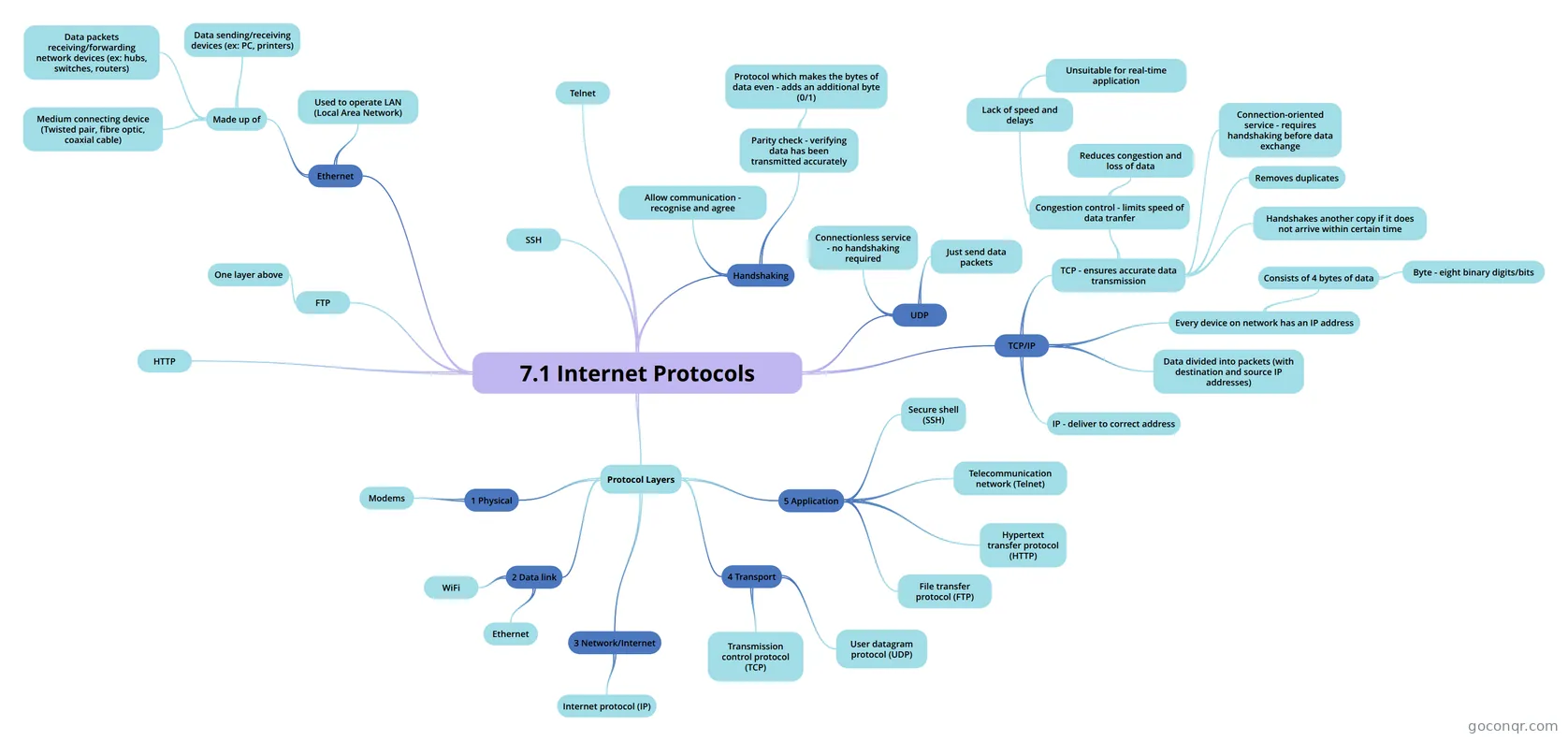
The map 7.1 Internet Protocols runs through Ethernet, TCP/IP, UDP, FTP, HTTP, Telnet and SSH, then sets out the protocol layers from physical up to application. Chapter 3: TCP/IP goes further, placing protocols such as DNS, DHCP, HTTPS and SNMP in their layers. Flashcard decks like Transport Layer and OSI Model cover the same ideas in small pieces.
Where to start
- Open Wired and Wireless networks to see the whole topic on one map.
- Take the Network Topology Quiz, which asks you to identify bus, ring and star layouts and name their drawbacks.
- Move to the quiz 2.1.6 Networks for questions on LANs, WANs, network interface cards, routers and client-server setups.
- Use the protocol maps once the basics feel steady.
Using quizzes and maps together
Read a map first, then close it and answer a quiz on the same idea. Wrong answers show which branch to reopen. Flashcards such as Topology Flash Cards and Bus Topology suit short, repeated practice on key terms. Many resources mention exams such as GCSE Computer Science, GCSE ICT, IGCSE, A-level and BTEC, so teachers can look for material that fits their course.
Your next step
Choose one map, work through a matching quiz, and then make a set of your own to fill any gaps you spot.
Frequently asked questions
Which resource should I open first?
Start with the mind map Wired and Wireless networks. It gives an overview of network types, protocols and layers, and data transmission. After that, try the Network Topology Quiz to check that you can recognise bus, ring and star layouts and describe their strengths and weaknesses.
What do the mind maps on this page cover?
They cover why networks are used, including shared devices and files, and the costs and risks. They also cover client-server and peer-to-peer set-ups, LANs, wireless networking, data transmission, and the layers and protocols of TCP/IP, such as HTTP, FTP, DNS and DHCP.
Are the resources free to use?
Yes. Every resource listed here is free to open, study and take, with no account needed. They were made by GoConqr users rather than by GoConqr itself, so it is worth checking that a resource matches your own course before relying on it.
Which levels and exams do these resources suit?
Most are at secondary level. Resources mention GCSE Computer Science, GCSE ICT, IGCSE ICT, IGCSE Computer Science, A-level Computer Science, A-level ICT and BTEC IT, among others. School students can revise with them, and teachers can use them as ready-made material.
Can I save my quiz scores or make my own resources?
A free account saves your quiz scores and lets you make your own quizzes, mind maps, flashcards and notes. That is handy if you want to turn a topic such as network topologies into a personal revision set.
What if I cannot find what I need?
Try a nearby title, such as Networking, Protocols or Data Transmission, since the same topic appears under several names. Notes like Network Hardware and Error Detection fill smaller gaps. You can also build your own map or flashcards for the missing topic.